Desertcart purchases this item on your behalf and handles shipping, customs, and support to SINGAPORE.
🖥️ Elevate your workspace with style and performance — don’t just work, impress.
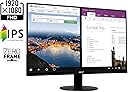
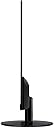
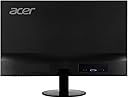
The Acer SB220Q bi is a 21.5-inch Full HD (1920x1080) IPS monitor featuring a sleek ultra-thin zero-frame design, 75Hz refresh rate with Radeon FreeSync for smooth visuals, and rapid 4ms response time. Equipped with HDMI and VGA ports, it offers versatile connectivity for both business and personal use, delivering vibrant colors and wide viewing angles in a compact, stylish package.


| ASIN | B07CVL2D2S |
| Adaptive Sync | FreeSync |
| Additional Features | Frameless |
| Aspect Ratio | 16:9 |
| Aspect ratio | 16:9 |
| Best Sellers Rank | #81,529 in Computers ( See Top 100 in Computers ) #2,072 in Computer Monitors |
| Brand | Acer |
| Brightness | 200 |
| Color | IPS 75Hz |
| Color Gamut | 0.72 |
| Compatible Devices | Devices with HDMI or VGA ports |
| Connectivity Technology | HDMI, VGA |
| Contrast Ratio | 2000:1 |
| Customer Reviews | 4.6 out of 5 stars 41,119 Reviews |
| Display Resolution Maximum | 1920 x 1080 |
| Display Technology | IPS |
| Display Type | ips |
| Global Trade Identification Number | 00191114774571 |
| Hardware Connectivity | HDMI, VGA |
| Has Color Screen | Yes |
| Image contrast ratio | 2000:1 |
| Included Components | Display, Stand, VGA Cable |
| Is Electric | Yes |
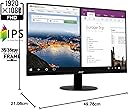
| Item Dimensions D x W x H | 21.1D x 49.8W x 38.4H centimeters |
| Item Type Name | Acer 21.5 Inch Full HD (1920 x 1080) IPS Ultra-Thin Zero Frame Computer Monitor (HDMI & VGA Port), SB220Q bi |
| Item Weight | 5.6 Pounds |
| Manufacturer | Acer Computer |
| Model Name | SB220Q bi |
| Model Number | SB220Q bi |
| Mounting Type | Wall Mount |
| Native Resolution | 1920x1080 |
| Number of Component Outputs | 1 |
| Picture Quality Enhancement Technology | Adaptive Sync (FreeSync) |
| Power Consumption | 25 Watts |
| Processor Count | 1 |
| Refresh Rate | 75 Hz |
| Resolution | FHD 1080p |
| Response Time | 4 Milliseconds |
| Screen Finish | Glossy |
| Screen Size | 21.5 Inches |
| Screen size | 21.5 Inches |
| Screen surface description | Glossy |
| Shape | Flat |
| Specific Uses For Product | business, personal |
| Total Number of HDMI Ports | 1 |
| UPC | 191114774571 |
| Viewing Angle | 178 Degrees |
| Voltage | 110 |
U**D
Great quality, fantastic price!
I purchased this monitor for my wife to use with her Alienware R17X4 laptop. She had broken a key on her keyboard but also wanted a little larger screen. So, I purchased a wireless keyboard and this monitor. She now uses the powerful Alienware laptop as a desktop with a larger display and a wireless, movable keyboard. She is a very happy camper. Others have commented on the great graphics, thin design, and good quality build for a great price, so I won't repeat those details here. I will however point out a few tips: 1. At first, it seems the stand will not tilt. But it does! Grasp the stand firmly and then tilt the monitor back to the desired position. Note it does not tilt forward or side to side, but does tilt back (facing more upwards towards your eyes) which really helps in most settings. 2. If you don't get a signal, make sure you plugs the HDMI cable into the "HDMI out" port on your PC, not the "HDMI in" port. Duh. I had mine plugged into the wrong port until I found my reading glasses and saw the problem. 3. We changed three settings which you may want to also do if you have a laptop. First, we changed the display settings to choose between "Second screen only", "Duplicate", or "Extend". We chose "Extend" so she can have two documents open at once on the two monitors, her laptop screen and the new monitor. You just drag one document off the edge of the monitor to move it to the other screen. 4. Next, we found that closing the laptop, when she only needed one screen, put it into hibernation and shut everything down. We went into Control Panel and changed Power Settings under "What happens when you close the lid". We changed it from "Hibernate" to "Do nothing". Now the laptop keeps running even when the laptop is closed. 5. Third, most Windows laptops are configured so you have to drag things off the right edge of your new remote monitor to get them onto the laptop screen. However we wanted her laptop setting to the left of her new monitor, so it was confusing to have to drag something off the right-hand edge of the monitor to get it onto the left-hand screen on the laptop. We went back into display settings, where you can drag the two monitors in the settings to reverse them. Now, she can drag items from the left-hand screen to the right-hand screen by dragging them in that direction, and vice versa. Much more intuitive to use that way. With those changes to the settings, she can open the laptop and use it as two monitors, dragging and dropping documents and apps from one screen to another. When she closes the laptop lid, it reverts to a single monitor (the new Acer) but does not go to sleep. This is perfect for what she needs. She can still power off the monitor when not needed for an extended period. Also, the laptop speakers still work when she turns on the sound even when the laptop is closed. I highly recommend this monitor for anyone wanting a very good quality, cost-effective solution.
K**E
Great monitor at a great price
Include me with the more than 20 000 plus positive reviews for this computer monitor. I paid $124 Cdn. The monitor is light weight, bright screen, the colours are accurate, and 75 hz refresh rate. I'm surprised how good it is for the price. The only fault maybe no height adjustment but you should already know that from the pictures. I can see why this monitor consistently is amazon.ca number one selling computer monitor.
A**O
Mejor que algunos monitores 4k
Este monitor supera en nitidez, saturación y fidelidad de color a muchos monitores 4k y aunque me dolió, se volvio mi monitor principal en cuanto comparé mi monitor con este, Claro que no es la octava maravilla del mundo, los pixeles son lo suficientemente grandes como para verlos si los buscas y la UI tiene sus defectos, pero por el precio es excelente. Es sorprendentemente ligero, en serio es atemorizante como lo puedo mover con una sola mano sin esfuerzo, el espesor es de casi 7 mm, y temía que la base fuera demasiado pequeña, pero es firme y se mantiene muy bien en su lugar. Es discreto, tiene buen acabado y se siente mas grande de lo que parece. Si estas relativamente corto de fondos y quieres un monitor extra, o conseguir uno bueno bonito y barato para tu primera PC gamer porque te quedaste sin fondos comprando esa 3090 y la fuente de poder para usarla o no quieres gastar mucho para ahorrar para la 3090 cuando solo pudiste comprar una 2080 TI porque nadie la tiene en stock, este monitor es la opción para ti.
D**Z
Increíble y barato
Compré este monitor por el simple hecho de que era un 1080p 75hz de Acer. Me sorprendió que estas características estuviese a sólo 1,700mxn. No esperaba mucho de él, pero en estos tres meses me dio una gran sorpresa. El monitor es increíblemente liviano y delgado. La fuente de poder es externa, lo que ahorra costos y ayuda a su estética general. Cumple con todo, el full HD, los 75hz, y es IPS ( no he probado el FreeSYNC, no uso AMD) Pros: +Es muy ligero, facilita mucho la limpieza del escritorio y el transporte. +Costo/beneficio, es de los mejores que puedes encontrar, superando a monitores 1080p60hz +Tiene varios perfiles personalizables y puedes alternar entre ellos fácilmente. +Tiene unos 30 grados de inclinación para mejor visualización Cons: -La base es de un plástico ligero y barato. Aunque para el peso del monitor, no necesita más. -Por default tiene un filtro verde muy molesto. Pero Se arregla en 10 minutos corrigiendo el color. -Los botones los tiene en la parte inferior, Cuesta algo de trabajo moverse en el menú a ciegas, y el botón de apagado es igual a todos los demás botones. -Tiene unos bordes negros que hacen parecer que no está dando la resolución total, pero te acostumbras fácilmente. Recomiendo ampliamente este monitor 100%.
P**N
Great monitor on a budget
This monitor is great for anyone looking for a high-resolution and fast refresh rate monitor at a low cost. I've used it for work and gaming, and it's held up wonderfully. The menu lets you adjust the settings to your preferences, but I find the stock settings are just about perfect. At its lowest settings the dim light is great for reading documents in low-light environments. At its brightest, I can fully open the window behind me on a sunny day, and clearly see the screen. All in all, great and reliable monitor.
Trustpilot
4 days ago
5 days ago