Desertcart purchases this item on your behalf and handles shipping, customs, and support to SINGAPORE.
🎨 Elevate your digital canvas — create like a pro, anywhere, anytime!
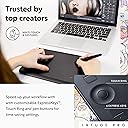
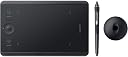
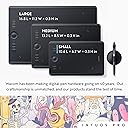
The Wacom Intuos Pro PTH460K0A is a compact, professional-grade digital drawing tablet featuring an ergonomic, battery-free Pro Pen 2 with 8192 pressure sensitivity levels. It offers wireless Bluetooth connectivity, a multi-touch surface for intuitive navigation, and 6 customizable Express Keys plus a Touch Ring for enhanced productivity. Lightweight and durable, it supports both Mac and PC platforms, making it the go-to tool for creative professionals seeking precision and portability.


| ASIN | B07PPQH867 |
| Active Surface Area | 29.06 square inches |
| Additional Features | Bluetooth |
| Best Sellers Rank | #4,167 in Computers ( See Top 100 in Computers ) #27 in Graphic Tablets |
| Brand | Wacom |
| Built-In Media | Stylus, Stand |
| Color | black |
| Compatible Devices | Laptop, Desktop, Tablet |
| Connectivity Technology | Bluetooth |
| Connectivity technology | Bluetooth |
| Customer Reviews | 4.6 out of 5 stars 4,443 Reviews |
| Display Type | LCD |
| External Testing Certification | 009461901796, 009461901796 |
| Global Trade Identification Number | 00753218986252 |
| Item Dimensions L x W | 17L x 26.9W centimeters |
| Item Type Name | Graphics Tablet |
| Item Weight | 0.99 Pounds |
| Manufacturer | Wacom Technology Corporation |
| Mfr Part Number | PTH460K0A |
| Model Name | PTH460K0A |
| Model Number | PTH460K0A |
| Model name | PTH460K0A |
| Native Resolution | 8192 levels |
| Number of Items | 1 |
| Operating System | Windows |
| Operating system | Windows |
| Pressure Sensitivity | 8192 Levels |
| Pressure sensitivity | 8192 Levels |
| Screen Size | 9 Inches |
| Software Update Supported to Date | unknown |
| Special features | Bluetooth |
| Specific Uses For Product | Digital Art, Design, Note-taking, Teaching, Remote Work |
| Target Audience | Student, Teacher |
| UPC | 753218986252 |
| Unit Count | 1.0 Count |
| Warranty Description | 2 years |
J**S
Absolutely worth the investment!
One line review: Absolutely worth the investment! . Now for some more length of the review if you would like to read. Battery life is great but based on what I saw online, it was under my expectations. Having said that, take it with a grain of salt since I haven't done any scientific tests for the same. It is certainly above average though. But believe you me, this device makes life so much easier. I can't tell you how great it is to use a laptop with multiple track pads. Love having the assignable keys. Made my life easier during Frequency Separation in Photoshop. (Can't believe I'm one of those guys finally, who knows how to do that.) Zooming into an image is so much more intuitive this way. I spent at least 2-3 hours each day for 2 weeks editing images and that was a great way to break in the device and the pen and also get comfortable with this interface of using a laptop. It has opened up the world of storyboarding for me during writing of my film scripts and I might even get into random drawing. It looks like I'll be learning a lot more stuff this year than expected and that's something I live for. Can't comment much about the nib yet. So far so good. I literally have nothing else to compare this too so, needless to say my review might not be what you're looking for but I'll be making a YouTube video review next month.
C**N
Great Product
bought this for my boyfriend and he loved it for his work! was very useful and the bluetooth function is especially amazing because there’s no need for cables!
N**H
Industry Standard, Worth the Price
After poring over reviews for less expensive tablets I finally decided to purchase the more expensive Intuos Pro (medium size). While pricey, it does not disappoint. It suits my needs perfectly as a 3d artist who suffers from wrist and joint pain. I moved from a mouse to a trackball years ago, and while it helped, it did not alleviate the problem. The pen-tablet combo is even better, for while some movements remain repetitive, many are mitigated through the multiple ways of accomplishing similar tasks. I still pull out the trackball when doing simple things like typing/navigating documents etc., but am using the stylus more-and-more for a variety of applications as I become used to it. PROS: ● Intuitive settings interface ● The included stylus is easy on the hands (mine are large, but not huge: long thin fingers) ● Bluetooth or Type C connection for wireless or wired use (nice when it works) ● Mid-size tablet is a perfect size for everything I do (the large would be too much for my tasks) ● Pen comes with several replacement nibs ● Tablet surface is sensitive and feels natural to write on for me ● Has a user friendly "Touch" feature that turns it into a giant track-pad with programmable hand gestures (works really well for me) ● "Touch" feature can be disabled with the flick of a switch ● On-tablet programmable buttons, as well as pop-up menus for all or select apps ● The option to replace the standard (medium) drawing surface (smooth, medium, rough) CONS: ● Sometimes the driver stops working (so far not often). Pulling its USB and then plugging it back in takes care of this, and when that fails a reboot is necessary--annoying when in the middle of a work-flow. EDIT: The bluetooth has consistently broken the tablet drivers--so much so that I stopped using the wireless option. It would be a great feature, if it worked without having to restart the system constantly. My bluetooth adapter works without a hitch with my other devices, so the problem seems to be Wacom's drivers. When plugged in (not using bluetooth) the drivers are much more consistent. Apparently Wacom drivers seem to be an issue with other reviewers as well--hopefully these issues are addressed through updates. ● The side buttons on the new model are stiff, requiring a bit of pressure to toggle/keep toggled. Repetitive tasks are then more difficult, especially when hand fatigue sets in. As a result I find myself using the keyboard for shortcuts with my left hand while working the stylus with my right. Wacom would do well to lighten the mechanical switch, or provide the option for user defined pressure settings. ● The "Touch" feature can only be disabled through the mechanical side switch. Some applications do not distinguish well between pen and hand input, making the touch feature undesirable when a stylus is necessary. It is a bit annoying to have to physically toggle a switch when one is using keyboard shortcuts, pop-up menus, etc. Wacom would do well to also include a programmable shortcut etc. for touch on/off (I believe the older version of the Intuos had this feature, but without the mechanical switch--which I do like). ● The included medium grade drawing surface seems to be wearing out my nibs prematurely. If I end up spending a lot on extra nibs I will take the plunge and replace the surface with its smooth variant, but would rather save the money. For now I am carefully refining my used nibs with 1000 grit sandpaper, which works well-enough. In spite of these annoyances, I am satisfied with this tablet. Hopefully the next permutation by Wacom will be even better (especially driver stability).
R**O
Ótima mesa, mas desative o "Windows Ink"
Atualmente uso Windows 10 e a mesa funciona perfeitamente, mesmo sem atualizar os drivers. Recomendo desativar a função "Windows Ink", tanto nas opções da mesa quanto nas do próprio Windows (para estas últimas, procure no Painel de controle). Sinceramente não sei qual é a função desse Windows Inks: ela é completamente inútil para o desenho, nada afeta nas funções da caneta e da mesa, além de ser irritante.
A**R
Out of box woes, reliable customer support
The tablet itself is wonderful—sleek, robust milled-aluminum gives the impression of quality. So the structure and durability is to par for regular use. Not sure about travel endurance, this has pretty much sat on the computer desk, but I assume it would hold up quite well. I’ve seen many reviews complaining about the surface of the tablet, however, noting the rough texture eating away at nibs rather quickly. In my experience it took several hours of drawing for a flat surface to become noticeable, but the nib worked enough for me to entirely overlook its presence. If you draw for a living I could see needing to replace these somewhat often, but the nibs are honestly quite cheap. I spend more on average quality drawing paper per month—using one nib per week is two and a half months for ~$10. TL;DR even if the nibs wear away quickly they should be easily replaced at little cost, but on principle this might be a negative for some. Just do some research and know your preferences before you buy. The surface itself is replaceable, which I love to be honest, for when you create smooth friction spots. You can easily peel of the original surface (its attached via adhesive) and replace it—these are somewhat pricy for the large sized tablet. These last much longer than the nibs. No noticeable wear after a month of use in my case. The pen gives the impression of fragility, as it is extremely light due to its battery-free operation. I can’t attest to how durable it actually is though, no accidents (knock on wood). Works well, and confirms to the ergonomic standards Wacom has established. My major complaint with the product is that it doesn’t seem well optimized for windows users. Out of the box, having installed the latest drivers, the $400 (got mine on sale) tablet ceased to function within ~45 minutes of use on a Friday evening. I had to wait an agonizing weekend to receive a response from their customer support. The issue was resolved promptly, and although the call center was clearly outsourced, the representative was knowledgeable, polite, and efficient. After essentially fixing some run files the tablet works like a charm. Keep in mind, having worked in a domestic call center that was supposedly customer support, our main focus was sales metrics. Hideously pressured to the point most reps outright lied to push numbers—not once was I pressured for a purchase. Although I would have enjoyed a native English speaker, US customer service isn’t the best. Mostly due to corporate policies rampant in the industry—at best they offer quick fix solutions like encouraging a return of the product, which is more often than not a waste of time. This product should really work out of the box for its price, but my issue was resolved promptly. So I can’t ding Wacom for having the appropriate resources in place. All in all, I would buy this again and highly recommend it to any artist/educator. Personally I prefer ”regular” tablets to cintiqs which hardly give you an increase in quality for the gratuitous expense. You can expect this tablet to perform if you make a living off such devices.
T**A
Another Great Product from Wacom. It Just Works.
It's a Wacom, what else is there to say? It's a great little tablet. I've never had a Wacom tablet that doesn't do a good job, and this one continues the trend. A invaluable asset to anyone into digital art. It's easy to hook up with only needing one USB-C cable, has a wireless Bluetooth option (tablet has a little side button to turn off the tablet when you don't need it on), and the two-button stylus is as sensitive as it needs to be. The driver is straightforward and easy to understand and use, while customizing the tablet to to what you need it to with what programs you need it to work with. You can set it up for different settings for different programs, or have one sweeping setting for everything, though if you use lots of different programs you will likely need different profiles for them, as many art programs have different keybinds to use their tools. The tablet itself seems a little fragile, as one may imagine, so dedicate some space on a shelf for it so you don't need to place anything on top of it. The ring and hotkeys are placed on the side, which I find to be perfect (not sure why the newest models have them on the top, I think that is a much clumsier design). The whole thing is a slick black with a fine material finish, making the product look sleek and compact. This tablet is easy to carry and is lightweight. You can set this tablet to accommodate either a left or right handed person. Not much I find at fault here, though there is one thing that perhaps should be mentioned: it does feel the nibs are less durable on this pen stylus then on other models. Don't know if the tablet finish just grinds them down faster, or I just have a heaver hand these days, but the nibs don't last that long. Good thing the pen holder comes with a bunch of 'em stored inside! Final thoughts: Great tablet. Would recommend. While there are a few alternatives to Wacom these days, and they are indeed viable options, I would still say get a Wacom to those who can afford it. The whole package just works.
Trustpilot
1 month ago
2 weeks ago