

Desertcart purchases this item on your behalf and handles shipping, customs, and support to SINGAPORE.
🚀 Elevate your flight game with precision, power, and style!
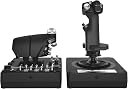
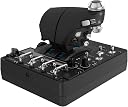
The Logitech G X56 H.O.T.A.S is a professional-grade flight simulator controller featuring over 189 programmable controls, 16-bit hall-effect sensors for precise input, and 4 adjustable spring force options. Designed for PC and VR gaming, it offers dual mini analog sticks for true 6 degrees of freedom, customizable RGB lighting, and ergonomic design to deliver an immersive and customizable flight experience.


| ASIN | B079P6SSHP |
| Additional Features | Ergonomic, Rumble |
| Best Sellers Rank | #6,608 in Videogames ( See Top 100 in Videogames ) #18 in PC Flight Controls #49 in PC Virtual Reality Hardware |
| Brand | Logitech |
| Brand Name | Logitech |
| Button Quantity | 24 |
| Color | Black |
| Colour | Black |
| Compatible Devices | PC, Windows |
| Compatible Video Game Console Models | Sony PlayStation VR |
| Compatible devices | PC, Windows |
| Connectivity Technology | USB |
| Connectivity technology | USB |
| Controller Type | Joystick |
| Controller type | Joystick |
| Customer Reviews | 4.1 out of 5 stars 2,798 Reviews |
| External Testing Certification | Não aplicável |
| Global Trade Identification Number | 00097855136145 |
| Hardware Platform | PC |
| Included Components | Palm Rest Spacer, User Guide, X56 Stick Base, X56 Stick Handle, X56 Throttle |
| Item Dimensions | 18.5 x 22.5 x 9 centimeters |
| Item Type Name | Logitech G X56 H.O.T.A.S. RGB Throttle and Stick Simulation Controller for VR Gaming (945-000058) |
| Item Weight | 3.14 kg |
| Manufacturer | Logitech |
| Manufacturer Part Number | 945-000058 |
| Model Name | X56 |
| Model Number | 945-000058 |
| Model name | X56 |
| Package Quantity | 1 |
| Power Source | Information Not Available |
| UPC | 097855136145 |
C**L
It’s cool
It’s amazing. Using it on DCS and SC.
M**D
Ghosting
After I bought the HOTAS I found that it have common ghosting issues ( random key pressed without you touch them) I’m waiting for refund meanwhile I bought different brand HOTAS.
O**D
Düşük Kalite
Ürünün malzeme kalitesi inanılmaz ucuz hissettiriyor. Çok çok basit bir plastik. Bundan kaynaklı ürünün ağırlığı da çok hafif. Kesinlikle ben buna mı para verdim dedirten bi yapıya sahip. Fonksiyonel olarak işini yerine getiriyor o konuda fazlasıyla iyi. Fakat joystick üzerinde çok küçük de olsa bir deadzone mevcut. Bu fiyatta bir ürün için olmaması gerekirdi. Bütçenizi biraz daha yukarı çekip rakip ürünlerini değerlendirmenizi öneririm.
س**ن
Very good
Very good quality and fast shipping
C**S
H.O.T.A.S. RGB Throttle and Stick Controller X56 – Excellent Control for Flight Sim Enthusiasts
The H.O.T.A.S. RGB Throttle and Stick Controller X56 is a game-changer for flight simulation. The build quality is top-notch, and the controls feel incredibly responsive. The RGB lighting adds a cool touch, but it’s the customizable buttons and precise throttle control that really stand out. It’s perfect for serious simmers who want realistic, immersive controls. Setup was easy, and it works flawlessly with most flight sims. Definitely worth the investment for anyone serious about their flying experience!
L**A
Buena elección
Muy buena compra, tengo un par de meses con él y es muy preciso además que la cantidad de botones lo hace mejor y altamente configurable
C**R
Perfect for Microsoft Flight Simulator 2020
This stick and throttle combo is perfect for the MSFS 2020... Lots of programmable buttons and mini-joysticks. The X56 itself is recognized by MSFS 2020 and both joystick and throttle along with many of the buttons and one mini-joystick are already pre-mapped automatically. It comes with two spare tension springs which you can use to replace the default one on the joystick. I decided to replace the default with the shorter spring so there is less tension needed to move the stick around. You can search youtube to get a better idea how to do this as it is not really clear on the supplied manual. In addition to the FOV button, the thumb mini-joystick on the joystick are already pre-programmed to allow you to smoothly scroll your view 360 degrees around the cockpit and windows. I also mapped other functions to the available buttons, such as one button on the throttle to act as the thrust reverse toggle so I can use the throttle as a thrust reverser during landing when togged to this mode. I also remapped some of the keys and this is easily done inside MSFS 2020 itself. The software it comes with is also very useful. For example, I used it to adjust the curves to make the rudder more responsive when I twist it since I find it slightly hard to twist. Now I need to twist it less to get better response. I have had no issues such as ghost button presses, etc., that I have read people complaining online about. I have the throttle plugged directly to a USB 3.0 port on the back of my PC and the stick plugged to the powered USB 3.0 hub on my main monitor. Overall, this is a great complement to MSFS 2020.
Trustpilot
2 weeks ago
4 days ago