🚀 Print smarter, faster, and safer — because your office deserves the best.
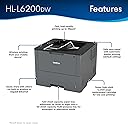
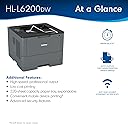
The Brother HL-L6200DW is a powerhouse monochrome laser printer designed for busy offices needing rapid, high-volume printing. Delivering up to 48 pages per minute with a large 570-sheet capacity and cost-saving super high-yield toner, it supports wireless and Ethernet connectivity for flexible use. Enhanced security features safeguard your documents, while Amazon Dash Replenishment ensures you never run out of toner, keeping your productivity uninterrupted.


| ASIN | B01824JTWK |
| Additional Printer Functions | Scan |
| B&W Pages per Minute | 48 |
| Best Sellers Rank | #313,153 in Office Products ( See Top 100 in Office Products ) #467 in Laser Computer Printers |
| Brand | Brother |
| Built-In Media | Printer Accessories;Printer Accessory |
| Color | Black/gray |
| Color Depth | 1 bits_per_pixel |
| Compatible Devices | PC, Mac, Android, Apple iOS |
| Connectivity Technology | Ethernet, USB, Wi-Fi |
| Control Method | Voice |
| Controller Type | Amazon Alexa, Vera |
| Customer Reviews | 4.4 out of 5 stars 1,698 Reviews |
| Display Type | LCD |
| Duplex | |
| Global Trade Identification Number | 00012502641803 |
| Hardware Interface | Ethernet |
| Initial Page Print Time | 50 seconds |
| Ink Color | black |
| Item Dimensions D x W x H | 19.25"D x 18"W x 16.25"H |
| Item Type Name | Laser Printer |
| Item Weight | 26.3 pounds |
| Manufacturer | Brother Printer |
| Maximum Copy Resolution Black and White | 1200 dpi |
| Maximum Copy Resolution Color | 1200 x 1200 dpi |
| Maximum Copy Speed Black and White | 48 pages_per_minute |
| Maximum Media Size | 8.5 x 14 inch |
| Maximum Print Resolution Black and White | 1200 dpi |
| Maximum Sheet Capacity | 570 |
| Maximum print Resolution Color | 1200 x 1200 |
| Model Name | HL |
| Model Number | HL-L6200DW |
| Model Series | HL |
| Number of Ethernet Ports | 1 |
| Number of Trays | 2 |
| Other Special Features of the Product | 520-sheet capacity paper tray, optional paper trays, super high-yield replacement cartridge |
| Output sheet capacity | 150 |
| Paper Size | 5.83 x 8.25, 8.50 x 14, 8.50 x 11, 8.25 x 11.70, 10.50 x 7.25, 4.13 x 5.83, 3 x 8.50, 5 x 14 inches |
| Print media | Card stock, Envelopes, Labels, Paper (plain) |
| Printer Connectivity Type | Ethernet, USB, Wi-Fi |
| Printer Output Type | Monochrome |
| Printer Type | Laser |
| Printing Technology | Laser |
| Processor Count | 1 |
| Resolution | 1200 x 1200 |
| Scanner Type | Document |
| Series Number | 6200 |
| Special Feature | 520-sheet capacity paper tray, optional paper trays, super high-yield replacement cartridge |
| Specific Uses For Product | personal, gaming, business |
| Total Usb Ports | 1 |
| UPC | 012502641803 |
| Unit Count | 1 Count |
| Warranty Description | 1-year limited warranty |
| Warranty Type | limited warranty |
| Wattage | 670 watts |
J**Y
Perfect for occasional large (5000+ page) printing tasks
Twice a year I need to print date(s) and an address on pre-printed, full color, thin, single page invitations. I used to use a local print shop, however the cost was significant. This printer is able to print the required information using a simple word document with a text box in the correct location for about $30 in toner. Using the default settings (600 dpi) and a standard USB 1.1 printer cable it prints approximately 26 ppm for this task, or 500 pages in 19 minutes, roughly 1,500 invitations in an hour. I print batches of 500, immediately reloading the printer with the invitations for another batch. The quality is excellent. So far I have printed the date/location on 4,000 invitations without a single paper jam, ink splotch, or other defect that I've been able to detect. Overall, this is an excellent, reasonably priced solution for this task. As of yet the original 3,000 page toner cartridge has shown no signs of running out (likely because each page is only a small fraction of the type on a full page document). Highly recommended for any similar printing task. I will say, you have to monitor it as the output tray only holds around 200-250 pages, so you have to grab them off every few minutes. Also, I'm not sure how to achieve the rated 48 ppm, but you likely have to set it to the minimum 300 dpi which does slightly degrade the quality. Standard settings are fast enough for me. UPDATE: I finished my printing task. The original toner lasted 5,000 pages. I purchased a 3rd party toner (E-Z ink) which worked excellent and is much less expensive than Brother. I let someone else complete the same task using this printer. In total we printed appx 12,000 invitations quickly and with no page jams or other issues whatsoever. Highly recommend. UPDATE 2: After 20-25,000 or so pages, I started to have some issues with the toner not transferring to the pre-printed invitation. I wasn't sure if this was due to using aftermarket ink or another issue. I found that by checking the setting "improve toner fixing" the problem was solved. Find it here: PROPERTIES > ADVANCED > OTHER PRINT OPTIONS > IMPROVE PRINT OUTPUT > IMPROVE TONER FIXING
H**T
Unbelievable value
When my primary work printer (an HP m604n laserjet) developed an issue with the feeding tray on the front, I decided to try this as a secondary printer while I send the HP off to be repaired. Both printers have very similar specifications. This Brother prints at 48 ppm and the HP prints at 52 ppm. Both hold just over 500 sheets in the main tray. Both are wireless enterprise printers. Both can take high yield cartridges. However, the HP costs $750+ compared to this Brother that I snagged on Amazon for $174! Not to mention the replacement high yield toner is significantly cheaper than the HP ($122 for the 12,000 yield brother while the HP 10,000 yield 81A cartridge is like $190). The first print did leave a crease/wrinkle in the page. So, I was thinking I got a lemon after looking at some of the other reviews. I opened the machine up and inspected everything and tried again and haven't had a creased page print since (now at about 500 pages in). Some reviews mention this being a power hungry printer and they are not wrong. When I click print, it dims my desk lamp for a split second! I am not sure why a printer requires such a power draw? It is not a dealbreaker to me though. All in all, this printer is an excellent value for the price. The print quality is almost identical to my HP and the print and initial print times are excellent. Would definitely buy again.
F**+
Almost 6 months and all is good
Edit: almost 6 months now and I have not experienced any issues. IMO it is a great printer. Purchased using amazon monthly payments. Previous: Still have not experienced any issues at all. Great printer, would buy again. It replaced my ~15 year old Brother HL-5240 that finally died. This Brother HL-L6200DW is still exceeding my expectations. Review from day 8: 1268 Total Page Count so far, 1134 2-sided and have experienced none of the issues that some have reported so far. I updated the firmware to the latest, "Main Version: 1.81" and Sub1 Version 1.75". I'm using 24lb Hammermill laser paper bought here on amazon. Power cord is embossed with "16AWG", most/all aftermarket power cords turned up by searching for "Brother HL-L6200 power cord" are 18AWG. The power cord for the HL-L6200DW must be rated for at least 13 amps which means you must use at least a 16AWG cord. I went with a 15 foot 14AWG Monoprice brand cord from amazon - it was less expensive than other brands of both 16AWG and 14aWG cords. 14AWG cords are rated at 15 amps. Since peak power is approximately 1368 watts, it does take a bit of current to get the fusers up to a temperature of nearly 400ºF to fuse the toner to paper, those that use the old 18AWG power cord that was used on their old printer or go with a longer 18AWG cord might just have issues with smelling something burning. 1200 dpi resolution and set to"Print in Black" so things like the text in the headers in Word always are in dark black. Print quality is, IMO, excellent. IMO lower settings and using toner saving mode probably would equal lower print quality. No idea if the settings to reduce paper curl and density adjustment might resolve some of the complaints but there are advanced settings that can be tried.
R**O
Good, Basic Printer - With Some Caveats
Good printer for the money. Appropriate for basic home/office use. Holds 1 ream of copy paper. Only printed about 300 pages with no errors, jams, or creases. Setting up the printer on my network required several steps on a small LCD screen with terminology that is not easily (to me) apparent. Drivers - I downloaded the entire driver set from Brother's website without issue. The install on Windows 10 was seamless, taking about 3 minutes. Print Quality - Meh. I don't expect great quality from a printer of this price range. Basic emails and documents are acceptable for my use. Do not expect crisp, sharp images appropriate with higher end machines. Sleep - Awaking from sleep mode takes longer than I am used to. You don't notice after a few days - just kinda adjust to it. I did adjust the print reset(?) time to 10 minutes since I am sometimes a few minutes between print jobs. This helped in my situation. If you do not require the latest/greates/leading edge printer with perhaps top in class economics, this machine might work well for you.
D**C
I followed the directions and had a trouble-free installation
I bought this to replace my 4 year old Brother B&W laser that needed a new drum after almost 30,000 pages (so print quality had degraded). It was also starting to have paper jams when printing pages with large images. I didn't think a new drum would fix page feeding problems so I bought a new printer that had its own new drum. I was amazed today at how easy it was to install my new printer. I just followed the Quick Setup Guide included w the printer and the Brothers download site as instructed in the Guide. I used the wireless connection option. With a little patience on my part, it was ready to print in about 20 minutes. Besides the trouble-free installation, I was impressed with the effort Brother had invested in boxing the new printer so it was easy to remove from the shipping box and in linking all the packing elements used to protect the printer during shipment so that I could easily remove them by following a picture in the Setup Guide. Brother also reminded me to save the shipping box with its packing material should I ever need to return it for repair. I'll keep the new shipping container not expecting to have to use it. I still had the box for my old printer which never needed repair. I checked out my iPhones and laptops and had them all connecting to the new printer in a half hour. The new printer is much faster than the one it replaced and just about as loud when printing. The print quality is excellent again.
D**B
A positive review: AND! ... how to over-ride the 'Low Toner' issue
I've worked from my home office for years and do a fair amount of printing -- mostly monochrome/B&W. I've personally had great luck with Brother monochromes. I typically do 1-to-10 page print runs, with only the occasional, say, 50+-page printing, so I'm very much a small-biz/home type printer. But these low-end Brothers have treated me very well, with high print-speed, good reliability, and crisp print quality. Now, I'm noticing a fair amount of negative reviews about this L6200-DW. Maybe I'm lucky, but I've had none of these issues mentioned like paper-crinkling, black smudges/marks, etc. I have had intermittent problems having it come out of sleep mode, but that may be as much my computer's fault...) However, the 'Low-Toner' issue that many talk about -- where the printer suddenly won't print when low toner-levels are detected EVEN IF the printer is still printing perfectly crisp, black print -- THERE IS A WORK-AROUND! Just search "Toner Reset on Brother HL-L6200DW" and you'll find a YouTube video showing a simple way to reset your printer's toner sensor, and you should be up and printing again. I've used it for this printer, and there are similar work-arounds for Brother color printers too. Good luck!
S**S
Toner lockdown is a nasty surprise!
I bought this for my home office a few months ago. Out of the box, it was great - easy to set up, straightforward to use, prints quickly and clearly. I bought the high capacity toner so I could get more life out of it. Now, at 10pm on the night before I have to go to court, the printer decided it's out of toner and STOPPED WORKING COMPLETELY. Never mind that it was printing perfectly fine, and never mind that I haven't even printed two packs' worth of paper yet. It insists it's out of toner, and nothing I can do (resetting the drum counter, covering the sensor, trying any of the other hacks online) will change its mind. This is a waste of money and resources, and a huge hassle. Brother has gotten too greedy. Making the printer useless until you feed it more toner isn't the way to win over customers. Update: I purchased the high yield toner. It's 6:15am, and I'm printing some last minute documents for an important presentation this morning. Guess what - the printer has decided it's low on toner, so it will stop any minute. I'm just hoping I can get through the documents I need before it quits working. I would 100% prefer to have lower quality documents rather than NO documents. Looks like I'll be scrambling to print at FedEx or something.
K**S
Perfect for a home or small office
I did my research. I read reviews across a half dozen units, and then I called Brother to get a sense of the kind of company they run, and how they interface with their customers. The phone as answered on the second ring, on a Sunday afternoon, and I was quickly transferred to a technical sales support associate. He spent the better part of 20 minutes with me, walking through the various models on the Brother website. He listened to my needs, suggested 3 products in the same family, and I chose the mid-range as I did not need the larger volume input trays. Now in my home office, it works perfectly, every time. The printer wi-fi quickly discovered my wi-fi network and was immediately available to my computer. The power save mode kicks in quickly. It runs quietly, fast, and is of high quality as advertised.
J**O
Una buena inversión.
Un producto de gran calidad, eficiente y ciertamente económico. Ya no es un modelo reciente, no obstante, para el uso moderadamente exigido, es una opción muy rentable.
L**Y
Amazing crisp dark printer with insanely fast duplex printing
This is an excellent printer. Really basic ultra fast black only printer. It's FAST to print full duplex. The wifi wired setup also is zero fuss and just works straight outta box as a wired Ethernet printer . You can setup wifi fast and no fuss too but if you have the option , then just connect it to Ethernet. The paper feeder holds a crazy huge wad of paper too. Fewer paper refilling. Android connectivity is fully reliable and I've not had any issues either. Best part of this all is the price tag. I sctual managed to find this as a open box Amazon warehouse deal 200$. Comes with a starter kit toner which should actually last a very long time. But that isn't all. There are a few low cost third party toner cartridges that cost significantly lower than OEM brand and I tried one which prints exceotially crisp. I cannot tell the difference. So that means the cost of ownership is extremely budget freindly low !!! Search for LCL Compatible for Brother TN-880. 60$ for TWO High yield toner kits. My previous printer had toner that costs more than the printer itself so I just threw it out and bought this instead. I highly recommend this no fuss no gimmick printer that does one job and one job well. Print .
V**L
love the capacity-whole ream at a time (550 sheet)
Bought 5 of these all told, Solid printer, love the capacity-whole ream at a time (550 sheet). Really appreciate the savings in time and money that the high capacity toner 12,000 pages offers. We work these hard and their function is simple and consistent. We have had a good experience with the Brother products over the years.
M**L
Gran calidad y confiabilidad
Excelente para home office. Pros: maneja con facilidad papel de distintos pesos; admite tamaños menos comunes; impresión veloz. Único contra: La impresión vía red inalámbrica no se configura tan fácilmente como las demás conexiones.
B**T
Plug n Play
Typical Brother Printer. This was an upgrade from HL-L5200DW. Paper tray takes a full ream of paper. Only difference is there is a longer delay before it starts printing. Once it starts though it produces much more pages per minute. There is also a super high yield toner available for this new model HL-L6200DW then was available with the previous model. Overall good machine. I am partial to Brother machines.
Trustpilot
2 weeks ago
2 months ago