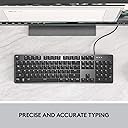
⌨️ Elevate your workspace with precision, style, and unstoppable productivity!
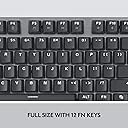
The Logitech K845 Mechanical Illuminated Keyboard is a full-size wired keyboard featuring 104 TTC Blue mechanical switches for tactile, clicky feedback. It offers an adjustable 4-8 degree tilt for ergonomic comfort, a durable aluminum top case, and customizable white backlighting with 5 illumination patterns. Designed for Windows users, it balances professional-grade build quality with sleek aesthetics, making it ideal for both office productivity and focused late-night work sessions.


| ASIN | B088KRJ28T |
| Additional Features | Adjustable Height, Adjustable Tilt, Backlit, Curved, Full-size Keyboard, Illuminated |
| Antenna Location | Gaming |
| Best Sellers Rank | #721 in Computer Keyboards |
| Brand | Logitech |
| Built-In Media | Cable, K845 Mechanical Illuminated |
| Button Quantity | 104 |
| Color | TTC Blue |
| Compatible Devices | Computer, Laptop |
| Compatible Operating System Family | Windows |
| Connectivity Technology | USB |
| Customer Reviews | 4.4 out of 5 stars 3,169 Reviews |
| Enclosure Material | Aluminum |
| Hand Orientation | Ambidextrous |
| Item Dimensions L x W x H | 17.12"L x 5"W x 1.43"H |
| Item Type Name | Wired Keyboard |
| Item Weight | 2.2 pounds |
| Keyboard Backlighting Color Support | Single Color |
| Keyboard Description | Standalone |
| Keyboard Layout | QWERTY |
| Keyboard Plate Material | Aluminum |
| Manufacturer | Logitech |
| Mechanical Keyboard Switch Model | TTC |
| Mfr Part Number | 920-009860 |
| Minimum Required Operating System Version | Windows 10 |
| Model Name | Logitech K845 Mechanical Illuminated Corded Aluminum Keyboard |
| Model Number | 920-009860 |
| Number of Items | 1 |
| Number of Keys | 104 |
| Number of Packs | 1 |
| Number of Sections | 3 |
| Power Source | Wired |
| Recommended Uses For Product | Gaming |
| Series Number | 920009860 |
| Special Feature | Adjustable Height, Adjustable Tilt, Backlit, Curved, Full-size Keyboard, Illuminated |
| Style Name | TTC |
| Switch Type | Clicky |
| Theme | Computing, Gaming |
| UPC | 097855161635 |
| Unit Count | 1 Count |
| Warranty Description | 1 Year Limited Hardware Warranty |
S**1
Fantastic keyboard, well worth the price of entry.
I have been absolutely loving this keyboard. Everything about it. The responsiveness to the keypress is fast and accurate. The keys aren't to noisy but then again I am using a headset most of the time. The backlighting - they nailed it. Most of the time there is some flaw or some of the keys aren't fully lit - this keyboard has no issues. The typical Logitech quality that I've some to expect over the years. I'm so glad I skipped going with a cheap keyboard this time around. I appreciate the fact that there are no dedicated media keys - which is one of the major reasons I went with this keyboard specifically. I use this keyboard for owrk so it needs to be dialed in and straight to the point. I didn't want or need any additional software installed on my work machine to make the device function optimally. The machined aluminum build quality is a nice touch, and I really like the footprint of the keyboard thanks to ditching the excess like media keys etc. Overall I'm very happy with the price point and quality of this keyboard overall. Really a great buy.
G**L
Entirely user-friendly
Best keyboard I ever met. I prefer cabled HIDs for those rare times when a PC doesn't know the meaning of "wireless". I chose this version to match my keystroke profile and it's so well designed that It would probably work after a bath in peanut butter. Though mildly amusing, I don't care that it has 5 built-in key lighting patterns, but I do like setting the backlight intensity to medium for working overnight. Key strokes are flawless with no divergent behavior in any key. Keys sit atop and off the board, instead of being buried in a crumb catcher, making cleaning with "canned air" a snap.
C**A
EXCELLENT KEYBOARD
Life with the new keyboard is really awesome. I mean, I loved my Logitech G510, but it died after many long years of good service. I wasn't sure the keyboard would work, since it wasn't shipped as I would have expected. It was like someone took the keyboard off the shelf (in the product box) and slapped a shipping label on it. No outer packaging and protection other than how the manufacturer boxed it. I do more office related work at home these days and less gaming that requires the cool features and bells and whistles, and wanted to go to the mechanical keyboards for efficience with typing. I like the feel of the keys beneath my fingers, perfectly spaced for fast typing without having to pound the keys. The simple backlighting is perfect as well. No frills, just a simple efficient white light. The characters on the keys are unimportant to me as I don't look at the keys when I type, BUT... looking at the keyboard, I find the "font" of the key characters to be perfectly readable and very attractive looking. As for the "quietness" of the keys, it would depend on your definition of quiet. I chose the red because I'm a fast typist and like the smoothness of flow, so rather than going for the brown and quiet, I'm satisfied with my choice. The sound of the keys is not much louder than my old keyboard. Since I always use a wrist pad regardless of the keyboard, there was no adjustment to the height of the keyboard, which I actually found not as high as many complain that it is. I can use it comfortably without a wrist pad. I've had no issues with the lighting -- yet. So far so good. I couldn't see where to adjust the lighting. It didn't come with a manual so I had to go to the Logitech site to get that information. Not a biggie. For the price? It's well worth it. UPDATE: October 18, 2021. I noticed for the first time this morning when cleaning off my desk that the "M" key and the "ALT" key no longer light up. In fact the text is now dark gray. Not a big deal for me, since I don't need to look at the keyboard to type. I suppose this is what typing 95 wpm does to the keyboard. I'm still loving the keyboard and would definitely recommend! UPDATE: January 26, 2021. I've got a couple of keys that have "died". That is, they still work, but the key itself feels "dead" and you have to pound it with your finger harder to make it type out the letter. I'm going to be doing a good cleaning this weekend and hopefully that will help. Otherwise, I'll be reaching out to the manufacturer on this issue.
B**Y
Great value but non-repairable.
Fantastic keyboard, love the feel and the sound of the keys. The compact form fits very well in my workspace. As of the time of writing this review (04.20.2026) I have used this keyboard every work day for four years now and all of the keys still work, but just recently some of the backlights behind the keys have started going out. Four of them have burned out within the last month or so. At this rate, I suspect they'll all start to periodically go. Unfortunately, the switches are soldered in and are not hot-swappable. Time to weigh the pros and cons of attempting to replace them or just buying a hot-swappable keyboard. TLDR; Buy this keyboard if you understand it is not easily repairable and you fully understand the backlights only have a lifespan of about four years.
K**Y
Quality construction
I have now been using this keyboard for a little over 1 week. So far so good. My previous keyboard was a HyperX Alloy Elite with blue switches so this keyboard is a bit of a downgrade. Even though this is a full-size keyboard. it takes up less space on my desk compared to my old one which is a plus. The TTC browns have been a pleasure to use although I did have to get used to them as I was coming from a Cherry MX Blue switch. The keys have a high actuation point so there is a faster responsiveness than what I had previously. The keys also feel much lighter. When I first received the keyboard, I had to double-check the packaging to make sure I didn't get send a red switch because at first it was very difficult to feel the tactile feedback. However, after typing on the keyboard for a while I can feel it just fine. Overall pros and cons: Pros: 1. Compact but full-size 2. No fancy bells and whistles 3. Backlighting is fantastic 4. Very sturdy with quality construction and materials 5. Keys are lightweight with a nice feel to them. Reminds me of the Dell keyboards so many of us used back around 2000-2010 era. The design itself is reminicent. Cons: 1. Wish it came with a wrist wrest - I can't be too upset given the price point but I will definitely need a wrist wrest sooner than later 2. This keyboard might be better for gaming than typing (it is marketed as a gaming keyboard) but for those of you who are strictly typists and not doing any gaming, you might look for a slightly heavier brown switch or look towards to TTC Blue switch model. 3. Even though these are TTC Browns there is still a small, subtle, audible click while typing which I find to be fantastic. To me personally, it's a great balance that I wasn't expecting. Just forwarning. 4. The keyboard doesn't have an onboard memory. If you take the keyboard from one computer to the next, it will not remember the lighting settings. It is rather easy to change the lighting, as all you need to do is hold FN & select F12. Takes about 5 seconds.
B**G
Software developer - Pros/Cons - gave out after about 1.5 years
So, a quick disclaimer. I'm a software developer and I used this keyboard for about 10 hours a day for about 1.5 year until the "=" & "{" & "}" keys started ghosting on me. I tried to open this up to replace the switch but found they solder each pin. Which is fine. This is pretty standard on cheaper keyboards. But I wish this was noted at the time I bought it. I purchased the keyboard thinking I could replace individual switches as they wore out. And, technically I still can. I just need to remove the solder, place a new pin, and solder that new pin in place. That costs some extra money to purchase the solder wick or vacuum and a soldering iron (something I used to have but eventually stopped the DIY hardware space) If you plan on using this day-in and day-out don't think you can easily replace broken parts. It'll be a process. Pros: - Blue switches felt good and prevented finger fatigue when typing all day - Keyboard was spaced really nicely and typing was super easy - Keyboard was very fast and responsive - Lasted about 1.5 years under 10+ hour loads each day Cons: - Not easily repairable - Keycaps become oily and worn fairly quickly Overall, I would actually buy this again. However, I did decide to move to a keyboard platform that allowed for easier repairs and more customization. But, this is an excellent product.
A**N
Better than other Windows-based mechanical keyboards
UPDATE (Aug. 24, 2025): In my original review I said the Keychron C2 was better but I'm sticking with this Logitech because the keys on the Keychron are labeled for a Mac. But a few weeks ago I've switched to the Keychron (and I already threw away the swappable Win and Alt keys, so I have "option" instead of Win (or the "Start" symbol), and the Command symbol (⌘) instead of Alt. But I'm so used to where these keys are that I don't need them labeled, and it doesn't bother me that they are for Macs). Also Print Screen, Scroll Lock and Pause/Break are labeled with unrelated symbols (like a microphone and brightness symbol), but I only use Print Screen and I know where it is. So while the Logitech is OK, I really like the look, feel and sound of the Keychron better. ORIGINAL REVIEW: I gave this keyboard 5 stars because it is well built, does the job fine and satisfies all my needs. But ideally Keychron would make a keyboard specifically for Windows (they provide replacement keys for Option->Windows and Command->Alt, but they don't for PrintScreen, ScrollLock and PauseBreak. And even though I rarely use those keys, it would bother me not having them properly labeled). I'm typing this review on the Keychron C2 Full Size Wired Mechanical Keyboard for Mac, which also uses red switches, and I like it more in several ways. The keys make a nicer, softer sound than the Logitech's keys. And the secondary functions of the F keys (like media/volume controls) are backlit, which they aren't on the Logitech. Though that's not a big deal because I only use Volume Down (Fn+F10) and Volume Up (Fn+F11). Also the Keychron's NumLock and CapsLock LED indicators are a nice, soft blue color, whereas the Logitech uses very bright, white LEDs (they are so bright & distracting that I covered most of them in black tape). And the Keychron has some nice touches like different colors for the letters & numbers vs. all the other keys, and a nice effect where the LED of each key slowly fades out and back in whenever you press them. So if the lack of proper labeling for the PrintScreen, ScrollLock and PauseBreak keys doesn't bother you, I recommend the Keychron over this keyboard.
R**E
Logitech K845 Mechanical Illuminated Keyboard
I’ve been using the Logitech K845 for a while now, and it’s easily one of the best keyboards I’ve owned. The mechanical keys feel incredibly satisfying — responsive, smooth, and with just the right amount of feedback. Typing feels fast and effortless, and it’s made a big difference in both comfort and productivity. The backlighting is clean and subtle, perfect for working in the evening without being too bright or flashy. The aluminum top gives it a premium, solid feel that looks great on my desk, and the adjustable tilt legs make it easy to find the most comfortable angle for long typing sessions. I also appreciate that it’s full-size with a number pad — great for work, creative projects, or gaming. It feels sturdy, dependable, and well-built, like it’s meant to last. Overall, the Logitech K845 strikes the perfect balance between design, function, and comfort. If you’re looking for a durable, high-quality keyboard that feels great to use every day, this one’s a winner.
S**T
Great Tactile Typing! Very Loud Switches
I ordered this keyboard for my home office, as my laptop keyboard is rather shallow and does not include a numpad. For the price, this keyboard is excellent! The blue switches have a great tactile feel and are a dream to type on; and all the keys are backlit. The deck is solidly built and fit & finish is decent for the price. Blue switches are LOUD, I would not recommend this keyboard for use in shared space or open plan office as you will drive your colleagues crazy! For home office or private space use, this keyboard is perfect.
A**N
The Best Keyboard In My Opinion
I have only had this keyboard for a couple of weeks, but I am convinced that this will be the keyboard I use for the rest of time. I have the brown switches which give a soft click with medium pressure for pressing, and the caps are a matte finish that give a slight grip to the fingers. This board has a nice font that fits the aesthetic nicely. The design of the keyboard is perfect. If you are like me, and hate over done RGB or rainbow lights, you might appreciate the sleek and clean cut look this board has. No rippling waves of changing colours, just an elegant white backlight that compliments the black and steel grey. Many popular keyboards have frames with a bezel to encase the keys. After using a framed keyboard for the last four years, I found it difficult to keep dirt and dust out from beneath the keys. This keyboard has an open concept frame that makes it easy to keep the keys clean. Overall, this keyboard's design not only looks amazing, but it's functionality is unlike any other that I've ever used. It is the best no nonsense design married with some excellent keys and features. 10/10 Would recommend!
R**O
Atendeu as espectativas
Teclado muito bom. Atendeu as expectativas. A iluminação ajuda muito em momentos de pouca iluminação e o barulho das teclas são suaves. Nada irritante. O acabamento também é impecável.
T**Q
Nice key feel, well made, good click sound, worth the money
This is the most expensive and high-quality keyboard I've ever owned and it is a delight to type on. The keys have the perfect amount of travel and make a delightful, positive clicking sound. The keyboard is finished in a matt aluminium and has a heft that makes it feel like a premium quality device. The backlighting is perfect for me, shining through the characters and numbers so typing is easy in low light or even in the dark. Three levels of brightness are controlled with the function key and there's no obnoxious RGB, only white light that can be made dim, bright, in-between or tuned off. The keyboard is tightly manufactured so no creaking sounds from moving it and the feet are a solid rubber with the perfect amount of grip to keep the keyboard fixed while being typed on, yet easy enough to overcome to reposition the keyboard. The keyboard is a compact size, taking up only as much desk space as required for the keys with a small perimeter of about a third of a key height. No software to install, just a well-made device that's great to use. As somebody who has always had cheap keyboards of less than £10, I was reluctant to spend £65 on a keyboard, but I had long wanted one with mono backlighting and this seemed to offer the best confluence of characteristics for me. When you consider that there are keyboards that cost upwards of £200, this is pretty reasonably priced for the quality.
A**J
I bought 2 of these, returned the brown and kept the RED!
If you are looking for mainly a typing KB, and you are a touch typing person, go with the RED (not Cherry MX). Logitech RED swtich is excellent, quiter than brown, less force to actuate the key, Linear with no bump. I didn't try Cherry MX but from reviews, I realized that people who tend to lean thier hands on KB (like programmer, etc...) accidently register keypresses unintentionally. I tried Brown KB for 2 weeks and its Amazing, but not for me! as its clicky with bump (less than blue for sure) and more noisy. once changed to RED switch, my typing speed increased by 10 WPM immediatley. Other aspects of Keyboard is excellent when it comes to style (very elegant, no RGB only white LED). Only problem is: you need a wrist pad (its a must) as the keyboard is high.
Trustpilot
5 days ago
2 months ago