Desertcart purchases this item on your behalf and handles shipping, customs, and support to SINGAPORE.
๐ก๏ธ Elevate your Surface Bookโs defense with clarity and confidence!
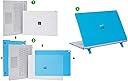
The mCover Case is a precision-engineered, lightweight hard shell designed exclusively for the 13.5" Microsoft Surface Book 1, 2, and 3 detachable tablets (2016-2022). Made from shatter-proof translucent polycarbonate, it offers full corner protection with a two-piece snap-on design, combining durability with effortless usability. This case is model-specific and not compatible with other Surface or laptop models.

| ASIN | B01AW7UF2I |
| Additional Features | Lightweight, Screen Protector |
| Age Range Description | Adult |
| Best Sellers Rank | #748 in Laptop Hard Shell Cases |
| Brand | mCover |
| Built-In Media | 1 |
| Color | Clear |
| Compatible Device Size Maximum | 13.5 inches |
| Compatible Devices | Laptops |
| Compatible Phone Models | ONLY Compatible for 2016 ~ 2022 13.5" Microsoft Surface Book 1 / 2 / 3 with Detachable Tablet Display |
| Customer Reviews | 4.2 out of 5 stars 1,858 Reviews |
| Enclosure Material | Polycarbonate |
| Form Factor | Clip-On |
| Item Dimensions | 12.4 x 9.24 x 0.9 inches |
| Item Weight | 9.2 ounces |
| Manufacturer | mCover |
| Material | Polycarbonate |
| Mfr Part Number | mCover-MS-SurfaceBook13-Clear |
| Model Number | mCover-MS-SurfaceBook13-Clear |
| Pattern | Solid |
| Shell Type | Hard |
| Theme | Book |
| UPC | 649242004164 |
| Unit Count | 1 Count |
| Warranty Description | Limited warranty |
| Water Resistance Level | Not Water Resistant |
G**L
iPearl-Old or New?
While I can't find anything similar to this design and it is exactly what I wanted I was surprised to see differences in design according to color. I purchased the green and pink covers. I noted to my wife how she plugs in her power cable into the Book. She pointed out a notch by the power port. I looked on mine and it didn't have one. Then I Ask her how she keeps hers from sliding, and she showed me the rubber feet on the bottom of the case. I looked on mine and it didn't even have cutout for the rubber feet, and there was no rubber feet of any kind. Then I explained to her my concerns of the case covering the many vent holes on the side, she once again pointed out to me that there were some cutouts on the side that looked like it would allow venting. I looked at mine and there were no cutouts. Long story short, seems like there is a mixed lot of old and newly designed stock at Amazon. The older green design has the flaws as mentioned above. The newly design Pink one seems to address those issues. Overall, I really enjoy the case even with its major flaws. It really protects the book. The functionality of the book does not seem affected by the cover including reversing the screen and closing it shut. A few more adjustments, purging old stock and addressing more vent hole support will make this a great product. For now I am still keeping this one and will wait to see what new design they come up with later. UPDATE: I failed to mention the pros with this cover. First, like I said, this is a very unique product. Can't find anything like this anywhere. The cover is very durable and hard, just what is needed to protect the Surface Book or any other device. The colors are beautiful and translucent which allow for the original surface to show through. Installation is very easy and snaps into place with no movement at all. If you want to protect your case I would get this case. And with the new designed cases this case will rock your Book.
G**N
Pretty color. Quick shipping
For the price, this product does exactly what it needs to. It fits well, not perfectly, but clicks into the ventilation on the main Surface unit and has tabs on the top of the keyboard piece to keep a firm hold on the device. The plastic seems thick enough to withstand some light damage, but definitely not enough to protect the screen or keyboard from a major drop on the floor off a desk or counter. It probably adds about half a pound to the total weight of the laptop but it's nothing too significant. The ports are well exposed, my charger fits well and my pen has enough space for the magnet to keep it held to the main unit. Pretty color. Quick shipping. I'm happy with it.
K**E
If I could give it a 4.9, I would
This case is really fantastic. It keeps my computer safe without adding a ton of unnecessary bulk like all the other surface book cases. I picked the clear case and I have a skin on my SB2 so it can still be seen. It doesn't interfere with sound or cooling at all and it still fits perfectly in my backpack sleeve. It is definitely a bit of work to get the top piece on. I had to apply a good amount of pressure to snap it into place; some of the tabs go on to the lip of the screen and some of them snap into the ridge where the air flow/speakers are. The bottom piece is super easy to get on/off. Although I've not had any issues with charging since putting this case on, it is easy enough to remove the bottom that it shouldn't be too big of a problem. The bottom piece did cause the corner of my skin/decal to peel up just a little but I took it off and put it on again and it's good as new. I expected that the wavy texture would bother me but honestly I kind of like it. It gives the SB a little more grip for carrying which I greatlt appreciate. I did not think the bottom would also be wavy but it is, if you care. The only thing I would dock it for is that it's a little uncomfortable to use as a tablet now. The case only "grips" the screen in 4 locations and they're not obvious unless you're looking for them. When note-taking I have to be a little creative about how I place my writing arm or they jab my forearm. I tried the folio case which was fantastic for notetaking but sucked in every other aspect. If you don't mind a little (2 minutes maybe) work to get it on and adjusting to use it as a tablet then this is a phenomenal case. It's definitely worth trying for only $20!
T**Q
Fits Perfectly! Don't listen to other negative reviews
I was hesitant to purchase this cover originally due to other reviews saying it doesn't fit flush. These reviews must have been by people who couldn't figure out how to properly install the case. When I first took the case out of the packaging and attempted to snap it on to my surface book 2, I had to do it making sure that one side was place on first before snapping the other side. When you purchase one and go to install, you will understand what I am talking about. There is one snap-on prong that looks like two individual prongs. That needs to be slid on first, with the prongs fitting in the grill groove. After that you just simply snap the other-side down. The case, top and bottom, fits perfect and snug if installed correctly. This is the best case I have seen for the surface book 2. Hard plastic appears to be of good quality. Get yourself one, you won't be disappointed.
A**N
Looks nice, fits well (after a modification)
Pros: Looks nice, fits well (after a modification), should protect the book from some scratches and dents. It is nice and light and slim so it still fits in the Maroo leather sleeve that I already bought. Cons: I had to file off one of the tabs on the top part of the case since it wouldn't fit straight out of the box. When I open up the surface book all the way the case keeps the hinge from hitting the table so it is off balance and will not sit flat on the desk/table. Hinders cooling a bit since it blocks off the top vents but it shouldn't be an issue unless you're doing something very CPU heavy. Overall this is a fine product if you own a nail file and want something that's light, looks nice, and provides a bit more protection than a skin would.
P**I
Perfect Pink and adequate light damage protection!
The case arrived just as listed and Iโd expected. The fit on the base of the Surface Book was pretty simple. The top cover has a couple of prongs are supposed to fit inside of the edge venting and can be a challenge to get aligned and inserted without bending and making a snug fit impossible. I was tempted to remove them but figured Iโd just try and try and try until I finally got them to align and go in. After that, the cover fits very snug and does not come off without some effort. The cover provides great protection from scratches, light impact and other minor damage but since itโs just a hard shell affixed directly to the laptop, Iโm not looking to test it with heavy impact anytime soon.
B**Y
A few small issues, overall works well
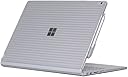
Edit - Dropping this from 4 stars to 1 - Multiple separate people have now said iPearl is making a new version of this case with holes in the upper lid for the venting around the clipboard. Clearly they realized pretty quickly it's a design flaw, but tough luck for us early adopters, huh? Not a super cool business move, iPearl. Full disclosure - I still haven't seen any difference in the cooling performance since I put this case on. However, I still also haven't put my Surface Book through anything more strenuous than web surfing while I listen to Google Music. The fans on the Surface Book generally only fire up under heavy load anyways, if that ever happens I'm sure this case would cause serious cooling problems. The magnesium casing of the Surface Book seems prone to dents, dings, and scratches, so I was looking for a case basically on Day 1. The problem has been that pretty much all of the protective coverings I could find were skins. I was looking for something a bit more substantial to protect my Surface Book as a I travel with it daily for work, but hard cases were hard to find. Eventually, iPearl came out with this one, so I figured I'd give it a try. I've had great success with iPearl's Macbook hard cases, and this one seems very similarly constructed. It's a top plate that goes on the back of the clipboard, and a bottom plate that goes on the bottom of the keyboard dock. The two plates are designed to protect the clipboard/base both when the two are connected, and when separated. No sharp bits or cracks when it arrived, it's a pretty good looking and well made hard case.. All of the cutouts are well-placed, none of the sensors get covered up. It has a very snug, secure-feeling fit. The one thing it does NOT protect (as you can probably see in the pics) is the Reflex hinge, it stays uncovered at all times. This does mean it wouldn't offer any real protection if you were to drop your Surface Book and it landed hinge-down. Any hard case is going to detract a little bit from the good looks of whatever you put it on, that's just the price you pay for extra attention. However, I do feel like this case does look better than the other (limited) options for Surface Book hard shell cases. There's a few issues I did have with it: - The AC adapter wasn't able to full insert into the Surface Book when I first put the case on. There's a small clip where the bottom half of the case snaps into place at the right rear corner of the keyboard dock, and that clip was in the way. I was able to bend it out of the way so the AC adapter can plug in, but I had to put enough pressure on the clip to bend it that I was really worried about breaking it. - The case blocks 90% of the air vents that go around the whole perimeter of the clipboard. I haven't seen temps going up because of this, but I don't tend to push the laptop all that hard in general use, either. People who worry about blocked vents will not like this case. Some venting areas are uncovered, and it could be that the vents can still exhaust air just fine even while covered up, but this is something to be aware of. - The plastic material is a tiny bit slick. It doesn't feel like it's going to squirt out of your hands at any time when you pick up your laptop when it's attached, but make sure to keep a good grip on it when carrying your Surface Book in this case - The Microsoft logo on the back is more or less completely obscured by the case. I know it doesn't light up like the Apple logo does on the back of a Macbook, but they could have at least made the plastic over the logo a little more translucent. This might not bother some people (or it might even be a plus for some who worry about their expensive laptop standing out) but I'd have much preferred a hard case where the company logo can still be seen easily.
A**B
Fits perfectly
I had read some conflicting reviews on whether or not the case fit well - some people said the top didn't fit completely or that they couldn't charge with the cord above the laptop with the bottom part on - I found both of these to be incorrect, but I can see why people made these comments. I was hesitant on buying it because of these reviews (but there aren't many other options, honestly!) so I wanted to clear up any confusion. The bottom is very straight forward to install - you just slide it on - but the top takes some more finesse and effort. I tried sliding it on at first, but that didn't work well for me, so I resorted to popping it on. If you pop it on, as most people probably do, it will appear that one side fits perfectly and the other side does not, leaving a gap so that the case is not 'flush' with the laptop. This is not true, however. It is just that the case fits very snugly, so if you do not push the laptop into the case on the 'fitting' side as far up against the case as it will go, then the other side will not be able to fit in, if that makes sense. There are these little latches that are meant to latch onto the side by the screen - if they are getting stuck in the middle of the laptop and not going all the way down so they can latch onto the side by the screen, then you need push the other side of the case more until the other side is fit in as snugly as it goes. I gather some people took to sawing off the extra plastic bits after concluding they would not fit... this is not necessary! Also, you CAN charge from the top with the case - again, you just need to make sure the bottom of the case is pushed snugly in as far as it can go. If there is extra 'room' so to say, at the bottom by the touch pad (as in, space in between the laptop and the case), then you will not be able to charge from the top because the case is not on correctly and will get in the way of the charger. I took pictures to try to demonstrate the small latches on the side of the case that need to latch on by the front of the screen - if they are getting stuck in that black groove in the middle of the top of the laptop, then you need to make the other side of the case fit more snugly. Also, the pen attaches with the case on without issue. Altogether, good case for the price, and I expect it to protect well from scratches as well as making it easier to handle in tablet mode! I hope this is helpful for people who were uncertain about the case like me.
G**R
Perfect case
Though a bit expensive, looks are amazing with a hardness. Perfectly fits the surface book 2. I think this is the only & best option available currently. I would recommend this for sure.
A**N
Fits perfect
Just got this today and it fits perfectly for my Surface Book 2. Seems to provide good shock protection, but I didn't want to test it out... :)
M**Y
Very Good
Very adjustive for the product surface book 3 13.5 inch, may be my selected color (blue) is not much good as Ads color
M**.
Buen producto
Buen producto! cumple su objetivo
M**A
Beautiful, matte!
This case is beautiful! It prevents the bottom of my computer from getting scratched and is so aesthetically pleasing. A bit tricky to slide on but once it's on, it's perfect! Note: I decorated it with some patches to suit my style.
Trustpilot
1 month ago
2 months ago