Desertcart purchases this item on your behalf and handles shipping, customs, and support to SINGAPORE.
🎯 Own Your Game, Own Your Network
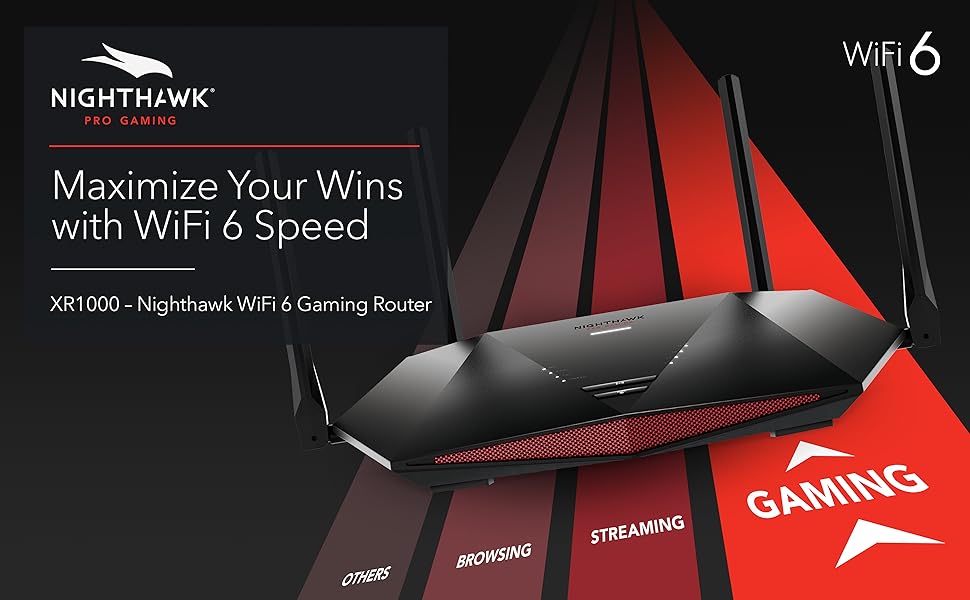
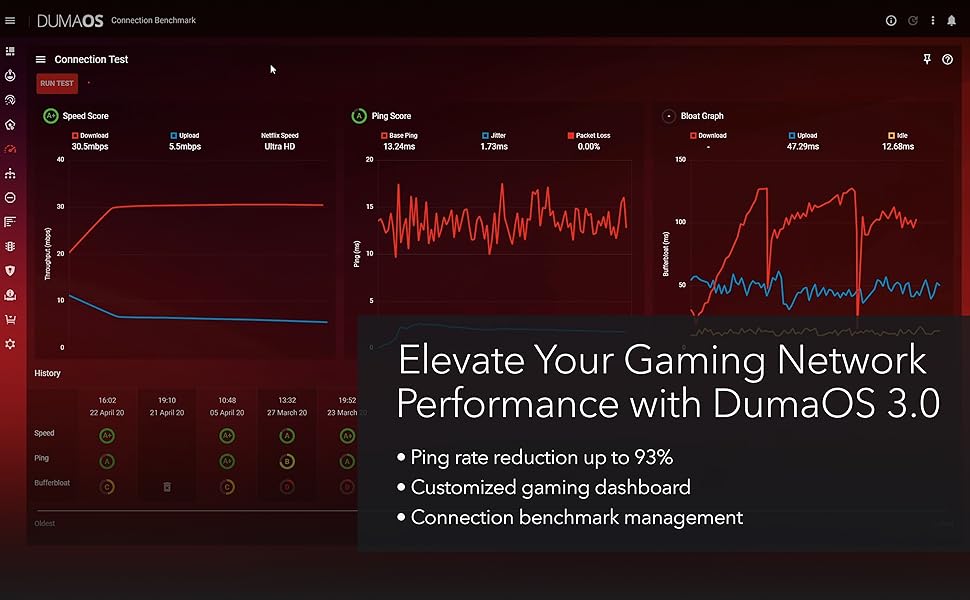
The NETGEAR Nighthawk Pro Gaming XR1000 is a WiFi 6 router engineered for serious gamers and multitaskers. Delivering AX5400 speeds up to 5.4Gbps and powered by DumaOS 3.0, it dramatically reduces lag and optimizes server connections. With built-in NETGEAR Armor security, 4 Gigabit Ethernet ports, and advanced traffic control features, it ensures a fast, secure, and customizable network experience tailored for high-performance gaming and streaming.


| ASIN | B08FWNNWTB |
| Antenna Location | Home |
| Antenna Type | Fixed |
| Best Sellers Rank | #11,535 in Computers & Accessories ( See Top 100 in Computers & Accessories ) #362 in Computer Routers |
| Brand | NETGEAR |
| Built-In Media | WiFi 6 Pro Gaming Router (XR1000), 4 detachable antennas, Ethernet cable, Quick start guide, Power adapter |
| Color | Black |
| Compatible Devices | Phone, Tablet, WiFi-Enabled Devices, Media Streaming Devices, Computer, PC, Mac, Gaming Consoles |
| Connectivity Protocol | Ethernet, Wi-Fi |
| Connectivity Technology | Ethernet, Wi-Fi |
| Control Method | App |
| Controller Type | Switch |
| Coverage | Internet Security |
| Customer Reviews | 4.0 out of 5 stars 2,528 Reviews |
| Data Transfer Rate | 675 gigabits_per_second |
| Frequency | 5.4 GHz |
| Frequency Band Class | Dual-Band |
| Item Dimensions L x W x H | 11.61"L x 7.87"W x 2.51"H |
| Item Type Name | Wireless Router |
| Item Weight | 1.3 pounds |
| LAN Port Bandwidth | 1000 Mbps |
| Manufacturer | Netgear |
| Maximum Upstream Data Transfer Rate | 2700 megabits_per_second |
| Mfr Part Number | XR1000-100NAS |
| Model Name | XR1000-100NAS |
| Model Number | XR1000-100NAS |
| Number of Antennas | 4 |
| Number of Ports | 4 |
| Operating System | Microsoft ® Windows 7, 8, 10, Vista ® , XP ® , 2000, Mac OS ® , UNIX ® , or Linux ® , Microsoft ® Internet Explorer ® 11 or higher, Microsoft Edge, Google Chrome ® 55 or higher, Firefox ® 45 or higher, Safari ® 10 or higher |
| Other Special Features of the Product | Internet Security |
| RAM Memory Installed | 1 GB |
| Router Firewall Security Level | High |
| Router Network Type | wireless_wired |
| Security Protocol | WPA2-PSK |
| Special Feature | Internet Security |
| UPC | 606449150544 |
| Unit Count | 1 Count |
| Voltage | 100240 volts |
| Warranty Description | 1-year warranty |
| Wi-Fi Generation | WiFi 6 |
| Wireless Communication Standard | 802.11ax |
| Wireless Compability | 802.11ax |
E**Y
Bought as a used unit but works great.
Bought this Nighthawk Pro Gaming 6 AX5400 (XR1000) router as "used - good" condition. When I took it out, the WPS button was stuck inside. Like someone pressed the button too far in that the button shifted up and was stuck under the cover. No big deal as I have star bits to take the router apart and fix the button. I knew used units are a little rough so I don't think this issue needed a star removed. As for setting it up, it was a slight hassle. I can tell why someone would return this router as the DumaOS interface is not too easy to use without instructions. If you want a router that turns on and works automatically, this is not the router. If you don't have a somewhat of an understanding on WiFi networking, this not the router for you as it requires some knowledge to set it up to have it work properly. The DumaOS interface is slightly buggy and almost all of the features didn't work after updating the firmware. Luckily, Netgear has previous firmwares for download and I rolled it back by one version to get it all working again. Still, I wanted the latest firmware and there was an easy fix to updating the firmware without issues. It's called not using Google Chrome browser and using Microsoft Edge browser. In fact, it works faster and less buggy in the Edge browser. Everything in the DumaOS works great on the latest firmware with Edge so if you're having buggy issues with the interface, just switch to Edge. Overall, buying this used saved me about 118 dollars. This replaced my old Nighthawk DST AC1900 (R7300). With the old router, Nintendo Switch had issues with the eShop and just trying to download games, the TV had streaming issues that would cut in and out, and my Oculus Quest 2 had a lot of connection issues. This router SOLVED ALL OF THESE ISSUES! It's a great router but you need to know what you're doing with the DumaOS interface to make full use of the router.
B**A
Put the gaming experience in your control without cheating
I am a gamer whom only plays fps games. I truly and hobestly was just about to give up gaming because i still experienced laggy games even though the lag was definitely not on part. I have 5.22Gbps upload and 5.20 Gbps download with 1 ms ping. Yet i would still experience maddening lag on my favorit games. I got the xbox series X and fiver connection and felt like it was all for nothing. Then i heard about the pro gaming router with all its features that quite literally eliminated the lag altogether. I was a nonbeliever, but figured it was worth a shot before I hang up my had and call it for good. So i bought it and found that not only did it actually eliminate lag but also prevented me from matching up against laggy players and laggy servers. This device put me back in control and I now am able to reap the benefits of the best possible Internet connection available on the latest GEN console. I'm not going to name all the features that it has, only the most important ones. The Geo fencing and Geo filter allows me to block servers that I never want to be matched on again. Also, I'm able to block all players that are outside of the United States to avoid high ping nonsense. I recommend this router to alll my friends and family because its not just good for gaming but also allows you to control the traffic and control how much speed your devices pull from your network. Truly the best gift i have gotten myself in the last 5 years. Tha k you so much for saving me from abandoning my passion for gaming and allowing me to actually have fun again. Even when i lose a game, i lose with a silly smile on my face because it didnt lag at all.
L**N
Glitzy Gunky and doesn't deliver core freatures
Update: I'm a security architect / engineer, been in the profession for 20+ years. Manage firewalls at work. Pro’s: Wifi - fast, true, nice maps, lots of charts. Very Pretty, That’s where it stops though. Usefulness? I found 17+ major areas where this > $300 item just does not stack up, so it will be ***returned***. TL;DR VASTLY SUB PAR for a) the price (> 300) b) NetGears' Rep (I have several products) c) and the maturity of the market. Yes, it is updated to current version as of early May 2022. I found at least 15 major usability problems that cause you to go elsewhere. Editing your own PING heatmap is buggy, error pone and just does not appear to work. These problems that WILL affect home users. There are BUGS listed here and significant user usability issues that, with 3% of effort, would make this device *significantly* more usable for the home user. 1) Router does not come with an AdBlock list, it should, as its a core feature. When you *first* open the ad bock area, you get a nice message explaining feature, and it specifically calls out protecting smart TV's. When you go find in the support forum the suggested block list, the “default” one, and … you go to Amazon TV, IMDB shows do not play. Why? Because … they have an ad. Stop the ad blocker – IMDB shows play. Now this is not some obscure cheap-o “smart TV” service, its … AMAZON and IMDB! 2) Router has a “ping map” feature, the idea is to see response time for common games. That’s not valuable to me. The idea of having my OWN ping map for work services, Google DNS. OpenDNS servers, etc., would help me to be sure that the services I need for work are “up” and I have good I’Net connectivity. All of the entries I created do respond to ping (ICMP Echo Request) at the cmd line, but … alas … when you add them to the custom router’s list and try it, you get zero response. Unlike the game lists. 3) AD BLOCK: The adblock feature has a “bubble map” showing volume of adds blocked by a given device on the network. Devices are listed as “unknown”, UNLESS the device gives up its name in some manner. For a home user, this is useless. The absolute minimum should be to show the sending devices IP address. THAT would allow the system user to at least see if ads are blocked for … oh … I don’t know, their SMART TV!!! It takes a LOOOOONG time for the ‘adblocker’ page to paint (longer than others). The ad blocker screen did not paint on initial access when I started this write up. I tried going to other screens, and back to ad blocker. ONLY when I hit the “refresh” button in the browser did the adblocker page paint. AdBlock history only goes back 24 hrs. Does not appear to be a way to export ad blocked sites – although you can click at a point in time on the bubble chart and see the ad sites blocked for a specific point in time. Does not appear a way to ‘exclude’ a system from adblocking (that would solve my smart TV issue…) 4) QoS: On day one of getting the device - I set this up. ON day three, when I wet to the QoS settings, I get the “Welcome to QoS” page. I looked at it 3-4 times, and never got the ‘welcome’ page before til day 3. QOS display just has broad classifications of applications, does not appear a way to edit the classifications, or add/delete/edit them. 5) Network Monitor: Same as point 4 on the “welcome” page. 6) “Network Monitor” shows information in the aggregate, you cannot (on this page) identify a top consumer. Why? Because what little “device” information there is not an IP address, or a system name (7/8 say “unnamed device”). I had a Nintendo Switch online – but it did not show up here on this page. 7) “Device Manager” – you may see a device name, you do see a MAC address, you DO NOT see the current/most recent device IP unless the device is online "at the moment". Most home users can connect the dot w/ a system name or IP, and may not know how to find a MAC address. Why show the MAC and not the most recent IP? OH – and I do see a “Nintendo Switch” in this screen, but not others … so … the Identifier in this fancy map display isn’t seen elsewhere, like the “traffic controller” page … Oh no, wait, after 30 seconds, there it is in the list on the TC page … why the delay? 8) The traffic controller page does not reliably populate – 2/3x, it is blank, 1/3 there is no info when you get the page elements – all of which are devoid of data. This is a page where you ‘configure’ properties – so it being empty is OK. It is not OK that a page with no data for its areas does not initially paint. 9) The “wireless status” don’t tell you the number of connected devices. Every other router I've used does. 10) LOGS: There are two places where you see logs – Setup | Monitoring ) Logs and Sys Info | Logs (bottom). These areas display … different information. (so they are different logs, but not labeled that way) The first just has DHCP logs. The second is system level activity. Aside from copy/paste (into notepad?) doesn’t appear to be a way to export/save logs, although there is an ‘email logs’ button – but NOT on the Sys Info | Logs area! 11) ON the dashboard widget that shows “Internet Status” you see the ISP IP, you do not see the DNS servers – have to go to the setup area for that. When you resize the widget you get an error “Missing JSON response” - QA should have caught that. 12) The “Block Sites” does not take a list off the Internet, you would need to edit each entry by hand. QA should have *DEFINITELY* CAUGHT THAT. Many other devices do this, lower than this price point, and PiHole does it for free. So does OpenDNS (for the most part), and NextDNS is $20/yr. 13) The “Block Service” function doesn’t block a “service”, it blocks a TCP or UDP port. Services can run on any port, this section is poorly named. 14) The “Email” address config page does not appear to have any ability to work with MFA enabled services – I did not try here, just reporting what I see on the page. (MFA may work, no idea…) 15) UPDATES: When you press the “check update” button, you get … black text on a dark read background, which is barely readable. You also aren’t told if you are current or not. SO – the user doesn’t know if they need to .. update. QA should have caught that. Most other areas have white text on the dark red background. 16) NTP – one server only, not multiple, can be defined. 17) PING HEAT MAP: This is supposed to be a shining area o/t product. I have Five (5) entries selected in the list for the heat map – a pencil icon shows. Cannot figure a way to change that. SOME times when you click on pencil, you get a “RPC error 'ERROR_UNKNOWN': cannot open //data/dumaos/rapp-data/com.netdumasoftware.pingheatmap/data/usr/custom_1651432715.lua: No such file or directory -> stack traceback: ?: in function …..” error message. Sometimes you get to create / edit a list. Inconsistent. 18) Other – I could not find a way to change the system color scheme, you are stuck with a fairly garish “red” scheme. AND … I do have “accessibility” checked as “on”. (I could see no difference with this checked on or off). ORIGINAL Post: Had it for two days. WOW - buggiest code EVER!!!! Took me several attempts to create my own 'ping' list. AND ... then it doesn't work. Can't tell you how many parts / panels generate a JSON / Javascript error. Seems that very little QA was done. Super Un Happy.
Y**L
Important steps!
Before you update the firmware (which you obtain through the netgear website) please make sure you reset the router to factory defaults. After you've flashed the new fw please make sure to factory reset it again and THEN set it up. This is known is a clean flash. If you're facing issues with WiFi dropping. Its due to a flawed WPA2 integration on the 4 way handshake. Simply use the better and more secure version WPA3 in settings and it works perfectly. You should be using the wpa3 anyways regardless If WPA 2 is flawed or not. I'm actually happy this happened to me. Geo fence works, QoS works, literally everything just works. Bufferbloating is no longer an issue. I love the ui, the only "bad" thing would be 100mbps loss compared to my ISP router. However seeing that this router has a much higher range, better ui and better controls this is a no brainer. Not to mention no buffer bloat.
C**S
Solid Gaming Router, Great While I Used It — Still a Good Budget Pick for Gamers
I used the XR1000 for a good stretch, and honestly, it served me really well. The WiFi 6 speeds were strong, the interface was easy to work with, and DumaOS actually did help keep gaming connections more stable. For console gaming especially, it did exactly what it was supposed to do. I eventually upgraded to a newer Nighthawk model for better overall throughput, and later moved my whole setup over to UniFi for multi‑AP coverage and more advanced network control. Those systems obviously outperform the XR1000, but they’re also in a completely different price and complexity tier. If you’re a gamer who wants lower lag, simple controls, and solid WiFi 6 performance without spending a ton, the XR1000 is still a good buy. It’s not the newest router on the market, but it’s reliable, easy to use, and delivers the gaming‑focused features most people actually care about. Overall: 4 stars — great for budget‑minded gamers, still worth considering even in 2026.
R**D
Great Signal. Handles traffic well.
The XR1000 gives me a great signal everywhere in my 1400 sqft home. It easily handles the traffic for my 12 devices without an extender.
M**A
This router is exactly what I've been looking for!
*attached is a photo of the physical router, as well as wireless download speeds 45 feet away with 3 walls in between using a Wi-Fi 6 device (Alienware Area 51M R2)* This review is for NETGEAR Nighthawk Pro Gaming 6-Stream WiFi 6 Router (XR1000). Well this is one of the best routers I've ever owned. I upgraded from the Nighthawk R7000 and I am not looking back. I currently use the 1Gbps plan with Frontier, hooked up directly from the Ethernet cable to the ONT Box so I am not using a modem. I've never seen wireless speeds at this level in my 25 years of being alive. To put it to the test, I deleted my entire Steam library and re-downloaded all my games. I averaged 97-99 MB/s download speeds. To make that a little simple to understand, I could download 1GB of data in about 10-11 seconds. This is thanks to the new generation of wifi being WiFi 6, just make sure your devices support WiFi 6 before considering this router because if not, you're better off purchasing a cheaper router. The next best thing about this router is its range. I can go 45 feet away from the router with 3 walls in between and still get 4/5 bars on the 5Ghz channel. My download speeds drop from 97-99 MB/s to 70-75 MB/s, which I don't really consider that much of a loss. The software this device uses is called DumaOS 3.0, A next generation system that allows you to Calibrate the bandwidth usage between all your devices connected to this router. You are able to allocate the percentage of the bandwidth used either by applications or by devices. I prefer the system to divide my bandwidth by applications, and by activating the "share excess bandwidth", the system will provide more than the allocated bandwidth should you need it to get those big files downloaded quickly. A few noteworthy items are that I did have some trouble during initial setup, where the setup page kept on reloading while the router tried to update its firmware. A solution I found to this was to simply set up the router through the Nighthawk app on your phone. That process took about 5 minutes versus having trouble using the Ethernet cable to set up the router. The next issue I had was that my WiFi 6 capable laptop received a "no internet connection" when wirelessly connected to the router. I corrected this by doing a "Network reset" on my laptop. Once I tried connecting again to the router, the issue was resolved and connection was established. To summarize, I highly recommend this router IF: 1. You own and use Wi-Fi 6 capable devices 2. A good internet plan of at least 500/500 speeds to enjoy your wireless speeds. 3. Desire the ability to customize your bandwidth usage across your devices. Enjoy!
Z**Y
Terrible, refuses to assign IP addresses, worse than useless
I purchased the Nighthawk XR1000 about a year ago, hoping it would be a reliable, high-performance router. Unfortunately, this has been one of the worst tech purchases I've made. My experience with this router has been riddled with issues, poor performance, and frustration. From the start, the setup process was challenging. The app, which is supposed to make setup "easy," was so buggy that it crashed mid-setup, forcing me to hard reset the router. I ultimately had to abandon the app altogether and set it up manually through my PC's browser. This should have been my first warning sign, but I forged ahead. Initially, everything seemed fine – my devices connected without a hitch. But within a week, they began to randomly disconnect from Wi-Fi. Attempts to reconnect would result in a “Could not obtain IP address” error, as if the router was outright refusing to assign IP addresses. Sometimes a reset would temporarily resolve the issue, but most of the time, nothing helped. On rare occasions when resetting did work, it could take up to three hours for devices to reconnect. I tried every troubleshooting tip I could find online, thinking each might be a solution, only to realize it was all just the placebo effect. The connectivity issues continued – devices would drop Wi-Fi at random, and the router stubbornly refused to assign IP addresses. Countless nights were spent with my modem indicating a solid internet connection, while this router blocked every attempt to connect. Despite many positive reviews, which initially gave me hope, I’ve come to the conclusion that my $300 investment was a mistake. I now see the price has been heavily discounted. And no wonder. I'm sure they're trying to unload the last of these pieces of crap onto unlucky customers. For me, I tried everything – moving the router around the house, adjusting settings – but nothing solved these persistent issues. Finally, I decided to switch to a new router, the ASUS ROG GT6, and immediately all my connectivity issues disappeared. Every device now connects flawlessly, and the ASUS setup process was a breeze. In summary, I will never purchase another Netgear Nighthawk product again. This router has been the most unreliable and frustrating I've ever owned, and in my opinion, it shouldn’t even be sold. If you’re considering the XR1000, do yourself a favor and look elsewhere – this product is simply not worth the trouble.
S**I
تحديد سيرفرات الألعاب
ممتاز جداً للقيمرز
A**A
Excelente router.
Excelente router, en cuanto a la instalación y el uso es muy fácil de operar, en cuanto a funciones, está muy completo, te brinda los ajustes necesarios para tener una estabilidad en el internet, independientemente del uso que se le de.
D**D
Go TP-Link
Get yourself something TP-Link instead of Netgear. Thing keeps turning off and resetting my DumaOS settings. Not only that but it's a nightmare to setup and slow as hell to load each page. Save your money.
N**H
It's simple and easy to set up - throughput is amazing
Simple to set up - wifi signal now reaches all along the house.
ِ**I
للعشاق الالعاب NETGEAR Nighthawk Pro Gaming 6-Stream WiFi 6 Router (XR1000)
انصح شراء هذا الراوتر ، تستطيع التحكم به من خلال النظام المثبت به وتتحكم بالالعاب والاجهزة الاخرى من حيث الاتصال وسرعته .
Trustpilot
3 weeks ago
1 day ago