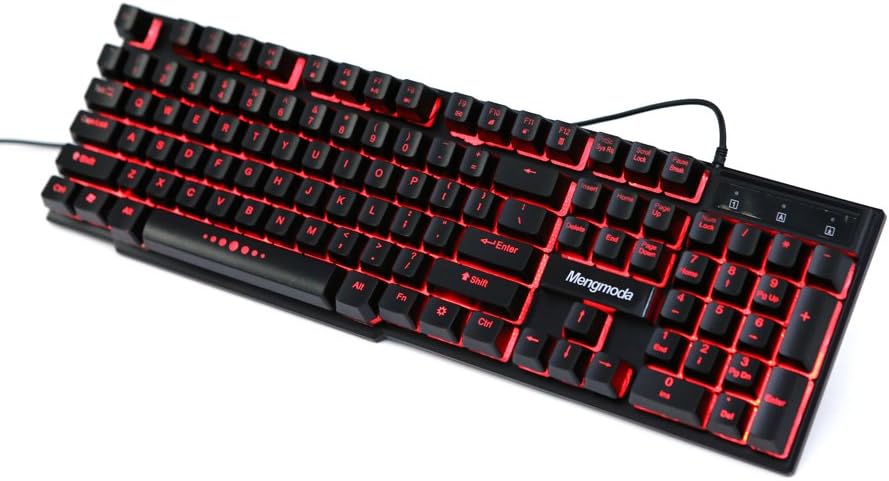





Gaming Keyboard RGB Gaming Keyboard Backlit Multicolor LED(Black)
Product ID: 22479301
Details
- BrandMengmoda
- ColorBlack Crackle
- Connectivity TechnologyUSB
- Hand OrientationAmbidextrous
- Included ComponentsUSB Cable
- Keyboard DescriptionGaming
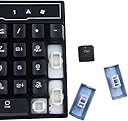
This is a mechanical feel gaming keyboard, not the real mechanical keyboard, but tones clear, feels good, user experience is similar to mechanical keyboard. Gamer's Equipment. 104 keys, 19 keys non-conflict, mechanical feel keyboard, strengthened space key. Specially designed keys for enhanced durability and tactile feedback, mechanical keyboard feeling. Easy to Operate. USB plug and play,. Anti-skid and waterproof design. ABS material, laser-etched, non slip design, splash proof and durable. Cool Background. LED backlighting on keyboard, 3 colour changeable breathing or permanent lighting mode. Easy type in the dark. in with cooler style. User-Friendly. Quickly control each function, ergonomic design, comfortable to operate. Fit for Windows 8, Windows 7, Windows Vista, or Windows XP. Review: Great keyboard for the price. - This keyboard is one of the best led keyboards I have ever owned and its only a third of the price. I like how bare bones it looks with the raised mechanical keys. The colors are red, blue, and this cool pink/purple. If you press the FN key and the light key it will put it into an alternating breathing transition through all three colors. The usb cord would be my only complaint and that is only because I always move my keyboard from my lap to my desk. Review: This is a nice keyboard. The lights look good although I wish ... - This is a nice keyboard. The lights look good although I wish it had more functionality. Just 3 solid colors. But as I said, the colors do look nice. It is not mechanical no matter what you read. I used it for about a year and a half before I upgraded. Only other issue besides the colors is that there is just no room outside the keys. The board just cuts off seemingly too early on each side. Very light. All in all it's a decent product but I'd suggest spending 20-30 more bucks and get you something mechanical with better LED options. It'll do, Donkey.
| ASIN | B01710JG60 |
| Additional Features | Waterproof |
| Brand | Mengmoda |
| Built-In Media | USB Cable |
| Button Quantity | 104 |
| Color | Black Crackle |
| Connectivity Technology | USB |
| Customer Reviews | 3.4 out of 5 stars 26 Reviews |
| Hand Orientation | Ambidextrous |
| Keyboard Description | Gaming |
| Manufacturer | Mengmoda |
| Mfr Part Number | MND-K110 |
| Model Number | MK001 |
| Number of Keys | 19 |
| Special Feature | Waterproof |
| Style | Modern |
| Style Name | Modern |
| UPC | 714569976026 |
Z**S
Great keyboard for the price.
This keyboard is one of the best led keyboards I have ever owned and its only a third of the price. I like how bare bones it looks with the raised mechanical keys. The colors are red, blue, and this cool pink/purple. If you press the FN key and the light key it will put it into an alternating breathing transition through all three colors. The usb cord would be my only complaint and that is only because I always move my keyboard from my lap to my desk.
J**W
This is a nice keyboard. The lights look good although I wish ...
This is a nice keyboard. The lights look good although I wish it had more functionality. Just 3 solid colors. But as I said, the colors do look nice. It is not mechanical no matter what you read. I used it for about a year and a half before I upgraded. Only other issue besides the colors is that there is just no room outside the keys. The board just cuts off seemingly too early on each side. Very light. All in all it's a decent product but I'd suggest spending 20-30 more bucks and get you something mechanical with better LED options. It'll do, Donkey.
F**R
Very Nice Keyboard, with One Showstopper Flaw
I am unhappy with this keyboard. First the good: It's a good looking keyboard, I like the minimal design, I like the feel of the shape of the keys (slightly cupped), I like the feel of the material of the keys, I like the adjustable backlighting and I really like that the keys are shielded underneath from getting dirt in them. It was also a great price. Now the bad: The enter key does not actuate reliably. I often have to hit the enter key multiple times because the first one does not register. I have been using this keyboard every day for about 3 weeks. I am a software engineer and the enter key failure is a huge disruption to my flow. The key must strike reliably, it's simply a showstopper for demanding professional use. This is marketed as a gaming keyboard, and the WASD keys are larger which is nice, but the font and placement of the shift characters (!@#$%, etc) makes them hard to read. Not a problem if you're gaming, but a bit annoying for other uses. It's unfortunate, because I like most everything about the keyboard, but the enter key issue is a showstopper. Hopefully they can fix the issue in future versions, because they are very close to having an excellent keyboard for the money. If you're using this keyboard purely for gaming, then it's probably fine.
R**Y
They keyboard looks like they start off with white plastic keys that are ...
They keyboard looks like they start off with white plastic keys that are translucent. Then they paint all of the keys with a Black Opaque substance with the value of the key left uncovered allowing the light from the LEDs that sit under some of the keys, to shine through. I have been using this keyboard for 3 months and the black substance on the keys is wearing off. The keys with the Mose wear are the E, S, and D keys. About 40% of the letter is now white on these keys. The things I like about the Keyboard: 1. I can work on things at night or early morning without turning on any lights. The three colors that display are just bright enough to to allow me to see the keys, and are not so bright that it is distracting. 2. The keyboard has a positive return on the keys, so they don't stick. 3. It's relatively inexpensive. The things I would like to see changed. 1. I would like to see a gold/Yellow color as one of the colors of the backlight. 2. The keyboard has little support pads at the 4 corners of the underneath side of the keyboard, but the unit is flexible enough that the keyboard bounces when I hit the keys in the middle. My solution was to put the remnants of a note pad under the center of the keyboard, so the bottom of the keyboard would not bounce on my desktop. This made the keyboard a lot quieter. I think if the manufacture put one more support pad on the bottom in the center of the keyboard it would stop the bouncing. 3 Make the black substance covering the keys more durable or permanent.
E**A
Bugs Out
Well,I was unfortunate to get a defected product, as soon as i plugged it in it started making my laptop bug out and started opening web pages on its own, Just Did the same thing over and over.
M**S
Great keyboard
I like it. I have been using this for about 7 months now. It works great but I use my shift key a lot so it's kind of warn down (just the paint though). It's a great keyboard if you don't want to spend that much money on a gaming keyboard. Would buy again. Cool trick - Press Fn then the light button(the one you change colors with) and it will cycle through the colors.
F**D
Pretty Good Keyboard-Had some personal issues with it
Pretty good keyboard. I enjoyed using this while it lasted. I plugged it into my home computer one day and ever since then the keys don't function normally. I think it may be a problem with my home computer but it could be the keyboard. My a,s,and d keys had some of the paint scraping off which made it look weird but other than that this keyboards fine.
C**N
I like the back lit keys
I like the back lit keys. It makes it much easier to see the keys. The response time is kind of slow but not horrible. The space bar has stuck since I got it so it gets rather annoying having to pound on the space bar to unstick it. It is an ok keyboard for the price but I would not suggest it for gamers.
Trustpilot
5 days ago
1 day ago