

🔌 Plug into flawless 4K clarity and rock-solid connections—because your setup deserves the best.
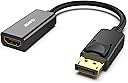
The BENFEI 4K DisplayPort to HDMI Adapter is a uni-directional DP 1.2 to HDMI 1.4 converter designed for professionals needing reliable, high-resolution video and audio transmission. Featuring gold-plated connectors and a secure latch mechanism, it supports up to 4K UHD at 30Hz and full HD at 60Hz, ensuring stable, flicker-free output compatible with major PC brands like Lenovo, Dell, and HP. Its compact design and 18-month warranty make it an essential tool for seamless presentations and media streaming.


| ASIN | B017Q8ZVWK |
| Best Sellers Rank | #8 in Computer Cable Adapters |
| Customer Reviews | 4.5 4.5 out of 5 stars (70,493) |
| Date First Available | July 31, 2015 |
| Is Discontinued By Manufacturer | No |
| Item Weight | 0.96 ounces |
| Item model number | 000095black |
| Manufacturer | BENFEI |
| Product Dimensions | 0.39 x 0.39 x 0.39 inches |
T**S
Perfect adapter – rock-solid, beautifully built, and actually delivers what it promises
I’ve bought my fair share of cheap DisplayPort-to-HDMI adapters over the years, and most of them have been disappointing: flickering at 4K, random signal drops, cheap plastic that feels like it’ll snap the first time you look at it funny, or worst of all – they just don’t work with certain GPUs despite claiming “broad compatibility.” This BENFEI adapter is legitimately the first one that has worked 100% flawlessly from the moment I plugged it in, and continues to do so 9 months later with daily use. It was literally plug-and-play. Windows detected the display instantly, no black screens, no “signal lost” nonsense, no flickering, no color banding. Audio passes through perfectly (bitstream Dolby Digital/DTS to my receiver when I route it that way). Zero issues. Never once had a handshake issue. Highly recommended. BENFEI has earned a permanent spot in my “buy again without thinking” list.
R**T
Worked as expected!
The review: The adapter seems to be made well. It was in a plastic bag rather than a box, but it did have a protective cap on the male DisplayPort end, and a plastic wrap on the housing of the HDMI end. It plugged in solidly, and I tested the release with no issues. I wonder if some of the people who had issues with it breaking off when trying to remove didn't realize that DP has an active retention mechanism that has to be depressed to remove. Seamlessly transferred both video to my TV and audio to my surround sound, as expected (or at least hoped). I always like to put my personal experience in my reviews too because I search questions and reviews for information, so I feel like this can help others: Active versus passive adapters: I'm using a Lenovo M83 Tiny PC as my home theater PC, which has a DisplayPort++ output. As others have stated, this is a passive adapter and MAY not work with your output unless it is labeled DP++. The DP++ stands for "DisplayPort Dual-Mode", and simply means that the port automatically recognizes if an HDMI or DVI adapter is attached, and sends the appropriate signals rather than the DP signals. Now it is important to realize that most modern DP ports are dual mode, whether the DP++ logo is present or not. As such, you should do the research before hand to find out if your device has a dual mode port, or risk finding out the hard way. Audio through adapter: My primary concern with this adapter was whether or not it would carry audio from the DP to the HDMI cable going into my surround sound receiver. To clarify, my setup is, PC Display Port > this adapter > HDMI cable > Receiver > HDMI cable > TV. When I initially booted the computer (first boot after installing Windows 10 Pro), Windows immediately displayed video on my TV, however no sound was playing on the surround sound speakers (I was clicking the Windows volume slider and listening for the "ding"). Through Control Panel (not the garbage Windows 10 Settings app, what was wrong with the Control Panel, Microsoft?!), I went into the Sounds options. Under playback devices, there was only one item listed, "Speakers". However, almost immediately while I was in the sound options, another device showed up with the name being the model number of my receiver. Windows automatically set it as the default device. I went ahead and disabled the other "Speakers" device just to be safe. After rebooting, all settings remained and sound continued to work properly. If you are using a surround sound receiver, you should also click on the playback device and select Configure. In here, I was able to specify that I have 5.1 surround, but there were also other options such as stereo and 7.1, so make sure you pick the right one. If you are running this directly into a TV, stereo is the default setting, which is what you want. It does send a test sound to each speaker individually, so I was able to verify that the 5.1 signal was actually making it through the adapter. Now whether this is an uncompressed PCM signal or some sort of compressed audio stream is yet to be determined; but this may depend on the source media/application that is providing the audio. Edit from future me: This does support 4K as well. I saw somebody else say it doesn't, but they must be having issues with other parts of their system (source, or receiver not supporting 4K passthrough, etc.). I have slightly changed my setup listed above, and am now running the HDMI cable directly to the TV. I upgraded to a 4K TV, but my receiver does not have 4K passthrough, so I had to bypass it. Now the HDMI cable plugged into this adapter runs to the TV, carrying both video and audio to the TV. TV is receiving 4K from the PC, no problem. I can listen to the sound through the TV speakers, but I don't as I am using a TOSLINK cable to carry the sound back to the receiver. I need to upgrade my receiver to one with 4K passthrough and audio return channel to simplify my life but that costs money and would only potentially reduce the number of cables I need by one. However, I already have to return audio from the TV to the receiver via TOSLINK because I want the TV app audio to come through my surround sound speakers too, so in the end it's all the same.
A**D
Great adapter for Display port to HDMI
My new computer had Display Ports for connection to a monitor. I used my Television as the monitor to make a HTPC solution. As you may be or not be aware. Display Ports are commonly used with monitors as apposed to TV's that typically like to used HDMI. Thus I needed an adapter to convert signals from Display Ports to HDMI Interfaces. This product worked flawlessly. The quality was excellent. This is a short cable which made a simple connection to the PC as I already had an HDMI at the location where the PC was to be located. This was perfect! I highly recommend this product for this purpose. Hookup done in seconds.
C**O
Seamless Connectivity and Outstanding Performance
My communication issues have been greatly alleviated thanks to the BENFEI 4K DisplayPort to HDMI Adapter 5 Pack. These adapters have become an integral component of my technology due to their dependable performance, user-friendliness, and top-notch construction. This adapter set's seamless connectivity is one of its most notable qualities. I was able to connect my gadgets without any hitches thanks to the adapter, which bridges the gap between DisplayPort and HDMI. Whether I'm using my laptop to connect to an external monitor or my desktop to stream material to my TV, the adapters always provide a solid and high-quality connection. The adapters' gold-plated connectors guarantee reliable transmissions and long service life. When utilizing these adapters, I did not encounter any signal drops, flickering, or interruptions. The gold plating makes it seem nicer and makes sure it always connects securely. Another great feature is how simple it is to use. The adapters fit securely into the ports and don't budge thanks to the male-to-female construction that makes plugging in and taking them out a snap. When juggling numerous gadgets and configurations, this degree of ease and convenience is invaluable. These adapters' compatibility is remarkable. I've tried them out with everything from laptops and desktops to projectors and televisions. The adapters' consistent performance across a wide range of brands and models makes them a flexible option for anyone looking for a connection-free experience. The adapters' compatibility with 4K resolution is a definite selling point. The adapters guarantee that I will always have a clear and detailed picture when I am playing games, working with graphics, or viewing high-definition videos. This bundle of five adapters is a great bargain for the money. Having spare adapters on hand has come in handy on numerous occasions, especially when hooking up multiple gadgets at once. Because of their small size and portability, the adapters are a must-have for professionals who frequently travel for work. The BENFEI 4K DisplayPort to HDMI Adapter Kit really stands out in terms of construction quality. The adapters appear to be sturdy and well-made, and they've held up amazingly well despite repeated insertion and removal. To sum up, the BENFEI 4K DisplayPort to HDMI Adapter 5 Pack is an essential purchase for anyone in the market for high-quality connectivity and impressive output. They are a must-have addition to any technological setup because to their faultless interoperability, gold-plated connectors, and support for 4K resolution. Whether you're a gamer, professional, or just someone who appreciates a smooth connection, you'll be very pleased with the results you get with these adapters. For their outstanding performance and adaptability, they earn my highest rating of five stars.
A**R
They work great. Good value for the money.
A**H
ممتااااز
S**S
جيد جدا
S**V
Very good product. Working well. I had procured one from local shop for the same price, but it did not work. This is a good item
A**Z
Funcionamiento correcto, tal cual fuese HDMI directo, calidad excelente a buen precio.
Trustpilot
4 days ago
2 months ago