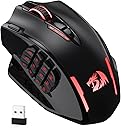

🔥 Dominate your game with pro-grade precision and endless control!
The Redragon M913 Impact Elite is a versatile wired/wireless gaming mouse featuring a high-precision Pixart 3335 sensor with 1ms latency and up to 16,000 DPI. It boasts 16 programmable buttons, including 12 MMO side keys, customizable RGB lighting, and a robust 45-hour battery life (extendable to 80 hours in eco mode). Designed for esports and MMO enthusiasts, it offers dual connectivity modes and extensive software customization to elevate both gaming and professional workflows.


| ASIN | B088B3ZM76 |
| Batteries | 1 Lithium Polymer batteries required. |
| Best Sellers Rank | #93 in Video Games ( See Top 100 in Video Games ) #6 in PC Gaming Mice |
| Customer Reviews | 4.3 4.3 out of 5 stars (6,651) |
| Date First Available | May 7, 2020 |
| Item Weight | 4.7 ounces |
| Item model number | M913 |
| Manufacturer | Redragon |
| Product Dimensions | 6.89 x 4.53 x 0.04 inches |
R**B
Great Mouse for MMO and all gaming in general, software is ok but I made it better!! READ FOR MORE!
I have a Logitech G502 Wireless Lightspeed and it was great, love having the extra buttons. I loved it so much I wanted MORE buttons. I saw this mouse and thought I would give it a try. Turns out it pretty great, the side buttons are tactile enough that you can't "accidently" press them. The tracking and wireless is excellent, as good as any other gaming mouse out there. If you turn the LED's off the mouse can last you over a week on wireless! My only complaint would be with the software. The programing is great and macros etc. THE ONLY thing is that you have to manually open the software and click to load a profile for each game you want to play (yes there's a button underneath but I play more than 2 games.). I was spoiled with LGHUB as it would auto switch profiles depending on what game you were playing and you didn't have to do a thing. So I decided to make a little utility that will do that for you and manage your games profiles. You can even make desktop shortcuts to launch from there. Now I find it much friendlier to use the mouse and it's my goto for all my games! Hopefully Redragon will update their own software to allow auto switching or at least command line switching for launching games. Just search GitHub for XB Redragon and you'll find my profile manager. Sometimes if you want something done right, you have to do it yourself. It doesn't do anything other than open the Redragon software for you and click the button for you and autoload the profile you selected then can also launch your game :)
K**R
Look no further
This mouse is awesome. The packageing was a solid plastic water proof box with firm plastic clips on all 4 corners and the internal packaging held the mouse securely in place with confidence that it would not damage in shipping. Per usual with Redragon it has a USB c cable, a USB 2.4g connector, option for Bluetooth connectivity. What surprised me is this has 2 modes! A game mode and a standard mode. All it takes is a simple press of a button on the bottom with a nice sharp click and it will instantly program those settings. That was a nice feature. A quick Google search to the website and typing in the mouse produc code and 5 mins I had the software downloaded. All I can say is wow. There is so much programmability with this mouse. You can do DPI adjustments but no lock option, however with the way you can program the level of its 5 dpi settings it doesn't matter. You can program key strokes, command prompts, make custom commands and much much more. For around 30-40 dollar the value is far beyond what I was expecting. The mouse does not have adjustable weights but it felt just about right with its large internal battery capacity. And after about 30 mins of playing with the settings I had a great set up for fps games and was quickly performing at the top of my game like it's second nature. The buttons have nice definition where I could comfortably tell where I was and knew where I was pressing and each button had a lovely mechanical clock to let me know what I pressed. The LMB and RMB has around. 3-4mm of play so it's not hair trigger for gaming mouse but definitely spamable and with the option to program a rapid clock button just to the left of the LMB it doesn't matter. I have currently recommended this mouse to my gaming friends as this just make a big difference to my gaming efficiency. I recommend this for all genres of games and can definitely seeing this being useful for professional use like with data analyst or editing or coding.
G**R
So far, the best MMO mouse I've ever used in over a decade
It's been about a month since I've had this mouse, and it's dang near perfect for me. If you're into MMO type mice, I would highly suggest giving this one a try. I'll start off with my gripes that keep this mouse from being absolutely a 10/10. The mouse has a glossy type finish which makes the mouse a slight bit slippery. Which takes some getting used to and is easily fixed in several ways. Could use some textured tapes, could sand it, or wait for it to be worn in. Outside of that, I wish there was linux support for the software. The mouse works perfectly as describe, but I like having only one DPI setting on my mouse, and enjoying having it breathe green. Going onto the pros, the mouse itself has memory so if you do get the software you can change things how you want. Which is what I did, one DPI setting and made it breathe green. It's very responsive on both the wired and wireless connection, and it's quick to switch as well. I have mine around 1,800 DPI I think, which is perfect for me in terms of just using it on my desktop and web browsing and stuff. And I believe it's a 1,000hz polling rate, and this is the more important number. And whether I'm gaming with it wirelessly or wired, I never feel like there's any lag or delay. The battery life is great as well. I only ever charge it maybe twice a week. I'm sure I could go a few weeks on eco mode but I do enjoy the RGB lights on it. The most important feature to me though, the scroll wheel has been holding up quite nicely. This mouse has been the first one in a decade to last more than a month for me. I hope it continues to hold up, but it's very promising so far. The numpad on the side is also very tactile, not the best i've used but very usable. I have large hands so I do wish it was pushed forward a little and the buttons wider. Nothing that learned muscle memory can't fix.
D**E
Hardware limitation won't allow multiple clicks at the same time, but still a great mouse.
This mouse is really good except the fact its hardware limitations don't allow 2 buttons to be pressed at the same time. So if you wanted to make your button 17 (top left button) on the mouse to act as a modifier like control or shift key, the mouse doesn't recognize that you are hitting it and one of the 12 side keys. something like auto hot key program wouldn't work either because again, the hardware limitation :( If you don't intend on making that button a modifier or clicking 2 buttons at the same time, this is a great alternative to razers crazy priced mouse which is what I am coming from. But seriously this is a great mouse.
F**Z
I very rarely post reviews on products but I have to for this one. I'm a big MMO player, so I've been looking for a good MMO mouse for years. I've tried everything from Razer Naga (3 of them lol), Corsair Scimitar and Steel Series, and they all ended up failing pretty quickly. Battery wasn't the best, connectivity was crap with a lot of them, and the buttons would degrade after a while. Also I couldn't find a good white MMO mouse to fit my setup. I decided to give this one a go, didn't have high hopes and it's ended up being the best purchased I've ever made on Amazon. I haven't had one connectivity issue with this mouse since I bought it nearly a year ago, no button issues, its comfortable in the hand and looks good. I did start off using the RGB, but the battery life really degrades tbh, so I turned off the RGB and I can last a whole month without having to charge it. I honestly can't recommend this enough.
D**S
I bought this wireless gaming mouse to improve my performance and comfort in MMO games. I was looking for a mouse that had a lot of buttons, a good battery life, and a reliable wireless connection. I chose the Redragon M913 Impact Elite Wireless Gaming Mouse because it had good ratings and a reasonable price. Here are some of the pros and cons of this mouse: One of the pros of this mouse is that it has 16 programmable buttons, including 12 side buttons that are easy to access and customize. You can assign different functions, macros, or shortcuts to each button using the Redragon software or other compatible software from your game or system. This gives you a lot of flexibility and control over your gameplay. Another pro of this mouse is that it has a long battery life and a low-consumption mode. The mouse comes with a 1000mAh rechargeable battery that can last up to 45 hours with RGB lighting on or up to 80 hours with RGB lighting off. You can also switch to eco mode by pressing the DPI button for three seconds, which reduces the usage of backlit and extends the battery life even more. A third pro of this mouse is that it has a fast and stable wireless connection with low latency. The mouse uses a 2.4GHz wireless nano receiver that plugs into your PC or laptop’s USB port. The wireless click latency is only around 1ms, which is very impressive for a wireless mouse. You can also use the mouse wired with its detachable USB-C cable if you prefer. One of the cons of this mouse is that it is quite heavy and bulky compared to other gaming mice. The mouse weighs 171g without any weights added, which might be too much for some people who prefer lighter mice or have smaller hands. The mouse is also quite large, measuring 123mm long, 92mm wide, and 42mm tall. Another con of this mouse is that it might not be compatible with some older motherboards or BIOS versions, as it requires support for USB-C ports and XMP profiles. You might need to update your BIOS or tweak some settings manually to get the best performance out of this mouse. A third con of this mouse is that it might not work well with some games or software that do not support multiple buttons or customisation options. You might have some issues mapping all the buttons or getting them recognised by your game or system. Overall, I think this is a wireless gaming mouse that will make you feel like an elite if you play MMO games or need a lot of buttons on your mouse. It’s not the lightest or the most compatible option out there, but it’s definitely one of the most versatile and reliable ones. (Sorry if this was a bit geeky) >.< If this product was helpful, please press the helpful button below!
N**X
First impressions, comparing this to my old UtechSmart VENUS Pro (which I had for 2-3 years before the battery started dying) and the Razer Naga Pro. I had initially bought a much more expensive Razer Naga Pro, but found the buttons way too easy to push accidentally, and the mouse overall uncomfortable in the hand. I can safely say that for those with wide hands: this is the MMO mouse for you. The Redragon and the Utech are almost identical (probably from the same factory), however the Redragon is a bit bigger and wider, with a proper thumb rest, and a pinky rest as well. The buttons are a bit easier to push than the Utech, but still hard enough to push that you're not really gonna be accidentally pressing them too often. The software is very similar to the Utech with all the exact same features and the same lack of brightness control for the rainbow RGB mode (tho there is brightness control for all static modes). The main thing I don't like compared to the Utech software is that you can't see what all the buttons are assigned to at once, just one by one. When I was setting the buttons, occasionally one would bug out and disable itself or assign to the wrong button, so not being able to see them all at once meant I didn't realise this for a while sometimes. Overall tho, it gets the job done. Definitely not as nice as other software such as Razer, but you can't expect that at this price point, and you do get the advantage of it being less system heavy because it doesn't need to run in the background. The mouse feels nice in the hand, and while both it and the Naga Pro have a plasticy finish (compared to the Utech which is more texturised), the Redragon feels much nicer in the hand to me. And cooler too! The Naga's material always felt warm, which is just kinda bleh in hot climates such as Australia. Both the thumb/button side, and the finger rests have a glossy finish, which I would prefer not to be there at all, but it is comfortable. The Utech had a small glossy finish area under the palm and I never ran into too many issues with scratching, fingerprints, etc, so hoping for the same here. The Redragon, despite apparently being lighter than the Utech, tends not to glide as easily as far as I can tell depending on the surface. It glides easier on a desk surface or a more slippery mousepad, but a mousepad that's less slippery will lead to it moving more slowly, and strain your wrist a bit more. Increasing the DPI does help make up for this a bit. For Linux users (and Mac too? Don't think the software is on there), you can expect this to work perfectly across all your systems once configured in Windows, as everything is stored onboard in the mouse, just like the Utech. Including the mouse's second profile, which can be accessed by clicking the profile button on the bottom of the mouse. RGB will work, you just won't be able to change it. But there isn't a ton of RGB options anyway so I usually just leave it on rainbow. I had lots of success using my Utech with my Steam Deck, and given that this Redragon mouse is practically the same mouse with small differences, I fully expect to have the same experience here. Will update if that is not the case! It's really amazing the bang for buck you can get with these Chinese mice vs the big name brands. There just isn't any competition for wireless MMO mice atm in my eyes, which is such a shame because there's some awesome wired ones, and most MMOs that will benefit from this style of mouse don't really need the low latency of wires. Also, if there are any FFXIV players reading who're thinking about trying out an MMO mouse, just do it! It's so worth it!
A**I
One of the best things I've purchased. It has two customizable modes. I customized one for work and one for games, which means I use it all day. One full charge keeps it up for 3 days, which is more than what I expected. The only thing, which is not an issue, is that it doesn't have RGB zones. Still, the RGB is pretty good.
M**N
Buon prodotto ma credo che quello precedente fosse leggermente migliore. In ogni caso, l'unico con così tanti tasti e wireless che ho trovato. Modding estremo. Da tenere non troppo lontano dal ricevitore. Durata batteria migliorabile.
Trustpilot
2 months ago
2 weeks ago