


Desertcart purchases this item on your behalf and handles shipping, customs, and support to SINGAPORE.
🖤 Cool in Black, Quiet in Power — Own the Silence, Rule the Performance
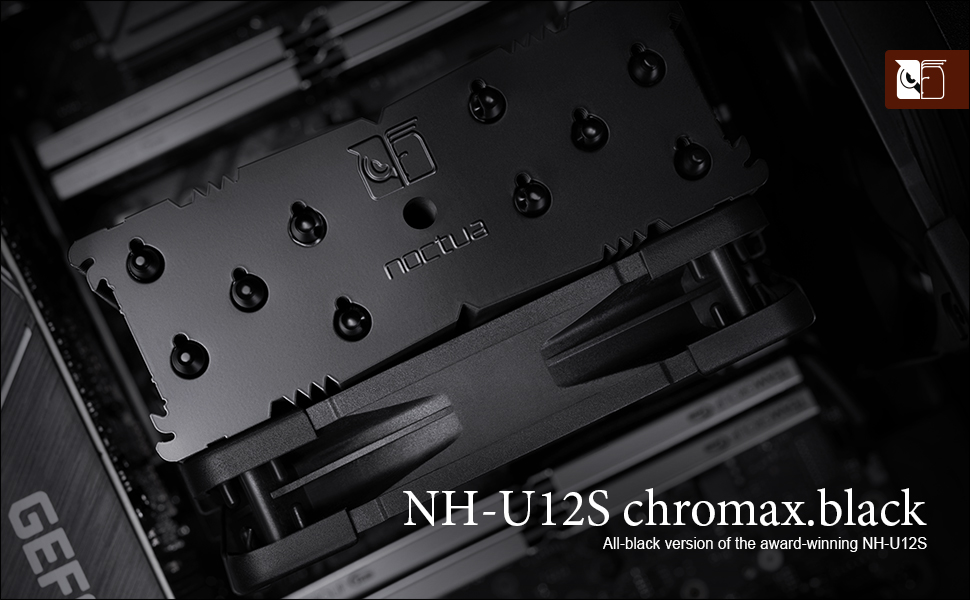
The Noctua NH-U12S chromax.Black is a premium, award-winning 120mm tower CPU cooler featuring a sleek all-black design, five copper heatpipes, and the renowned NF-F12 fan with PWM and Low-Noise Adaptor for whisper-quiet operation. Its slim 158mm profile ensures broad compatibility with most ATX and Micro-ATX cases without obstructing RAM or PCIe slots. Equipped with the SecuFirm2 mounting system and high-end NT-H1 thermal paste, it supports a wide range of Intel and AMD sockets. Backed by a 6-year warranty, it delivers exceptional cooling performance favored by professionals and enthusiasts alike.




| ASIN | B07Y88BNYZ |
| Best Sellers Rank | #199 in Computer CPU Cooling Fans |
| Brand | Noctua |
| Brand Name | Noctua |
| CPU Socket | Intel LGA1851, LGA1700, LGA1200, LGA1156, LGA1155, LGA1151, LGA1150 and AMD AM5, AM4 |
| Cooler Heatsink Compatibility | Intel LGA1851, LGA1700, LGA1200, LGA1156, LGA1155, LGA1151, LGA1150 and AMD AM5, AM4 |
| Cooler Heatsink Material | Copper (base and heat-pipes), aluminium (cooling fins), soldered joints & nickel plating |
| Customer Reviews | 4.9 out of 5 stars 5,767 Reviews |
| EU Spare Part Availability Duration | 6 years |
| Global Trade Identification Number | 09010018000177 |
| Included Components | NH-U12S chromax.black |
| Item Dimensions L x W x H | 4.92"L x 2.8"W x 6.22"H |
| Item Highlight | 158mm Height, Low-Noise Cooling, 5 Heatpipes, For Intel & AMD, 120mm Fan, 100% RAM Compatibility, Rich Accessory Kit |
| Item Weight | 580 g |
| Manufacturer | Noctua |
| Model | NH-U12Schromaxblack |
| Mounting Type | CPU cooler mount |
| Number of Items | 1 |
| Number of Packs | 1 |
| Part Number | NH-U12S CH.BK |
| Product Dimensions | 4.92"L x 2.8"W x 6.22"H |
| UPC | 841501100178 |
| Warranty Description | 6 year manufacturer’s warranty |
C**Y
Easy to install - Maintains Excellent Thermals
As Most people that are currently buying this are most likely fans of Linus Tech Tips on YouTube, the LTT edition is pretty sweet in my opinion, the additional orange anti-vibration pads and the LTT stickers and badge are great. This is my first time reviewing a product that i have purchased on amazon and i felt that i needed to do just that, because this cooler aside from being the LTT edition, is the best CPU cooler that i personally have ever bought. i have built a couple of computers before and i'm not one of the ones who goes for all the overclocking and max speed that some people will do. i put this NH-U12S Chromax Black on my computer that i built in 2016, a Gigabyte 990FX ATX Motherboard with an AMD FX6350 Black Edition processor, in a Corsair Carbide Air 540 case. Unlike most of the recent CPU's that have came out in the last year or so that only use 65 to 90 Watts of power, the FX6350 is rated at 125 watts, and therefore gets quite toasty under full load. as of writing this i have been working my CPU to the max pretty frequently lately as i have found the joy in having my own Plex Server and using my PC to rip and encode my collection of old dvd's. with the stock cooler that came with my CPU, sitting there just idle (nothing running) it was staying around the 50C (122F) range , when running Handbrake to encode video, all cores on the CPU at 99% load, i was getting temps in the 80C - 90C (176F-195F) range and a max of 95C (203F) a couple of times on really long encodes. after installing the NH-U12S Chromax Black, i can't say enough about how well this thing works, it cut my CPU temps far more than i was expecting, now at idle running right around the 24C (75F) mark and i have seen it dip to 19C (66F) once. Now running Handbrake to do the same encode jobs i have not seen the CPU get past 50C (122F) at all. All of this is with what came in the box, no extra fan or anything just the 1 that came with it, and did i mention that this thing is stupidly quiet as well? i have my PC about 2 feet from me and it is about chest level when sitting in a chair and i can't hear it at all even when computer is under load. For my next PC build or for a friend/family member build, i will definitely be buying more Noctua Products, if the NH-U12S Chromax Black is still available at that time i will be buying another one hands down. hopefully this review is helpful to someone trying to make a decision
G**1
Where to start?? The hype is real! Very happy i went with this instead of water cooling!
Was debating forever to go air cooled vs water cooled. I was this close to getting water cooled because i did not like the big bulky plus ugly color air coolers. Until the pros didn't outweigh the cons for aio anymore. The pros for me on aio were sleeker looking, quiter, lower temps. The cons ,extra point of failure, possible leak, extra ui software that could possibly slow down my system/ use unnecessary resources. So i was already on the fence on air coolers just for the damn aio software ur forced to install. Then i saw many videos(including linus tech tips) where they show performance was almost on par with aio vs air coolers As well as other videos where the aio actually got louder than air coolers as they reved up(witch is the whole point of getting a damn water cooler is cause u think there suppose to be quieter but there not once they rev up) so after that there really was no pros anymore for aio. What sealed the deal for me was this beautiful all black edition noctua. Aswell as this mode is not so big as there flagship cooler(i didnt want something too bulky). Performance is great on my i7 4790k on stock turbo boost 4.4ghz (27 degrees on idle and when gaming around 40-50) aswell as the tinnitus the stock cpu cooler would cause is non existence anymore. The fact i can use my computer again without my ears ringing like crazy, alone are worth the price. It almost feels like a new computer. It feels and sounds quieter and more premium and i couldn't be happier. Def one of the best upgrades ive done for my pc.
A**R
A beast of a cooler. Both functional and gorgeous.
I bought this to replace the stock cooler for the i7 9700f that came in my prebuilt. The product was packaged beautifully, with a small box for mounting hardware, thermal paste and a few other accessories in the top. There was a large box containing the cooler itself in the bottom. (edited) The installation took about 2 hours (mind you, I am new at upgrading computers) and would have taken a lot less time if I had realized initially that the back panel of my PC case was removable and had a cutout allowing me to access the rear of my motherboard. Noctua provides very well written and clear instructions for how to mount this cooler. In the box, you will find instructions for both Intel and AMD platforms. If you're building a system and you know what you're doing, it'll probably take no more than 10-15 minutes for you to put this cooler in. If you're swapping a cooler like me and have no clue what to do, you'll get by with the instructions in 1-2 hours, maybe faster. (edited) As for noise, when my system is idling, I don't hear this cooler at all. At full load, it ramps up to about 1200RPM, but the noise level remains minimal and it is certainly a huge improvement over my original cooler. Sound tests show it peaking at around 30 decibels, whereas my old cooler would top out around 55. The performance of this cooler is beyond anything I could have expected. My CPU used to idle at around 55C and would heat up to 88+ with my old stock cooler. Thanks to the NHU 12 S I am now seeing idle temps at 33C and peak temps no higher than 55. Overall , my system feels much more stable thanks to this upgrade. Lastly, this cooler is absolutely gorgeous. I've made a few upgrades since purchasing my prebuilt and I think it really pulls them all together. I did make the mistake of not measuring the inside of my case, however, and I failed to account for the raised position of the body of the cooler over the CPU. The heatsink has a couple of protrusions on the top of it which have prevented me from being able to place the glass panel back onto my case once I finished swapping coolers. My case is 19.61" x 7.28" x 16.57", so if your case has a similar width 7.28", you might want to consider buying the smaller NHU 9S cooler.
M**2
Mo meed for AIO coolers anymore... Amazing Cooler Here!
I have been a system builder for over 10 years now. I have been suggesting AIO liquid coolers for my customers for many years now because it they always were better performing then fan coolers. My mind has been changed with this cooler! For a fraction of the prices, this cooler is hands down better then several top AIO coolers I have installed and is right on par with many of the higher end AIO coolers. I just recently did a build with a Ryzen 9 5900X where the AIO Corsair Cooler I had originally picked out would not fit in the case due to the motherboard heat sinks headers being to large. So I was forced to look into other cooling options for the CPU. I have red many positive reviews on Noctua fan coolers, but hated the brown and white color scheme. When I discovered they started making an all black fan, I pounced on this model, and I am amazed at the performance. While running Prime95 in stress test mode, pushing the CPU to 100% for over an hour straight, this cooler paired with the thermal paste that comes with it is hands down a beast! While I did see temps spike to 90c at random times (normal for these Ryzen 9 CPUs), they never stayed there for any longer then 10 seconds, and the average temp under full load through out that hour was 76c. I have had AIO coolers that couldn't hold the temps under 79c during stress testing. The mounting system for Ryzen CPUs is one of the easiest installs I have encountered, and it is tight/snug on the CPU. The heat pipes and cold plate are obviously made well, as it had no issues pulling the heat off. And this is without a second fan doing the push/pull methods. There is just the one fan on it. These temps might be even lower if you opt in for the second fan on the other side of the fins. I have never suggested fan coolers for the higher end Ryzen builds I do. That is no longer the case. This will be my go to cooling option for builds going forward.
C**L
Best remedy for the liquid-cooled cooling system that was running hot.
I was running an NZXT M22 Kraken liquid-cooled system on my ROG Strix motherboard with i5-8600k chip and RTX 2060. Not overclocked, playing games like Apex Legends, DOTA 2, COD Warzone, and Black Desert. I was seeing temperatures at idle, no load around 30 to 35 degrees C. After playing any one of these games for about 30 minutes, temps would exceed 80 and even go above 90 while in-game. Everyone said "try re-seating your thermal paste, reset your bios to default" etc. Did both of those things with little to no changes; thermal paste was Kryonaut grizzly by the way. So I start looking at Noctua air coolers. Considered getting the NH-D15 (the incredibly large 140mm cooler) but was concerned about fitment on the MB around the RAM sets. Found the NH-U12S in sexy black. Kudos to all the previous folks that wrote positive reviews about it, because I placed nearly all my faith in those reviews. Ordered it, and could not be happier. Temperature at idle is now high 20s; gaming under load for over an hour produced temps never exceeding 67. And because it runs cooler, the fans in my tower don't kick into overdrive, making gaming a quieter, more pleasant experience. These are the pros. Cons: a big, black heat sink with a black fan on it will never be aesthetically pleasing like the floating, color-changing lights that a liquid-pump can provide. But to me, looks come second when it comes to performance and longevity. Well worth the price, easy to install and I would recommend it to anyone suffering heat issues.
V**N
Incredible difference
I recently built a system with these specs: Intel Core i5-12600KF MPG PRO Z690-A WIFI DDR4 16g Patriot Viper RGB RAM running at 4000mhz Gigabyte RTX 3060Ti I was using some cheap CoolerMaster horizontal cheap fan which was a stupid move given these 12th gen Intel chips get hot. I ran tests and this thing warmed up my room like a nice sauna in the gym. When I did a Cinebench run I said I need something better. Today I installed this Noctua NH-U12S chromax.Black thinking I'd get a drop but not this big of a drop. I re-ran the same test and took the averages. The differences in the temp on the averages was big. My temps dropped more than 20 degrees Celsius. I even had Cores thermal throttling before. With the Noctua, not once. Right now I am looking at HWiNFO64 and the Average over the course of the past few hours of the core CPU temp is 35 degrees, Max was 58. Just amazing the difference in the drop in temperature. This unit is pricey but I believe it's worth it. The packaging is top notch. I'm tired of getting awful instructions from some of these manufacturers. Noctua had two separate set of instructions for Intel and AMD. Everything was labeled so clearly and packaged clearly. The parts were quality and install went soothly. The tube of thermal paste you are given is so generous you could paste up many more fans. Just quality all around. As for sound, this thing is assassin silent. Even at full RPM I didn't hear it. Just smooth spinning. If you have an Intel 12th chip, or even any chip, that you want to keep cool don't hesitate to get this fan. I cannot recommend it high enough. I am so impressed I am going to purchase one for my AMD build.
R**K
This CPU Cooler Is Tough To Judge
I bought this to upgrade my Noctua NH-D9L. My 92mm cooler was doing fine but I wanted to get the temps down a little more without going the water cooler route so I thought this 120mm unit and two fans would do the trick. As with all other Noctua products, the packaging was excellent and the quality of the cooler and fan were first rate. Installation was simple and straight forward provided you have access to the back of your PC in order to install the bracket. I didn't use the thermal paste provided, not that it is bad at all, but I use a different higher end brand to get maximum performance. So the reason for my uncertainty about the NH-U12 is my temps have gone down, but not a significant amount (on average 2 degrees at idle and 4 degrees during load). Maybe my expectations were too high. I'm not certain. I thought I could get at least 5 to as much as 10 degrees lower. That could have been reaching a bit. I will say I'm getting 35 degrees at idle and a high of 62 degrees at load, so that's not terrible by any means. Also on the plus side, the fans are quiet (I added an additional fan) and the unit looks great in my gaming computer. I love the black finish! So as long as you have nominal expectations regarding temps and you're not thinking you can get near AIO water cooling numbers, I'd say you'd be happy. For me, I'm going to give it some time and determine whether the NH-U12 will be enough or if I need to go the AIO route.
I**I
The little cooler that could
I purchased this cooler to cool an AMD Ryzen R5 3600 in a Fractal Design Meshify C case. The stock cooler for the 3600 is anemic (and loud) and the goal for this build was quiet operation. After reading a bunch of reviews, I opted for this cooler (even though it was more expensive than some of the Scythe options I was looking at and I love Scythe products) as the black color would look nice in the case and the emphasis in reviews on how silent it operated. The install was extremely easy. The only complaint I have is that you have to remove the fan from the cooling tower to install it; in contrast I can pull and install my Scythe Fuma 2 without having to do so (though I often remove the middle fan for ease when blowing apart my build for various reasons). I found the spring clips on the Noctua for securing fan to be a bit more temperamental than Scythe's, but no so much that it warrants giving this cooler anything less than 5 stars. The cooler comes with Noctua's NT-H1 thermal paste, which is my go-to paste for my builds, so that's a nice feature if you don't already have a syringe of this lying around (and would set you back about $13 US to buy separately). The real proof of what a gem this cooler is appears when you first power on your system. The fan spins to life without so much as a whisper. Even under load you can barely notice it running. I repeatedly had to look at the cooler to make sure the fan was spinning (the case fans are also very quiet as is the EVGA 2060 SC Ultra GPU in the case). I was very impressed at the noise level. What's even more astonishing is how effective this thin tower, single fan cooler is at cooling the CPU at such a low noise level. Noctua really knows what they are doing with their cooler and fan designs. The recipient absolutely loves the performance and noise level of the build as well as the aesthetics of the components (cooler included), so thanks for making me look good, Noctua!
C**N
Güçlü ve sessiz
Ryzen 7 7700X (105W) işlemcide Aida64 stress testinde 70 dereceyi geçmiyor. %100 Fan hızına karşın çok hafif rüzgar sesi çıkarıyor. Thermal Grizzly macun ile kullanmanızı şiddetle öneririrm.
B**B
Excellent CPU cooler fan - Absolute Silence - Amazing Performance
I too would normally never write a single review on anything. Until I came into contact with the Noctua NH-U12S. Just built a new PC and was using the AMD stock wraith prism RGB cooler on my Ryzen 3900x. As a RGB fangay, I'm definitely one to not shy away from RGB and love the gimmicks that come with it. The AMD wraith prism cooler looked alright but was significantly loud on both idle and active use (streaming/gaming/editing/etc.). I managed to reduce the noise levels during idle but it was still fluctuating between extremely loud and okay/decent. I've heard from many sources stating that this could be changed in BIOS/software and I had taken the necessary steps to reduce the noise but I noticed it would come at the cost of CPU temp or inconsistent fan levels (might be a BIOS issue). The Noctua NH-U12S puts all of these worries to waste and more - it's a high performing fan that runs basically fully silent in both idle and active load (running at around 30-35 degrees celcius on idle). Simple to set up, manual guide easy to follow that even a monkey could do it and its compatible across both Intel and AMD sockets (seperate guides for each, all in the box). I would hands down recommend this to anyone that is thinking between the AMD wraith prism or another CPU fan. No doubt in my mind that this would impress anyone looking to upgrade/build a new PC with AMD's latest Ryzen CPUs.
C**R
Noctua NH-U12S - hoher Preis, aber seinen Preis wert
Da ein selbst zusammengebauter Sielerechner in meiner Familie mitten im Spiel immer öfter einfach mitten im Spiel neu startete, wurde unter Windows 10 Build 1909 das Tool CoreTemp installiert. Dieses zeigte, dasskurz vor dem plötzlichen Neustart die Prozessortemperatur schnell über 90°C stieg. Da ein Gehäuse mit drei gut positionierten Gehäuselüftern verbaut war, war es sehr warscheinlich, dasses an der Prozessorkühlung lag. Verbaut war ein (umgelabelter) Boxed-Kühler, dessen Luftstrom nicht gut positioniert im Gehäuse-Airflow lag. Eine neu angebrachte Wäremeleitpaste brachte auch sehr wenig Besserung im Gegensatz dazu lief der Rechner mit entfernter Seitenwand stabiel. Also musste ein neuer Prozessorkühler her. Mit dieser Erkenntniss überprüfte ich meinen Officerechner (AMD Ryzen 2400G, ohne expilzite Grafikkarte), auf welchem in letzter Zeit öfter Folding@home läuft, welches die Prozessorleistung auslastet. CoreTemp lieferte auch hier eine Max. Temp. von 94°C. Wenn es auch keine Abstürze gab, das war mir zu viel. Also auch hier musste ein neuer Prozessorkühler her (auch hier war ein Boxed-Kühler verbaut). Meine Wahl fiel auf den Noctua NH-U12 einmal in der originalen Farbe (Cappucino-braun) und einmal in schwarz (ca. 10€ teurer). Geliefert wurden diese in einer stabielen Pappverpackung. Alle benötigten Installationsmaterialien war en sowohl für AMD-Prozessoren als auch für Intel dabei. Auf der Homepage von Noctua in Österreich kann man übrigens nachschlagen, welcher Kühler für welchen Sockel geeignet ist - klasse! Selbst hervorragende Wärmeleitpaste ist im Lieferumfang enthalten - vorbildlich. Die Installation ging schnell von der Hand. Kühler mit verbautem Lüfter lässt auf den beiden Mainboards (Asus B350 Prime bzw. MSI B450 Gaming Carbon) genügend Platz selbst für große Speicherriegel - auch das ist vorbildlich. Den Lüfter kann man schnell von Push- auf Pull-Betrieb umrüsten. Einfach nur die Klammern öffnen, diese vom Lüfter entfernen (geht sehr einfach), anders herum wieder am Lüfter anbringen und dann den Lüfter in richtiger Ausrichtung auf die andere Seite des Kühlers bringen - fertig. Zusätzlich könnte man noch einen zweiten Lüfter am Kühlkörper anbringen. Dieser kostet dann zusätzlich noch mal ca. 20€. Langer Rede kurzer Sinn, was bringt das alles? Schnelle einfache Installation und beide Prozessoren laufen unter hoher Last ca. 20°C niedriger. Mein AMD Ryzen 2400G hatte letztlich unter folding@home eine kurzzeitige Max. Temp. von 70°C statt 94°C. Guter Lüfter - optimal im Gehäuseairflow positioniert - Lautstärke bei geschlossenem Gehäuse --> fast unhörbar. Ich lasse ihn auch übr Nacht rechnen und schlafe dabei im gleichen Raum. Der Preis von 70,-€ (schwarz) bzw. 60,-€ (braun) ist schon eine Ansage, aber absolut seinen Preis wert. Von mir also eine Kaufempfehlung, ich würde den Noctua immer wieder kaufen.
A**O
Silenzioso, Efficiente e di QualitĂ Superiore: Il Miglior Dissipatore per CPU
Il Noctua NH-U12S chromax.black si distingue per la qualità eccellente dei componenti e la facilità di installazione. Le istruzioni sono chiaramente separate per processori AMD o Intel, e all'interno della confezione è incluso tutto il necessario, persino il cacciavite. La ventola si inserisce e rimuove con estrema semplicità , il che rende il posizionamento molto agevole. Personalmente, l'ho installato su un AMD 7600x e, in condizioni di riposo con il profilo prestazionale attivato su Windows, la temperatura si mantiene intorno ai 33°C, mentre sotto stress, con tutti i core in funzione, la temperatura media arriva a 77°C. Sono estremamente soddisfatto delle sue prestazioni. Oltre alla qualità costruttiva, un altro aspetto che mi ha sorpreso è l'incredibile silenziosità del dissipatore. L'ho installato su un Ryzen 3700x con overclock, dentro una Fractal Pop Air white RGB, e devo dire che il Noctua ha prestazioni eccellenti. La stabilità delle temperature è fenomenale: anche sotto carichi pesanti come After Effects, Blender, Photoshop o durante il gaming, il dissipatore mantiene la CPU sotto i 65°C, senza alcuna variazione nel rumore. A differenza dei sistemi di raffreddamento a liquido che ho usato per anni, il Noctua NH-U12S chromax.black è così silenzioso che spesso mi dimentico di averlo acceso. In conclusione, se state cercando un dissipatore che combini silenziosità , efficienza e facilità di installazione, il Noctua NH-U12S chromax.black è la scelta perfetta. Dopo questa esperienza, sono convinto che i ventilatori Noctua saranno una parte fissa dei miei PC in futuro.
N**I
Incredible Air Cooler
This is an upgrade from an Intel stock cooler I have been stuck with for 3 years, and I will lay down the facts of this cooler! Things to make sure you have before buying this cooler: The only thing you need is Ethanol or Isopropyl. I recommend at least 90%, which is what I used. You can buy 1L of 99.9% Isopropyl Alcohol for £5. Noise: It is so quiet. The noise levels are very low; it’s very quiet. At maximum 1500 RPM, it’s noticeable but nowhere near noisy. The noise in the video I attached was actually my GPU, which needs an upgrade (GTX 1650). Accessories: The included mounting kits are great. If you, for some reason, struggle with manuals, Noctua has videos for installing this cooler for different boards. It was pretty easy; just make sure you follow carefully and don’t rush anything. The included screws were very well made and did the job; they even included an Allen key with a screw on the end, so don’t panic if you don’t have a screwdriver on hand. Also included is their thermal paste! They have very good thermal paste, and it spreads very well. Make sure you put no more than a pea-sized amount in the center of your CPU. Way too much and too little can both result in overheating. How cool is my CPU?: Before my CPU was hitting 91° MAX while gaming on an Intel stock cooler. I have stress tested this CPU on 100% and it barely hit 60°. This is a HUGE difference; however, please note that this will vary from user to user, for variables like Case Airflow, fans, proper installation, usage, etc. The Specs: It works fantastic. I have it on an i5-9400F, my motherboard is a Micro ATX ASUS PRIME H310M-R R2.0. Make sure your case is big enough, mainly due to the fact that if your RAM blocks the fan, and so the fan sticks out a bit, make sure there is clearance. I have a mid-tower case, and it fits just fine. Is it worth it?: It’s on the pricier side; however, it was easy to install and works fantastic. If for some reason you don’t have the correct fittings for your motherboard, simply contact Noctua and they will send out what you need for free, no charge. So yes, it was absolutely worth it.
Trustpilot
5 days ago
1 month ago