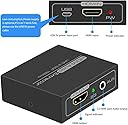
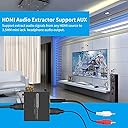
🎧 Unlock pristine audio from your HDMI devices—because your sound deserves to be heard!
The DONGJIAN HDMI Audio Extractor converts a single HDMI input into HDMI video plus separate 3.5mm AUX and L/R RCA audio outputs, supporting 4K@30Hz, 3D, and multiple HD resolutions. It features automatic EDID management for optimal compatibility, requires no external power for most devices, and is compatible with a wide range of HDMI sources including gaming consoles, streaming sticks, and PCs. Ideal for professionals seeking seamless audio extraction without compromising video quality.


| ASIN | B084RN22MW |
| Best Sellers Rank | #82 in Video Converters |
| Customer Reviews | 4.2 4.2 out of 5 stars (1,493) |
| Date First Available | February 12, 2020 |
| Item Weight | 7.4 ounces |
| Item model number | HD14AUX |
| Manufacturer | DONGJIAN |
| Package Dimensions | 7.72 x 4.96 x 0.83 inches |
D**R
Worked Great for Connecting my Roku to my PC
I had a Roku Express lying around and decided to attach it to my PC monitor through a KVM switch so I could stream shows \ movies at my desk. It worked great, except for the fact that the Roku has no audio jack and my monitor has no speakers. I.e., I needed a way to send the audio to a set of speakers, so I ordered this little box. Installation is simple - just plug in the HDMI cable from the source (my Roku) and then run an HDMI cable to the monitor (or TV) and an audio cable from the Aux port to your speakers (or plug in your headphones). The video quality is great, although I don't have a 4K display to test it with, and the sound quality is good, though that can depend on the quality of your speakers\headphones. I have not noticed any delay or audio sync issues. Note that if you use the HDMI output of your PC's graphics card as the video source, there is likely to be no audio, so don't blame this adapter for the fact that your PC's HDMI output doesn't include audio. Most desktop computers have separate audio outputs. If you're using a newer laptop, it should work fine, but most desktop graphics cards do not send audio through the HDMI port.
B**E
Arrived on time in and works as described!
Arrived on time and performs the function I needed perfectly which is to extract an audio feed from one of my hdmi monitor cables. I have a system dual monitor kvm box and the audio stopped working through it so in order to have audio on whichever of the 4 systems I am actively focused on and viewing the monitors and using the single keyboard and mouse on can now also be actively playing needed audio on said system switched to. What I did was unplug my left monitor hdmi cable and plug into the extractor box instead and then run a short hdmi cable from the extractor box to the monitor and a audio line from the extractor box to my speakers. Then on all 4 systems I set active audio playback device to the appropriate hd monitor device. Now when I switch to either system 1, 2, 3 or 4 the audio switches to that as well allowing the audio play on the speaker from which ever system is selected on the KVM Switch Box while bypassing it’s 1/8” audio circuit and using the hdmi instead.
B**N
Works with Chromecast
This works with the Chromecast to convert audio into analog to use with the amplifier for outdoor speakers. Does not need the power supply for audio only with the Chromecast. I can now cast music apps to my outdoor speakers.
J**O
Works with caveat
I am using this with an Amazon fire stick. Initially the sound would only output when the video output was not connected. I happen to have an EDID passthrough HDMI plug which also prevents the audio from being captured by the HDMI when the video out is plugged in. I have not tried other HDMI capture Devices, but I imagine that because HDMI is integrated into device functions there will be some variance on how this works with different source devices. In the end this device does indeed extract audio from HDMI.
P**T
GARBAGE!
This thing worked only one time before failing to break out any audio. As soon as I plug a HDMI cable into the out port and connect it to anything, audio will drop. It failed me twice before I had to rip my receiver out of the living room because this ch!ne$e made POS didn't work.
A**N
Works exactly as expected.
I bought this to hook up a Roku device to an extra monitor I has lying around. I needed to port the audio to an external speaker. This worked perfectly. No over complicated inputs. It's exactly as the description describes. The graphics on the amazon page really helped with set up. Great Device!
J**K
Works great for sound from dvd player out to my old RCA stereo and HDMI out to my new TV
Just installed it, so can't attest to longevity. However, had an old analog stereo receiver that I wanted to be able to get the sound out of my dvd player to. The dvd player had both HDMI and RCA outputs, but sound would only go to HDMI. This was a great solution to get HDMI to the TV, but RCA to my old stereo. Works perfectly initially. Hope it will stand the test of time.
A**R
Works fine as long as your monitor has speakers
This unit did not work in my application. I wanted to extract analog audio from the HDMI signal to send to an amplifier + speaker combo, while driving a Samsung S27E310 monitor, which does not have any built-in speakers or audio jack. When connecting this unit to any monitor that does not have its own speakers, the analog output goes silent. When connecting to a monitor that does have speakers, then the extracted audio appears on the analog output jack and also remains on the HDMI signal that is passed through. If you want audio only (no monitor), you can use this "FUERAN 4K Display Emulator Plug Headless Ghost Emulator Fake Display HDMI-Compatible" and you'll get the audio. Since this unit did not work in my application, I returned it and got this, which works fine for me and is very similar in price: "VPFET HDMI Audio Extractor 4K HDMI to Optical 3.5mm AUX Audio Adapter Splitter Converter Supports HDCP Dolby Digital DTS 5.1 PCM" Whatever you get, test it in your application. Don't rely too much on specs, previous reviews or the instruction manual.
M**O
Al conectar apenas y se escucha definitivamente no sirve
E**S
it work fine , just plug it and don't touch it , if you keep moving it it will make noise of course I'm using dollars store cable :)
A**Y
Very pleased with it so far. It does what it says it's supposed to do and no issue with the sound. I used this to pair regular chromecast to my old school stereo that only takes RCA jacks. It was the perfect solution to replace the AUDIO chromecasts that now don't work with the Google updates. Bonus: for some reason I didn't have to plug in the converter in this set up for power. I'm guessing the chromecast is giving it the power needed.
A**R
We had an old computer monitor, old speakers and an old chrome cast - we figured it would be great to use them and have a small tv setup in our bedroom. Computer monitor did not have HDMI input or an auxiliary connection We bought a HDMI to VGA converter and this thing. It works perfectly, we can cast from our phones to the monitor. It's exactly what we needed
I**T
This works just as it is advertised. It makes it possible to connect some decent speakers to an HDMI TV that has no audio out. I don't know why TV makers stopped putting the headphones out jack on their TVs. Worst idea ever. With this device you can have a headphones jack again. The only thing I don't like is that the device continues to send audio to the tinny TV speaker. It should just redirect 100% of the sound to the headphones jack. For this, I give it only 4 stars. I get around this by muting my TV and that turns off the cheap TV speaker. Then I can enjoy high quality sound from my speakers.
Trustpilot
2 days ago
1 week ago