Desertcart purchases this item on your behalf and handles shipping, customs, and support to SINGAPORE.
⚡ Elevate your workspace with seamless 4K power — connect like a pro!
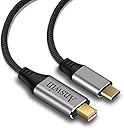
The Answin USB C to Mini DisplayPort Cable delivers ultra-high-definition 4K video at 60Hz with 7.1 surround sound support, connecting USB-C devices (with DP Alt Mode) to Mini DisplayPort displays. Its durable nylon-braided construction ensures longevity, while plug-and-play functionality offers effortless setup. Compatible with a wide range of modern laptops, tablets, and phones, this cable is ideal for professionals seeking reliable, high-performance connectivity.


| ASIN | B082LNGMHJ |
| Best Sellers Rank | #60 in Thunderbolt Cables |
| Brand | Answin |
| Brand Name | Answin |
| Cable Type | USB |
| Color | Grey |
| Compatible Devices | HP Spectre 13 / Spectre X360 / ENVY 13 / ENVY X360 / EliteBook Folio G1, MacBook/MacBook Air/MacBook Pro/iMac, Surface Book 2 / Go / Chromebook / Pixelbook Dell XPS 13 / 15 / Inspiron 15 7000 / 13 7000, Tablet Compatible Devices HP Spectre 13 / Spectre X360 / ENVY 13 / ENVY X360 / EliteBook Folio G1, MacBook/MacBook Air/MacBook Pro/iMac, Surface Book 2 / Go / Chromebook / Pixelbook Dell XPS 13 / 15 / Inspiron 15 7000 / 13 7000, Tablet See more |
| Compatible Phone Models | Huawei Mate 10 / 20 / 30 / 40 / 50 / 60 / 70, LG G5 / G4 / V20 / V30 / V40 / V50, OnePlus 3-11 / Lumia 950/950XL, Samsung Galaxy S25-S20 / Note 25-20, iPhone 17/ 16 /15 / iPhone 15 Plus / iPhone 15 Pro / iPhone 15 Pro Max Compatible Phone Models Huawei Mate 10 / 20 / 30 / 40 / 50 / 60 / 70, LG G5 / G4 / V20 / V30 / V40 / V50, OnePlus 3-11 / Lumia 950/950XL, Samsung Galaxy S25-S20 / Note 25-20, iPhone 17/ 16 /15 / iPhone 15 Plus / iPhone 15 Pro / iPhone 15 Pro Max See more |
| Connectivity Technology | DisplayPort, Thunderbolt, USB |
| Connector Gender | Male-to-Male |
| Connector Type | Mini Displayport, USB Type C |
| Customer Package Type | FFP |
| Customer Reviews | 4.4 out of 5 stars 850 Reviews |
| Data Transfer Rate | 6 gigabits_per_second |
| Frequency | 60 hertz |
| Indoor Outdoor Usage | Indoor, Outdoor |
| Item Shape | Round |
| Item Weight | 0.06 kg |
| Manufacturer | Answin |
| Model | Answin 09 |
| Number of Items | 1 |
| Number of Pins | 24 |
| Other Special Features of the Product | Braided |
| Outer Material | Nylon |
| Part Number | Answin 09 |
| Recommended Uses For Product | Connecting USB-C devices to Mini DisplayPort monitors, HDTVs, or projectors |
| Special Feature | Braided |
| Unit Count | 1 Count |
P**O
Very good to connect IMac 27 2009 to new macs
This is the second time I've bought this cable to connect a new Mac to an old iMac 27, year 2009. First for my own and second for my daughter. It works fine to use old Imac 2009 as monitor in target mode. I've never tried with another configuration, but with my iMac 27 2021 (latest version), Mac Mini M5 2026, and MacBook Air M4 and M5, I'm sure it works fine.
C**S
Got that iMac working as an external monitor to my MacBook Air M2
Happen to have a 27-inch 2009 iMac that was gathering dust and getting ready to show up on craigslist. I had been using this with my 2014 MacBook pro using a mini display port cable as an external monitor. Just upgraded to a 2022 MacBook air with M2 chip. There are a bunch of Thunderbolt/USB-C to mini-DP cables and adapters out there, but many do not work with the newer MacBook Airs, or with the Target Display Mode (TDM) on the iMac. ***NOTE*** AFAIK, newer Macs will work ONLY with 2009 and 2010 27-inch iMacs in TDM. If looking at a cable always use the "Looking for specific info" search box and ask. This one works just fine. I can use the iMac as an extended or mirrored display. Display quality is great. Default resolution is 2560x1440 and there are a slew of lower resolution options.
H**.
worked with my 2009 iMac
I wanted to replace a multi-cable / multi-adapter setup to connect my iPad or Mac Studio to my old 2009 iMac. This USB-C to mini DisplayPort cable did just the trick and was long enough to give me a little extra play moving the iMac around on my desk. I use it as a second monitor next to my primary one. Be careful in making sure your DisplayPort device will work -- the seller is good about giving specific details about compatibility, although you have to hunt for detail. For example, it doesn't support all iMacs. But in my case the seller specifically represents: "Compatible with the Apple Cinema Display or iMac (Target Display Mode) made before 2010". I'm using it with 2009 iMac in Target Display Mode.
J**M
Mini DisplayPort does not connect to late 2009 27 inch iMac. Looks like it should work
The cable seems to be of high quality but did not work for me. The Mini DisplayPort did not work with my late 2009 27 inch iMac. The connection looks like it should work but it does not connect. I wanted to know if they are a different specification? Any help?
J**E
Good quality but did not work for me
Does not work with my 2022 m2 MacBook Pro, to Mid 2010 iMac
H**G
It worked. What else do you need?
T**G
Have to wiggle the cable
At first, it worked well. Then, on the USB-C side of the cable, the connection became unstable. I have to wiggle the cable to get it to work. It has become totally unreliable. I've tested my other components with other cables and adapters. They work. It's the Answin cable that's the problem.
N**.
Imac as a monitor!!!
I have just purchased a new MacBook Pro 14” m1 to replace my 2012 MacBook Pro and my 2010 iMac 27”. I really wanted to streamline my setup and not run multiple computers anymore and found out about running clamshell mode. Now I have my mobile MacBook Pro and can plug in a cable and use my old iMac 27” as a monitor even with my computer closed. I just linked my apple keyboard and mouse to my MacBook Pro and it functions as a regular desktop and can be unhooked and used as normal too. It works!
A**F
يعمل بشكل جيد جدا ومناسب
G**C
Working great
Working like a charm with my MacBook Pro M1 A2338 2030 and my IMac late 2010 27 in. All I had to do was to connect the cables and go in my system preferences- monitor- disposition - video copy! Easy and the quality is perfect!
N**S
Great for old iMacs
Works good, it's useful for older imacs late 2009 edition.
L**A
Nice quality but didn’t work
Excellent quality. I have it 3 stars because it didn’t work as indicated, on a 2012 MacBook Air.
V**D
Works really well
Bought it to display my Windows 10 laptop screen (thunderbolt 3) on my old iMac mid 2010 (mini DP). It works really well. The quality of the display is not altered. All you have to do is connect both ends of the cables.
Trustpilot
2 weeks ago
4 days ago