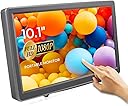
10.1 Inch Touchscreen Monitor
Product ID: 174455792
Details
- Aspect Ratio16:9
- BrandELECROW
- ResolutionFHD 1080p
- Screen Size10.1 inches
- Screen Surface DescriptionGlossy
🎯10-point Capacitive Touch
📺10.1" FHD IPS Display
🔌HDMI & VGA Plug & Play
Desertcart purchases this item on your behalf and handles shipping, customs, and support to SINGAPORE.
🚀 Elevate Your Screen Game: Portable Power Meets Precision Touch!
The ELECROW 10.1 Inch Portable Monitor combines a stunning 1920x1080 IPS touchscreen with versatile HDMI and VGA connectivity, built-in dual speakers, and flexible mounting options. Designed for professionals and gamers alike, it supports a wide range of devices including Raspberry Pi and major gaming consoles, delivering crisp visuals and immersive audio in a sleek, portable form factor.


| ASIN | B082HWF2HW |
| Additional Features | Blue Light Filter, Built-In Speakers, Eye Care, Portable, Touchscreen |
| Aspect Ratio | 16:9 |
| Best Sellers Rank | #70,541 in Electronics ( See Top 100 in Electronics ) #1,663 in Computer Monitors |
| Brand | ELECROW |
| Color | Black |
| Compatible Devices | Camera, Desktop, Laptop, PC, Tablet, Gaming Console, Raspberry Pi |
| Connectivity Technology | HDMI, VGA |
| Contrast Ratio | 800: 1 |
| Customer Reviews | 4.2 out of 5 stars 877 Reviews |
| Display Resolution Maximum | 1920 x 1080 pixels |
| Display Technology | LCD |
| Display Type | LCD |
| Hardware Connectivity | HDMI, VGA |
| Image Contrast Ratio | 800: 1 |
| Included Components | 1 x 10.1 Inch Portable monitor, 1 x 12V/2A power adapter, 1 x HD to HD connecting cable, 1 x Metal Holder, 1x User Manual |
| Item Dimensions D x W x H | 1.2"D x 6.6"W x 10.4"H |
| Item Weight | 1200 g |
| Manufacturer | ELECROW |
| Model Name | ELECROW 10.1 Inch Touchscreen Monitor |
| Model Number | Portable Monitor |
| Mounting Type | Wall Mount, Desk Mount |
| Native Resolution | 1920x1080 |
| Number of Component Outputs | 1 |
| Picture Quality Enhancement Technology | IPS LCD, Eye Care, Blue Light Filter |
| Refresh Rate | 60 hertz |
| Resolution | FHD 1080p |
| Response Time | 13 milliseconds |
| Screen Finish | Glossy |
| Screen Size | 10.1 inches |
| Screen Surface Description | Glossy |
| Shape | Rectangle |
| Specific Uses For Product | Business, Entertainment, Gaming, car audio and video |
| Total Number of HDMI Ports | 1 |
| Viewing Angle | 170 degrees |
| Voltage | 12 volts |
| Warranty Description | 1 Year Manufacturer |
| Warranty Type | 1 Year Manufacturer Warranty |
R**B
Surprisingly Excellent Feature-Packed 1080p Display
I wanted an extra aux display on my desk that I could use for my Raspberry Pi server. I thought this would merwly fit the bill but wouldn't be anything too thrilling. This thing however far exceeds my expectations. The color reproduction looks great, a tiny bit on the cool side out of the box but you can easily adjust the white balance / gamma by tuning the 0-100 RGB values in the menu. No dead or stuck pixels on mine, and the pixels are sharp and tight. This display uses a truly native 60hz 1920x1080 pixel panel -- many others on Amazon listed as 1080p are actually much lower resolution. I was really impressed to find that the 0-100 brightness setting actually controls the backlight of the panel rather than just dumping black or white color into the video signal. Because of this you can set the display to be very dim or very bright while maintaining contrast. It behaves just like the brightness settings on any modern smartphone! When powered on, there is a bright LED at top that is blue when signal is detected and red when there is not. It's a bit too bright, but could easily be covered with a piece of electrical tape. The tiny rear speaker is overpowered and completely lacks treble, but is there if absolutely necessary. A mini-stereo (typical headphone size) line out jack is built into the side though, and it outputs any audio that is received via HDMI, so you can connect headphones or desktop speakers through the monitor if needed. There are physical Volume up/down buttons along the top of the display to adjust the volume 0-100. This thing really has all the conveniences of a full-size desktop monitor. The stand is rather simplistic but does the job well, there 2 legs plus the shelf itself that holds up the display. All are rubberized and they can be freely adjusted and tightened to any angle. All in all I am extremely impressed with this model. Do keep in mind that at only 10.1" a desktop interface like Windows or Linux may be a very hard to read smaller buttons and icons unless you adjust your scaling appropiately.
B**T
Great for Raspberry PI, but read this to get best results.
This is a nifty monitor for a Raspberry Pi Zero project that I am working on. Hauling around a monstrous monitor does not make sense for a computer scarcely bigger than my thumb. I have tried some of the small, cheap screens that you can get that just plug into a Raspberry Pi, and they have their place. Sure, they have touch input, but the resolution is quite low. As I have to sometimes do some development work on the PI, this smaller screen is often insufficient for my needs. So I was looking for a bigger screen with better resolution. I found this one, with 1920x1200 resolution (for real resolution, many screen sellers will lie and say that it is an HD screen when it is really a 320x240 resolution screen that is capable of displaying downsampled 1920x1200 images - an outright lie in my books). I got this and experienced two hiccups. The first is that the menu is by default in Mandarin. Since I don't read Mandarin, and in the infinite wisdom of the designers of this, they chose all of the menu entries that you need to change the language be in Mandarin by default. I have seen this before, it it seems to be a really odd design decision - if you can read Mandarin, you don't need to change the menu, if if you can't then you cannot tell how to change it. Fortunately, there are a few reviews here that tell you how to change it to English. In the end, I really didn't need the menu, but I wanted to see what the options were. Onto the second hiccup. I hooked this up, and the image was nice indeed. I was excited. Then something happened. The screen blanked, made a bit of a soft "bzzzzt" sound stayed off for a second or so, and came back on. Then it happened again in a few minutes. I checked the HDMI connector and the power connector, and all seemed good. So I worked on it for a while, and this continued. Very aggravating. So I tried it on a PC, and it was fine. I wanted to hold off on my review until I got to the bottom of this. So I did some searching. Then I found the following suggestion: Open up a terminal window and run "sudo leafpad /boot/config.txt" (without quotes of course). Search for the following entries, remove the '#' character at the beginning of its line (if present), and change to the following values: hdmi_force_hotplug=1 hdmi_drive=1 hdmi_mode=16 disable_overscan=1 Save the file and reboot. It worked wonders. There had been a black border around the screen (that I didn't really notice at the time) that disappeared as well. So the problem was with the configuration on the Pi, not the monitor. Very happy now and I will probably be buying at least one more.
K**S
Great little Monitor, stand not so much
I needed a small monitor with HTMI input, real 1080P video as a means to show the current selection coming live from an ATEM Mini video switcher. This monitor fit my needs perfectly. Including being able to plug in a headset and monitor the audio directly from the monitor. The only negative is the wire stand that comes with it does not fit the width of monitor. It works but the monitor does not sit perfectly. The monitor is great for my purpose, the accessory needs rethinking. Update. Decided not to use this monitor as intended above. But then started carrying it with me to help with developing presentations. I can quickly see what my presentation will look like using the presenter mode. I also don’t use the stand that came with it for the reasons above but instead use a small tripod that screws into the bottom of the monitor. I have a soft cloth I keep it wrapped in while I’m my backpack and am looking for a case for it. Being very lightweight comes with a price and that is made with plastics it may not be as sturdy as my laptop. I am still very happy with this little monitor.
U**Y
This one set up fine, however the colors were washed out to an ...
Bought 2 of these as a 4th and 5th monitor for use as smaller displays for lesser stuff of importance while leaving me a lot of retail space on my desk. Originally I would have given this a 5stars as I purchased one as a test. It worked perfectly out the box, vibrant colors, no problems setting anything up, heck, it started in English rather than mandarin. I've lowered this to 3stars however as what I suspect isn't too rare of a problem with monitors crept up with the second one purchased the same day. This one set up fine, however the colors were washed out to an excessive extent. I fiddled around with all the, admittedly, limited options on the device aswell as my own computer settings. However nothing could bring this second monitor even close to the value I was getting from the first and there was no one I could keep this when I had 4 monitors with perfect colors and one without. As such I docked 2 stars as I return the second one but will raise it back to four stars should the third one work perfectly. Aside from color issues and vibrancy problems, these monitors are great. Their low profile works perfectly for someone who wants something smaller yet without a sacrifice in quality. The display is comparable to my 3 main monitors aside from the obvious size difference(3x 23in vs a 10.1). Honestly, atleast from the side I know of, if space is an issue and you just want another monitor for use as a small client for perhaps web browsing, holding programs such as irc out of the way to leave you your main display(s) free, etc, then I can recommend this provided you get one with proper coloring. Edit: July 23, 2018 Updated to 5 stars cause honestly, I couldn't find anything wrong. I returned the one with the color problem, got a new one. Tested them both for a few days and they're perfect for their job. I don't think it's worth it to dock a star for one faulty item. So review will stand but with this update that I'm pleased as punch with my purchase. I doubt I'll ever need more than 2 but for the two I have, their price and quality is well worth what I used them for.
B**N
Great Screen, Touch Functionality Hit or Miss
I bought this product to pair with a Zosi DVR for a security camera system. The image quality is full HD, which matches that of the cameras on the system so it is a big plus. But the main reason I bought this was so that I could put the screen farther from the DVR but attached to the USB so that I didn't have to be next to the DVR to toggle which screen I was viewing or what replay to look at. However, the touch functionality doesn't work with the Zosi DVR for some reason, despite the mouse functionality working in the same USB port on the Zosi DVR, and the Elecrow monitor touch functionality working with a separate computer. If Elecrow could update their driver to be more compatible with DVRs, such as with a setting from the menu to eliminate multitouch or other incompatibilities, then it would make security system installs a much more streamlined and flexible process. If the vendor reads this, it would be great to update and test the drivers with some DVRs and note such for buyers, as this screen excels at showing clear images while having a small easily installable design which can be inconspicuously put in a convenient location by the register for convenience store owners, next to alarm panels for home owners, control centers for warehouses, etc. Often the wiring for a security system lends itself the DVR in a separate location from the monitor(s), having the touch without a mouse simplifies the design/use. I would also like to see the touch screen functionality have a USB to USB connection in later models as this would make the ability to custom wire/route the cabling easier for recessed access designs. If it were just this, I would still give it five stars as that can be accommodated with some additional work, but the touch screen was the main reason to get this rather than just a HD monitor which would cost less, so bumping down to three stars. Still seemed like this touchscreen had the best documentation on Amazon for what it might work with and did not require driver installs like many others (which wouldn't work on some applications like a DVR), just a few updates from perfection.
Q**E
Beautiful 10.1 inch Screen and Excellent/Communication Seller
Oh my goodness. This Electrow 10.1 inch non touch screen with built in speakers is ahhh mazee inggg! Excellent sound and picture quality. The screen uses 7-8 watts of power and is super light weight for easy portability. You can hook up a gaming system like the mini Sega or a higher grade DVD player for seriously crystal clear playback. Combine this product with a Dr. Prepare 200 watt portable power station, a Kensington extension cord and watch DVD's for 14 hours if you lose power. Set up pictured runs about $350 with tax. You save $$$ with the HDMI cord included with screen. How cool n helpful. Set up outlasts portable, rechargable DVD players by 8 hours. The screen makes absolutely no noise (no humming) and the speakers are "ear bleeding" loud. Great buy. It's for the raspberry pi device and I do not own a pi at this time, so I cannot review that feature. Thank you for reading.
K**S
DO NOT BUY! Junk HDMI controllers!
Do NOT buy these!!! The HDMI controllers are crap! They are advertised to work with Raspberry Pi and Jetson and I can assure you that they work with neither of those. I tweaked HDMI settings in both boards to try to get these monitors to handshake with them...nothing. They will work for about 30 seconds then either go "green screen" or start cycling through the HDMI handshake process and THEN eventually just go "green screen". Don't waste your time or money!
D**3
Small footprint RPi monitor perfect for limited space
When I got my Raspberry Pi 3 B, I used an HDMI switch so it could share my big monitor with my desktop computer. But switching back and forth turned out to be too cumbersome, since I need access to the desktop computer while working with the RPi. A new monitor seemed like the obvious solution, except that I had limited space left on my desk. So a 10" monitor seemed like the right solution, and this product was just right. Setting it up consisted of plugging in the HDMI and included 12V power supply, and it just worked perfectly from the start. There are 4 adjustment/menu buttons along the top, but I have not needed to use them. I did have one confusion: The monitor comes with a protective film sheet which is applied so well I didn't realize it was there. The only clue was a small green tab in the upper-right corner. I tried pulling it, but it seemed firmly attached. So I wrote an email to Elecrow support and got a response by the next morning. I was assured that I just needed to pull harder on the tab, and I succeeded in removing the film. As you can imagine, 1920x1080 on a 10" screen means small terminal characters (I work a lot at the command line), but they were very sharp. And it's easy enough to select a larger font size in the preferences of the terminal app. And you can do similar things in a web browser if needed (e.g. ctrl-+) In summary, a fine product with great customer support.
Trustpilot
1 month ago
1 week ago