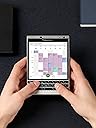
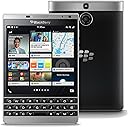
โจ๏ธ๐ฑ Power your professional edge with the BlackBerry Passport Silver Edition!
The BlackBerry Passport Silver Edition is a GSM unlocked smartphone featuring a unique 4.5-inch square 1440x1440 IPS touchscreen, a long-lasting 3450mAh battery with up to 30 hours of mixed use, and a touch-enabled physical QWERTY keyboard that doubles as a trackpad. Running BlackBerry OS 10, it supports both native BlackBerry apps and Android apps via sideloading, making it a productivity powerhouse designed for business professionals who demand security, durability, and seamless desktop integration through BlackBerry Blend.


| ASIN | B011DJN5K8 |
| Additional Features | Built-In GPS, Mobile Hotspot Capability, dual-band, dual-camera, smartphone |
| Average Battery Life Talk Time | 30 hours |
| Battery Average Life | 30 hours |
| Battery Capacity | 3450 |
| Battery Description | 3450 mAh |
| Best Sellers Rank | #580,616 in Cell Phones & Accessories ( See Top 100 in Cell Phones & Accessories ) #10,109 in Cell Phones |
| Biometric Security Feature | Fingerprint Recognition |
| Brand | BlackBerry |
| Built-In Media | Camera, Video Recorder |
| CPU Model | Snapdragon |
| CPU Speed | 2.26 GHz |
| Camera Description | 13 MP |
| Cellular Technology | 4G |
| Color | Silver |
| Connectivity Technology | Wi-Fi |
| Customer Reviews | 4.4 out of 5 stars 1,614 Reviews |
| Display Pixel Density | 326 pixels_per_inch |
| Display Resolution Maximum | 853 x 480 |
| Display Type | LCD |
| Effective Video Resolution | 13 mp |
| Flash Memory Supported Size Maximum | 32 GB |
| Form Factor | Smartphone |
| Frame Rate | 30 fps |
| GPS Geotagging Functionality | True |
| Global Trade Identification Number | 00802975061112 |
| Headphones Jack | 3.5 mm |
| Human-Interface Input | Keyboard |
| Item Dimensions | 5.1 x 3.5 x 0.36 inches |
| Item Weight | 7.04 ounces |
| Manufacturer | BlackBerry |
| Memory Storage Capacity | 32 GB |
| Model Year | 2015 |
| Number of Front Cameras | 1 |
| Number of Rear Facing Cameras | 1 |
| Operating System | Blackberry |
| Optical Sensor Resolution | 13 mp |
| Phone Talk Time | 30 hours |
| Processor Series | Snapdragon |
| Processor Speed | 2.26 GHz |
| RAM Memory Installed | 3 GB |
| Ram Memory Installed Size | 3 GB |
| Rear Facing Camera Photo Sensor Resolution | 13 mp |
| Resolution | 1536 x 864 |
| SIM Card Slot Count | Dual SIM |
| Screen Size | 4.5 inches |
| Shooting Modes | Manual |
| Sim Card Size | Nano |
| Specific Uses For Product | Web Browsing, Email, Social Media, Calendar, Contacts, Messaging |
| UPC | 802975061112 |
| Unit Count | 1 Count |
| Video Capture Resolution | 1080p |
| Warranty Description | Limited 1 yr |
| Water Resistance Level | Water Resistant |
| Wireless Network Technology | GSM |
| Wireless Provider | AT&T |
L**A
Work WIDE!
I had my eye on the BlackBerry Passport since its release in September. I'm an AT&T customer and was hoping to get the device from them when they released it. Fast forward two months later and still no word from AT&T on a release, but BlackBerry had slashed the price to $499 for Black Friday and I went ahead and pulled the trigger. I will go ahead and say that I'm a huge BlackBerry fan and when I first saw images of the Passport, I thought it was a hideous device. It was this huge square phone with this awkward looking three-row keyboard. The phone looked extremely wide and like something unwieldy. As video reviews came out and size comparisons to other popular phones, I grew more intrigued by its weird shape and keyboard. Let's start with the BB10 as a whole. I'm used the the OS because I've owned the Z10, Q10 and most recently the Z30. BlackBerry 10 is a gesture based operating system that has grown beautifully since its first iteration almost two years ago. I have access to apps from BlackBerry world as well as android applications directly from Amazon App Store or anywhere I can download .apk files from (websites, 1mobile market, etc.). I can also side load an application called "Snap" to install applications directly from the Google Play store. Of course the use of android applications can be hit or miss, I've found that most apps I use work just as well as native applications. I use Beats Music, Soundcloud, Instagram, Netflix and Hulu religiously and all work well with the Passport. With this being said, if you are a huge user of Google applications that require Google services, this may not be the device for you. There are workarounds if you are so inclined to try them, but if you don't want to do the work or use an alternative application, stick to what you know. Next, the physical size of the Passport. This phone is big. I have larger hands for a female and I find it quite comfortable to use with two hands. It takes some getting used to, but the phone is really not that bad after a few weeks of use. I've had it for about a week now and I have adjust well coming from an all touch screen device. The phone on the heavier side for a smartphone, but it's not like I'm carrying around a brick or doing hard labor. It feels solid and if I drop it (knock on wood) I don't feel like it'll be greatly damaged. I rarely carry a purse, so when people see me they always ask, "Can you even fit that thing in your pocket?!" The answer is YES! I wear a lot of dress pants for work and I can fit the phone securely into a front pocket. It's not as bad as I thought it would be before I got the phone in hand. Also, I work out and usually listen to music. There isn't a armband or pocket that this phone works well with, but I did find the Flipbelt on Amazon and it works ridiculously well. Let's talk about this keyboard. In one word, it's AMAZING! I was leery when I first saw that there were only three rows of keys on the phone, but after using it...it just makes sense. You get numbers and punctuation on screen depending on what your needs are. The kicker is that the keyboard is touch sensitive. With the word suggestion built into BB10, you can swipe up suggested words as you would on a Z10, Z30 or Z3. It felt familiar coming from a Z30 to the Passport. It gives you a few options to type and does help when using the phone single handed. The keyboard also allows for you to swipe through lists, websites, etc. which is great because you can utilize the entire screen for viewing and not reading around your scrolling finger. The last thing that takes this phone to the next level is the use of BlackBerry Blend. Blend allows you to connect to your Passport via USB, wireless network or mobile network from you laptop, iPad or Android tablet. You have full access to your files, emails, texts, and BBM groups and individual texts from you laptop or tablet. This is an amazing feature for work! I can view incoming messages from my laptop and send a reply without having multiple emails open in my browser. I can attach files from my computer or phone into an email and send it off without missing a beat. Blend is exclusive to the Passport and Porsche designed phones, and will be available to other BB10 phones in the near future. All in all, if you're willing to WORK WIDE, I would recommend this phone to you without a doubt. It just works really well. If you're all in with an Android or iPhone ecosystem this may not be the phone for you and that's okay.
E**N
The best smartphone I've owned
I purchased this phone for myself about a week ago. I was looking for a more professional phone with good security and durability. This is it. The Passport has a tremendous battery life. Just yesterday, I used it most of the day until late night, and it went from 100% to still 67% charge. It could last another 2 days at my usage level before needing to be charged! I love the physical keyboard. It takes some getting used to if you've been accustomed to all these iPhone / Samsung virtual keyboards, but I've always preferred the physical keyboard, although I miss the speed of the swipe function of the Android virtual keyboard. The screen is square, so it actually makes reading better and looks more like a desktop screen. It's not ideal if you want to play games or watch movies, but for work purposes, it is excellent. The shape is more ideal for reading articles or looking over graphs and charts. The screen is incredible. It is a HD IPS (in-plane switching) LCD screen with exceptional resolution. The advantage of this type of screen is that it has a BETTER life span than a normal LCD or even OLED screen while retaining the same clarity. Keep that in mind. Also, and even better, you can read easily from this screen in direct sunlight! I was stunned when I discovered this while using my Passport outdoors and I realized I can see everything on screen perfectly without having to find shade somewhere. The build is quite sturdy. My silver edition has a metal frame which is quite solid. It is more stumpy in shape, which probably makes it more damage resistant than the elongated rectangular shapes of most oversized smartphones now. The shape also makes it feel much more secure in my pocket; I don't have to worry about it falling out. And even if it did, like I said, it's quite sturdy, and even moreso now that I have it in a leather case. The OS is the BEST I've ever used. Clean and smooth and fast. My phone was the unlocked version and there was no bloatware on it. I've owned a Note 3 and iPhone 6s+ and a Windows phone (and even my beloved Amazon firephone, too!), but Blackberry's OS 10 is the best. The downside is that its app store is not well-supported, but if you use the phone as a productivity device and not as a toy, the Passport is absolutely the best around. You could always load up the Google Play Store by yourself if you know what you're doing, but if apps are important to you, it is better to stick with Android (or maybe try the Blackberry DTEK or Priv hybrid phones). Personally, I already own an ipad, so I can have my fun apps on that, meaning my phone can be a productivity device. The Passport does have an Amazon appstore on it, so you can get most Amazon apps, including Underground games, too, if you like. That said, if you stick with the Blackberry native apps, they will run the quickest. I will admit to installing the Google store just so I could get my Kindle ereader; for some reason, it is not offered on the Amazon appstore for Blackberry, which is puzzling. I must praise the Hub, which collects all your emails / messages / facebook messages / etc in one easy-to-access location. It is a simple concept but once you use it, you will marvel at how useful it is! Nothing like it exists on other OS platforms. Other reviewers have mentioned this, but I will repeat it too - the Blackberry Passport is the best smartphone for WORK. It is NOT a toy. It has been designed to appeal to the business-oriented consumer. Casual consumers or app-lovers will not like this phone, but for business, you cannot find a better phone out there.
W**R
A truly impressive device
I am extremely impressed with the capabilities of this device and the thoughtfulness and coherence of the BlackBerry 10 operating system. I've had the Passport now for a couple of months, and recently received the 10.3.1 OS update, which added a ton of cool new elements, including emergency battery saving mode. I've stumbled across a number of other features, though I'm not sure if they are new or not, like "advanced interaction" which does stuff like silence or shut off screen when the device is flipped over (also I'll note the universal search is amazing ... for example I couldn't remember the term "advanced interaction" but I just typed in "flip" on the home screen and, among the results, was "advanced interactions" in settings). I also recently discovered the keyboard shortcuts, you can assign an app or a bunch of other actions to the long press of any key. It would take too long, and frankly I don't remember off hand, all the pleasant little surprises the OS and the device offer, but it's pretty cool. I will say I saw one review complaining about the combo virtual and hard keyboard. I'll say I think the arrangement is genius (how does one complain about a partially virtual keyboard but embrace a fully virtual one? Makes no sense). Anyway, you need to realize that the keyboard is touch sensitive. So, a back swipe = "backspace". And a down swipe = shift. Further, though the virtual keyboard appears when you swipe down (shift), you don't actually need to use it: When you "shift" you can then press the hard key corresponding with the soft key, so for example, swipe down then press the "m" key and you'll get a dollar sign. Though the secondary character isn't printed on the hard key, it works exactly as you'd expect a keyboard with the shift key pressed to operate. Finally, a swipe up selects the predictive text word being suggested for you (there are three presented just above the keyboard, left, right and middle). Once you become accustomed to using the shift key to get your symbols (like speed typing you remember that shift-"b" is "@" and shift "h" is "&" etc, though you can also see it when the virtual keyboard pops up), and begin to rely on the predictive text swipe up, and the really high quality hard keyboard, you can beaver out messages dramatically faster than any other input device. Virtual Assistant: Unlike predecessor BlackBerrys, the voice command system works really well. I haven't done side-by-side tests, but I ask it to do stuff like set alarms and find things on teh web or the device and it performs very well. Blend: This is one that seems to have been overlooked by a lot of people. You install the app on your computer or tablet, and then basically it gives you access to all the messaging, calendar and contact functions of your phone right on your desktop. So, get to the office, pop the Passport on to a cradle (fyi battery life is very good, I often forget to charge at night and I'm still OK for the better part of the next day, which is a relief from battery anxiety I've had with all previous phones), and respond to SMS, email, BBM from my computer; it also shows your contacts and calendar. It doesn't show Notes which is a shame that I assume will be addressed in a future update. It also doesn't let you edit your contacts. But it is Gen 1, and quite a remarkable tool. Also they say nothing is saved on the second device; just the display and input of the second device are used, so Blend could be used on any random computer without worrying your data is going to be left behind for someone else to come across. Anyway, I've seen a lot of reviews where the user seemed to have no idea how to make use of the capabilities of the device (I'm not surprised, I just happened to stumble on this function, there are a lot of hidden gems really, maybe I should read the manual). Oh, the photos are really great quality, even my friends with iPhones have to admit. I just noticed a couple of weeks ago that in the Photo Album app, if you click on the occasional banner that separates sets of photos and videos, it automatically creates a slide show of videos and photos taken in some coherent period of time, with a variety of transitions, etc, it adds some music and a little intro cover and closing. I'm really impressed with this, as what a cool way to show your vacation pics without the dull flipping from one pic to the next. And no effort on my part at all (this is called "Automatic Story Maker"; there is a "Story Maker" app too which allows you to select the media, the intro, the music, etc but I haven't spend time fussing with all that, so I like the automatic mode). I've had good luck with Android apps on the Passport. There are a bunch of Android app stores you can install directly from the browser on the device (the browser is REALLY fast) like 1 Mobile Market and Aptoide and APK DL and Vshare and Mobogenie, so you are not limited to Amazon App Store. I strongly encourage people to install this app called "Snap" which is a native app like Google Play Store. Snap must be side-loaded (a 1-time thing), which is about a 5-10 minute process, there are lots of guides how to do it (basically put the device into Dev mode and install an extension on Chrome browser of your computer). I put on Google Maps (there's an apk on the web you can install to address the sign on issue), yelp, snapchap, instagram, paypal, Shazam, Airbnb, several off-line maps apps, and a bunch of other ones I actually never use. Uber has a mobile site m.uber.com which works just like the app. Is the Android emulation absolutely foolproof? No, you'll occasionally see some message about Google Play Services or something, but I'm really happy with it. I think of it like this: It's a small compromise to pay for access to a mobile powerhouse of features no other device offers and that I really need and use and rely on. And anyway I have an android tablet where I've downloaded hundreds of apps I never use, but maybe that gives me psychic comfort I don't know. Finally, I'll note the dramatic improvement just in the OS update from 10.3 to 10.3.1; the OS isn't perfect but is constantly being polished and improved.
T**T
Nearly great phone
Overall this device is very good. There are many more features than the my prior BB - a 9810 Torch. PROs * Works great on T-Mobile - T-Mobile upgraded my SIM from micro to nano at no charge. * Gets a better cell signal than the BB Torch - probably a better antenna * Excellent performance on WiFi - even for streaming video * Great display and camera - really great - with a better flash than the Torch * Easy to use alpha keyboard and good numeric touchscreen keys * Was easily able to transfer my full calendar (0ver 7000 events) and contacts (over 5000 names) with BB desktop transfer * Moderately easy to set up multiple business Emails - both POP and IMAP - even some with complex login * Excellent transfer of photos and music from my Torch to the Passport and sync with my Desktop PC CONs * The interface is not as intuitive as the Torch - so far I have not found some features. * Copy and Paste of a phone number or a long block of text is not nearly as easy on the Passport as it was on the Torch. * It seems that several functions that required just one screen tap on the Torch require 2 or 3 on the Passport * Many capabilities I had set up on my Torch have eluded me so far - I am hoping that I can purchase several Apps to handle these functions. * There is no way to transfer the blocked phone numbers from a Call Blocker app on my Torch to the Passport - the App on my Torch does not have a Passport version so I purchased a blocking app for the Passport - I have over 200 blocked numbers on the Torch that I must manually enter on the Passport one at a time. * Could not transfer my Notes/Memos or Tasks from my 9810 Torch. Converting Tasks to "meetings" has been a work-around. Converting Notes to Docs may work-around but then they are not part of Outlook. * * * Have not yet been able to sync with MS Outlook on my desktop - this is a "critical must do" - I am hoping that I can buy an App to do this. I am hoping that there is not some limited number of items that can sync or that long fields (8000 characters) in Outlook are not causing sync failure. * It is not a phone that you can use with one hand - but I did not expect it to be * Emails take longer to show up on the Passport than on the Torch * Entering symbols when typing long Emails slows down typing a lot. I only tend to use a few symbols so it would be great if there was an App that could add a custom row of touch screen symbols above the touch screen numbers that could be displayed when I selected that app such as $, %, &, >, <, *, Euro, Yen, ...
L**.
I'm glad that I've overcome my fears about the size
I use my phone for almost everything. From answering emails from my students, checking their homework on the go, talking with my parents abroad, watching videos at the airport, listening music, taking and editing pictures for fun, sharing information with my coordinators, and so on. I'm a smartphone power user. I have a Samsung tablet that hasn't received an updated since I got it a year ago (with the promise that it that the best of the best at the time), also I have a very fancy and heavy laptop. However, my main device has been my Q10. I have used other devices (LG's, iphones, Nokias, Sony Ericsson, etcs) so I'm pretty much familiar with everything out there. Blackberry gave me freedom and made me feel secure about my information. At the beginning my Curve, them my Bold where a little behind of the other "fancier" flagship smartphones. But none of them could make what I wanted. So, I didn't make the switch. (Usually, as a smart buyer I don't follow the trends. First I do my research, balance the pros and cons, then I make my decision) I love my Q10. Perfect size, the keyboard is a masterpiece (fast and furios), but like with any device looses power with the abuse. I have been looking the reviews for the Passport, trying to keep a cold head regarding the super enthusiastic reviews and the super negative ones. The fact that you can't go to the store and try one was frustrating. However I decided to get one with a discount from Amazon (plus, they approved me for the Amazon.com store card and gave a $40 dsct) What I deal! $240 off. I'm going to be honest, when I opened the box I had my reservations. The phone looks huge and feels different in the hand (especially switching from a smaller Q10). I decided to give it a try (I could have returned the next 30 days). I'm a 5'4'', 129 lbs guy. I'm a short person. I use slim fit pants and jeans, also XS is my best fit in clothes. THerefore my main concern was: is it going to fit in my pockets? To my surprise, it fits perfectly in my jeans and pants (not in my shirts, though). Problem solved! I have small hands and I can use it mostly part of the time with one hand, however, 2 hands is ideal and automatically you handle the device in that way after a few days. Does not bother me whatsoever. I've been using my Passport for 2 weeks now and I'm so happy to have overcome my fears. The screen estate is a win! Reading, watching, touching is a marvelous experience. It is super fast. Works, I think, at least 3 times faster than my Q10. The call quality is amazing. My office is in the heart of a building, under 4 floors of concrete, and most of the phones lose the signal once you get in into the building (included my Q10) However, this phone has at least 2 lines of coverage sitting on my desk (WINNER). 10.3 is a ridiculous OS. My Android apps load faster than in my students Samsung S4 (this amazed one of them because told me [Professor, I'm so sorry to tell you that BlackBerry is dead) When he tried my Passport recognized his mistake. Now is looking for a Z30. My students like it (even though they are iphone users) especially my pre-med students after I showed them the Nanthealth video. I have downloaded several games from the Amazon store and they are amazing on this square screen, not to mention the fast they are. Feel like they were made for this OS. I started to use Blend and I love it. I use my phone features in my laptop while it's charging. I'm not going to lie about the keyboard on this phone, took me some days to get used to it. That was almost my deal breaker. However, once you master it you love it. The word flipping is amazing, the touch feature is pure innovation. I use it to scroll up/down while I'm reading in landscape mode. (people go crazy when they see it) :p These are my two cents for this amazing device. In my opinion, the best out there for both heavy users and regular users. Totally recommend to give it a try.
R**K
Great Device for the money and a no brainer at the 499.00 Black Friday Special
First of all , I am a former iPhone 6 user and bought the passport on the official launch day. I have used the device as my daily driver since then and this review is based on my "hands on" experience for the last two months and not someone who picked up the device for 1 hour and based their review on that. Likes: Big bright screen and plenty of real estate for spreadsheets and emails, text is sharp and easy to read. Color is very accurate when looking at photos sent from my clients. Device is built like a german panzer tank, feels solid in you hand. I feel I got a quality made device for the money I spent. Blackberry OS10 is very fluid for my daily driver, I use my device mainly as my business tool and laptop replacement and this device fits the bill perfectly. Takes some time to adapt to, but now I could't be without it. Keyboard is great, took a while to get used to, but after a week, I found myself liking it better then a touch screen one. I also found my self typing with less errors. Processor is great and the screens and gesturing is snappy, if you haven't used OS10, give it time, you will find yourself liking the gesturing concept. The "Hub", nothing on the current market even comes close to this feature that is unique to Blackberry OS10. All of you messages, emails, Facebook/Twitter notifications in one area. Accessed by a single swipe to the right. Makes this or any Blackberry OS10 device a true messaging and business tool. Peak function on the main screen, lets you know who you messages are from and are displayed on the main screen. The message can also be accessed by tapping once to see the content and tapping agin to access it. I came back to Blackberry from being a long time Apple iPhone user, I have had a love/hate relationship with the brand since I left it several years ago. But, I decided to come back with the z10 was released last year. OS10 has had it's issues early on, but now with the ability to run Android apps and the improvements in the functionality, I am here to stay. If you have small hands, I will let you know this is a large device and takes two hands to really be efficient with the device. I am a big guy and have paws for hands and I have adapted to the device quite well. If you are used to using your current device with one hand, this may not be the device for you, but if you are willing to try something new, give it a chance. Camera, does a good enough job for what I use it for. I don't shoot videos or take my personal photos with my phone, thats what I have a Digital SLR and a good lens system for. At 499.00 for the black Friday special, this device is a no brainer, I bought one on launch day back in September, sold my iPhone 6 and I am not looking back. I use my smartphone for my business where my emails, text and social media apps are my top priority. I don't play games, watch movies or shoot videos or pictures with my device. If you are looking for a device that will increase you productivity with a great calendar, messaging capability and is reliable, give the passport a shot. You won't be disappointed.
Z**C
Love this phone!
I bought this phone from Amazon used with a condition of "Like New". The disclaimer was "Item will come in original packaging and packaging will be damaged". I saved a little over $90.00 by purchasing the phone this way and it was well worth it. The box was indeed damaged, but there was not one cosmetic imperfection on the phone or any of the included accessories. The phone came with what looked like an AT&T nano SIM card in it. T-Mobile is my carrier so I simply went to one of their stores and had them activate a nano SIM and was on my way with the passports voice and data working fine in less than 15 minutes. They didn't even charge me for the micro SIM, but I'm sure that depends on the store and rep you deal with. All I can say is that I am in love with this phone. I came from a galaxy note 2 which was a very nice phone as well. I was just looking for something different than android or iOS and this caught my eye as it is definitely different. I haven't used a blackberry since my son had a curve some years back and I would have to constantly restore the OS because he would always manage to get an "Uncaught Exception" error. I couldn't stand the OS back then but this BB10 OS is very nice indeed. The phones hardware and OS are a perfect marriage making all tasks move swiftly. The physical keyboard allows me to actually look at other things besides the keyboard and type with no typos whatsoever which I could not do on a virtual keyboard. The large square screen is beautiful and I no longer have to turn the phone sideways to view a non-mobile website. I have had many people ask me about the phone and say how nice it looks. The phone is big but fits fine in my pockets and I can type one handed on the phone although my hands are big and I would imagine that most people would find it uncomfortable to do if they can even do it all. The battery life is seriously unbelievable. As I write this, I am going on 18 hours without charging the phone and my battery is sitting at 42%. I have had my Bluetooth radio on all day, received well over 100 emails, replied to around half of them, used remote desktop for about 20-30 minutes, BBM'd for a bit, sent and received texts all day, received and made many phone calls including one for just over an hour, played TunnelX at least 10 times, watched a dozen or more YouTube videos, and have browsed many websites as well. So to have 42% battery left after all this and 18 hours after my last charge is simply amazing to me as none of my previous smart phones could even come close to lasting this long. The apps available for this OS can leave a lot to be desired if you come from android or iOS. However, you can apparently load apps from BB World and android apps via the Amazon app store but I have only installed apps from BB World and not many of them. Even still, what I have installed is sufficient for me since my phone is used more for business than entertainment and for that purpose it seems to fit like a glove. Nevertheless my 4 teenage boys look at it in awe and surprisingly aren't concerned about the lack of entertainment apps but want to learn how to use the OS so go figure. For me it is definitely a keeper and I look forward to discovering the cool features it has.
L**Z
My First Blackberry
I am a first time Blackberry customer, and I'll spend the rest of this review gushing over a phone that most people will never even think about buying. To give a little background on my knowledge of phones, I have owned iPhones before (4+5), I own several Windows phones, and I also own a few flagship Android devices as well. I have used this device for about 2 weeks now, and I'm probably more intrigued with it now than when I first purchased it. I am not going to talk about the specs or anything like that as you already know about those. I think what makes this phone extremely viable as my daily driver is the ability to run android apps. With a very small amount of tweaking, I was able to install Google Play store, Google Maps, and use my Google account to download new apps and all the apps I already purchased. I read reviews that try to attack it's ability to run Android apps, but I've only had 2 out of approx 25 apps I've tried that do not work. The other run flawlessly and look fantastic. The BB10 OS is solid. Compared to iOS, Windows Phone, and Android, it relies heavily on swiping instead of a dedicated home key. I found the switch generally easy; however, there is a bit of a learning curve and reward. It took longer to learn than other switches I've done, but it has many more nuanced features that allow for greater productivity. I think it's easier to multitask and switch between apps on BB10 than other phone OS i've tried. Also keep in mind the physical keyboard allows for key specific shortcuts. In Twitter for example, I can press R to refresh or T to snap to the top. The call quality and speaker phone are better than any other phone I've used before. The screen is easier to read. The keyboard is easier to type. The battery lasts WAY longer than any other phone I've tried. The OS allows for faster/better multitasking. The notification LED light is fantastic. It fits absolutely fine in any pants I've worn (albeit leaving a nice square protrusion). My one negative is the obvious-- you really can't use this phone very well with one hand. The bluetooth connectivity in my car has worked so well that this has never been an issue for me. *Update-- After posting this I did think of another minor negative--there are very few cases and screen protectors for this device. The screen is curved/tapered at the edges, and many reviews and forums state that the glass screen protectors don't stick or are cut very small to avoid the curves. To wrap up my review, this is the best phone I've ever used (for two weeks). The OS is a fantastic surprise, and I didn't feel stranded like on Windows phone as all my android apps were available. When I read news articles on this phone, I would always see some comments hating on Blackberry or calling this phone ridiculous. I know the internet is full of trolls and ignored those anyway, but what is clear to me now is that anyone talking negatively about this phone simply hasn't used it. It really is that simple.
C**C
Funciona, el terminal es magnรญfico para todo
Me llegรณ bien fรญsicamente, al configurarla no reconocรญa tarjeta SIM y tuve desconfigurarla y devolverla. Solicitรฉ otro terminal al mismo vendedor y me ha llegado ayer, Miรฉrcoles 4 de Abril. Al dรญa siguiente la tenรญa configurada y ahora funciona estupendamente. Gracias
K**.
My bb passport
Received mine today absolutely brand new in a sealed box no problems at all Truly genuine blackberry product with all all the accessories
P**L
complicate history
Not that easy. let me put you in context; I am a senior iPhone programmer & senior programmer for more than 18 years of experiences. I consider myself as above average technical. And this is my long review of the Passport. First, it's an awesome devices. Design is superb, excellent finition, feel sturdy and solid, it's a professional smartphone. Hardware is also very good for a 2014 phone; 3gm of ram, external sd card up to 128gb. Keyboard with touch sensitive scrolls / actions is nice too. Batteries last for about 72h with moderate usage; which is very very good in my book too. We love the top LED that flash the color you want for the notifications type you want (sms, email, etc) Software too have some very nice ideas : multitasking is very natural with the swipe up gesture to go back to your homepage (I also have tendency to swipe up on iphone but no!). The Hub is interesting too where you see all your notifications, very similar to the iOS notification drop down panel. On a 5@7 or during a diner, put the Passport on the table and you'll get zillions of comments like : what is that ? what are you doing with this ? Are you back from the past ? Do you need love, are you all right ? You know, that kind of comments... :) Where it is a bit harder to live with are: - not even software design during the experience: sometimes the back button is bottom left, sometimes it is top right, etc - not much available free applications; for facebook messenger, I've paid 3$ for an app that works. I mean, there is alternative solutions but be prepare to have some trade off, which I can live with that. - keyboard takes time and times and even more times to be familiar with. We've all been use to type on a virtual screen keyboard, going back to a physical one take times so give yourself time in the transition experience... - steal proof; nobody want to steal that thing out of your hands be worry free - bluetooth connection / layer seems faster than on my iphone 7+; the passport is super fast to reconnect to known bluetooth device which is nice Why did I bought that ? Well, after installing the ios app Moment, I've observed that I was spending *too* many times on iphone. I mean, it's sooo addictive and so crazy nice that it came to a point where it doesn't make any reasonable sense. 4h / day on a cellphone is a lot in my book. It's way too much. Sure I could have remove apps from the IOS device but temptations are too strong; games, social, pinterests and instagram, oh temptations... Also, note that the passport have an android emulator that can runs android content. So it means that if you can find the app on the amazon app store, you can potentially run it on your Passport. Go to the grocery, or on the sidewalk of a populated street, or in a park and observe. Everybody's on their smartphone. I was and still am one of those folks. I've witness someone almost been killed by a van while doing whatever on her smartphone and not looking while crossing the streets. Grocery waiting line everybody's hooked, in fact, at the moment you wait for something, we / I have the reflex to reach out for the smartphone and scroll / navigate / chat / whatever. Try going to the bathroom / restroom without your smartphone just for fun. With the Pasasport, there is soo nothing curious to check on that you will be wondering why did you bring it with you at the cabines. :) Well, enough said... if that device would have come 4 years before, it could have been a winner on the market causes ideas were there, not just the level of refinement that we are experiencing on our everyday's life today. What software works for me : - Spotify from amazon app store; works like a charm but the not vertical wide screen give me a compact interface which is a medium experience. - Face10 for facebook - Messenger 10 for facebook messenger (with notifications in the hub) - iGrann for instagram - HG10 for hangout chat Its a good device for : - a person that want a physical keyboard for SMS only messaging - a person who want to be 'disconnected' from the social networks like snapchat, instagram, google play, etc... - you don't play game - battery autonomy is important in a business context - relative security of the device (even if I do thing that apple have very secure and robust device + os too) Its a "ain't that sure" device for: - you like mobile gaming (but last time i've tried Hay Day it was working yay!) - you are more social app user than an ant on a rainy day - you like to do everything with your mobile (controlling lights, doorways, special apps, carrier apps, apps apps apps)
K**K
but a lots of important apps don't function well on it like whatsapp, truecaller
Its a nice-looking phone...attracts attention everywhere...but a lots of important apps don't function well on it like whatsapp, truecaller, google maps, etc..gr8 for executives!
K**A
It's great!
Can't believe the company sold it to me for the 168$ not including tax and shipping tag, I won't bother with the trouble of returning this or demanding a refund but merely taking it as a lesson. The storage the apps took also was ringing bells in my head when it said "Apps: 666mb" Just kidding, it's just a number but still somewhat a sign. Also my dumb bum should have listened to when Blackberry said they stopped supporting their phones. - Pros: the rear camera is great if you're on the go but good luck even trying to offload the photos. YouTube works fine but don't expect to log in to your accounts. Cons: The SD card reader wont even update. Claims to be off a network, even though clearly is on my home wifi. Cant log into emails, can't log into Twitter (what I wanted it for to take a social media break.) Can't even log into LinkedIn. My mac won't even read the phone itself in order to add Documents, Pictures or Music Phone is an absolute lemon, but if you're like me and love the design of the phone and overall nice display and keyboard with a backlight. It'll do as a work phone. Just have to carry a second phone on me for email related stuff. Anyways learn from my review as a sign or reason, that I suppose Blackberry will be dead forever. Sad because I've always liked John Chen. Edit: I got the phone working with apk versions of Twitter, Facebook and a different browser. I'm not using media currently but also still good to have access to outlook from the web. There's a trick on how to activate the wifi on youtube and ever since then it's been doing great :) I actually came to enjoy it!
Trustpilot
5 days ago
1 week ago