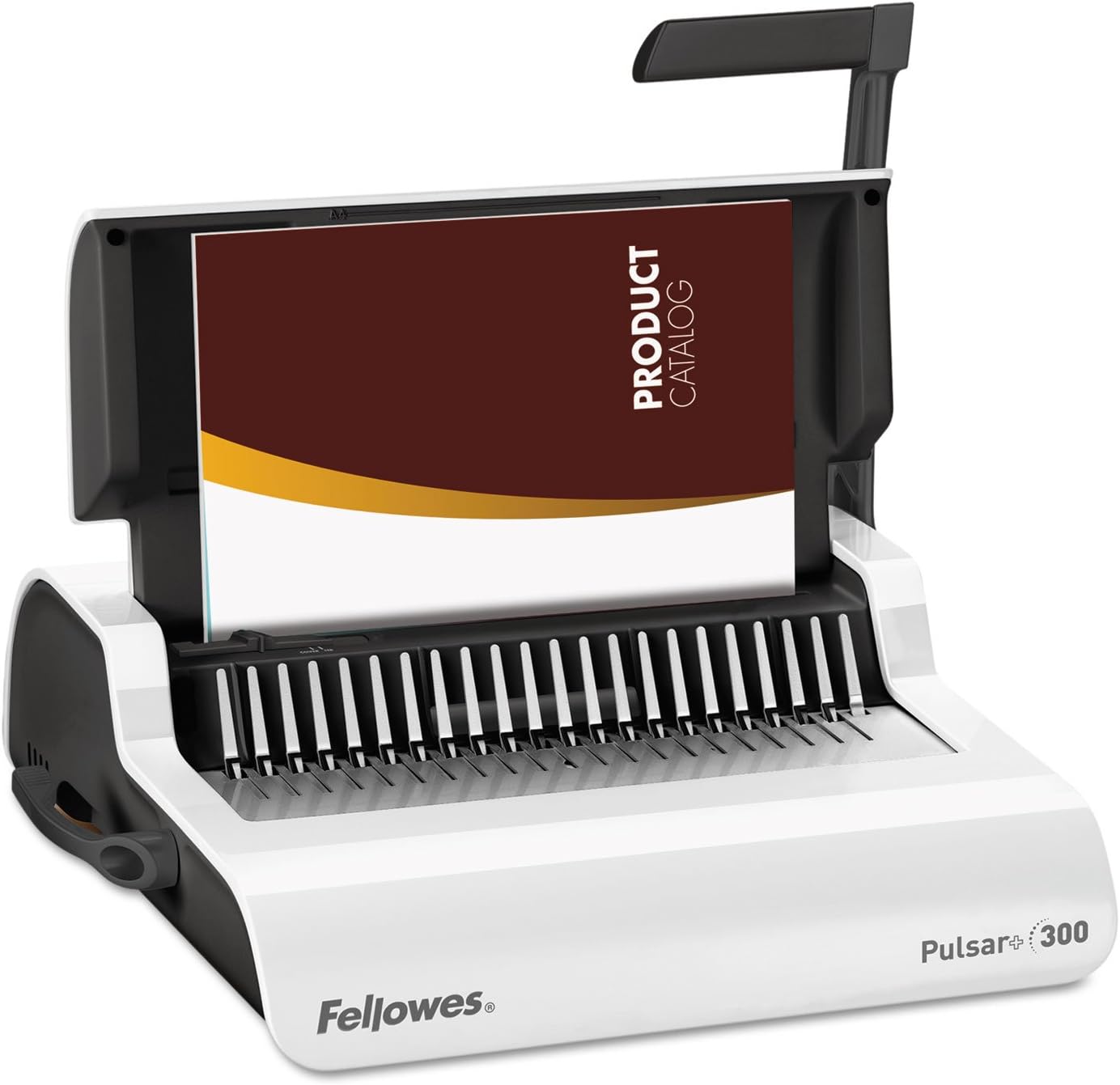
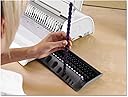

Fellowes 5006801-99 Binding Machine Pulsar+ Comb Binding (5006801)
Product ID: 1573199
📄Punches 20 sheets at once
📏Precision edge guide for perfect alignment
📚Binds up to 300 sheets
Buy anything from 5,000+ international stores. One checkout price. No surprise fees. Join 2M+ shoppers on Desertcart.
Desertcart purchases this item on your behalf and handles shipping, customs, and support to SINGAPORE.
📎 Bind brilliance, boost your brand — make every document a statement!
The Fellowes Pulsar+ Comb Binding Machine is a compact, medium-duty manual binder designed for office professionals who demand precision and efficiency. It punches up to 20 sheets at once and binds documents up to 300 sheets with a 1.5-inch comb. Featuring an adjustable edge guide, vertical loading for perfect alignment, and a built-in comb storage tray with measurement device, it streamlines your document finishing process. Ideal for creating polished reports, presentations, and custom books with professional-grade results.


| ASIN | B009FFXN4Q |
| Best Sellers Rank | #35,817 in Office Products ( See Top 100 in Office Products ) #17 in Binding Machines |
| Brand | Fellowes |
| Color | White/Black |
| Customer Reviews | 4.8 4.8 out of 5 stars (564) |
| Date First Available | September 25, 2012 |
| Ink Color | Multicolored |
| Is Discontinued By Manufacturer | No |
| Item Weight | 15.4 pounds |
| Item model number | 5006801-99 |
| Manufacturer | Fellowes |
| Manufacturer Part Number | 5006801 |
| Material Type | Plastic |
| Number of Drawers | 2 |
| Number of Items | 1 |
| Product Dimensions | 5.13 x 15.38 x 18.13 inches |
| Size | 9.75"W x 7.5"H |
M**M
Binding machine review plus recommendations on covers and paper
I’ve had this binding machine for about two years, and I’ve used it for at least 100 different books on family history and genealogy topics, ranging in size from 20-500 pages. It’s sturdy and works flawlessly. And, it’s saved me a LOT of money and time over going to an office supply store to have them do what I can now do myself. I’ve only had two problems: (1) not fully learning how to use it in the beginning - I am NOT crafty in any stretch of the imagination, so I needed to read the instructions and play with it at the beginning before I figured out how to use it. Once you figure it out once, though, it’s quite easy every time, even if it’s been awhile between uses. (2) very occasionally the pages / covers don’t get punched properly, but every single time it’s been because I’ve been in a rush; it’s never been the machine’s fault. Just make sure you keep paying attention to each step as you make each book, have a few size combs as options, and, have back and front covers if you need an extra level of niceness, and you’re good. After trying lots of different methods for books, these are my recommendations for great covers and paper, all of which work great with this binding machine. Genealogy and family history books are great, but when they're printed on garbage and put together like garbage, it takes away from the information I've put together. It's awesome when you put together something for someone and they're blown away the second they see the book, before they've even opened it. --------------------- COVERS Note: the covers suggested here are thicker than the flimsy samples that come with the machine General cover suggestions: - get thicker covers (8 mil) these bend but are not at all flimsy, and they work great with this machine - get oversized (8.75" x 11.25" vs 8.5" x 11") it just looks tidier, and covers your books better - get them in bulk: the price drops significantly when you get larger quantities in a package, so go with the 100 sized packages if possible - only put one cover in your binder at a time - you'll have less mistakes that way. Binding Front Cover recommendations: (1) Fellowes 52311 Crystal Clear Presentation Covers with Round Corners, 8mil Oversize Letter, Clear (Pack of 100) https://www.amazon.com/Fellowes-Binding-Presentation-Covers-52089/dp/B0015ZXIL2 I'm not crazy about how the Crystal Clear covers feel. They feel like they'll scratch up like crazy, but then they really don't. You can't beat them price-wise. Right now 100 packs are about $18, which comes to .18 a cover. (2) Fellowes Futura Premium Heavyweight Presentation Covers, Oversize Letter, Frosted, 25 Pack (5224201) https://www.amazon.com/Fellowes-Binding-Presentation-Covers-52089/dp/B0196JUY7Y The Frosted ones are amazing. They're see-through yet frosted just enough to give them a much more professional look and feel than the crystal clear ones, in my opinion. Unfortunately I've only been able to find them in 25 packs, where they cost about .90 cents to $1 each. If you hunt around a little you can find a bit better of a deal, but no where near as low as the clear ones. If the costs were closer between the two types, I'd only use frosted. Binding Back Cover recommendation: Fellowes Binding Presentation Covers, Oversize Letter, 200 Pack, Black (52138) https://www.amazon.com/gp/product/B000Y9FB0G At about $22.50 for 200, these are a fantastic deal at less than .12 each. --------------------- PAPER If you want great paper, this is the stuff to get: Hammermill Paper, Premium Color Copy 8.5 x 11 Acid Free, 28lb, 100 Bright, 5 Reams / 2,500 Sheets (102450C) https://www.amazon.com/gp/product/B005EO3QHG/ If you get it on the Subscribe and Save deal, it's currently about $40.50 a box, which comes to about .0162 cents per page. SO worth it. It feels fantastic, is wholly opaque, prints great in an ink jet. Absolutely hands down the best paper I've ever used. People WILL comment on it, and will think you spent a crazy amount of money on it. Note!! Because the paper is a lot heavier than most kinds people use, you have to account for that when choosing a comb / spine size. I made a little chart that I taped onto the binder itself to remind me what size comb to use with the 28 lb paper. If you have less comb sizes, use the next size up. The chart is attached as an image to this review.
D**B
Works great!
With Staples charging us around $38 PER REPORT I just figured I'd have to start doing it myself. I love this little machine. I had no issues with doing around 20 sheets and didn't really count as I did them. I did less sheets at a time with the clear covers, a but more with my heavy card stock backers, but all n all you'll get used to how many to punch at a time and it goes quickly regardless. As for the comb part , that's a little tricky. You can drop in the comb but it seems you almost have to use something to poke them more forward to ensure all the loops in the comb get caught and pulled out. I use a letter opener to do that. It's really NO BIG DEAL to do that and no way an issue with the machine. I just found it easier and faster to just push the comb a little forward so it could be grabbed better. Sliding the punched pages with clear front and backers takes a little practice of opening the comb a lot, then close a little, then a little more as you slide all the pages at once on the comb spikes... but again, it's fast, it's easy and you'll get the hang of it. Oh another note, I thought a full arm pull on the machine would be better than just a single pull arm on the right side like this machine and I'm wrong. It truly doesn't matter at all. Great machine and I highly recommend it!
L**S
Great Comb Binder
I worked in an office with an ancient comb binder that was super heavy but worked great. I purchased this for home and self publishing. It's very lightweight and does an excellent job. I love how you can punch holes and keep the binding on to fill a little at a time. Great product!
J**E
Handy and easy
This is the best machine for putting pages together. Easy to use and binding looks professional. Lots of compliments.
A**R
Well made & easy to use
I chose this binding machine because I need to be able to bind 350 page books and files and the price was great. I was a bit leery as many of the reviews mentioned difficulty binding so many pages. Having used an office binding machine before and learning a few tricks for binding large numbers of pages, I decided to go ahead and order it. I am very happy that I did. The machine functions perfectly if you know how to use it properly. For those people attempting to bind 300 pages there are a few tricks to know: Once you have your binder comb loaded on the machine and the stretcher arm has the comb opened... load 20 pages at a time onto the comb ends. Punching all of the pages and trying to load them all at once won't work. As the comb ends fill up... slowly release the stretcher arm a little bit at a time to expose more of the comb ends (pull the comb through the pages a bit to expose more as you allow the comb stretcher to retract. Then load more pages... continue doing this as you go and it's easy. All in all this is a great machine. The price is amazingly low, and the workmanship is solid.
K**N
Great machine
This machine is so easy to set up and use. I quickly binded 12 books the first use. If you are using a sheet laminator first, you do need to trim the top and bottom for the pages to fit.
J**N
Very Happy, Wish I Bought it Sooner
I take a ton of photo; so I wanted a comb binding system for creating albums of my printed pictures. Initially, I bought an entry level GBC BindMate machine. It cost me around $79 and was a total P.O.S. from the very first day. The punch on it was so unreliable that I ended up pre-punching my photo paper, before printing on it. At least that way, I wouldn't waste my ink too. After about 8 months, I threw away my old GBC machine; but if I added up the cost of all the mispunched sheets of photo paper, it would more than cover the cost I just pay for my new Fellows Pulsar+ machine. In another review, a user complained about mis-punched pages on the Fellows Pulsar+. His complaint was due to the paper had a sight curl in it from having been printed on. In that case, I would recommend pre-punching your paper first. Or, you can even buy pre-punched paper; but the cost is 2-3 times higher than punching it yourself. I've only had my Pulsar+ for 1 day; but I already love it. When it arrived, and I lifted the box, I knew it wasn't another cheap piece of plastic junk. At about 15 pounds, it actually weighs more than my inkjet printer; but a solid build is a good thing. When I punched my first sheet of paper, I thought something was wrong. There was absolutely no resistance; so I didn't think the paper had actually punched. It was literally like a hot knife cutting through a stick of butter. And even better, the punched holes were clean and crisp, with no hanging chad whatsoever. The Pulsar+ is rated for punching up to a maximum of 18-20 sheets of 20 pound paper at a time; so I decided to put it to a test. (Amazon's item description says 18 pages; but the actually machine says 20 sheets.) I was able to punch 20 sheets; and they all came out cleanly punched too. Admittedly, I had to apply a bit more force than I liked. After experimenting a bit with the number of pages, I can punch about 5-8 sheets with almost no resistance. Beyond that, the amount up resistance goes up as the number of sheets increased. Another thing I really like about the Pulsar+ is its ability to punch and bind at the same time. On my old GDC machine, the punch was on the bottom and the binding area was on the top. Consequently, if I was binding a document, I couldn't punch additional pages at the same time. Fellows got it right and put the binding area on the bottom and the punch area on top. Consequently, having a partially bound document does not obscure the punching area. Another nice feature is that the paper support on the Pulsar+ serves as a lid when the machine isn't in use. This helps protect the internal parts from dust and/or damage. Plus, it just looks a lot neater. The lid is black on the inside and white on the outside. When the lid is opened, there's a small strip of white (about 1/8") that shows at the very top. The contrasting colors help you know that your paper is correctly inserted into the punching slot. The built-in storage tray is yet another nice feature of the Pulsar+. It's not real big; but it will hold a few plastic binding combs. It also has a size gauge that shows what diameter of comb to use for various document thicknesses. Last, but not least, my Pulsar+ came with a free 10 document starter kit. On my previous comb bound document, I've used standard card stock for my covers; but I had wonder if the actual comb bind cover were worth the cost. The covers are only about twice as thick as the 110 pound card stock I've been using; so in my opinion, they're not worth the cost. Each cover sheet costs about 50₵ (i.e. $1 for one document, with a front and back cover). Even so, it was nice that fellows let me try out their covers at no additional cost. If my opinion changes, I'll update this review to include my new observations. ***** UPDATE after one month of use: In my initial review, I gave this machine a 5-star rating; but I have decided to drop that down to 4-stars. To date, I have punched and comb-bound most my photos; which I previously had in document protectors, stored in 3-ring binders. The comb-bound photo albums take up about half the space the 3-ring binders took; so that's great. I don't have an exact count of how many pages I've punched; but my best estimate is somewhere around 6,500 pages. About half of those pages were thicker inkjet photo paper; and the other half were 20# bond paper. In addition, I've punched (one at a time) a pack of 25 poly document covers. When I punched the first poly document cover, two of the holes had hanging chad. I punched a few more covers; and they also had the problem hanging chad. After a bit of experimentation, I was finally able to get the covers cleanly punched. How I accomplished this was by placing a piece of card stock in the punch, in front of the poly covers. This allowed the punch dies to go through the poly cover cleanly. The other reason I have downgraded my rating is because the dies are no longer punching as cleanly as when it was brand new. In my opinion, the dies have become dull a bit too quickly. The machine is still usable; but the holes it punches just are a bit ragged around the edges. A kitchen knife will dull after being used for awhile; and apparently the punching dies in this machine do likewise. The difference is that I can resharpen a kitchen knife. That isn't an option with this machine.
D**N
Very easy to use.
I’m very happy with this binder machine! It works perfectly right out of the box and is extremely easy to operate, even for a beginner. The setup was straightforward, and it binds documents neatly and securely. If you’re looking for a reliable, user-friendly binder, this is a great choice. Highly recommend!
S**O
Descrizione pessima, non ci stanno i fogli A4
Sono costretto a renderla perche i fogli A4 per la lunga non ci stanno ma la cosa triste che mi ha dato veramente fastidio è che non c'era scritto da nessuna parte...
T**M
A4 PAPER DOES NOT FIT!!!
A4 paper DOES NOT FIT into the hole punching part of this binder and that is not clear in either the photographs or the description. Infact the pictures show larger paper than will actually fit, in the hole punch part of the items...false advertising.
M**N
Práctica, resistente
Me gustó todo de esta engargoladora, buenísima a dos años y medio de mi compra funciona como nueva y le damos mucho uso, una de mis mejores compras en Amazon.
E**R
Exactly what I need for our Homeschool
I love that this is a “take out of the box and use” type of machine . It does not need an electrical outlet to operate so I can pack it along if we choose to homeschool from our motorhome in the summer . Easy to use . Make sure you a) line up the paper just right and b) don’t punch more than the recommended amount or the punches will not line up . I use different weighted paper depending what I am putting together - I have been able to punch about 5 pages of 32lb paper at once I have put together 100+ Page books and it goes quite quickly once you get the hang of it . I chose comb binding over coil as I like to add pages to the boys’ booklets as we go and knowing myself , uncoiling and recoiling each book every time would drive me bonkers. With this one , I put it in the machine, remove the pages , add what I need , put them back in and close the binding :) Nicely priced too - about average for a manual machine .
B**S
Not for A4!!
So disappointed that it cannot be use on A4 paper! Why don’t you provide clear descriptions! Purchase with cautions.
Trustpilot
1 week ago
1 month ago