Desertcart purchases this item on your behalf and handles shipping, customs, and support to SINGAPORE.
🖱️ Elevate your workspace with precision touch—because your productivity deserves the best.
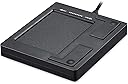
The PERIPAD-501 is a compact, wired USB touchpad designed for professional laptop and desktop users. Featuring 7 multi-touch gestures and a durable 5-foot cable, it offers plug-and-play ease with no driver installation required. Compatible with Windows 7, 8, and 10, its sleek black design and ambidextrous layout make it a versatile, reliable input device for enhanced navigation and productivity.


| Additional Features | Kiosk Application |
| Antenna Location | Office |
| Asin | B001CX85I8 |
| Best Sellers Rank | #10 in Computer Touch Pads |
| Brand | Perixx |
| Built In Media | Touchpad |
| Button Quantity | 2 |
| Color | Black |
| Compatible Devices | iPad |
| Compatible Operating System Family | Windows |
| Connectivity Technology | USB |
| Customer Reviews | 4.2 4.2 out of 5 stars (1,237) 4.2 out of 5 stars |
| Enclosure Material | ABS and rubber coating |
| Generation | 2 |
| Global Trade Identification Number | 06920820850101 |
| Hand Orientation | Ambidextrous |
| Item Dimensions L X W X H | 2.95"L x 0.51"W x 3.39"H |
| Item Type Name | Perixx PERIPAD-501 Professional Wired USB Touchpad - Black - 3.39"X2.95"X0.43" Dimension - Multi-Touch Support for Windows 7, 8, and 10 |
| Item Weight | 70 g |
| Keyboard Description | USB |
| Keyboard Layout | AZERTY |
| Language | English |
| Manufacturer | Perixx Computer GmbH |
| Mechanical Keyboard Switch Model | Capacitive |
| Mfr Part Number | 11284 |
| Minimum Required Operating System Version | Windows 7 |
| Model Name | PPD-501U-10062 |
| Model Number | 11284 |
| Number Of Items | 1 |
| Number Of Keys | 19 |
| Number Of Packs | 1 |
| Power Source | Corded Electric |
| Processor Count | 1 |
| Series Number | 501 |
| Style Name | Compact |
| Switch Type | Capacitive |
| Theme | computer accessories |
| Total Usb 2 0 Ports | 1 |
| Unit Count | 1 Count |
| Warranty Description | 12-month limited warranty (including 30 days return policy) for items directly bought from Perixx USA., 30 days return policy, and 1-year manufacturer warranty for items sold by Resellers and Distributors, e.g. Amazon.com. The buyer is obligated to return the product back to the manufacturer's headquarters at their own expense. |
User
Two sizes of simple touchpads that work well and are a great value
2019 UPDATE: REVIEW OF LARGE MODELAs I said in my original review, it is astonishingly hard to find touchpads that allow you to select text or blocks of data like normal laptop touchpads. I liked the original small version very much, but when I needed one for my home computer, I decided to try the larger model despite the mixed reviews here.The larger touchpad works exactly like a regular laptop touchpad. Just like the smaller version, there is no software to install. Just plug it in and you're ready to go. I particularly like the nice large, physical mouse buttons. A couple important notes:- This is not a precision touchpad. It's just like a regular mouse. If you need a precision touchpad, you'll need to look elsewhere.- Some people have complained about hypersensitivity, which I have not experienced at all. If this is a problem, you can change the pointer speed and other features using the built-in Windows mouse settings.Lastly this touchpad is not as slick or customizable as the JellyComb ($70) or Apple models ($120), but it's also only $25. In other words, it works fine for normal work on your computer, but it's not fancy, which may or may not meet your needs. It happens to be perfect for me.ORIGINAL REVIEW OF SMALLER MODELI prefer using a touch pad with my desktop PC because it's easier on my wrist since I have carpal tunnel syndrome. It is surprisingly difficult to find one that works just like a normal laptop touch pad. I do a lot of work with Word and Excel, and the newer touch pads don't allow you to do a normal click and drag, which makes them useless for me.This touchpad is smaller than I expected, but it works just fine. Plugged it in, didn't need to install anything, which was important since I'm on a system at work where I don't have the ability to install anything, even as simple as a mouse driver. It seems well-made and since it is so small and light, it's easy to take it with me if I'm switching computers. And the price is right!
User
Consider this Great Product!
I looked for an alternative to the conventional mouse, since excessive mousing results in much pain. As a product, this is very well constructed, including the switches, which are miserable in most off-the-beaten-path products, and have bad reviews for most touchpads. Since I've had this only a day, I can't speak to its long term durability, but it seems solid. It was designed and is marketed by a German firm, and manufactured in Taiwan (nowadays, that's often better than China). The price is a fraction of competing models, so if it lasts at least 6 months, I'm way ahead.Since I have not used Windows external touchpads since Windows 4.1, I was uncertain about its use, and there are no directions in the package (the package says there are), and the web site has none for this product. I sent an email to the manufacturer, and within a couple of hours received a response to my questions! They state that they will have a manual in a couple of weeks. I did some research, and found out that the operation is identical to that in the EasyCat manual.I know from experience that using 3rd party pointing drivers is often problematic under Windows (due to Windows XP-Vista systems complications). The standard mouse driver works, as instructed. I have not tried it on an Intel OS-X machine, but it will probably work, even though that is not claimed. Windows 8 compatibility is unknown at this point, but since 8 has a better driver interface, so I wouldn't be surprised if eventually this pad shows more capabilities under 8.Smooth touchpad use requires experience, so I haven't fully mastered it yet. I still use an Evoluent Vertical Mouse as well, but it is nice to have more than one type of cursor input device, since I click thousands of times every day.
User
Better than the same company's wireless, bigger version
This is a simple device that works well for a plug and play peripheral with no software. The size is perfect, to me there is no advantage to making a touchpad any bigger because it just means more hand movement. The surface is smooth and doesn't have to much friction and the screen tap works flawlessly. Its small but actually stays put better than its bigger version because of really grippy rubber feet. The control is very fine, you can click and drag to change the TINY volume control that comes up on super loud amazon product videos for example. The scroll is much better than the bigger version, it can be used to fine scroll single lines at a time. I appreciate the gestures built in such as 3 finger swipe up to task view, 3 finger swipe down to show desktop, etc but the 3 finger touch brings up a random start type menu which is not very useful for me and the 4 finger tap shows the calendar, again not useful for me. A software program that allows you to assign a shortcut to these would be much better...say control H for voice or escape for example. Also the cord...well if that's what it takes to make it work (again I must stress that the wireless version SUCKS) I guess ok but at least make it a usb-c so I can use a longer better cable. The cable is very light and thin and is hard to get neat because it bunches up more easily. Also it attaches to the right side and I would prefer it connects to the back of the device. Its a great device that could be perfect with some improvements but it is cheap and it works. Actually its one of my fav peripheral even compared to more expensive ergo ones.
User
Awesome and definitely recommend
My laptop touch-pad button was broke so I couldn't click on anything. It was too expensive to repair and the other option was to buy another laptop. However, the laptop still worked great; it was just the touch pad that was not working. I figured I would purchase this to use instead, and it worked out awesome! It works just like it was my built in touch-pad. Very easy to set up just plug and play. I plugged it in the USB and it is right next to the laptop. It has little rubber feet so it does not slide around and easy to glide and click. So a big thank you to Amazon and the manufacturer for selling something that works perfectly!
User
Works well but watch out for reverse scrolling and disability to disable edge swipe
The touchpad itself works well. Scrolls, touch-click, etc. work well and accurately. However, it is very annoying that two-finger scrolling, both up and down and left to right, works the opposite of normal touchpads on laptops. Normally, two finger slide down moves the screen down, but with this touchpad it scrolls the screen up! Same left to right: the screen moves to the left when two fingers are slid to the right. Also very annoying is there is no way to disable edge swipe. Normally, edge swipe is disabled for touchpads and you can easily disable it for the touch screen under settings. However, this touchpad is not recognized by Win 10 as a touchpad or touch screen (it is recognized as a generic keyboard) so there is no way to disable it. I ended up putting a piece of duct tape over the edge of the touchpad to disable edge swipe.UPDATE: See this page to learn how to change the scroll direction to match a standard laptop: partitionwizard<dot>com/clone-disk/reverse-scrolling-win10<dot>htmlSee the bottom of the page for instructions on how to modify the registry. If you're not comfortable modifying the registry you're out of luck.Still haven't found a way to disable edge swipe other than the duct tape.
User
Simple, good form factor, just works
Perfect size for something functional and usable for actual work yet easy to pack in a bag. I use this with my Raspberry Pi daily. So far it's been problem-free. I like the fact that it's wired and simply works as it should when plugged in - no battery or bluetooth concerns. If this is still working as well in a few months, I'll buy another for another machine and it takes up less space than a mouse on a desk and I actually prefer it for most purposes.
User
Tiny size and scrolling & zoom gestures poorly implemented
I bought this as I wanted a touchpad for my desktop setup to hopefully alleviate some of my shoulder and wrist pain from using a standard mouse. Unfortunately this did not perform well at all:a) The touch activated section is tiny, about half the size of my laptop touchpad. This makes it extremely awkward to use as I'm constantly hitting the side of the touchpad when I'm trying to move the cursor across the screen. I don't get a smooth tracking experience as I have to keep re-positioning my finger.b) Vertical scrolling is not smooth on screen and the touchpad is slow to recognise the 2 finger scrolling gesture.c) Zoom gesture recognition is very poor - half the time the gesture would not work.d) Plastic build feels cheap - pick it up and you will hear the mouse buttons rattling.It works with Windows 10 and is plug and play but do not expect anything remotely similar to a decent laptop touchpad.
User
Utilitarian and accurate trackpad for multiple operating systems
This is a basic no-frill trackpad. I've been using on my various computers, from older Puppy Linux and Linux Mint distros on through Win7, Win8.1, Win10, and Windows Server 2012 It performed flawlessly in every single instance- downloading drivers atotmagically- and I find myself often using a mouse in my right hand and this trackpad in my left. This has your typical full-size USB connector and works equally well on USB 2.0 and 3.0 connection.The device itself fits inside the palm of my hand, and the buttons are not overly sensitive, nor do they require mashing to engage. The tiny rubber bumpers on the bottom do a great job holding it still on my desk, and the plain black outside is just that: plain black. The pad itself is textured, not slick, so you get some tactile sensation unlike on some laptops I've experiencedA nice bonus is it has a long USB cord- I'm guessing 5 1/2 or 6 feet long, and though the cord is somewhat stiff, you can hang this by the USB plug from a door-hinge to help straighten it. At least that's what I did- the pad is light enough that it won't put any strain whatsoever on the strain-relief plugs.
User
Works great
Works perfectly, on windows PC and I use it on my raspberry pi.
User
touchpad
Mindere responsiviteit. Rammelt ook iets binnenin. Voor de rest doet wat het hoort te doen
User
Usabilidad
Cool
User
ottimo
perfetto, lo s'infila nella porta USB e fa subito il suo dovere. Provandolo funziona anche l'altro cursore, quello del PC, contemporaneamente. Quando lo si vuole rimuovere non c'è null'altro da fare che staccarlo dalla porta USB, semplice. Io ho Windows 10 e l'ho acquistato perchè a volte, rarissime volte, quando il PC è sotto sforzo di CPU al 100% per delle conversioni video, Synaptics, che è il programma del cursore, si blocca e non resta che riavviare; ma con questo prodotto salvo il lavoro e lo porto a termine
User
Works on Windows 10, buying another.
Had this about a month. Bought to use on desktop because of tendonitis in my thumb fro using a mouse. Just cannot hold one for more tha a few moments without getting pain. Doctor says repetitive strain injury. Any way it worked well on my desktop but, when I put Windows 10 on my Lenovo I7 laptop, the scroll stopped working. So gave up trying to make it work and moved the pad to it. It works just great on Windows 10. I found it very easy to use especially the one finger scroll never could get used to two finger scroll. Like it so much I am just buying another so I have one for each of my laptop and desktop.
Trustpilot
5 days ago
2 weeks ago