Buy anything from 5,000+ international stores. One checkout price. No surprise fees. Join 2M+ shoppers on Desertcart.
Desertcart purchases this item on your behalf and handles shipping, customs, and support to SINGAPORE.
๐ต Glide through work and life with the mouse that moves as fast as you do!
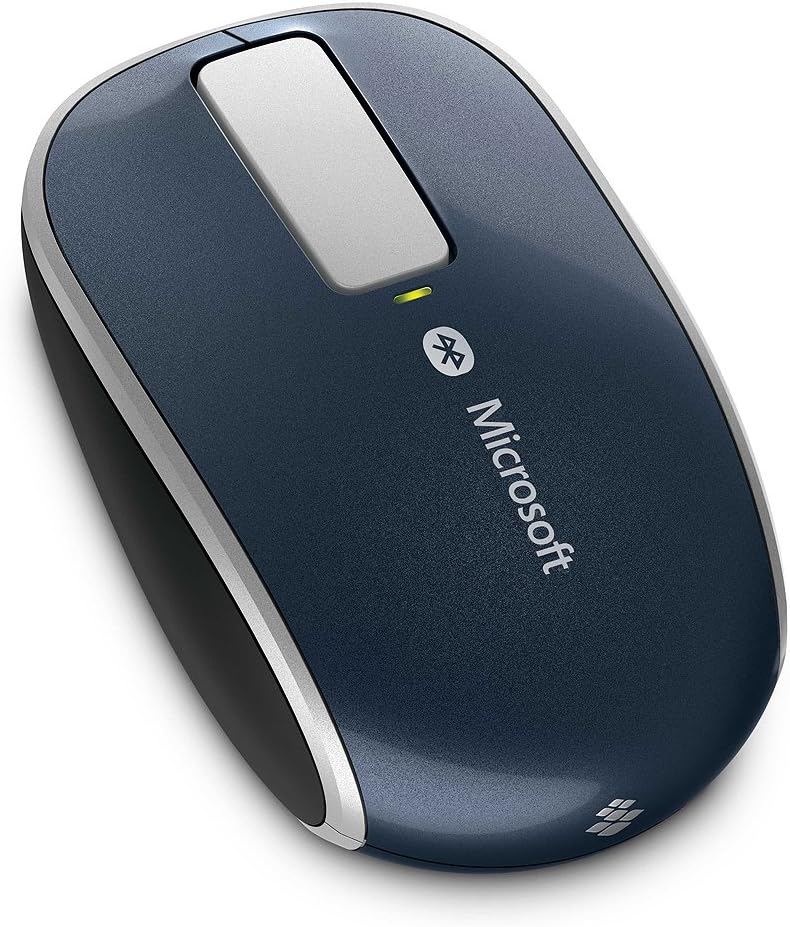
The Microsoft Sculpt Touch Bluetooth Mouse combines innovative 4-way touch scrolling with BlueTrack technology for precise tracking on virtually any surface. Designed for comfort and portability, it offers wireless Bluetooth connectivity without a dongle, three customizable buttons, and up to 9 months of battery lifeโmaking it the ideal productivity companion for Windows PCs and tablets.
| ASIN | B008OEHPPM |
| Additional Features | Wireless |
| Antenna Location | Tablets |
| Are Batteries Included | Yes |
| Are Batteries Required | Yes |
| Battery Average Life | 9 months |
| Best Sellers Rank | #2,670 in Computer Mice |
| Brand | Microsoft |
| Button Quantity | 3 |
| Color | Storm Gray |
| Compatible Devices | Laptop |
| Connectivity Technology | Bluetooth, USB, Wireless |
| Customer Reviews | 4.0 out of 5 stars 500 Reviews |
| Enclosure Material | Plastic |
| Global Trade Identification Number | 00885370359251 |
| Hand Orientation | Left, Right |
| Hardware Platform | PC, Tablet |
| Item Weight | 4.8 ounces |
| Manufacturer | Microsoft |
| Model Name | 6PL-00003 |
| Model Number | 6PL-00003 |
| Movement Detection | Optical |
| Movement Detection Technology | Optical |
| Number of Batteries | 2 AA batteries required. (included) |
| Number of Buttons | 3 |
| Operating System | Windows 7, Windows 8 |
| Power Source | Battery Powered |
| Range | feet |
| Special Feature | Wireless |
| Style Name | Modern |
| UPC | 803982729316 163120433339 021113066271 088021331259 885370359251 168141475610 132017754598 045555992752 012304216650 172302699883 611231535416 |
C**S
no clue what others are complaining about ... this is a quality mouse at a bargain price
I was very hesitant to order this mouse I was purdy hesitant to order most any bluetooth mouse ... they all seem to be somewhat poorly rated I had a Logitech V470 from a few years back ... I woulda simply bought another one, but they're like $70 ... not sure if I paid that for the first one ... but I didn't wanna pay it, now clearly, bluetooth mice are commanding a premium price over their "wireless" counterparts ... but jeez! I received this mouse, the packaging was very good ... even came with two genuine duracell batteries the battery cover came open easily, and shut smartly upon putting in the batteries, the mouse immediately came to life, and was broadcasting to pair I turned on bluetooth on my HP Slate 7 Extreme, and it immediately found the new mouse (it did display as a mac address, but with a mouse icon next to it) ... and paired as quick as I tapped "pair" from then on, the mouse worked exactly as ya'd expect ... it's optical, so I was using it on the arm of my la-z-boy I also plugged my HP into the TV about 12ft away, and the mouse was working as though it was wired the shape is very rounded, and isometric ... so, vs a V470, it felt a bit awkward ... but, it's clearly a "solid"/quality piece of equipment it has no scroll wheel ... if ya rely heavily on a scroll wheel, I'd recommend ya avoid this mouse in its place, it has that metal strip (in the pic) ... ya flick your finger across it ... it'll make a clicking sound reflecting how fast ya flicked, and how fast it'll scroll for the bit I played with it, it seemed like there was two scrolling speeds ... way too slow ... and way too fast ... obviously, it takes some practice to develop a finer touch but, for minimal scrolling, it gets the job done ... and the new tech is kinda cool ... someone who's never used an actual scroll wheel (can't imagine) might not have any issues with this, at all on my HP, I tried left/right scrolling, and it worked fine ... same as vertical ... not sure how much use I'd get outta it ... but it worked I considered taking off a star for the scroll wheel ... except, what's in its place gets the job done, and at thirty-ish dollars, it's simply not appropriate to dock a star for a matter of personal taste I wouldn't normally review an item with so many reviews already (don't see the point) ... but, with all the new Windows tablets out there, and people tryin to use em in desktop mode, a bluetooth mouse can be a real life-saver ... and otherwise spending $70-ish is kinda painful ... particularly after buying a new $300+ tablet
B**S
It works ok. Lacking a few features compared to it's non-Bluetooth cousin.
I have had the Microsoft Explorer Touch Mouse - Sangria Red for a number of years and liked it quite a bit, but when I got my new notebook USB ports became a little more scarce and I didn't want a dongle attached all the time (even though it's pretty tiny). So I got the similar Sculpt Touch Bluetooth version thinking it would have the same feature set and usability. Unfortunately the Sculpt Bluetooth version is different in a few ways. First, the shape is slightly different, it's a little bit smaller and the top portion is shaped differently but for me this wasn't a problem and the mouse still feels okay in the hand. The biggest difference though, and the thing I don't like about it, it that the the touch strip has only 2 functions: a scroll control and a center-click. With the Explorer version you had scroll and center-click but also 2 other button functions that could be assigned to one of many other functions through MS's mouse software. For me this gave me scroll, center-click, AND browser back AND browser forward. If the Sculpt supported those extra "buttons" it would be a five-star mouse but lacking that (and me being used to having those functions) it just becomes an only okay mouse. On it's own, and not comparing to the Explorer twin, it's decent. Battery life seems okay and connectivity is pretty consistent with only very occasional drops of the Bluetooth connection. Tracking on my desktop surface is also pretty reliable. Most people would be happy with the mouse. But ultimately this one ended up in the desk drawer and I'm using the Microsoft Sculpt Comfort Bluetooth Mouse (H3S-00003) ...it is Bluetooth, thereby getting rid of the dongle, and it has the ability to do browser back with a thumb swipe on the blue button (It's not as nice as the Explorer but it's close).
J**I
Right size and weight, reliable so far.
Got my new VAIO notebook recently, so the perspective of freeing one USB port by using Bluetooth mouse was very tempting. My favorite mice manufacturer Logitech recently neglected Bluetooth versions - last model you can still buy is over 5 years old and looks ugly/dated. I have tried cheap mice you can get at discount stores but their mechanical quality is abysmal - they fall apart after a couple of months. This one is perfect - not to small for my big hands and functions well so far. I may be a tad too heavy with standard batteries, but the weight is perfect when I installed Energizer Lithium AAs. The touch surface/button combo may require some adjustment if it is your first time, but I have used Arc Mouse and similar Logitech mouse before, so no problems for me. I really appreciate that mid-button click functionality is preserved (I missed it in most recent Logitech mice that use it to change the way scroll-wheel works). Please note that Bluetooth mouse usually takes a couple of seconds to re-connect when your computer wakes up after going to sleep or energy-saving mode. It is normal behavior and (unlike some cheap mice) this one always reconnects You can safely ignore software download if you do not want to change button assignments.Microsoft software for mice was always bloated, and this version is no different. One remark for Amazon - if you search for "bluetooth mouse" this one is not showing because it does not have 'bluetooth' in the name - it is a shame, because with Amazon prices it would be flying off the shelves... AFTER FOUR MONTHS OF USE: Still working and still on the initial set of lithium batteries. One accident - Windows update played hinky with the driver so I had to reinstall it. Other than that, the mouse works like new.
T**S
Very good bluetooth mouse - does take a bit to get used to
This is honestly one of the best Bluetooth mouse I have ever used. Granted there are many other better wireless mouse out there, but for Bluetooth variants, this is very much up there. This is my observation after using it for 3 days: What I like: Small, smooth action, tracks on all surfaces, virtually no moving parts, interesting tactile feedback on slide bar, excellent Bluetooth connectivity What I don't like: Heavy for its size, tactile feedback a bit too strong, metallic blue color doesn't match laptop, need to click on button to "wake" mouse after inactivity Another behavior of this mouse I find odd initially: when you scroll the mouse quickly, the mechanical tactile feedback will continue even after you lift your finger off the scroll bar, due to inertia scrolling. So if you scroll the page quickly and lift your finger off the mouse, the tactile feedback keeps on going and makes the "thump" sound all by itself, which is quite amusing... Overall I highly recommend this mouse, if you are looking for a Bluetooth on a Win 8 laptop/ultrabook.
P**T
Finicky touch strip; Limited customization options
INTRODUCTION I bought the Microsoft Sculpt Touch mouse as a replacement for another Bluetooth travel mouse, which died on a recent business trip. This previous mouse had served me well for several years, but with only left/right buttons and a scroll wheel, I was looking to upgrade to something with a more robust set of features. After a fair bit of research online and in stores, I settled on the Sculpt Touch. I like the traditional three-button mouse style, and plan to use this mouse primarily with Windows 7 (i.e. mouse-centric interface; not the Windows 8 touch-centric interface). At the same time, I've grown to enjoy the touch capabilities of the Apple mouse that came with my wife's iMac, as well as the gestures available on the touchpad for my Android tablet (on an external hardware keyboard). Therefore, this three-button mouse with a four-way touch strip seemed to be a perfect compromise. Additionally, looking back on my stable of old mice, I found that all of my favorites were Microsoft brand. Some came for free with computers. Some I purchased as aftermarket accessories. I hadn't sought out Microsoft mice, specifically, so I was surprised to realize that I had organically developed such a preference for one brand. Based on prior experience, the Microsoft branding gave me confidence that the Sculpt Touch would be a quality mouse product. REVIEW I've been using the Sculpt Touch for a few weeks now and, overall, I'm dissapointed in its behavior. The mouse does have some nice features, though, and may be a good fit for someone with different needs or preferences than my own. The following lists itemize the good and bad features of the Sculpt Touch mouse. Advantages: + Size / shape: As a travel mouse, the Sculpt Touch strikes a perfect balance of size, shape, and weight. The body of the mouse is large enough to use comfortably for extended periods (for reference, I wear an XL men's glove), yet flat enough to fit easily into my briefcase. The mouse body, itself, is extremely light. Most of its weight comes from the two AA batteries that power it. + Tracking: The "eyeball" tracks amazingly well on a variety of surfaces - better than any optical mouse that I've ever used. Even on our polished stone countertops, mouse movement is smooth and precise. Microsoft's BlueTrack technology lives up to its claims. Unfortunately, the Sculpt Touch as a larger list of negative features - some of which may be fixable with software updates, and others that are probably inherent in the hardware, itself. Disadvantages: - Insensitive touch strip: Effective scrolling with the touch strip is almost impossible due to the strip's low touch fidelity. Most importantly, it takes a LARGE finger movement to "activate" the touch strip to begin scrolling. Once scrolling has begun, fine-grained scrolling is possible, though nowhere as precisely as with an Apple mouse, for example. If there was a way to increase the initial sensitivity to allow scrolling without such a big finger swipe, I'd give this mouse another star. In its current state, however, this one limitation is enough for me to recommend against purchasing this mouse. - No back/forward horizontal swipe: The Microsoft Mouse and Keyboard Center software that allows you to customize the mouse's behavior does not allow assigning browser back/forward commands to the horizontal swipe gestures. You can assign these commands to the left/right/middle buttons, but not to the horizontal swipe events - which effectively means that there are no back/forward browser capabilities. You can't realistically assign the back/forward commands to the three primary buttons without impacting basic browser functionality. The horizontal gestures are, in my opinion, the obvious place to allow this customization. Hopefully a future software update will allow this option. (Alternatively, it would be nice to use the Page Up / Page Down features of the touch strip to perform back / forward commands but, unfortunately, those capabilities are hardwired; see below.) - Awkward middle button: The touch strip also functions as a physical button, which you can click by pressing on it. Interestingly, it actually serves as three buttons, depending on where your finger is located when you click it: Tip = Page Up, Middle = Middle Click, Bottom = Page Down. This is a potentially useful feature, except that you cannot customize which area of strip serves as which type of click. Specifically, I use the middle button orders of magnitude more frequently than either the Page Up / Page Down buttons - and the middle click location is an odd place to reach with my finger. Additionally, there is no physical indicator of where the "middle" of the touch strip is, like there is for the "F" and "J" keys on most keyboards, for example. From years of using other mice, it seems natural to click the tip, rather than the middle, of this long touch strip. Unfortunately, the tip/bottom are hardwired to serve as Page Up / Page Down buttons, so I'm stuck curling my finger to reach the amorphous middle area of the touch strip for middle clicks. In fact, it's so odd that I've switched from using my middle finger to using my index finger to perform middle clicks. - Hardwired Page Up / Page Down buttons: As mentioned previously, the Page Up / Page Down features of the touch strip are hardwired. You cannot choose which area of the touch strip performs which function and, strangely, you cannot assign other features to these two areas. By comparison, you can assign any of several dozen commands to the middle/left/right buttons - but the behavior for these three buttons are so standardized across operating systems and applications that I suspect most people would never choose to customize them (myself included). It seems obvious that the "extra" buttons on this mouse would be customizable, but they are not. SUMMARY To summarize, I would not recommend the Sculpt Touch mouse, based on its low fidelity touch strip and limited software customization options. Hopefully, Microsoft will address the latter issue with a future release of its Microsoft Mouse and Keyboard Center software. If I had to do it again, I would choose a mouse with a physical scroll wheel and physical back / forward browser buttons. In fact, I may do that, anyway, depending on whether I become more comfortable or more annoyed after working with the Sculpt Touch in the coming months.
B**S
Gr8 mouse
i bought this mouse on the 5th of April got it today actually a little later than i had hoped mouse feels a little small possibly cuz I've been using a bigger mouse for about 3+ weeks before this came so just need to readjust ** mouse feels normal now readjustment period was short :D its a bit more compact the the Logitech anywhere mouse MX. setup was easy and the mouse tracks like its supposed to very accurately ++ the touch strip is cool not that i have gotten used to it it does have one or 2 faults one fault is it can sometimes not register you touches / swipes second fault is to me scrolling is not so smooth but that's because windows scrolls to the setting i have under mouse 6 lines ... MS could fix smoothness by a software update its not the mouse itself is software the good about scrolling is when the mouse registers touches and flicks its responsive which is about 90% of the time there are one or two moments where u may try to scroll and either u did not touch the touch strip or it failed to register your touch. the mouse vibrates when you are scrolling its a hap-tic feed back feature at first it felt fake but not that i've been using it for a few weeks it feels like a regular scroll wheel except when u do a flick then it feels fake since it keeps vibrating until you touch the strip or it stops lol. i would leave it @ default if u don't like it id recommend vibration level 1 its soft and you know you are scrolling the mouse fell of my pc once meaning it was not working like if it lost its paring i think it was windows 8 on my computer acting up so i repaired it to my system also there is lag when ever i have my phones near the mouse or it could be a laptop issue it happens in weird places and also the same places so i'm guessing it has interference in those places i get the issue ******* UPDATE ******* its windows 8 and the Intel drivers that caused the dropping off / lagging issue so an update should fix that not a mouse issue** other than the little quirks im 100% happy most if any issues can be fixed by turning off the mouse n back on tracking is excellent on par with my old Logitech anywhere mouse mx that the left click button stopped working on. it has rubber grips on the side so it wont slip and feels nice to hold ps i like the blue light :P ++ it came with batteries.
J**J
Yoga issue (resolved - sort of)
Let me preface this by letting you know that I have 15 years in IT. That said, this is (most likely) not a PEBKAC issue =) I am running a Lenovo Yoga with Windows 8 Pro and the latest Microsoft drivers. Paired this mouse easily with the Yoga and started pointing and clicking away with no issues. After a few minutes the mouse would randomly start lagging and jerking as I moved the cursor - to the point where it was unusable. When I re-paired and power cycled it occasionally gets back into working order, only to have the same behavior randomly start up again after a minute or three of use. I've searched the web-o-sphere for similar complaints but have found very few so I may have a lemon. That said, the one I do have is garbage. Edit: After further review there is a setting for the Yoga in device manager that needs to be modified to fix the aforementioned issue. Go to device manager -> Bluetooth -> RTL8723A 4.0 + High Speed Chip -> Properties -> Power Management and de-select "Allow the computer to turn off this device to save power". That will do the trick. Given this fix, the mouse is fairly good. It paired easily and lets you point, click, and scroll. Edit: The setting fix did help a bit, but I did still get disconnected a few times per day - which was not acceptable. I since returned this mouse and got a Logitech T400. I have to live with the (small) receiver dongle, but it FAR surpasses the Microsoft Touch. It never disconnects and the touch scroll is much much cleaner and responsive.
Z**Z
Works surprisingly well!
APPEARANCE & FEEL The mouse is actually quite attractive. It's more of a grey than a blueish grey as shown in the photograph. It's all a shiny, glittery kind of plastic...nothing too special. The sides are a comfortable rubberized plastic. I'd say the mouse is a bit too flat and compact for my liking. I had to get used to having the scroll "wheel" so far down and it would have been nice if the entire body were more curved and tall. USING IT Same good BlueTrack goodness that we're used to. The mouse works well on glass, marble, and carpet (which I'm using right now). As I mentioned earlier, the scroll strip feels a bit low. Despite that, I was pleasantly surprised at how well it felt. On Mac, it operated with fluid scrolling action similar to a Magic Mouse. On PC, it moved at line intervals (not as fluid and pretty, but still functional). I used the driver utility to set the vibration to low--this made the mouse feel less jerky as I scrolled. The inertial scrolling is like the wheel momentum of the Logitech M325 Web Mouse but without the physical wheel. You don't need to firmly press on the strip to scroll, but it won't detect a mere graze; your finger has to be at least sliding on the surface. I needed four-way scrolling for use in Adobe CS (which works very decently with this mouse) and usually use a Mighty Mouse. The Mighty Mouse's scroll ball got all messy and stopped working, so I replaced it with this. While it would have been nicer to have a larger touch surface, like on the Magic Mouse, for horizontal scrolling, the Sculpt Touch is perfect for my uses. And, it looks cool!
Trustpilot
1 month ago
3 weeks ago