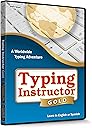
⌨️ Level up your typing game—because your keyboard deserves a world tour!
Typing Instructor Gold is a dynamic typing software designed for kids and adults, featuring 36 global-themed destinations and over 20 skill-based lesson plans. It combines educational rigor aligned with national standards and engaging arcade-style games to improve typing speed and accuracy. With a motivating passport-stamp reward system and flexible practice options, it transforms typing mastery into an immersive, fun adventure.


| ASIN | B07NLJVKJK |
| Best Sellers Rank | #438 in Software ( See Top 100 in Software ) #7 in Typing Instruction |
| Customer Reviews | 4.2 4.2 out of 5 stars (137) |
| Date First Available | March 20, 2019 |
| Is Discontinued By Manufacturer | No |
| Item model number | EVM TIG |
| Manufacturer | Individual Software |
| Manufacturer recommended age | 12 months and up |
| Product Dimensions | 0.56 x 5.31 x 7.5 inches; 2.89 ounces |
D**H
Great typing instruction!
This typing instruction DVD is super retro, but it sure does the trick! I love that in addition to key practice, you can play games that give you practice to type faster. My kids actually got into it a little, and I think their typing improved over the summer. I got stickers for the keyboard to go along with it, and it worked really well. Very happy with my purchase.
N**4
As Advertised - Good Product
I bought this program for my 8 year old daughter, and I've been very impressed at the user friendliness of the program. More importantly, her typing skills have vastly improved in just six months of use. She uses it about 30-45 minutes a day - the games are fun and indirectly force the user to type faster for higher scores. I highly recommend this software for anyone trying to supplement today's heavy reliance on technology in the classroom, and especially for schools that don't offer typing classes. I'm not sure she would have done well with it prior to age 8 - her hands would have been too small and attention span too short.
C**E
Easy to use and understand
Very useful
M**N
Super Frustrating At First, but Tech Support Came Through To Help!
First of all, the programs are great, after you get them installed. But, I had a great deal of trouble with this. I emailed tech support, sharing that I was very upset about the whole experience. I'm pretty sure I dropped the ball on my end, and didn't follow through with the email conversations. I'm from that generation when you could pick up the phone, make a call, and get stuff fixed right away. Now, it's all done with email, which can be frustrating. But, the lead tech guy, Jerry Galindo called me on his day off, and took a half hour to help with getting this straightened out. He stayed on the phone till both programs were downloaded, activated, and working perfectly. What was happening was that my McAfee program was deleting the typing programs before the activation was completed. So, if you see another review, from an angry guy, it was me, so just ignore it. Jerry remoted into my computer and installed both the kids and adult versions of this. I really appreciate that! Thanks Jerry!
H**T
Update--Couldn't install on Win 10 and no response for customer service
Update: I visited this weekend and got it installed. Still frustrated with no response from the developer. However, my friend loves it so far. I had searched on ways to install if one is the admin yet Win10 required one to logon as one. We were! One solution I read many times was going into the command line and doing a few things. Didn't work. Was forbidden. Another thing was equally useless. I did find a suggestion for turning on Developer Mode. So I did. It worked. Microsoft should be ashamed. When I turned it on I got warning that installing software could be damaging to the computer. WHAT!!! (Aside: My own Win 10 machine after a crash and rebuild now periodically is demanding I do everything on Microsoft's cloud. I still haven't figured out how to stop that.) Anyway, if you're trying to install this or any software on your Win10 computer and are being told to contact an administrator even though you are it, try turning on Developer Mode: Settings > Update & Security > For Developers and select “Developer mode” Original: (Dislike? Can't install. It was gift for someone a couple of hours away. Finally got there to give it and it wouldn't install because of "administrator." She's the admin. Nothing out there from Microsoft what to do. (Some command line stuff) I'm not sure the next time I'll be there. Maybe next weekend. I wrote to customer service the day I brought it down (a couple of weeks ago) and nothing back. It would have been nice to have some tips from them before I return. Otherwise I've wasted money on a useless product.)
A**A
Fun easy program
This is a very easy program to use, even my five year old child loves using it. I had originally purchased this for my 8 year old, but my five year old quickly caught on. It has fun games that keep her wanting to keep typing.
S**E
Fantastic Customer Service
Fantastic product and customer service! I use this product for our homeschool which Switched on Schoolhouse recommends! Great for ages 8 and up.
A**N
Activation code don’t work
Activation code don’t work!
A**R
Great value for the money
Excellent way to help you improve your typing skills
Z**L
OUTDATED INTERFACE
This typing instructor is outdated interface and graphics, it looks like it’s not been updated since long. There are technical difficulties with this software of crashing again and again, which is frustrating. Though, lessons are bit of advance level.
S**R
Outdated technology
After I ordered it I found an online resource called Typesy which did a lot better job, with a possibility of multiple users which was very beneficial to me.
B**L
Ability to have ultiple users
Good program with numeric practice for both 10key, numeric key pad and symbols.
A**R
Works with windows 10. Others are cheaper but do not work with windows 10 be warned .
Great program. Now I know I can’t type but.... now there’s hope!
Trustpilot
2 days ago
1 month ago