Desertcart purchases this item on your behalf and handles shipping, customs, and support to SINGAPORE.
🎨 Elevate your digital canvas—create anywhere, create like a pro!
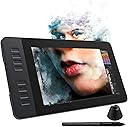
The GAOMON PD1161 is an 11.6-inch portable drawing tablet featuring a Full HD IPS screen with anti-glare film, 8192 levels of pen pressure sensitivity with tilt support, and 8 customizable shortcut keys. It includes a battery-free pen with 8 replacement nibs and connects via HDMI and USB to Windows, Mac, or Chromebook devices. Designed for students, professionals, and creators, it supports a wide range of creative software and is ideal for digital drawing, animation, and online collaboration.


| ASIN | B07VTKYH9D |
| Active Surface Area | 11.6'' |
| Additional Features | 8 Express Keys, Portable & Lightweight |
| Best Sellers Rank | #116 in Computer Graphics Tablets |
| Brand | GAOMON |
| Built-In Media | 3-in-1 Cable & US STD Power Plug, Digital Pen, GAOMON PD1161 Pen Display Tablet with AG Film Pre-applied, Glove, Pen Holder with 8 Pen Nibs |
| Color | Black |
| Compatible Devices | Mac OS, Windows OS |
| Connectivity Technology | HDMI , USB |
| Customer Reviews | 4.3 out of 5 stars 2,029 Reviews |
| Display Type | IPS |
| Item Dimensions L x W | 14.21"L x 7.87"W |
| Item Weight | 866 g |
| Manufacturer | GAOMON TECHNOLOGY CORPORATION |
| Mfr Part Number | A2.PD1161-0-EN0000-1-US |
| Model Name | GAOMON PD1161 Pen Display |
| Model Number | A2.PD1161-0-EN0000-1-US |
| Native Resolution | 1920x1080 |
| Number of Items | 1 |
| Operating System | Windows |
| Pressure Sensitivity | 8192 levels |
| Screen Size | 11.6 inches |
| Special Feature | 8 Express Keys, Portable & Lightweight |
| Specific Uses For Product | Drawing, E-Signature, Painting |
| Target Audience | Student, Teacher |
C**_
Pretty good for my first display tablet (read full review)
I'm not sure if this drawing tablet was worth its price, but it's definitely not a bad one (I haven't tried out other models/brands, so I don't know how this one compares). I wish the screen were higher definition, but that might be just my problem since I have a bad habit of drawing small rather than zooming in... (Also, my fault for expecting iPad quality, obviously it's not going to live up to that!) I noticed the color accuracy was a bit off, but it was an easy adjustment to make thanks to the tablet's easy-to-navigate system settings. Another issue I ran into was the pen being a little off from where my mouse was, but again, easy fix with screen calibration! This tablet in general takes some getting used to, and you have to spend some time figuring out how to customize it to be comfortable. However, for my first pen display tablet, the functionality is 100% fine, and I like how it came with a glove, pen stand, extra nibs, and a tablet case and stand. That made it worth the extra dollars, I think. I love the paper-like texture and buttons on the side. I've used GAOMON before for my previous non-display tablet, so I might be biased. Honestly, I really like this tablet despite some other reviews saying it's not the best. I myself was on the fence about whether or not I should purchase it since the ratings seemed mixed, but I find it neat. Overall, would recommend. P.S. In my opinion, it works best when you set it as an extended display instead of mirrored. You can have a movie, reference, and chat open all while drawing, which is perfect for someone with an abysmal attention span like me!
C**D
Generally Great All Around Minus a Couple Quality of Life Quirks
I got this tablet on sale for about $300 USD in December 2020 and so far it's been a good purchase. This has been my first dedicated Pen Display tablet, although I've worked with Wacom Bamboo and Intuos Pro M and I can't tell the difference in term of input reading for the pen of either motion pickup or pressure sensitivity. I'm going to mainly be comparing it to those two tablets are a user who has made the leap from non-display graphics tablets to GAOMON pd156 Pro display drawing tablet. The display itself can be pretty bright, especially in a dark room, although I probably need to play with the hardware settings a little more. The shortcut buttons, in my opinion, are a step up from the Bamboo and Intuos Pro because they're very distinctly clicky with no annoying "half-press" that Wacom tablet buttons have as a result of the Wacom touch sensitivity on their tablets' buttons, the pd156 PRO buttons are strictly PRESSED/NOT PRESSED in function, which I didn't think I'd have to praise but it was a genuinely frustrating feature that couldn't be disabled on the Intuos. There is also an extra shortcut button available which has proven redundant at worst and highly convenient at best (with the second extra button being reserved for tablet monitor settings). The pd156 PRO also has, in my opinion, a more intuitive radial wheel button as it does not utilize touch sensitivity and instead opts for a simpler analog scheme wheel. It functions identically to other radial wheel buttons with the scheme of: Press interior button to cycle through customizable functions -> rotate wheel up or down to activate the function with each partial turn. As of now, there is only 3 customizable up/down function slots for the wheel button, for a technical total of 6 function slots. The stand is nice and made of sturdy materials, although it could be better as it just operates like a kickstand and a board. I've seen other stands that have a more complicated and customizable configuration, but if you're a stickler for stands, you've likely bought a specialized one anyway. The wire plugin for the tablet is also very stable, meaning you're unlikely to accidently knock it loose. To my knowledge, the tablet is exclusively wired. The pen is mostly a step down from the Wacom pens I've used. Its design is totally straight and cylindrical, which I have no real issue with, but if you find yourself needing that extra rubber padding or curvier design for a steadier grip then you're currently out of luck. There is no eraser on the pen, meaning you'll have to depend on your shortcut buttons or some other custom action if you have need of quickly accessing the erase function. Most importantly, the pressure sensor for the pen is located slightly farther up into the pen than the Wacom pens I've used, meaning that tilting actions and grip techniques are going to have less freedom at sharper angles, which is especially important to me when I'm in the zone drawing, tilt my pen at those sharper angles, and suddenly find that the cursor doesn't line up with the pen nib, instead lining up with where it is seated inside the pen, or even the plastic of the pen bumping into the display. My suggestion would be to either somehow extend the nib seating forward, or make longer or more projected nib seating in the pen. The driver software is also a minor step down from Wacom as it only provides two pips on the pressure sensitivity graph, where I believe Wacom supported at least 5, meaning that the pd156 PRO only supports a quadratic formula for pen pressure natively through the driver config, although this shouldn't be a dealbreaker as almost all drawing software has built-in pressure sensitivity options. The driver has also been upgraded in major ways several time since I purchased to improve stability and majorly any decrease software issues. The customer service was quick, friendly, and lenient. I had experienced a glitch in my pen causing it to continue drawing as I lifted it off the tablet, which the support representative informed me that it was probably because I dropped the pen, which had happened. Me dropping the pen should have voided the warranty, but they were nice enough to send me another pen free of charge after I provided proof of the issue. For its price of $350 , size (15.6 inch) , usability, comfort, customer service, and lack of major issues, I would definitely suggest this as a nice display tablet, especially for beginner and intermediate users.
E**Y
Good for beginners on a budget
This is my second Gaomon touch screen tablet, so it hurts my heart to say that I’m not thoroughly impressed with this one. I went from the 21-inch tablet to the 11-inch for sake of mobility (the 21in didn’t fit into my airplane carry on), and the change is pretty drastic. My two biggest grievances with the smaller tablet are as follow: 1) Parallax. I know it see it mentioned in other reviews, and quite honestly, I see why. The cursor is often 3 or 4 millimeters to the left of my pen, which isn’t a big deal in the grand scheme of the universe, but in my small universe it feels awfully large. I’ve adjusted for the parallax by switching the resolution on my Mac and tampering with the settings on the tablet directly. 2) The cables. If you don’t mind tripping over cables every five seconds, then this won’t be a problem. I thought I was getting away from the umbilical cord that plagued the 21in tablet, but this one is exactly the same. I know Wacom tablets are way out of my budget, but the cable situation on these tablets is enough to make me want to swan dive into debt. I’ll finish this review by saying that this tablet is not a bad choice for artists getting a foothold into screen tablets. It gets the job done and the flash sales on Amazon are a major plus. If you’re looking for a tablet with a Bluetooth feature and significantly less cables, I encourage you to look elsewhere.
A**.
Nice for the price
A nice tablet for the price. I have it set up for left hand use--all the buttons on the right side--and it works very well. I'm a beginner artist and don't have extensive tool needs (yet), so this is working well for me at the moment. I haven't fiddled with the color menus--it's a little finicky in the settings--and it does seem to be off compared to my laptop monitor, but it's not the fault of the tablet. I simply haven't taken the time to really hone it in yet. It's fairly plug and play, with just a little tweaking necessary in setup to calibrate the screen. Figuring out how to flip it for left hand use took some figuring out, but it can be done. All in all I'm satisfied with the tablet, and am enjoying using it.
T**A
Amazing tablet for it's affordable price
I have had this tablet for well over a year now and it is probably one of my favourites! I cannot recommend it enough, especially if you are on a budget. Fits nicely in my desk area - not too big, not too small. Very light and comes with a leather case if you happen to travel - I don't, but it's still useful. Pressure sensitivity is awesome. Only issue I've ever had is with magma, but I that isn't really the fault of the tablet. Not everything will be compatible and that's alright. You can export your tablet settings too if you happen to move computers. It has never lagged, drawing feels smooth always and the screen has a paper-ish texture that makes it really comfortable to draw on. The only downsides I think is one button at the bottom doesn't seem to bind to anything and the wheel/button area seems to get dirty very easily, and is hard to clean. Sometimes the parallax messes up but it's easily fixed by lifting the pen away and repositioning. These issues are really easy to look past in my opinion because of the price - it's very worth it! Try not to get your cable damages though, as the replacement is much shorter than the original. My rabbit chewed my original, lol. But it still works great and customer service is very helpful on the chance you do run into issues.
S**X
Extremely Disappointed
I was so, so excited to find this quality of tablet for the price that it was when I ordered it. It has lovely reviews, is highly rated- It seemed like a steal! However, I was extremely disappointed when it arrived & I tried to use it. I read & followed what little instructions it came with to the last period. I installed the correct program, plugged it in correctly, did everything right. And it just wouldn't work. The screen would come on & duplicate my laptop screen, but the programming would not recognize the device. I spent between 1 & 2 hours of troubleshooting. I tried uninstalling, reinstalling, turning my computer off & back on, changing ports, using different cords... nothing. I even had one of my coworkers try it on his computer! His computer would sort of recognize the tablet, but would not duplicate his screen, the pen would not calibrate, and it was extremely laggy. I tried to utilize the live chat on the company Gaomon website, only to receive a message that they were not available during weekend hours. At 11am on a Friday. After some deeper digging online, I found several reviews on other websites experiencing the same problem. Many of them mentioning that the company itself offered little to no help when they were eventually able to get ahold of some form of customer service. I'm over it. I've already sent it to be returned & will be looking for a different tablet. --- If you do want to try it out though, it seemed like a solid, well made tablet. It had some weight to it, had a decent screen, and came with a light faux leather screen cover. However, the power cord setup is really awkward & short. If you don't have a desktop outlet or power strip, you're probably going to struggle with finding a comfortable position to actually use it.
K**T
PLEASE read before purchase!
I hate seeing this product suffer from customer mistakes. This is truly an amazing product and these reviews are just completely unfair. For the past 5 years, I’ve been using a Huion h610pro but a few weeks ago- it finally gave out. I’ve been wanting an on-screen tablet for a while but I don’t have the funds nor room for an expensive $600 tablet and this seemed like the perfect buy. When I opened the tablet box- everything seemed normal. Setting up the tablet cables was quite difficult but I got it completely in just about 10 minutes. I set up the drivers and assumed everything would be just fine. However, when I went to use the tablet with the pen- it didn’t work. The screen was on but it wasn’t responding to the pen. I clicked on the driver's app- and saw everything was greyed out. I deleted and redownloaded the driver a good 4 times before realizing the issue. The HDMI and USB cords weren't fully in. This seems to be a common issue with people saying the drivers don’t work and I wish people would just… use some common sense and look at the Gaomon help center instead of saying it’s broken. The drivers work. I promise you. This product does not come with a stand- so I’d suggest either using it flat on the tablet (which works best for me) or buying an appropriately sized computer stand if you need one. It’s NOT a stand-alone product. Please DO NOT give this product a bad rating just because you don’t know how graphic tablets work. It doesn’t come with an art/ illustration tool (like Sai, Clip Studio…) and I don’t see why it would. If that’s what you want, spend the $1,000 on an iPad pro. The tablet itself is rather compact- easy for packing away. There are 3 long cords you will have to manage with though. The HDMI and USB plugins on the tablet are on the right while my computer's plugins are on the left. If I was left-handed this wouldn’t be an issue as I could just turn the tablet around. For me though, as a right-handed person- this means that 2 very thick cords will be up against my leg for however long I plan to sit at the desk. I do have 2 cons though. Color correction. It took 20 minutes just to get a similar color match to my computer. The menu setting was quite difficult to figure out at first. Monitor collaboration. I don’t know if I’m just doing it wrong- but the pen is always just... Slightly off. It’s not a huge deal- I can manage- but it can be quite annoying to deal with- especially in small areas.
C**A
HEED MY WARNING !!
GAOMON PD1161 What you need to know about this tablet~ It arrived really quickly and was pretty good for its size. Was nicely packaged. To hook it to your computer you need an HDMI input as well as only one free USB port, along included US STD power adapter. Installing was simple and Easy. The screen itself can feel really nice and responsive when drawing on it. Has 8 buttons you can program. The pen feels very comfy in your hands and needs no charge! Which is really the best thing an Artist could ask for. It is very sensitive to the screen and feels natural when drawing. I've tried a lot of other programs for example; Clip Studio Paint which is my main , Paint Tool Sai , Photoshop , medibang and Tv Paint Pro which is a good combination if your an animator and the key buttons will help a ton. The Tablet itself is able to do a duplicated or Extended MODE which is really handy when you need to look up a reference or just switch a program to appear in the tablet and have easier access. Only issues I've had with it so far is the pen not drawing exactly where I aim but with the monitor calibration I can easily adjust it which is an easy fix. The Tablet doesn't have a stand , though since I enjoyed it so far I'll most likely buy a stand for it! I would recommend this to anyone just starting graphic drawing or wanting to upgrade. Be that artist that see's exactly what they are drawing on screen. The size itself is perfect for taking it around to places or visiting friends. For its price its really not bad. An Amazing purchase! Hope this helps you out !
S**A
GAOMON PD1161, An Efficient skilled tablet for designers n illustrators.
WOW, excellent tablet, it works excellently on photoshop as well as Affinity designer. I am grateful to Google, Amazon n GAOMON for all the services they r providing wt clear transparency n of course for the videos posted by GAOMON in You Tube n googling it to find out how to set n use the tablet in Google. Thank u God bless 🌹🌹🌹🙏🙏🙏💜💜🙌🙌
F**D
Fantastic to use
Ease of use. Excellent light and transportable
G**I
Amazing
Love it, good for beginners! P.s little bit laggy pen on edges but adaptable. Not an issue
L**S
Very good for the price
For reference I have used Wacom, XPPen, Huion and Gaomon, this one works pretty well for its price. I use keyboards so the buttons really don't matter to me, but the roller is definitely less reactive than Xppen's, So if you like using the roller for zoomin/out or buttons on the tablet I'd suggest to buy Xppen. This one is also very very light compared to other 15.6 inches on the market. I mainly bought this bc it's so light I can easily move it since I don't always want it on my desk. The pen works fine, I like the mechanical pencil-like feeling of it. Pen is also very light, doesn't sweat u out or make ur muscle sore for holding for too long. For the price I'd say it's worth it, good for beginners!!
B**S
Muito bom
Muito boa. Chegou em perfeito estado e a mesa é maravilhosa. O tamanho é basicamente o de um tablet, e a textura é maravilhosa. Única coisa que eu falaria é que os botões não são tão gostosos de apertar, mas eles funcionam perfeitamente
Trustpilot
2 months ago
3 days ago