📈 Elevate your financial game with the pro’s choice calculator!
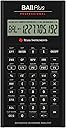
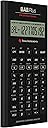
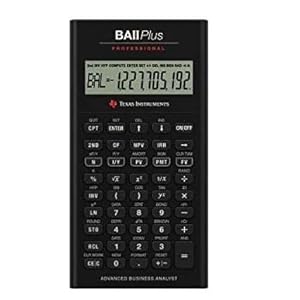
The Texas Instruments BA II Plus Professional is a top-tier financial calculator designed for business and finance professionals. It offers advanced time-value-of-money functions, comprehensive cash flow analysis, and key financial metrics like NPV, IRR, and payback calculations. Built with a rugged metal exterior and user-friendly interface, it’s ideal for CFA candidates, finance students, and professionals seeking reliable, exam-approved performance with extended battery life.


| ASIN | B0001EMLZW |
| Best Sellers Rank | #3,117 in Office Products ( See Top 100 in Office Products ) #3 in Financial & Business Office Calculators |
| Brand | Texas Instruments |
| Calculator Type | Engineering/Scientific |
| Color | Black |
| Compatible Devices | Calculator |
| Customer Reviews | 4.4 out of 5 stars 5,876 Reviews |
| Display Type | LCD |
| Enclosure Material | Metal |
| Global Trade Identification Number | 00033317192045, 03243480104807 |
| Item Dimensions L x W | 6.14"L x 3.17"W |
| Item Weight | 6 ounces |
| Manufacturer | Texas Instruments |
| Model Name | BA II Plus Professional |
| Number of Batteries | 1 CR123A batteries required. (included) |
| Power Source | Battery Powered |
| Screen Size | 3 |
| UPC | 033317192045 |
| Unit Count | 1.0 Count |
| Warranty Description | 1 year Manufacturer |
A**R
With a few minor changes, the best financial unit ever made
This is my first ever review of any product. I own a lot of calculators. Mostly HPs (12C, 10B, 48GX, 49G+, 50G), a few Casios, Sharps, other specialized types. This is my first TI and it is a real nice piece of work. In a nutshell, this is one spectacular business calculator. It looks good, feature rich (I can't think of anything I would want that it doesn't have), interesting interface. A total winner. I ordered on June 5, 2007. It arrived June 12th. About $35 w/free shipping. I won't compare it with the HP12C. Have had the 12C for a long time. Always loved it. Faster, slower? Po-tAto, Po-tato. With all the good things about this calculator, there are just a few things I'd change or add to it. There are three glaring flaws that I can't believe they forgot. 1) No equivalent to the "EEX" key on the 12C. Or at least a "000" key that allows entry of thousands, millions, ... with one button press. This is a very annoying ommission for me. Keying in 3, 6, or more zeros is a real pain in the arse. This is an absolute must have feature. 2) A calculator with trig functions and no "PI" key? Duh! 3) No slide off hard cover? Very, very bad move. Maybe a two line display would be nice. But I won't lose any sleep over that. The rest for me is just key placement. Moving from upper right to lower left for power and clear? These keys are nearly always near each other. The "CE/C" and back arrow key also on opposite extremes. They should be clustered closer together. The on/off key should also be a shifted key to avoid accidentally keying it when unit's in a pocket, or by a stray key press when working. One should have to take deliberate action to turn the calculator on or off. Matter of fact, you should have to "hold" the shift key and press the on/off key to turn the unit off. The unit should also have the option (in setup) of using "continuous memory" or not. [Meaning when you manually shut the unit off, it comes back on where you left it, rather than clearing] So, I would move the backspace key up one and make the "on/off" shifted above it. Then I would move the "CE/C" key where the backspace key is now. Move the "CLR WORK" key with the "CE/C" key. Then all the clear keys would be together. Now, where should that "PI" key go? How about shifted above the square root key? Then I would move the reciprocal ("1/X") key to the shifted position and make that key either an "EEX" or "000" key. Now there would be an extra key left where the "CE/C" key was in the lower left corner. How about a "TIME" key? This calculator is nice enough that it should know what the time and date are. Yes? Matter of fact, it should be one of those self setting atomic types! Maybe a timer too. Does the equals ("=") key need to be two (2) keys high? No big deal either way. (But no, it doesn't! Move +, -, X, / down one! Hmm. Another extra key. Maybe that could be where the "EEX" could go.) Last request would be in the display options. On most HP scientific calculators, there is something they call "engineering notation". Basically it is "scientific notation" but grouped in multiples of (3). You know, kilo (E3), mega (E6), giga (E9), ... Has no one thought that this is also "money notation" too? Thousands, Million, Billions, ... Like some annual reports list "(in Thousands)"? Once in awhile a body might want to display like that too (Maybe a letter in the "indicators" along the top could be used. The "T" and "M" in "COMPUTE" could indicate thousands and millions? The "B" in "BGN" for billions?) For me, this calculator, with these few changes, would easily be the new "world standard" for business calculators. And the trig functions are a nice touch too.
J**2
Better than the regular BA 2 plus but still flawed
I own both this and the regular BA 2 plus. They have the same functionality but the build quality on this model is much better in every respect in which they differ. Both models share the same weaknesses, though. Strengths: * Allowed on the CFA exam and in many finance classes. This is the real reason for its use * Has most finance-related functions you would need reasonably handily available * An alternative to the ubiquitous HP 12C * Has both chain and algebraic mode. Chain mode calculates everything up to now immediately, so 2+3*5 = 25. It also has algebraic mode, which would give you 2+3*5=17. Some people like one way and some like another. I'm glad they provided both. Personally I use algebraic mode but you have to get used to it. Weaknesses: * The biggest weakness in both this and the regular BA 2 plus is their decision about key presses. You CANNOT press a key until you have completely released the previous key or it will not register. This leads to big problems if you are typing fast on it. You really have to use the same finger for all keys you press or some of your key presses will not register. You may think this is a small problem because this is how many people use a calculator. However, the BA 2 plus has many important functions that you can only get to by pressing "2nd" and then the key. It would be very desirable to be able to press second with one hand and the key with another. I can't tell you how many errors this has caused for me. I think TI had to implement this on purpose, so I have to blame their engineering and/or design department. The HP does not have this failing. * Screen construction. The plastic over the screen is really, really thin and in contact with the LCD. This means a very gentle touch will turn your LCD black or put crazy designs on it. This is problematic since this calculator only provides a soft case and the screen is not recessed, so the screen WILL get pressure applied at times. No need to make things so delicate, TI. * Friction with the table. The regular BA 2 plus has no friction between it and the table so as you type, your calculator will move around. Awful. This pro model has two small rubber bumps at the top of the calculator but the bumps at the bottom are plastic with no friction. This means the calculator has a tendency to rotate as you use it. I don't know why TI didn't just use rubber at the bottom like they used it at the top. * Interface design. This is not the worst design in the world, but it does seem like the guys at TI could have put more thought into which functions are frequently used in finance. For example, you must press "2nd" in order to use the exponential function. That's a very common function in finance! They made really obscure functions like inverse hyperbolic cosine as easily available as really basic and important stuff. Another example of a poor decision: it takes multiple keystrokes to clear basic items like the values stored in the time-value-of-money spreadsheet or the memory locations. Why make these commonly used key so obscure. What TI really needs to do is video people actually using this calculator on the CFA and in classes and see which keys get used. Make them easy, preferably one keystroke. Bury things that are *never* used in a menu or something. Neutral comments: * Some people say the keys require a lot of pressure to press. This is true but it's also true of the HP and generally, I think, a fine choice. They could have made them more gentle, but these positively click, so you really know when you have pressed them. You won't accidentally press wrong keys. I think it's fine. Anyway all three main financial calculators (HP 12C, BA 2 plus, BA 2 plus pro) have high pressure keys.
P**Z
Great Calculator for CFA
Excellent calculator for level 1 of CFA, came in perfect condition (packaging) when compared to the standard BA II Plus (could have been bad luck on my end back then, either way was just the packaging), nevertheless both are almost identical in terms of the functions available. This one just has firmer buttons which for some can be good and others may prefer the standard BA II Plus.
G**E
It is small in my opinion
Bought for a friend and it worked really well for my their classes
A**N
Good calculator but I don't like the buttons.
I purchased this calculator for use in my finance classes and overall it's a great calculator. Pros: -It has great functions that are easy to use. -It's a nice size, not as bulky as my TI83 calculator. -Sturdy build, I definitely don't worry about it breaking. -It is a very nice looking calculator. Cons: -It comes with a soft case. Not too much of a problem but it would be nice to have a hard case for the extra security. -The buttons drive me nuts. They are good in that they aren't super easy to push so I don't end up with a number I didn't intend to be there, but I struggle with getting it to register the numbers I DO want. Maybe it's a processing problem and that it can't keep up with me. But I really don't enter numbers very fast and I am very deliberate about pushing the buttons down hard. I have to be annoyingly intentional about watching the screen to make each number shows up when it's pushed. Basically, I have to type a number in much slower on this calculator than on any of my others. In conclusion, this is a great calculator in regards to excellent, easy to use functions, sturdy build and appearance. But if you like to type in lots of numbers quickly, you might want to find someone who has one of these to see if it will work for you. Best of luck!
S**E
Professional, useful product!
Professional, useful product! Last semester, I bought the Texas Instruments BA II Plus Professional Financial Calculator for my finance exam. I can handle both math and various financial problems by using the calculator. The financial Calculator can save much time to make short work of complex equations and easily to learn how to use all its function. It should handle modified internal rate of return, modified duration, net future value and pay back. And it has a nice “firm-touch” keypad. I have used the financial calculator almost one year, and I got the prefect grade in my finance exam by using it. When I use the financial calculator, I needn’t to use the financial formula sheet or spend a long time to think about how to find the each part of formula. Because the brushed metal face has a polished metal inset to highlight the primary financial function buttons. Advantage • The Professional Financial Calculator has a very attractive appearance, it has a solid feel that is consistent with its metal look. And it comes with a black protective case. • It can approved for Chartered Financial Analyst (CFA), and a quickly speed of calculation, for example, a complex Internal Rate of return took two or three seconds. • You can easily to learn how to use the calculator different function, because you can research many videos to teach you to use it on YouTube or most finance textbook gives example using the calculator. And the battery access is very easy. Disadvantage • The product is $21more than BA II Plus Advanced, but it worth for the price, it has a couple of additional functions compared to the BA II Plus Advanced. • The manual is hard to finding in first time using, and we have to use the Down Arrow key to roll through a series of selections to get it. But when you are familiar with the each part of the manual, we can quickly to find all parts that we need. • When someone entering many value and punching away at the calculator quickly, the button feel so resistant that it sometimes missed some of his keystrokes. However, we have a too quickly to enter a number that is always inaccurate or a wrong number. I would recommend the Texas Instruments BA II Plus Professional Financial Calculator to any-one who have work or study in accounting, finance, investing and related business. It has worked wonderfully for me.
E**E
Button 3 is not working
The product named as acceptible but the button 3 is not working. It came about 1 month and not working properly. That is unbelievable :(
K**R
Great tool
A great tool if the Excel formulas make little sense to you. This is way simpler, especially for a student of finance. I got this for graduate school, as they are not programmable, but I will probably most often use it throughout my career. The professional version is well worth the extra couple bucks.
Trustpilot
5 days ago
2 weeks ago