Buy anything from 5,000+ international stores. One checkout price. No surprise fees. Join 2M+ shoppers on Desertcart.
Desertcart purchases this item on your behalf and handles shipping, customs, and support to SINGAPORE.
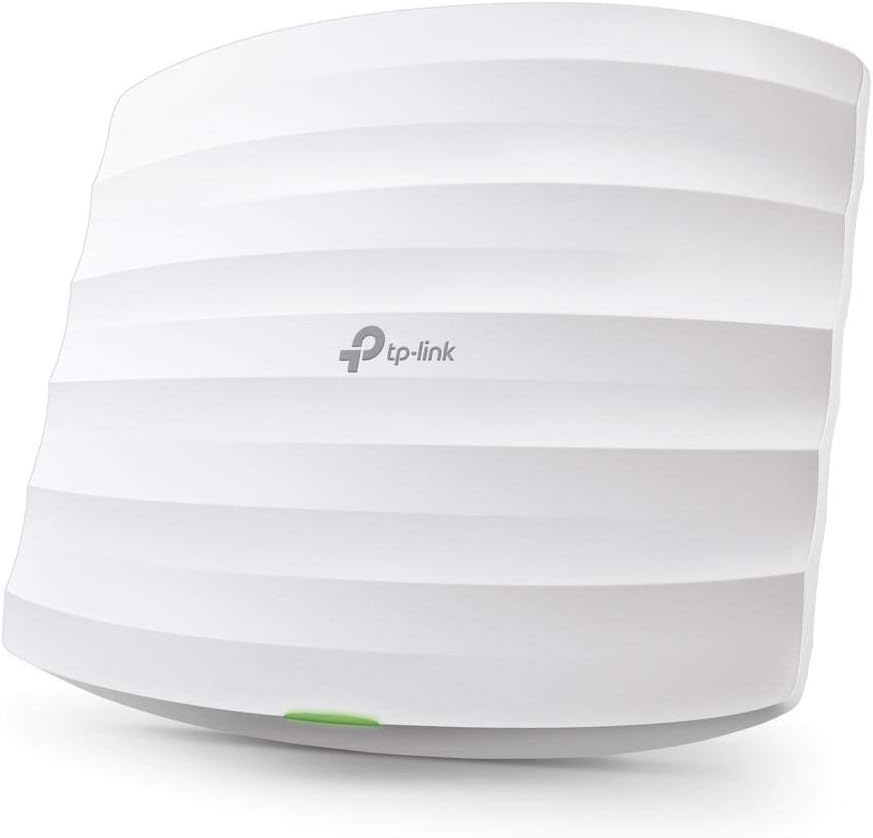
🚀 Elevate Your Workspace Wi-Fi Game with TP-Link Omada AC1750!
The TP-Link EAP245 V3 is a dual-band AC1750 wireless access point designed for business and high-demand home environments. Featuring MU-MIMO technology, it delivers combined speeds up to 1750 Mbps, supports seamless roaming, mesh networking, and advanced security protocols. Powered via PoE for flexible installation, it integrates with Omada’s cloud-based SDN platform for centralized, remote network management. Backed by a limited lifetime warranty, it’s a reliable, scalable solution for professional-grade Wi-Fi coverage up to 1500 sq ft.


| ASIN | B07NMZR3F1 |
| Antenna Location | Home |
| Antenna Type | Internal |
| Best Sellers Rank | #152 in Computer Networking Wireless Access Points |
| Brand | TP-Link |
| Built-In Media | AC1750 Wireless MU-MIMO Gigabit Ceiling Mount Access Point EAP245,Gigabit Passive PoE Adapter,Power Cord,Mounting Kit,Installation Guide |
| Color | White |
| Compatible Devices | Desktop, Laptop |
| Connectivity Protocol | Wi-Fi, Ethernet |
| Connectivity Range | 1500 Square Feet |
| Connectivity Technology | Ethernet |
| Control Method | App |
| Controller Type | Switch |
| Coverage | 1500 ft² (approximate) |
| Customer Reviews | 4.6 out of 5 stars 2,023 Reviews |
| Data Transfer Rate | 1300 Megabits Per Second |
| Frequency | 5 GHz |
| Frequency Band Class | Dual-Band |
| Global Trade Identification Number | 00845973092962 |
| Has Internet Connectivity | Yes |
| Has Security Updates | Yes |
| Is Modem Compatible | No |
| Item Dimensions L x W x H | 8.06"L x 7.15"W x 1.46"H |
| Item Type Name | Access Point |
| Item Weight | 0.84 Pounds |
| LAN Port Bandwidth | 1000 megabits_per_second |
| Manufacturer | TP-Link |
| Maximum Upstream Data Transfer Rate | 1300 Megabits Per Second |
| Mfr Part Number | EAP245 V3 |
| Model Name | EAP245 |
| Model Number | EAP245 V3 |
| Number of Antennas | 3 |
| Number of Ports | 1 |
| Operating System | Tp-Link Os |
| Other Special Features of the Product | Access Point Mode, WPS |
| RAM Memory Installed | 128 MB |
| Router Network Type | wireless |
| Security Protocol | WPA, WPA2, WPA/WPA2-Enterprise (802.1x) |
| Smart Home Compatibility | Not Smart Home Compatible |
| Special Feature | Access Point Mode, WPS |
| UPC | 845973092962 |
| Warranty Description | Limited Lifetime Warranty |
| Wi-Fi Generation | Wi-Fi 5 |
| Wireless Communication Standard | 802.11ac |
| Wireless Compability | 802.11ac |
2**S
Easy Install and Flawless WiFi AC1750 2 pack
I bought the AC1750 two pack to extend the wireless signal through out my house. My current tri-band router which is in the basement just wasn't giving good signal on the second floor and with two of us working from home it was becoming an issue. I installed one of these in the basement below the living room and the other in the hall on the second floor. I used the Omada software (free to download) on an existing media server. Setup was painless one time through to put in all of the SSID's, passwords and make a group. Then just add the AP's to the group and you are done. Very easy. They have been in use for two weeks now. Streaming video, WiFi calling, video conferencing, and your standard internet fare all work flawlessly. No bandwidth issues what so ever with two people using five device and streaming audio. Signal strength is very good. I get a connection in my garage which is over 50' away from the house. Granted the speed is slower but that's to be expected at that range with brick walls between. Speed within the house itself is stellar with device speeds coming higher than my better rated tri-band router. I have installed and supported AP's from Zyxel, Netgear, Ubiquiti, and Cisco. These TP-link Omada AP's are easily some of the best I have worked with to date. Highly recommend.
C**E
Easy to set up and great range
I bought two for my two-story house, but one covers it and would've been sufficient. It's pretty near to have full signal just about everywhere though, including the immediate surrounds of the house. Although the instructions recommend only using the Omada Controller software for large installations, I find it worth using even for my house... It's neat to see the combined stats for the APs, plus it makes it easier if your configuration is complex. I found a Dockerized version of the software on Docker Hub and tried setting it up in Kubernetes and then using docker-compose, but there were a couple of problems: Its internal database didn't get initialized properly, which made the startup fail, and the AP discovery didn't work because the they were on a different subnets compared to the controller. While both surely are solvable, it was a chore with lots of ports to be forwarded and special DHCP configuration to advertise the location of the controller. After wasting a couple of hours on that, I gave up and installed the software on a dedicated Ubuntu VM. It has been running flawlessly ever since. The VLAN tagging feature is handy for dividing the wifi network, being able to separate IoT and guest devices from internal devices. It works smoothly with the VLAN feaures in my OpnSense firewall/router.
J**R
Highly recommended! Business grade WiFi for low price.
To start, I am a network engineer with many years of experience in the high-tech industry. I’ve managed many enterprise wireless solutions (meraki, xirrus, ruckus, ubiquiti, Cisco). I started buying 2 of these EAP245’s and added a 3rd because I was so happy with the value of this unit. 3 of these units handles 40 clients (about 30 home automation devices) and 10 newer laptops/iPhones. I have gigabit internet and this install is in a 2700 sq. Ft home. Previously, I was running 2x TM-AC1900 (had terrible dark spots in the house, frequently had to disconnect and reconnect to connect to different AP’s) Pros: - Form factor — no big antennas poking off, Easily mounts to wall or ceiling. - Speed and Signal — excellent speed and signal. See screenshot. - Omada — once it’s setup, the controller software is really quite excellent. I would not run these in an enterprise but for a small business or an insanely powerful home solution, this is a great solution. Adding new AP’s is incredibly simple. Configuration is simple and the analytics/reporting is actually fairly impressive. - Advanced features — a large reason I chose this unit is the 802.1r functionality. This allows seamless roaming. No disconnection when walking through the house, great for WiFi calls. The Omada controller gives you great visibility into channel utilization. Cons: - Limited advances features — Frankly, for what I need to do in the house, the current feature set works perfectly. The only feature I wish the controller had is an “auto signal adjustment” feature. - Potentially misleading marketing — this is probably my own dumb fault but I did not realize that having the controller on the LAN was required to have centralized management. I mistakenly assumed the “cloud controller” was a phone-home / cloud-based solution provided by TP-Link. You must run the controller (either the OC200 device or the Omada controller). The “cloud controller” is simply the ability to access your controller remotely when you are outside of the network. Notes: - I battled setting up Omada for a few hours (again, I am a very technically inclined person). I’m running the Omada software in Docker on a Centos7 server. I can’t fault TP-Link for this as “firewalld” was preventing the Java app from correctly listening on my servers network interface. Takeaway: Overall, the EAP-245 is an amazing little access point. The low price point of the AP and quality of the business grade controller makes this a very robust home WiFi solution.
J**E
This is a great little access point
I am and IT consultant. I put APs in all the time. I used to use Engenius but they dropped phone support. If you are a vendor and you have no phone support you don't have me. I tried the tplink waps and was surprised. I like them due to their integrated interface and their simplicity and their gigabit poe network interface. They are also quite hardy. I have not had one die yet (knocking on wood). So to summarize: Excellent Price Point, Excellent device performance, phone support if you need it but after you install one or two of these, you will not need a lot of support unless the device goes bad. If you need a good indoor wap, you will not go wrong by purchasing one of these guys.
S**T
Forget Consumer Products. Use this for your home.
I recently dumped my consumer grade mesh network for a home built pfsense router and added these AP's along with the OC200 for management. I have to say that the firmware upgraded has provided a fantastic experience mgt of wifi. Guest configuration including setting up basic captive portal and VLAN is easy. Signal in my home has never been better. I have 3 AP's covering 3 floors without issue. Stability seems rock solid so far. Will continue to update as time goes on.. 9/8/2020 Still enjoying this product combined with their oc200 and my pfsense NUC. The OC200 makes mgt of your WiFi a breeze. Stability is fantastic and speeds are still rock solid. Roof mounting APs still beats mesh satellites sitting in various rooms. Setting up vlan and configuring a captive portal guest wifi were easy. I would still like to have some additional reporting and block functions related URLs at some level. Btw..the people complaining about the inability to get 300 Mg down close range. I get 350 pinned. I'm approximately 10 ft right now from one of my ap's. My suggestion to them is maybe look at a better router or better internet provider.... 9/14/2020 After upgrading my Router, tweaking and confirming my new 1GB service speed, I am not happy with results and lowering my review pending an update from TPLINK support. I should be getting closer to gig down with CAT 6e cable and a GS108PEv3 (Powered switch) Best I can get is 400 mb right below the AP. More to come... 20/27/2020 Can't find where my network is being throttled. Short of adding an access point from a competitor, I should clearly be exceeding 300 mb. The POE switch is a GS108PEv3, I have router with 1 gb ports (physical connection gets close to 1gb) and cat 6e cable throughout. I have to assume it's something to do with the AP's. Tech support has sucked for lack of better words. (thanks for the canned FAQ that was useless..) Stability is great..but need this solved.. Sept 2021 After several updates, further tuning, I am pleased with stability of the wifi and speeds. I am getting slightly better speeds. The key is stability. I don't have drops like my original consumer neteork equipment that I had in the past.
A**R
Lives up to its reputation for stability and value
I know this thing is pretty mature at this point, but it really lived up to its reputation online. We've had a number of consumer-grade routers over the years and they've ALL had their quirks, connection issues, etc. but the worst we've had is the bgw210-700 gateway that AT&T forces its fiber customers to use (and pay for monthly). It has terrible WiFi reliability and they won't let you run your own router without turning on double-NAT or other trickery. Enter the EAP245. Now I'm able to turn off the WiFi on the AT&T box and all stability problems have disappeared. We have anywhere from 13-15 devices on WiFi, my wife is on Zoom all day, I'm on VPN all day, and we've had zero connection drops or problems since. Just huge smiles on our faces. From what I've read about this box, this is a feeling we should have forever. We have a one-story, 1200sqft ranch so signal issues are never a problem, but strength is good. I bought this device for its reliability so it's not even ceiling mounted. It's just sitting on the table next to the router and signal is great. Highly recommended. Hopefully the firmware updates keeping coming after this much time on the market (I know V3 is "newer" but still). As for setup, I know that's been a controversial issue in other reviews, but I found it easy. I skipped the Windows controller and Android "app" (no thank you) and just connected to it directly over WiFi for setup. RTFM folks. The instructions are in the manual! Setup took about 15 minutes but only because after I updated the firmware I had to set all up again.
M**E
Good fast signal coverage, nice controller software, easy setup.
So far so good with two of the EAP245 v3’s. I first installed the mobile app, updated the firmware via the default web portal and then installed the Omada Controller via Docker (I chose whichever Docker was the top hit via search engine). Manually installing the controller under Linux seems to be problematic due to old versions of dependencies and the controller FAQ; latest Omada version via Docker install took one minute. From there via the Omada Controller web UI I adopted the two EAPs, configured the SSIDs, and just like that I was in business. Most of the time was honestly spent updating the firmware and faffing about with Omada (manual install) before using the Docker method. If you have port overlap issues you can also do a macvlan in Docker which should work fine as well or if your server has a spare NIC I believe you could assign the container to use one other than the default NIC. For the money and effort these seem like a killer value. I can imagine UBNT’s offering a single pane viewer for (all) their other hardware is also nice; but I needed newer WAPs and these appear to work well especially for the price; in the Omada web view I can see what I need in terms of the radio signals and clients. PoE is great to have.
G**G
Solid and stable wi-fi connections for all devices throughout home
I always had "so so" wi-fi reception in parts of my (single story) house from my 802.11n wi-fi router/firewall, which is inside my home network closet. I purchased two of the EAP245 V3 APs along with the OC200 controller to control them (and a little 5 port POE switch to power them all) and installed one AP in the front of the house and one in the back of the house. Configuration was pretty straight forward (assuming you have at least a little previous router/wi-fi setup knowledge), and the provisioning of the APs by the controller was automatic and fairly quick. As soon as I got everything working, I upgraded the firmware of the APs and the OC200 controller (which can all be done through the controllers web interface - the batch update feature for the APs firmware worked without issue). I also ended up tweaking a couple of settings - I assigned static IP addresses to the APs and OC200, and I enabled "Fast Roaming" and "Force-disassociation" in Advanced Wireless Settings. I have had this setup running now for about a week, and the wi-fi now is rock solid and so consistently fast that wi-fi at home now seems ubiquitous (now I know why that other company used that word in their company name).
K**M
Easy to install, worked reliably
Having used consumer grade equipment with all the bells and whistles, I found that they were unreliable. Works for awhile then one day, it doesn't work requiring a power cycle or several power cycles to get it to work again. This is a business class equipment that once installed, continues to work all the time. A POE adaptor was provided with this item so there's no need to buy one if u don't have a POE switch.
A**M
Very good
Dont spend money on expensive useless extenders. Use Tplink AP’s, much cheaper, better wifi coverage and easy to setup.
B**L
Works Great
Excellent product
D**U
Instalado
Excelente producto y cumplió con todas mis expectativas!!!
J**G
Excellent price to features.
It is great that it can be configured and managed standalone if one wants too, it works fine that way too and it is great if you have only one or two of these APs. I have also setup the omada controller in a container and it works great. Wifi coverage is better than my previous velop and I can now easily have my IOT and guests in separate VLANs and control at the firewall what they can access. I'm very pleased so far with this product.
Trustpilot
1 week ago
2 days ago