


🚀 Power up productivity anywhere, anytime!
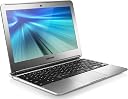
The Samsung 11.6" Chromebook (2012) combines a crisp HD display with a speedy Samsung Exynos 1.7 GHz dual-core processor and 2GB RAM, delivering a lightweight, fanless laptop experience. Designed for professionals and students who value portability and security, it boots in seconds, offers 6+ hours of battery life, and runs Chrome OS with automatic updates and built-in virus protection. Ideal for web research, document editing, and streaming, it’s a budget-friendly device that keeps you connected and productive on the move.
| ASIN | B009LL9VDG |
| Automatic Backup Software Included | Adobe, Gmail, Google Drive, Hangouts, Microsoft Office 365, Webcam |
| Battery Average Life Standby | 6.5 hours |
| Battery Cell Type | Lithium Ion |
| Battery Life | 6.3 hours |
| Best Sellers Rank | #108,137 in Computers & Accessories ( See Top 100 in Computers & Accessories ) #19,686 in Traditional Laptop Computers |
| Brand | Samsung |
| Built-In Media | AC Charger |
| CPU Model | Samsung Exynos 4210 |
| CPU Model Generation | 5th Gen |
| CPU Model Number | 5250 |
| CPU Model Speed Maximum | 1.7 GHz |
| Cache Memory Installed Size | 1 |
| Camera Description | 0.3 MP front-facing web camera |
| Chipset Type | Samsung Exynos 5000 series |
| Color | Silver |
| Compatible Devices | External displays, wireless devices, USB devices |
| Connectivity Technology | Wireless |
| Control Method | Touch |
| Customer Reviews | 4.1 out of 5 stars 5,986 Reviews |
| Display Resolution Maximum | 1366x768 |
| Display Technology | LED |
| Display Type | LED |
| Form Factor | Other |
| Front Photo Sensor Resolution | 0.3 mp |
| Graphics Card Ram | 2 GB |
| Graphics Coprocessor | Intel Integrated Graphics |
| Graphics Description | Integrated |
| Graphics Ram Type | Shared |
| Hard Disk Description | SSD |
| Hard Disk Interface | Unknown |
| Hard Disk Rotational Speed | 1 rpm |
| Hard Disk Size | 16 GB |
| Hard-Drive Size | 16 GB |
| Hardware Interface | HDMI, Solid State Drive, USB |
| Human-Interface Input | Keyboard |
| Item Dimensions L x W x Thickness | 11.4"L x 8.21"W x 0.69"Th |
| Item Weight | 2.4 pounds |
| Keyboard Description | Multimedia |
| Keyboard Layout | QWERTY |
| LAN Port Bandwidth | 3 |
| Lithium-Battery Energy Content | 30 watt-hours |
| Manufacturer | ???? |
| Memory Clock Speed | 1333 |
| Memory Slots Available | 1 |
| Model Name | Series 3 Chromebook |
| Model Number | XE303C12-A01US |
| Model Year | 2013 |
| Native Resolution | 1366 x 768 pixels |
| Notebook Pointing Device Description | touchpad |
| Number of Ports | 2 |
| Operating System | Chrome OS |
| Optical Storage Device | No optical drive |
| Power Device | AC adapter with lithium-ion battery |
| Processor Brand | Samsung |
| Processor Count | 2 |
| Processor Series | Samsung Exynos 4210 |
| Processor Speed | 1.7 GHz |
| RAM Memory Installed | 2 GB |
| RAM Memory Technology | DDR3L SDRAM |
| RAM Type | DDR3 SDRAM |
| Ram Memory Maximum Size | 2 GB |
| Resolution | 720p |
| Screen Finish | Glossy |
| Screen Size | 11.6 inches |
| Series Number | 303 |
| Speaker Description | Stereo speakers |
| Specific Uses For Product | personal |
| Total Number of HDMI Ports | 1 |
| Total Thunderbolt Ports | 2 |
| Total Usb Ports | 2 |
| Touch Screen Type | capacitive |
| Touchpad Feature | true |
| UPC | 887276007144 803982818584 |
| Unit Count | 1 Count |
| Video Output | HDMI |
| Video Processor | Intel |
| Voltage | 110 volts |
| Warranty Description | Parts and labor |
| Warranty Type | Limited |
| Wireless Compability | 802.11a/b/g/n |
| Wireless Technology | Wi-Fi |
S**M
Perfect for what it is
I have been using Chromebooks for some time now, and I love them. I own a dell studio 15 and I was getting tired of lugging it around and having to fight for tables with outlets when studying at a coffee shop, or only getting an hour's work done before it died. I needed something smaller, lighter, and with a better battery life. While I would love a macbook air, I'm not in a position to spend $1200 for a device at this time. That's when I started looking at Chromebooks. The only hangup I had was that I had to be online to get any use out of it, and then I realized that I am always online. It takes a little bit to get it set up the way I wanted it but after that it does everything I need it to, I can even access my iCloud account online and update my to do list and calendar. Well, almost. There are certain test that I have to take for school that I need a regular PC for, and then there is my iTunes account. For those I use my laptop at home. Even then I can remotely access my computer from anywhere. I love writing on it, the keyboard is very good. I used it on a trip to DC, and was able to get work done on the train gong up and back. The fact that I usually only charge it at night like a cell phone is a plus. I will warn anyone who is considering buying one that this is not for those who need to replace their powerful PC, the lack of significant hardrive space and Chrome's limited OS will frustrate someone coming from a Macbook pro or other $1000 computer. This is for those who are already comfortable working in the cloud, or need a small, light, second computer with a great battery. If that's you then I highly recommend it. As far as word processing goes, I have a skydrive account. I can access all of my documents, open them with the online version of Microsoft office. I'm a creature of habit and I don't like Google docs for daily use. I'm not really big photo social media guy, I only use Linked in and Facebook so I cannot speak to that for anyone. If I listen to music I use Google play and synced all of my iTunes music to it so I have access to everything I own. I rarely use the speakers, I prefer headphones as I am often out in public. I don't watch movies on the Chromebook, I only watch lectures for school and they are usually of poor video quality to begin with. If I'm gonna watch a movie I'll watch it on my HD tv at home, never really understood the need to watch movies on tiny screens. (I know I'm a boring old man). So if you're looking for something that turns heads, and does everything your Mac (or your friends Mac) does don't buy a Chromebook. But if you need an inexpensive, reliable device for working in the cloud then this is for you. I love it
H**E
Chromebook Review
I've had the chromebook for about three weeks now, so I thought it was about time that I posted my initial impressions since I looked over so many reviews before buying. First I'll describe myself so that readers will have a little context. I'm an adult graduate student who is beginning full-time next year. I'm pretty tech savvy, but probably something of a minimalist by most standards. My needs don't include watching or saving full length feature films or TV shows. I may need to watch shorter videos on YouTube as required for classes. I listen to Pandora sometimes, but it's far from a necessity. So, why do I need out of this computer? I need a word processor. I need the web for research; for me that mostly means searching databases and reading pdf versions of scholarly articles. I take notes faster on a keyboard. While I don't really need it, being portable is a big, big want. I don't play videogames or do facebook. What I like about the Chromebook As several people have noted, the battery life is better than advertised. It is crazy how long the thing can last after a full charge. The size is amazing for putting in a bookbag or messenger bag. Because the battery is so good, you can just shut it 90% of the time without shutting down and toss it in a bag. Pop it open whenever and you're ready to go. The convenience of the size plus the battery probably makes it worth $250 alone. For what I do, it is plenty fast. It surfs the web, loads pdf documents, loads pages quickly and easily handles all the tabs that I have had open on it. But then again, I don't play Call of Duty, while listening to Pandora, while watching YouTube, while downloading the Lord of the Rings Trilogy … I mostly read and write on it. The mousepad operation is pretty smooth. Two finger scrolling is awesome. It works for reading and so on, but it works for zooming too if you use ctrl + two finger scrolling. Great keyboard for such a small machine. Is it a little tight? Sure. But one of the biggest advantages to this machine is its size. To have a computer that weighs in at under 2.5 pounds, it's worth a little tightness in the keyboard. No moving parts. That might not mean a lot to some people, but I had an old laptop whose hard drive crashed. I'm pretty sure it was an overheating issue. I haven't been a big fan of the cooling system in laptops since. ARM processor + solid state hard drive = no spinning hard drive, no cooling fan= less stuff that can break in cheap electronics. That makes me happy. I have plugged in flash drives, a usb mouse and a usb headset with mic. They all worked fine immediately. The price is unbelievable for this machine; I mean really? $250? If you get an open box version from Amazon or a coupon at Best Buy you're talking $200, new. Unless you want a massive hard drive, I just don't think anything else in the price range can compete. It's basically like a productive Ipad with a keyboard (to me). Someone who knows more about tablets may think I'm a fool, but I've seen bigger fools than me trying to type a paper on the screen of an Ipad. I can write manually faster than that. I thought pretty hard about buying a tablet instead, but after fooling around with a few, I just couldn't figure out what I could do with them other than surf the web or play games. The keyboard on the Chromebook was a big selling point for me. I put Lenux on it, and it works great. (Look it up online.) Mostly I use the word processor, but I was also able to load Java that way. It allowed me to use an interactive “collaborate” function through Blackboard. As far as I know, Blackboard collaborate would not have worked without Linux. What I don't like Google documents is good for taking notes and writing a first draft. If you're a serious student, I wouldn't plan on typing all of my papers solely on Google Docs. It's not on the level. Yet. Tables are the worst in it. You can't see your formating marks. Once documents get really big, it doesn't scroll through them all that well. If you intimate with Word, Google Docs is kind of a joke for something polished. (Like I said above, I put Lenux on mine and LibreOffice does work pretty good.) There's no Java. To me that's only been a problem with Blackboard collaborate, and I was able to circumvent it through installing Linux. Not really a big deal to me. The size. This is in the “what I like” column too. The thing is that its size makes it super portable, but I was recently working on editing a 25 page paper on it, and it was just, unbearable. I had to open it on a bigger computer to work on it. The size is a blessing and a curse. I wouldn't want this to be my only computer for heavy editing (the kind of stuff that involves moving around lots of text ten pages away and switching back forth or looking at two windows a lot or using a split screen). The hard drive space. I don't really need a lot of space, and it still bothers me a little. I got a 32 GB SD card to go with it, but it sticks out of the side a little. It'd be nice to be able to put it all the way in and leave it, but that didn't work out that way. I still wouldn't trade it for a netbook with a spinning hard drive and a fan, but then again, I really don't need more that about 8GB to do what I'm doing with the thing. For a lot of people, hard drive space may be a deal breaker. Sum-Up All in all, I would definitely buy the Chormebook again. It's portability and battery life alone probably sell it, I mean, combined with the very reasonable price tag. A Macbook air costs how much? At least five times as much, and at least one of the main disadvantages (size) would still apply to the Mac. There are a couple of netbooks in the same price range, but the main advantages I saw there was having Windows and the bigger hard drive. If you don't need the hard drive, that's one down. With Windows, you'll either end up with Windows 7 Starter or Windows 8 neither one is a great option to run on a small computer. Both Chrome OS and Lenux are much less susceptible to viruses. And faster. I think that you really just need to know ahead of time what you're going to use it for, and make sure that it will be able to do what you want it to do. It's not a full-blown laptop, but for what it is, it's better than a laptop. I wouldn't buy it as my kid's only computer and then send them off to the dorm unless I was trying to build character by encouraging him to use the ample computer labs (available at almost any institution). Not a bad strategy if you're trying to build a little character. It's doable for sure, but just know that for big stuff, they would probably need to use a bigger machine. (Also, don't get me wrong; I typed many pages of the monster paper on the Chromebook. It worked great. Editing was the problem. It was just difficult to move back and forth in a doc that big and to open multiple windows at once or use the split screen.) Besides, you could probably buy one of these, plus a desktop or non-Mac 15” laptop for less than a Mac. Basically, Chromebook’s a pretty sweet deal.
P**K
Chromebook perspective from an IT Geek
First off, I am an admitted IT Geek. I have a computer science degree and have spent my entire career working in IT on everything from mainframes to wearable computers. I really know computers inside and out. I want to provide some perspective about the Chromebook by a person who spends 10-12 hours on some type of computing device every day. So why would I ever buy a device like this? Well, I ordered the Chromebook to evaluate it for my parents. They are not tech savvy at all. They have a Kindle Fire and an iPad, but when they do write e-mails and want to do other tasks, the pads are just not enough. They are computer users and media consumption people. What I found out during my work with the Chromebook is that it is the right computer for me too. Now, off to the review... First off the Google Chromebook is computer unlike anything coming from the minds of Apple or Microsoft. Something on the surface that an IT Geek like me probably wouldn't like. It doesn't have a full-blown operating system like OSX nor is it a mobile platform like Android. It is something in between, it is ChromeOS. It is very fast, very reliable, and is perfect for doing your everyday tasks. If you mostly read e-mail, write notes, run spreadsheets, develop presentations, chat, Facebook, and surf, you should read on. The Samsung Chromebook is very sleek, thin, and light. It is somewhat similar in form to a Macbook Air, but it's also close to a number of the new Ultrabooks. The feel in hand is very solid and doesn't seem like a $249 computer. The keyboard is very good; very solid feel and great action. If you type quickly (100+ wpm), you'll be happy to know this keyboard can keep up with you. The only better keyboard I've used in recent memory is the Air, but it's not far off. When you open the box and lift the lid it automatically starts up in under 10 seconds. This is not coming up from sleep mode. That's its boot time from a cold start. The setup process is as painless as it can be. Attach it to your wireless network and if you have a gmail account, just login and you are done. I up and reading e-mail in my account in less than 5 minutes. The last out of the box Windows experience took nearly an hour before I was through all of the setup questions, patches, and add-ons. Now that you are logged in, the simplicity of the system reveals itself. Effectively the entire Chromebook is a dedicated Chrome browser. Almost everything you do is in a Chrome browser window. There are applications included and that can be installed, but they all run inside of the Chrome framework. It is a new way to think about computing. And boy is it fast. About the speed: Wow is the best way to describe it. I dare you to find a browser that is as responsive as the Chrome broswer on ChromeOS. All running on a tiny little ARM processor. This tiny little ARM processor is what gives the Chromebook its 7+ hour run time on a single charge. In practice a lot of this depends on what you are doing. If you want to stream 7 hours of YouTube videos, you're probably going to be disappointed, but for practical all-day off the charger use, I'm seeing that performance easily. It also charges like lightening, so if you throw it on the charger for an hour at lunch, you won't need to worry about it into the evening. Back to why I am keeping the Samsung Chromebook. The device does what I need to do 95% of the time during my work day and 99% for the rest of my life. All of this in a very sleek, inexpensive, and portable package. I still have my work computer, a Lenovo i7 based monster, but it is huge, heavy, and doesn't have nearly the battery life or portability of the Chromebook. I now leave that laptop in the docking station on my desk and carry around the Chromebook and that is the computer I take home. I suppose if I was still spending the majority of my time writing C# I would need a different tool, but the Chromebook is the right tool for me. Pros and Cons? This introduces an interesting point of view. What can we really compare the Chromebook to? There is nothing else that is in it's class, so I guess I'll focus primarily on functionality. Pros: -Inexpensive (I didn't say cheap) -Light -Fast -All Google-Centric (this can also be a Con) -Very simple to setup and use -Long battery life -Good build quality -Good keyboard -Good library of add-on applications (yes, another app store) -Everything for one price (Hardware, Operating System, Storage, Office Applications) Cons: -Not a full-blown operating system -Doesn't run Mac, iOS, Windows, or Android applications...none of them, it can't -All Google-Centric (this can also be a Pro) -Some apps you know and love aren't available yet, maybe never (Netflix is one) -Not as mainstream as either full-blown computer platforms or mobile platforms I gave the Samsung Chromebook 4 stars because it's really good, but not perfect. Bottom line, this is a new device that lives somewhere between tablets and full-blown traditional computers. It is a great consumption device with a full keyboard for doing some serious work (documents, spreadsheets, presentations, e-mail, and web-based applications). I recommend that you give it a shot, I think you'll really like it.
G**S
Why I have decided to buy this Chromebook
There is a good reason why near 3 thousand people left review for the Samsung Chromebook and most agreed it is a darn good machine for the price. If I may let me say a few words too about not specifically the hardware, but rather why I decided to buy Samsung Chromebook and why now. Many of you may agree, right now it is a terrible time to buy any kind of PC including notebooks. Haswell on the way, revision of Windows 8 at the cornel, SSD mounted ultrabooks on the rise that cost thousand or more and of course the buzz around Chrome OS uncertain with its Packaged Apps direction. So, why did I decide to buy a Chromebook and picked Samsung? For the Chromebook a single, most darn good reason is security. I am still using Windows XP and I prefer to use free programs to do things, like You Tube downloader, file type converter, media player and so on. However these freebies often saturated with spywares and no matter how well I try to protect my computer, soon or later I'll get hit. Before I bought my Samsung Chromebook my Google account was nearly hijacked. You can understand I really don't want to share my stuff with just anybody. The solution is a Chromebook. It is near impossible to get infected, so being secure is exactly what I wanted. As far as why I picked Samsung is pretty obvious. Best keyboard, has all the connectivity, long battery life, light weight and probably the best is it has no moving parts, not even a fan and yes, of course the price. If you are looking for a Chromebook look no further. You may have to buy another Chromebook 6 month later, but right now is a very good if not the best choice you have. So there you go. Updated: 10/23/13 Having a wireless network at home allow me to use my Chromebook anywhere around the house. It is very handy and spoiled me to that point I hardly use my PC anymore. Using the Chromebook is joyful simple. Just open it and there you go, continue where you have left. Same thing for putting aside. Just close it and it is done. I watch lots of YouTube videos. At night after I went to bed I pick for example a stand-up comedy and let myself fall asleep. When the video finish the Chromebook puts itself into sleep mode too. My goal is to turn the Chromebook into an eBook reader, perhaps having a timer with it. The big drawback of course is it doesn't run Skype. I know there is Google's Hangouts, but I am sorry the World at this moment running on Skype and Google should acknowledge that and should do everything to work it out with Microsoft to make Skype running on Chromebook. At this moment nothing could boost Chromebook sales better than that. Updated: 3/10/14 It is almost 6 months that I have purchased this product and I like it more than eve. Since my purchase many more new Chromebooks came out, but I still would buy Samsung. For one reason is its fan-less design. Sure the new Intel's Haswell chip seems to be faster, like Acer C720 series using it, but it has fan, which means you have to careful not plug the went hole. This one you don't have to worry about that, using it in the bad, or placing the unit over something soft material, like comforter or pillow is no problem. I just like that freedom. Besides, speed is never was an issue for me. My Chromebook working for me many ways. When I am sleeping it download files, like .avi files. When I am watching TV and I want to find out where Sochi is I just reach for my Chromebook and map it. If need a word or some kind of references, again I just rich for my Chromebook. Social network, emails, reading online magazines, post photos and many other activities my Chromebook is beside me. I also purchased a Chromecast. One of my best spent money. It is working wonderfully with my Chromebook and watching for example YouTube on the TV is a surprisingly different and very enjoyable experience. And finally don't think about Chromebook as a PC or a full-fledged laptop replacement, because it is not or at least not yet, but rather a media device that do a lot and for some perhaps it does enough that you don't need any other computer.
T**O
Edit: Shattered screen while just sitting in a closet.
EDIT 8/15/2013 SCREEN DESTROYED Well, I've just had to go ahead and change my rating from a 5* product to a 1* product, I've been using the Chromebook on and off for class and it had been performing quite well (see below review and edit) however I turned it on today after about two weeks of non use (it has been sitting in my closet in a case on a shelf) and there are cracks spiderwebbing out from the bottom right hand corner! I know that this is not due to ANY misuse as my there is no cross device usage between my wife and I (she has her ipad etc. and has been away for work for the duration) and it shut down perfectly fine. To reiterate, there has been NO PHYSICAL DAMAGE, there isn't a mark on the thing, no drops, no knocks, the screen has been opened from the center at all times so there is no twisting. Just...spiderweb cracks everywhere. Apparently this is classed as physical damage and user error by Samsung so their warranty doesn't cover it. I googled the issue and found MANY other people finding the same thing, also reporting that Samsung don't seem to be aware of it (also be aware that most extended warranties that do not explicitly state repair of user error damage will not cover this e.x best buy). $250 might be cheap but I expect something to work for longer than nine month I'm basically left with a brick now unless I want to go to the trouble of trying to find a replacement screen from screen surgeons or someone. A shame, I have a samsung phone, fridge, dishwasher, microwave, soundbar, and am writing this on a samsung tv. and this is the first product that I'm ashamed to have bought into so readily, it feels cheap (but acceptable for such a low price) but the sheer poor screen build quality and lack of owning up to the problem have soured me on at least another of these products from them. I'll be looking elsewhere for a replacement. I'm sure that thousands of you don't have this problem, but I've just became one of those one star people whom I always look at and wonder "Why one star if everyone else loves it", for things like this. ============================= This arrived yesterday, came well packaged and secure (though only paper was used by amazon to secure the chromebook box within the main package). After unboxing and turning on (for some reason it would only turn on the first time when it was connected to the mains power supply despite it then being at 98%, it's been on and off since then, I think it could have been a user problem?) the setup couldn't be simpler, just log in using your google account...and that's it. The build quality for the price is excelled, nothing felt 'hollow' or unsupported, the keyboard is very satisfying to use, as is the trackpad and multi touch. I thought that the screen wouldn't be very bright having read some of the other reviews but at max brightness it was definitely bright enough for me! I happened to find 1/2 to 2/3 brightness better to work at. The keys looks nice and the dedicated browsing buttons are great and take the place of F1-F12 etc.(as you no longer need F keys). my only turn off is that after typing for a few hours there was already a patina of grease on the space bar from my thumb (I was my hands, honestly!) that I'm going to keep on top of with chlorox wipes (I guess it's good for hygiene) but that surprised me as it took a 'long' time for my last laptop to show this shine on its keys (mostly because I was wearing the plastic away from use). All the 'apps' work as you would expect and look basically like their online counterparts (most of the apps are just links to the online versions) though you can use documents offline and they will be uploaded next time you connect to the internet, you can also choose to sync your google documents and download your files for use offline (not sure how this will work if I go over the storage limit of the chromebook...or where they're kept when they can be used offline as they're not in the "files" folder. Connectability seems good, USB ports, AV out, SD card slots etc. all present, the power supply seems a weak spot in the back if you knock it off a table or drop it, looks like it's waiting to snap off due to it being very thin. I heard that the bottom scratches easily so assumed that it had no support pads but it does...so I can only assume people are resting it on their laps on ... zips or something, it seems fine to me. Battery length...is awesome. I sat and types for 3 hours + online last night on 2/3 brightness and the adaptive battery monitor but me at around 55-60% with 4 hours left at that useage level so it definitely does what I need it to in that aspect. As we all know, Netflix is not working at the moment on this due to the ARM processor but it looks like it's in the works, hulu works as does pandora etc. and crunchyroll for those who like anime so that's nice. You can easily customize the background etc. and the in built camera/mic is nice for vid chatting though you're currently limited to google vid etc. having the guest option is a nice touch, I can just hold the power button once, log off and someone else is on instantly to browse around (basically puts it into incognito mode so nothing is saved). Startup time is around 9-10 seconds to the desktop depending on how fast you can type your password but it's about 7-8 seconds to the main login screen as promised. Google drive is easily upgraded and adds onto whatever google drive is associated with the first account you log in with. I'm still not sure how to get my internet passes but I'll worry about that when I actually a) need them b) go on an airline where I can use them. I don't think I could ever use my 5gb so 105gb is a massive amount. I haven't tried streaming video from google drive (not sure if that's even possible) but if it is that could be a nice compromise from movies on a flash drive/SD card. Google remote looks promising if you don't mind keeping your main pc on at home as you could theoretically load programs on that and remote control it to display on the chromebook (correct me if I'm wrong). Once I've used it more regularly I'll update this with any problems I've found but so far Samsung appear to have hit it out of the park and I have zero actual complaints (no start errors requiring reloads that other users seem to have). Would definitely recommend. ------------------------------------------ Edit: 4/9/2013 I use my chromebook for my extended campus program (about 5 hours at a time) and I've never yet ran out of battery or came close, with lower brightness settings, not using speakers etc. just wireless and typing I can get 8 hours. Average life is dot on 6 hours as promised. As a build issue I have noticed that the trackpad on the bottom right is a little lower than the left, easier to click, I don't know if this was intended but it hasn't gotten worse and it's not that noticeable but I thought I'd mention it. The auto update works flawlessly (I had a minor issue when I changed my google password but once it connected to the wifi it asked me to update it), you get to use sites like hulu and crackle along with Netflix (I hear, I haven't tried yet myself but apparently this has been a recent change!) If you're looking for a replacement for your desktop pc (or even your traditional OS laptop) this isn't for you, if you're looking to supplement it, go right ahead, you won't regret it. Also I've never seen any of the problems that the 1 stars have mentioned, black screens, dead, having to push reset, not finding wireless etc. I think it could have been a bad early batch.
M**T
Be clear how you plan to use it, read the reviews, then decide (update Dec 16)
I've had my Chromebook for about two weeks now and have given it an "average use" test run on it over that time. It does what I wanted it to do, has the limitations I'd expected from the reviews I'd read, and is generally excellent value for the price. Pro: --great keyboard--I like the touch and layout in the space. It's a tiny bit "clicky" but not annoyingly so. I miss the delete key and some of the quick key options I'm used to with a PC, but I'm adapting. The most commonly used key commands (for copy, paste, print, save, etc,) are unchanged. I don't like back-lit keyboards so that's not a problem for me. Some reviewers have noted its absence. --excellent battery life--I've gotten a little over 8 hours on a charge with using it for text/writing, web surfing and having it "sleep" overnight. That's not brilliant, but for a working laptop at this price, I'm a happy camper. --light weight yet solid. I tend to be gentle with my toys so I'm not bothered by the plastic case. Yes,there may be some give on the keyboard, but only if you have a very hard touch or you're trying to test its limits. (I checked. It flexed, but I had to push.) I'm a fast touch typist with a light touch and I generally don't rest my wrists on the computer when I'm keying so have encountered none of the squeaks or flex that other reviewers have mentioned. --VERY fast boot and wake up. Actually takes longer to shut down than to boot. Also very easy on the battery during sleep...I left it three days on sleep (unintentionally), yet saw surprising little drain on the battery. --screen is decent IF you have the right tilt and aren't trying to share it with others. It's a one-person screen. But get the tilt or view angle off by a few degrees and it goes to poor and straight on to unviewable. But what do you expect for the price? (Okay, the screen on my old Acer netbook is better, but that sucker is SMALL.) For most uses, I've set brightness at around 75 or 80%, so that helps. At max brightness, it's plenty bright for me, but not for a couple other people who tried it out. --Nice size for working. I like my laptops actually on my lap, and the light weight coupled with a good size makes it a very easy machine to work with for hours at a time. --Surprisingly decent speakers for such a cheap machine. I use a Logitech lapdesk under it so there's no muffling effect of fabric. They aren't high end, by any means, but they're actually significantly better than the speakers on my $900 Toshiba or the several Dell Inspiron laptops I've worked with. --Quiet (no fans for solid state!) and cool. Very nice! --I really did enjoy NOT having to install all the other software and going through all the system setup and adjustments that are needed for a new pc. Take it out of the box, plug it in, get on-line, go do something else for 5 minutes, and it's ready to go. When you consider how much those services and software packages can cost, this machine is an even better value than its wallet-friendly $249 price. Add ordering it from Amazon and getting free shipping and it's a super value. And not once it two weeks has the shut down been postponed because the system is "installing 1 of 18 updates" like MS is so fond of doing. CONS (or at least IFFY) --Other reviewers had mentioned problems with the browser and web page display. I use Chrome on other computers, both desktops and laptops, and like it a lot. Unfortunately, there really is a problem with Chrome's performance here. I've experimented with setting my 4 year old Acer (1G ram), my Kindle Fire, and the Chromebook to bring up the same page off the same wifi service at about the same time. There were times even the Kindle outperformed the Chromebook, and the Kindle is not a speed demon. I really did expect Chrome to work better than it has on this machine. It's adequate, but not what I would have expected on a machine that is specifically intended to use Chrome as its centerpiece. And it does stutter and seem to lose track of pages at times. This is my single greatest reservation with the thing. I would have liked Netflix capability going in, but knew it wasn't there and crossed it off my list. But I really did expect it to do better with a wider range of websites. That took a star and a half off the review, right there. I also wish I could get rid of the "recently visited" boxes on the screen of each new tab. I prefer either high-use apps or nothing but the background graphic in that space, but haven't figured out how to change it (and haven't tried very hard--it's not that important, just a nuisance). --Trackpad is acceptable, no better. I've found the trick is to use a firm touch. It's actually less responsive than the trackpad on my old Acer. It helped to set the speed all the way to the top. System works fine with a nano-wireless mouse if you want one. However,an inadvertent brush of your palm will shoot the cursor off somewhere else, which is annoying. It can happen on any laptop, but it does happen more often with the Chromebook. --I knew going in that I was stuck with Google Docs for offline work (it has improved but still isn't really more than merely acceptable for basic work) or a Chrome app service like Zoho for online work. I actually installed Google Drive on a couple other laptops and a desktop and set it for offline work to test it out before I ordered the Chromebook . The print facility and offline performance were okay, but I'm still counting off a half star because Google docs isn't wonderful and you have no other real options on this system . Update Dec 16, 2012: I've been experimenting with MS Office Web Apps through SkyDrive on the Chromebook and been very pleased. So long as I have a wireless connection I can edit and work on my Word and Excel documents with ease. Some of the quick key commands aren't available since Chromebook doesn't have the same keyboard structure, which isn't a huge problem (I use a lot of keyboard commands in preference to the mouse because it's so much faster). Of course, you have to be online to take advantage of the apps, which means you're still stuck with Google Drive and Google Docs when you're offline so the half star off remains. I assume the same on-line functionality would apply if you're a regular Mac person and use CloudOn, but can't confirm that. --the ports on the back side are set a little close. I haven't had problems because I'm not using them for much except the mouse on occasion, but it could be a problem for those who want to connect multiple devices. Overall, the Chromebook is a good value and a decent machine. I'd buy another...unless I suddenly, miraculously, join the ranks of the wealthy 1% who think the cost of a top-of-the line Mac or ultrabook, plus software, is just pocket change. Until then,I'll stick with my Chromebook as a light-weight, long battery life alternative for basic writing/spreadsheet work and some web surfing or email. Update Dec 16, 2012: For what the Chromebook can do well, I love it. Love love love the keyboard. Love the light weight and long battery life and fast boot. It's so easy to grab and check something. Love being able to work in bed, out in the yard, haul it around without having 7 pounds of computer and chargers in the bag on my shoulder or worrying whether the battery will last. However, Chrome still hangs up on the web. Example: Every week, I check the NFL standings [Go, Broncos!!] and every single time,Chromebook hangs up....I scroll down the page, then I scroll back up and find I have to refresh the page because some of the information bars from the very top of the page are now superimposed on the stats. Never happens on Chrome on any of my other machines--I checked--so this is definitely a Chromebook problem. Still,I expect the problem will be resolved eventually. If not with updates to this OS,in future editions of Chromebook. And I'll definitely be in line to order the next generation when it arrives.
N**R
Chromebook is a GREAT BUY
I purchased the Samsung Wi-Fi Chromebook because I needed something fast and portable. I have a large powerful Windows-running laptop for work so I didn't need another PC. I also satisfied my need for something Apple with an iPhone 4S (but I will be upgraded to the Samsung Galaxy Note 3 when my contract is up at the end of the year. Sorry, Apple, I don't want your ugly gold iPhone.) ANYWAY. I love this Chromebook. It is the best deal for the price. If you looking for a computer to give a teenager or a college kid it's great for that. Transferring between Google Docs and Microsoft Word (or the other programs) is simple, so that's not an excuse to not buy the Chromebook. It takes some time getting used to how everything runs but once you get it it is simple. If you love keyboard shortcuts, the Chromebook is full of them. This machine is versatile and sleek (it really looks like a MacBook Air but is a fraction of the cost). It is very light and portable. It has a good battery life and charges quickly. If you're already using Google Chrome as your browser, doing typical internet things is exactly the same. Things I Do With The Chromebook: -Watch TV/Netflix. Unplug the HDMI cable from your cable box and put it in the Chromebook. You can mirror the screens or use the TV as a second monitor. Anyway, I can stream movies quickly right on to the TV. -Listen to music. I have a two Bluetooth speakers and the Chromebook connects right to them. With the Pandora app, you're good to rock out. -Work. I can create docs using Google's apps, save them to the drive and then open them on my PC in a Microsoft program if necessary. -Social media stuff. It's the same as on a traditional computer. I know I'm not using the device to its full potential and there are so many more uses and applications. The reps at a Best Buy are great and will talk to you about how to make the Chromebook do what you want it to do. I'm pretty sure I will be purchasing two more Chromebooks during the holiday season (on Amazon). Happy browsing! UPDATE: I've had this Chromebook for 10 months. It still works perfectly (minus the normal hiccups that would come from having my Chromebook set on the Beta channel. Dev scares me though.) ANYWAY a few weeks ago I had my Chromebook on the coffee table next to a glass of water. During the night, one of my cats knocked the glass over (yes, I am a cat lady). Since it was a busy few days at work, I didn't notice my Chromebook had been sitting in a puddle of water for two days (when I finally had time to sit in front of the TV again; remember I have separate work computer...). I was pretty disappointed. I knew I could buy another Chromebook...BUT this was my modded-out personalized Chromebook and I didn't want to reprogram all of my settings. I turned it over and let all of the water drip out. When I was sure there was no water left in it I plugged it in and let it charge up--when I plugged the charger in the light went on--this is a really good sign. I let it charge for about 2 hours. Then the moment of truth.....it WORKED. It turned on like nothing had happened. I was surprised, but not shocked. I know Samsung makes great products. I love this thing. . . I don't know what else to say.
T**T
Ubuntu(Chrubuntu) user from particle physics research
--------------------------------------------------------------- (Update: 7/31/2013) (FYI, I am coming from installing and using Ubuntu on this device.) 1) I bought 2 more for my wife and mom (ChromeOS). They both love it. My wife doesn't carry her heavy Dell laptop any more; it stays in her office. This had also replaced her iPad (iPad 3 I think) as the new bed-side multi-media device. 2) After several tries, I finally got to install CERN's ROOT successfully. (Version 5.34.00. Higher versions won't work though) It runs really well. This was awesome, because I no longer had to SSH to my linux desktop machine for accessing ROOT. 3) I use Dropbox for my cloud storage. 4) I compile codes, creates graphes, read pdfs, make power-point (Libre Office) files, do emails, access other servers globally, and etc. (Seriously, if you are a ubuntu person, you don't need too much storage.) 5) The typing feels slightly choppy. I think this has to do with the ARM-core optimization; after a few days though, I got used to it and it doesn't bother me any longer. So after more than 7 months of using it, I still love it. --------------------------------------------------------------- (Update: 2-12-2013) I hope everyone knows that I am not a complete idiot in saying this is a Quad-core. I know it is supposed to be a Dual-core. However, when I view the system detail on Ubuntu, it says ?????x4, which means "Quadcore." So I'm not sure which one is right. But I decided to stick with what my notebook tells me. Also, it turned out what I installed was Chrubuntu, made specific for chromebooks. Everything works very well, except for speaker which has an easy fix. (Please, read also the comments.) --------------------------------------------------------------- It seems this whole thing is very misleading, because this notebook should come as something quite revolutionary, but Samsung does it very quietly, and humbly, by releasing this system with a very cheap pricetag and without any advertisement. Not to stir the water I guess? :) Anyway, as a satisfied Samsung Series 9(made of duraluminium and expensive with SSD) user, I wrote a review saying "I wished Samsung would make ARM-based notebook" in the past, because even with SSD it came short of being "ideal" package due to it having to cool mechanically the Intel-based chip, which still made fan-noises. Well, 1.5 years later, this is my dream come true; and a quad-core chip at that!! :) This is a revolutionary stuff in computing. I'm involved in particle physics research, in which vast majority scientists use linux-based systems. So, as soon as I received this chromebook, I brought "Ubuntu Reformation" on it. (No "95-thesis" though.) It does everything I need for my research. It's blazingly fast. A wonderful system for a research guy like me. (There are many wonderful video instructions available on youtube for installing ubuntu.) There, however, is one thing that didn't work, which most customers could just simply ignore and is not the system's fault. There is a math analysis tool called "ROOT" developed by CERN scientists, and used widely by many particle physicists out there. Well, I wanted to build the ROOT from source code, and it gives me options for "linuxarm" architecture. It compiled successfully, but it just won't run, and freeze at the startup. I wish someone from Samsung community and from CERN community could sit together and resolve the compatibility issues. This system would do wonders for the CERN scientists, I'm sure. PROS 1. No moving mechanical parts, such as hard-drives or cooling fans, which means it is absolutely quiet. (If you are a student, this could be a huge plus in a classroom, because your notebook doesn't make noises like your classmate's, which means your professsors are less annoyed by notebook noises, which could means he/she could give you better grades.:)) 2. Screen: Although it seems somewhat "washed-out," I actually like it, because it hardly gives strain on my eyes. It's actually more like glittery washed-out, if you will. (Maybe that's why the system was intentionally designed that way?) For guys like me who have to look it computer monitors all the time, this is very important. How should I say it..., it gives me a clean feeling to look at the screen. 3. Quad-Core Exynos chip: It's a wonder! It makes me think that maybe all the microprocessors are supposed to be made this way from the getgo... maybe its the other articheture brands unable to produce their chips less dissipative, having to require customers to attach huge cooling fans, thereby neccesitating another industry (cooling fans) unneccesarily; only that it asks the customers to pay for their failure. Too much conspiracy theory? O well, if you know anything about solid-state physics, you know it is a major challenge to create a microchip less dissipative of heat. Anyway, one thing for sure, I guess Samsung engineers had figured out how. And it is amazing. 4. Very affordable. Light and slim. 5. No headache due to fan-noises. I might be overly sensitive, but I get headaches from computer fan-noises. Whenever I turn off my other ntebook computers, I instantly feels stability in my soul. It's that bad. So this noebook is also medically - and psychologically - commendable. 5. Solide performance: It feels solid and fast. 6. The temperature gets ony to "warm"-level at times when I watch youtube; otherwise, no heat coming from this notebook. CONS 1. This is coming from using UBUNTU. You must "unmute" speaker every time you reboot. (To do so, you open the terminal and type "alsamixer" and unmute by pressing "m" at the speaker bar.) But this is no problem for me, because I only reboot once in a full moon. 2. I tried to access this system(UBUNTU, not ChromeOS) through SSH command from my desktop computer, Well, not that it's slow, but it seems a little jerky, not smooth. But if it is the other way around, meaning you access other machine using from this notebook through SSH, then it is no problem. (Maybe still some more compatibility issue to work out?) 3. For ChromeOS, skype doesn't work. But I've read somewhere that they are working on it. 4. I wished there was a microSD slot, instead of a regular SD card slot. Also the SD card sticks out. Maybe they could have made the bay a little deeper. CONCLUSION: I only write reviews for which I can give 5 stars. So here it is. This chromebook by Samsung is a wonder. Do not be deceived by how Samsung released it with such a cheap pricetag, a "stealth technology" sort in marketing strategy I guess, because this is nothing short of a revolution IMHO.
G**A
購入後10日ほどたちました
あちこちのレビューにある通り、用途を絞ればいいPCです。 ネット接続してないとほぼ使えないのは割り切りです。 オフラインのアプリもぼちぼち出てますね。 私の場合、facebook、webメール、ネットでの調べ物等で、大活躍、そして大満足しています。 iTunesと年賀状は仕方ないですね...WindowsPCを使ってます。 以下使った感じですが、あくまでも個人の感じですので、人により違うところもあると思います。 全体のデザインはxxxxxxx airのパクリと言われてもしょうが無いです。 大きさ、重さは程よいところ、バックに入れても邪魔になりません。 キーボードは英字キーボード、日本語入力等で少し特殊なキー割り当てもありますが、非常に打ちやすく、打った感じも感触良く、キーボードがたわむこともないです。 ディスプレイについては、酷評されていることもありますが、発色も良く、輝度も十分あると思います。 スピードは、早いです。 電源ON、OFF、スタンバイからの復帰、私のandroid携帯より早い(笑) Youtube、ニコ動もスムーズに動きます。 ネットの表示も早いですね。Core i3あたりのWindows7PCより早いかも... 動画を連続再生していると、やや熱くなってきますが、普通にネットしている状態ではほとんど熱くなりません。 バッテリーの持ちも良いですね。 動画連続だと、さすがに減りは早いですが、メールや調べ物、時々動画ぐらいなら、朝から晩まで持つでしょう。 私は、朝会社に持っていきメールやネット、家に帰ってネット(動画閲覧あり)で、夜まで十分持ちます。 寝ている間に充電しておくという使い方をしています。 まあ、普通の方にはおすすめしません。 ・普段google chromeを使っている。 ・インターネットのみで良いので、手軽に使えるサブPCが欲しい。 ・タブレットも良いが、やはりキーボード付きが良い。 と言った方にはお勧めですかね。 今のところは、あくまでもサブなんでしょうね。ネットだけの方ならメインでも良いのでしょうが... chromeOSという割り切りは、シンプルで使いやすく、androidやwindowsよりも良いかもしれません。 値段を考えれば良いPCです。 コストパフォーマンスは高いんじゃないでしょうか。 ちなみに、ファイルアプリを使えば、SDやUSBのデータをgoogleドライブにコピーできます。 本体のデータでも、アプリ使えばデータいじれますし、facebookへのアップロードもOKです。 ネット上のデータをダウンロードするのもOKですよ。 残念ながら、androidの携帯をUSB接続しても認識してくれません。 これが出来ると非常に良いのですが...
J**B
JSB
使い始めて4ヶ月経ちほぼ満足しています。Chromebook の仕様の為に直接にUSB端子にプリンターを繋いでも印刷出来ない点は致し方ないです。それ以外は、、慣れてきました(笑)今では、マットに置く指の数で違う機能を使い分けられるのが楽しくなっています。液晶画面がイマイチなのも我慢出来ます。英語版キーボードもすぐに慣れますよ♬ 梱包傷みで格安でしたが中身は無傷。気軽に使い倒せてバッテリー持ちも良い!ゼロスピンドルの快適さを知ったらもう以前には戻れません。クラウドを多用しているひとには便利なガジェットと言えるでしょう。
A**様
寝床PCとして使ってます
Windows8.1のchromeが最近のアップデートでほとんどchromeosと同じような使い方ができるようになったので、専用ハードのこの商品の存在意義が薄れてしまった感はありますが、 ・ファンレス(真夜中に使うと基板からのノイズが聞こえるくらい静かで・・・) ・トラックパッドの感度(win&androidのタップ機能はoffにしないと誤検知がひどくて使い物にならないのですが、でもほとんどデフォルトタップ有効なんで自分の使い方が悪いだけかもしれませんが…) この2点で寝床PCとしてはMacBook air並のいい仕事をしてくれます。(静音性はこちらの方が上) WEB観覧、メール程度であれば下手なPCよりも使い勝手はいいと思います。 タブレットの場合、寝ながらですとWEB観覧は時々手が疲れたりするので、ある程度キーボードを使って検索などするのがわかっている時はこの端末を使ってます。 気になった点としては、 前述の基盤からのノイズ(真夜中でも端末付近まで耳をかざさないと聞こえないレベル)と、トラックパッドの指の滑りがmacbookと比べるとちょっと悪い、3点タップによるドラッグができない位です。 滑りはガラスコーティング剤使えばよくなるかもしれませんがまだ試していません。
A**R
便利な時代になりましたね。
すべてをネット環境で行う。 Googleのシステムを活かすには最適なPC。 何処でも使える軽さ すぐに起動する早さ 長持ちするバッテリー iPadの変わりになりました。 難点はディスプレイ。 プレゼンテーションには向いていません。 しかし値段を考えれば優秀なマシンです。
V**P
箱が破ってあったのにはびっくりした
箱が破ってあってグチャグチャで PCも新品なのに傷ついて汚れてて、心配だったけど今のところ使える。
Trustpilot
3 days ago
1 month ago