We remain fully operational. Our teams are working around the clock to ensure your deliveries continue safely.

下载应用程序


Buy anything from 5,000+ international stores. One checkout price. No surprise fees. Join 2M+ shoppers on Desertcart.
Desertcart purchases this item on your behalf and handles shipping, customs, and support to SINGAPORE.
🕹️ Take control of the skies — where precision meets power and style.
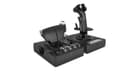
The Logitech G X56 HOTAS is a high-performance flight simulator controller featuring 6 degrees of freedom, 189 programmable controls, and customizable RGB lighting. Designed for both casual gamers and professional sim pilots, it offers adjustable spring resistance, dual USB connectivity, and VR readiness, making it a versatile and immersive tool for next-level flight simulation on PC.


| ASIN | B079Z3DSBK |
| Country of origin | China |
| Customer reviews | 4.2 4.2 out of 5 stars (2,622) |
| Is discontinued by manufacturer | No |
| Item model number | 945-000059 |
| Product Dimensions | 18.5 x 22.5 x 26.6 cm; 2.28 kg |
| Rated | Not PEGI rated |
| Release date | 24 Aug. 2018 |
T**Y
Seems like the best value at this price point
In a nutshell I think this is probably the best throttle and stick at this price point. In fact it's a really good price for what you get. I'm very happy with this buy. The only negative thing I can say about the throttle is that it lacks 0%, 50% and 100% detents (e.g. for afterburner). Otherwise, tons of switches, ability to split the throttles, multiple modes.. all you need. The stick's great. Again plenty of buttons which feel really satisfying to use, the spring in the can be adjusted if you want an easier time moving the stick, or if you want to make it more difficult. In terms of feel it's good, but not incredible - going higher end would get you that, but we're in the mid-range. I am totally satisfied with the quality here. The software's garbage. You'll probably find yourself having to clear profiles every time you boot your PC, since you'll be using the ones in the game. Don't discount the X56 just because of the two clicks it takes to do that.
M**M
Great performance and quality!
The performance of this stick as compared to a traditional, potentiometer based systems is huge. The Hall Effect sensors provide great resolution, fine-grained enough for good helicopter control, I use the stick mainly for this purpose; most casual enthusiasts wouldn't want to fork out the big bucks for an actual Cyclic Sim control and this is a great compromise in my mind. I would say that both the throttle and the stick would be easier to use if you have large hands, I do and find it comfortable but I could see someone with smaller hands having a few issues reaching a couple things without moving the stick around too much. The spring adjustment for the stick is great, having a few to choose from with varying tensions is a great idea IMO, for example I would use a stiffer spring for a fixed wing compared to a helicopter, where you need that easy fine-grained control with very little movement of the stick. The tension adjustment on the throttle could be a little better but it does work. I mainly use this with X-Plane 11 + 12 on MacOSX with no compatibility issues; all axis, buttons, switches etc are detected in X-Plane and function correctly. The devices are detected by name inside X-Plane.
S**E
Best HOTAS in its price range
After a year with the X56, I'm really happy with my purchase. I use this for DCS in VR and it works really well. The joystick is too big for my hands and I had to artificially raise the palm rest at the base (using layered cardboard) by about 1 cm so that I could rest my palm and still reach all the buttons but you have to be careful not to raise it too high as you can cover up the button at the very bottom of the actual stick. Once I found the right level to raise the palm rest then it was comfortable but be careful with this if you have small hands. The throttle is built really well and is comfortable. It also has heaps of buttons and switches which is excellent! It does have 3 things that you need to consider - The throttle movement is a little on the heavy side and doesn't slide easily. I would have liked it if it was a little easier but that's a preference thing and you get use to it. - The throttle doesn't have an afterburner indent. For those flying fighter jets, that means you won't get the physical nudge on the throttle once you've hit afterburners so might not realise they're on. Not the end of the world but something to think about. - The throttle takes lots of power and people have had issues with buttons being triggered randomly due to using a non-powered USB hub. Make sure you have a reliable direct USB connection to your PC or a powered hub to plug it in to. Overall, the HOTAS is the best in its class and to get anything better you would need to pay ~2-3 x more for a professional Warthog, WinWing or Vipril Hotas so although not perfect, it does represent good value for money.
A**N
Logitech X-56
Plus points: Throttle controls can be bound or unbound together to work as one lever or 2 Momentary switches spring back with good response. Everything easily within reach. Programming buttons - software allows adjustment of basically everything for use within games / Sims. Very very adjustable so many buttons. RGB lighting also very adjustable as well as brightness. Has mounting holes on the units to mount to desk / sim pit style brackets. Although the rubber feet do allow to be placed direct on a desk without it moving too easily. Bad points - Lack of an internal cable management for excess cable length. The throttle resistance knob is a bit sticky and often won't allow rotation. Even a minor adjustment results in either no resistance at all or stiffer than would be desirable. Summary - Having used HOTAS style controls in the past this is certainly my favourite to obtain. Controls are very adjustable and the ergonomics are superb. The build quality appears very sturdy as it should be for its cost. Would certainly do sim pit pilots proud. Only drawback being the throttle resistance knob
R**O
Funzionalità e Prestazioni Utilizzando il Logitech G X56 H.O.T.A.S., ho scoperto che offre un controllo avanzato con sei gradi di libertà (6DoF), che includono pitch, roll, yaw, movimento avanti, indietro, su e giù. I mini stick analogici aggiungono ulteriori assi di controllo, rendendo il dispositivo ideale sia per simulazioni spaziali complesse che per il volo atmosferico, permettendo un’esperienza di gioco altamente immersiva e realistica. Vantaggi • Configurabilità Estesa: Con 189 controlli programmabili, tra cui 31 pulsanti, 5 hat switch e numerosi dial e switch, posso personalizzare il dispositivo per adattarlo alle mie esigenze di simulazione, utilizzando il software incluso. • Versatilità delle Molle: Le quattro molle intercambiabili mi permettono di regolare la tensione del joystick, adattandosi perfettamente alle diverse preferenze di controllo e ai vari tipi di aeromobili. Le molle con tensione più bassa sono ideali per i velivoli più piccoli, mentre quelle con tensione più alta sono perfette per quelli più grandi. • Design e Estetica: Il design moderno con illuminazione RGB personalizzabile crea un ambiente di gioco visivamente accattivante. Ho potuto abbinare l’illuminazione alla mia configurazione di gioco per un look davvero unico. Svantaggi • Qualità Costruttiva: Anche se il dispositivo è robusto, è realizzato principalmente in plastica, con solo alcune parti in metallo. Ho notato che il dispositivo può sembrare leggero e le ventose incluse non sempre garantiscono una stabilità perfetta durante l’uso intenso, soprattutto se non fissato saldamente alla scrivania. • Problemi di Drift: Ho riscontrato problemi di drift sia nel joystick che nei mini stick analogici. Per migliorare la precisione, è stato necessario impostare delle dead zones nel software. • Assenza di Detent Centrale: Il throttle non dispone di un detent centrale, complicando il passaggio tra spinta avanti e indietro. Ho dovuto fare movimenti aggiuntivi per essere preciso nel cambio di direzione della spinta. Esperienza Utente Utilizzando il Logitech G X56 in combinazione con i pedali rudder Logitech, ho trovato che migliora significativamente l’esperienza di simulazione di volo su Microsoft Flight Simulator. Questo setup completo mi ha permesso di godere di un’esperienza di volo immersiva e realistica. Conclusione Il Logitech G X56 H.O.T.A.S. è un dispositivo versatile e altamente configurabile, perfetto sia per principianti che per piloti virtuali esperti. Offre un ottimo rapporto qualità-prezzo, specialmente se confrontato con alternative più costose. Nonostante alcuni piccoli difetti, come la qualità costruttiva e i problemi di drift, il Logitech G X56 è sicuramente un’opzione da considerare per chi cerca un sistema H.O.T.A.S. completo per i simulatori di volo e di spazio. In sintesi, se stai cercando un sistema H.O.T.A.S. che offra una vasta gamma di controlli e personalizzazioni per migliorare la tua esperienza di simulazione, il Logitech G X56 è un’ottima scelta.
D**N
Juste parfait pour mon utilisation ( Élite Dangerous) j ai de grande mains et il est a ma taille c'est très appréciable j'avais l'ancienne version "RHINO" mais il y avait des imperfections qui ont étées corrigées avec cette dernière version
D**Y
Nach Jahren der Verwendung eines Saitek X45, war es mal Zeit für ein neueres Gerät. Hauptsächlich spiele ich nur Elite Dangerous und Microsoft Flight Simulator. Ja noch nach 11 Jahren spiele ich Elite, und das 2-3x die Woche. Mein alter HOTAS gab (natürlich) nach 11 Jahren irgendwann den Geist auf. Nun aber zum HOTAS: Der macht einen guten Eindruck, ist Stabil und hat eine Menge an Knöpfen. Das was man für Flugsimulatoren und Space Simulatoren benötigt. Der Stick besitzt - 4 Knöpfe - 1 Ministick (analog) - 3 Hats (digital) mit je 8 Kontaktpunkten. Das Throttle besitz: - Auf dem Boden des Throttle - - 7 Schalter, je 2 Positionen - - 2 Drehregler - - 1 Moderegler für 3 Modis (für Programmierbare Funktionen) - Am Throttlehebel - - 3 Knöpfe - - 1 Schieberegler - - 1 (ich sag mal) Schieberegler der wieder zur Mitte springt - - 1 Rädchen auf der Linken Seite des Hebel - - 2 Analoge Regler rechts, welche zusätzlich noch eine Knopffunktion haben - - Noch mal 2 Hats (digital) mit 8 Kontaktpunkten - - 1 analogen Ministick So lassen sich sowohl Spiele wie E:D als auch Flugsimulatoren keine wünsche mehr offen. Die digitalen Hats und Schieberegler verwende ich als Knöpfe so hat das Hotas insg. 60 Knöpfe. Dazu die analogen Steuerungen, welche dann eher für analoge Flugzeugeinstellungen wie z.B. bei Flightsimulator Landeklappen oder Störklappen und Trimmung verwende. Zusätzlich besitzt der Throttle an der Seite eine Feder, womit das Gleitgefühl eingestellt werden kann. Hier habe ich auf ganz leicht gestellt, so bleibt das Throttle auch an der Stelle auf meinem Schreibstisch. Anordnung der Steuereinheiten (Throttle): Je nach Stellung des Throttle, sind die Kippschalter am Boden schwer zu erreichen (beschriftet mit TGL1-4), daher habe ich dort eher unwichtige Funktionen oder Funktionen welche ich nicht im Flug benötige. Anders sind die Kippschalter unterhalb des Throttle, die sind gut erreichbar. Ich spiele oft mit einer HTC Vive (VR Brille) und auch mit der VR auf dem Kopf sind die Schalter eindeutig und sofort zu finden. Anordnung der Steuereinheiten (Stick): Auch hier sind die Knöpfe gut angeordnet. Ich habe aber relativ große Hände. Mit dem Daumen kann ich gut die 3 Hats erreichen, auch den Knopf über den Linken Hat. Ich kann mir vorstellen das hier allerdings Spieler mit einer kleineren Hand den rechten unteren Hat auf dem Stick als unangenehm finden, da dieser al Scharfkantig empfunden werden kann. Wenn ich hier den oberen Hat nutzen möchte, berührt ungefähr die Mitte des Daumes das untere Hat. Der kleine Finger liegt gut auf den Unteren Knopf auf dem Stick und erreicht noch den etwas weiter entfernten unteren Knopf. Neben den Hats auf der rechten Seite ist noch ein Knopf der leicht vom rechten Zeigefinger erreicht werden kann, sonst ruht der rechte Zeigefinger auf dem Trigger. Der Stick kann leicht in allen Richtungen Bewegt werden. Allgemeines: Ich hatte ja vorher ein sehr altes Modell (X45) dort war das Throttle per Kabel am Stick angeschlossen und nur der Stick per USB am PC angeschlossen. Der X56 benötigt 2 freie USB Port, da sowohl der Stick als auch das Throttle direkt am PC angeschlossen werden. Da ich viele USB Geräte verwende habe ich mir auch ein USB Hub mit eigener Stromversorgung zusätzlich bestellt. (Nicht nur für das HOTAS sondern auch und einfacher an USB 3.1 zu kommen, aber dazu gibt es eine Rezession an anderer Stelle) Nice to Have aber meines Erachtens völlig unwichtig ist, wenn der Treiber direkt von Hersteller verwendet wird kann die Farbe eingestellt werden in der die Bedienelemente leuchten. Die Treiber des Herstellers sind nicht nötig, da Windows 10 diesen korrekt erkennt.
B**N
Ik ben al 3dagen aant wachten ging normaal al geleverd moeten zijn ik krijg ook geen updates
D**N
Had this HOTAS not long now and feels awesome when I'm playing Elite Dangerous . The twist on the joystick makes hell of a difference for flight simulator games. Even though it's mainly plastic feels but it's comfortably to handle smooth with all the switches to customize.
TrustPilot
1 个月前
1天前