We remain fully operational. Our teams are working around the clock to ensure your deliveries continue safely.

下载应用程序


Buy anything from 5,000+ international stores. One checkout price. No surprise fees. Join 2M+ shoppers on Desertcart.
Desertcart purchases this item on your behalf and handles shipping, customs, and support to SINGAPORE.
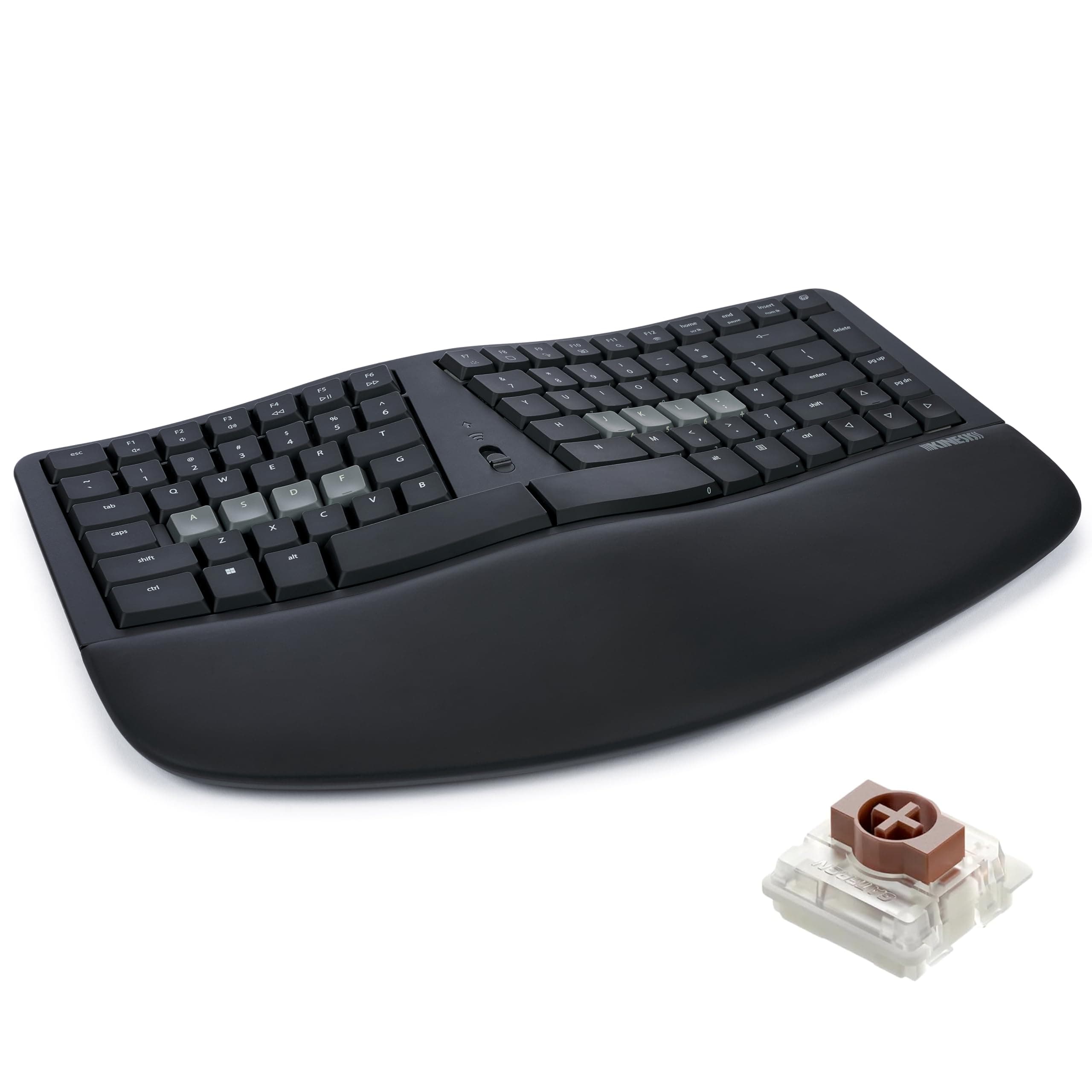
⌨️ Elevate your typing game with ergonomic precision and next-level connectivity!
The Kinesis mWave Ergonomic Keyboard redefines comfort and productivity with its signature wave layout, premium low-profile mechanical switches, and versatile dual Bluetooth plus USB-C connectivity. Designed for professionals who demand long-term typing health, it features programmable keys, backlit legends for low-light work, and an integrated numeric keypad accessible via function layer. This keyboard is a modern evolution of classic ergonomic designs, engineered to reduce strain and boost efficiency in any Windows-based setup.


| ASIN | B0DYG1KPX7 |
| Additional Features | Backlit, Ergonomic, Hotkeys and Media Keys, Programmable Keys, Wrist Rest |
| Antenna Location | Office |
| Best Sellers Rank | #98,984 in Computers ( See Top 100 in Computers ) #2,910 in Computer Keyboards |
| Brand | Kinesis |
| Built-In Media | 3 Negative Tilt Feet (Magnetic), USB Cable |
| Compatible Devices | Laptop, PC, Smartphone, Tablet |
| Connectivity Technology | Bluetooth, USB-C |
| Customer Reviews | 4.0 4.0 out of 5 stars (90) |
| Enclosure Material | Polycarbonate |
| Hand Orientation | Ambidextrous |
| Item Dimensions L x W x H | 38.7L x 24.1W x 4.4H centimeters |
| Keyboard Backlighting Color Support | Single Color |
| Keyboard Description | Mechanical |
| Keyboard Layout | Dvorak |
| Manufacturer | Kinesis |
| Mechanical Keyboard Switch Model | gateron_brown |
| Model Name | mWave Mechanical Keyboard for PC |
| Model Number | KB150P-TAC |
| Power Source | Corded Electric |
| Style Name | Windows (Black) |
| Switch Type | Tactile |
| UPC | 607998150023 |
| Unit Count | 1.0 Count |
X**O
This keyboard is essentially a reprogrammable Microsoft Sculpt with several other quality of life features. The keyboard comes with a usb-a to usb-c cable, batteries, and magnetic legs for the keyboard if you want negative tilt like the Sculpt's magnetic stand. The palm rest is very comfortable, maybe even more than the Sculpt. The surface is much easier to clean as it's less porous, someone else described it as "sculpt feels a bit neoprene/foamy where the mwave feels kind of vinyl and plasticky". Typing on the keyboard will be slightly louder and "clacky" than a Sculpt but not enough to disturb people nearby. The layout is very similar and requires no effort to transition to if you can touch type on the Sculpt. The low profile brown switches feel smooth and tactile. I was afraid the switches would bother me since it theoretically has longer travel than the Sculpt's laptop style keys but in real use the difference is negligible and it was easy to adapt to. The Clique software is browser based (like VIA if you've used a QMK keyboard) and it's easy to use. It allows you to have momentary layer switching (hold a key to switch layers and release to return) and mod-tapping which is really convenient. You also have the option to use ZMK Studio instead if you prefer an offline solution but the UI isn't as convenient. The main downside with the softwares is you can't bind macros (sequence of multiple keypresses) to your keys unless you're willing to make your own ZMK keymap and flash it on your keyboard. That being said, I very much appreciate that I'm not limited to the Clique keymap editor and have the option to use the ZMK studio or flash my own firmware. That along with wired or dual bluetooth connectivity, persistent custom bindings, double AA instead of triple AAA for longer battery life, and the comfortable typing makes this keyboard a huge step up from the Sculpt for me.
J**D
I was upset when I accidentally ruined my Microsoft Sculpt keyboard a couple of years ago but positively crushed when I then learned Microsoft was no longer selling them. Proper ergonomics are important for me, but I prefer something that is relatively "standard" rather than any of the truly radical keyboard designs that are out there. I also didn't want to spend hundreds of dollars. After a lot of research, I ended up purchasing the Logitech Ergo K860 (https://www.amazon.com/dp/B07ZWK2TQT) which I liked fine, but not nearly as much as the Sculpt it replaced. Unfortunately the durability on my first K860 wasn't great and I had to replace it only 18 months later. I didn't want to buy from them again, but there just wasn't anything else out there that met my specifications so I moved forward and reordered hoping my first one had just been a dud. Eight months later I was thrilled to learn the mWave had been released and decided to order one despite there being no reviews available yet. I'm glad I did! After a couple weeks of daily usage I've come away very happy with the purchase and feel like this is truly the ideal replacement for the Sculpt. The keyboard feels substantial and I like the negative tilt that can be achieved with the legs it includes. Important to note the tilt angle is "all or nothing" as there are no adjustments possible. A few things really set the keyboard apart from the Sculpt in a good way. The first is the the fact it is mechanical keys rather than the chiclet style. I have become more enamored of the feel and travel of mechanical keyboards in recent years and though I won't claim to be super knowledgable about them this one matches other I own and enjoy in terms of noise level and quality. I have made a point of asking multiple people if they can hear me typing during videoconferences and the answer has always been a no. The keys make noise for sure, as do all mechanical keyboards I'm familiar with, but they are not overly noisy. The next item I love is the backlight. I will often work in a dark room so having the keys lit can be helpful. The lighting has three different levels ranging from dim to pretty bright and the latter is what I'm showing in the picture attached to this review. That picture was taken in a room with a lot of natural daytime light and the backlighting is clearly visible. Frankly, in a dark room it is too bright for my eyes and I go with the medium level. Finally, I love how the keyboard is customizable thanks to what appears to be powerful programming functionality. I have not done more than play around a little with the programming, but it is something I expect to take further advantage of in the weeks ahead. There is only one problem I have with the keyboard and that is I was forced to get it in white since I'm a Mac user. After a few weeks it isn't showing any grime, but I expect that to change over time. They are going to be releasing a kit that will allow you to convert a black Windows keyboard into a Mac keyboard, but that isn't available yet so I decided to just go with the white. If the mWave stands up to extensive usage it will be a great option at what I consider to be a very fair price ($120 as of this writing). If you loved the Sculpt I'm guessing you'll love the mWave
M**A
Spacebar did not work properly from the first day. $220 for a keyboard and it does not work. Seller is trying to send me to the manufacturer for the return, very poor product and process
D**Y
I couldn't get on with this keyboard, the keys are simply too loud and they have very long travel, to the point I would catch other keys when moving across the keyboard. That and the US only layout, which I thought wouldn't be an issue, has just made me go back to my old Microsoft 4000 ergo keyboard. It's built solidly by the keys have an uncomfortable feel about them. Not for me.
M**I
Its something else it deserves every penny