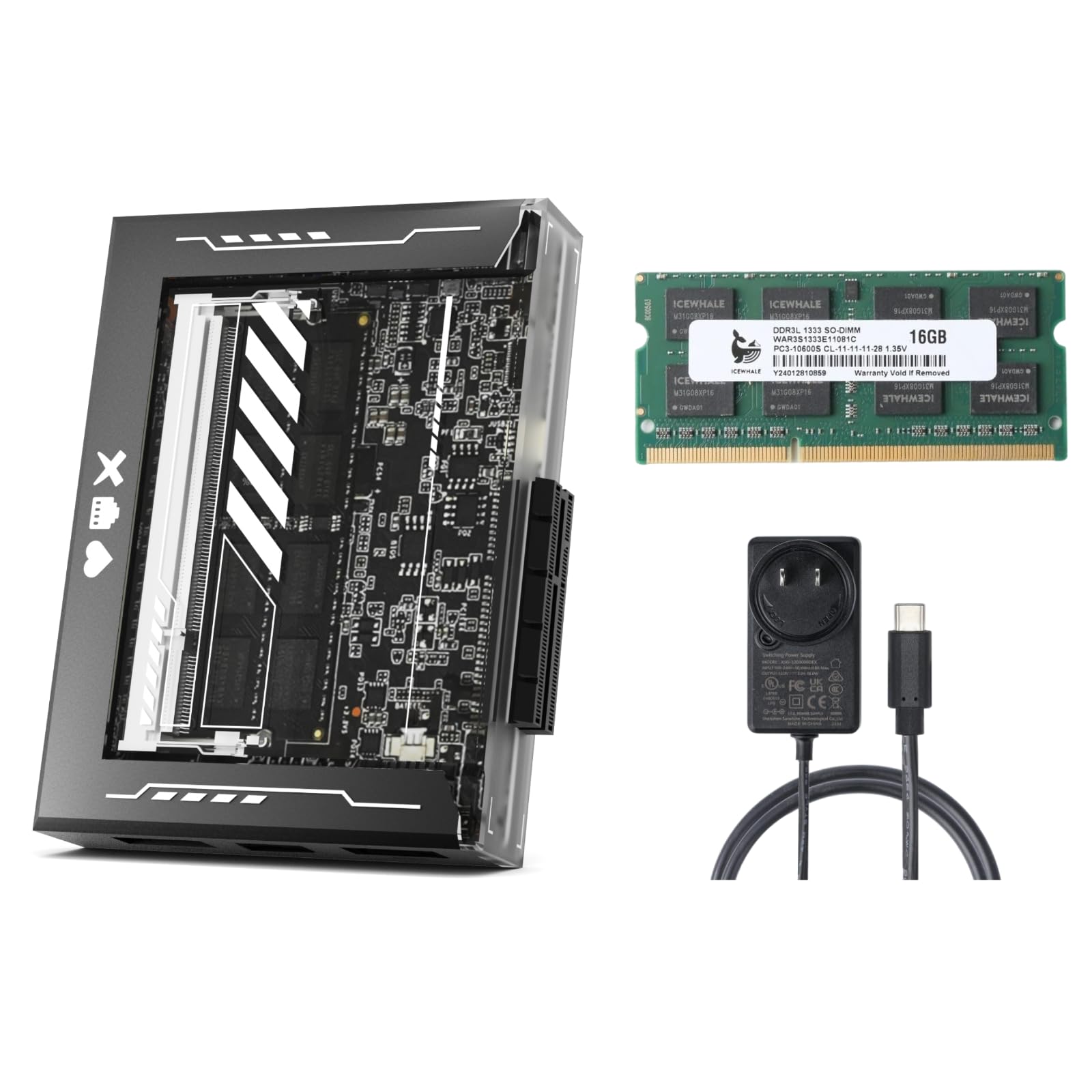
🚀 Own your cloud, stream in 4K, and expand without limits!
The ZimaBlade Personal Cloud NAS Server is a powerful, beginner-friendly all-in-one home server featuring 16GB DDR3L RAM, 32GB eMMC storage, and an x86 Quad-Core CPU capable of 4K Plex transcoding. It supports over 40TB of storage with dual SATA 3.0 ports and offers unmatched PCIe 2.0 x4 expandability for advanced upgrades. Pre-installed with CasaOS, it delivers a sleek, mobile-responsive interface with one-click app installs, enabling secure remote access and AI-powered photo management without subscription fees. Ideal for home lab enthusiasts and professionals seeking a versatile, scalable private cloud solution.


| ASIN | B0FBFQDXSQ |
| Best Sellers Rank | #28,578 in Electronics ( See Top 100 in Electronics ) #3 in Computer Servers |
| Brand | zimablade |
| Color | Basic Kit |
| Customer Reviews | 4.4 4.4 out of 5 stars (163) |
| Date First Available | May 30, 2025 |
| Flash Memory Size | 32 GB |
| Hard Drive | 32 SSD |
| Hard Drive Interface | PCIE x 4 |
| Hard Drive Rotational Speed | 7200 |
| Item Weight | 1.41 pounds |
| Item model number | ZimaBlade |
| Manufacturer | SHANGHAI ICEWHALE TECHNOLOGY CO LTD |
| Package Dimensions | 7.64 x 5.67 x 4.45 inches |
| Series | ZimaBlade |
T**Y
Good for tinkering or Omada/Home Assistant host
Overall, the ZimaBlade is a solid little server for basic applications. I’ve been running Home Assistant and an Omada controller for my network, and it handles both flawlessly with plenty of stability. It’s a great for tinkering or running low-resource apps. However, be aware of its limits: I tried using it for Frigate CCTV recording, but the processing requirements were too much for this specific hardware. If you stick to lightweight Docker containers and networking tools, it's a fantastic, power-efficient value
J**D
MUST HAVE homelab device - Amazing Value!
With zimabladeI have been able to set up an entire stack for my house that previously did not exist. Currently I am running over 30 different services hosted on two 2 TB ssds connected to the zima device. Casaos has been extremely easy to use and the simple yet effective UI is great for power users like myself, but is even better for new users. My girlfriend, who is not technically inclined whatsoever has been able to restart the device and even install new applications that she needed for her animal security cameras to work without my help. At only $150, the device provides Nas capabilities as well as security system capabilities that hooked directly into my camera system and also provide smart home and many microservices all within a single unit with only 65% CPU and RAM utilization. I highly recommend this device for home labbers as well as individuals looking to get into tinkering with Tech devices as it provides plenty of understandable UI and ux along with plenty of ports and expandability to work similar to a raspberry pi, yet not quite as advanced.
A**L
So far so good
So far so good I’ll update if anything weird happens
L**E
Good! get it
its a little slow, but much better in terms of power consumption than a normal NAS. no noise whatsoever. Good for the money I spent on it. The Home Assistant App that comes with Casa isn't customizable as much as the Raspberry pi. Don't expect this thing to run a fast minecraft server, do use this thing for file storage on a budget.
J**S
Very nice purchase. I’m a happy customer!
Received, installed and my older dell 7568 works much faster. Thank you! Price was decent for this memory module. Installation was a breeze and my laptop recognized the memory just fine, no compatibility issues at all. Happy that my laptop’s speed increased!
G**L
Well, that was irritating....
I bought two of these because I needed a small form factor tinker toy. This fit the bill especially because it was on sale. Gripe: Ram doesn't come with it. Yeah, I know it says that right in the description... but this is DDR 3 ram we are talking about at this point, there should be a landfill of this stuff just like the chips used in the product (not complaining about that piece... just saying) Actual issue: The biggest one of them all. Where the heck are you all finding the exact chargers for these things besides buying them direct from IceWhale? I used 7, yes... SEVEN... different chargers in my house and none of them worked. Just a solid red light when attempting to power on. My biggest beef here is that, if the company wants to make a product that's actually going to be used, they need to not make a charger that is uncommon to the common user. It feels very bait-and-switchy to have to say "Sure, we will sell you the base model of a product at an excellent price, but to make it actually work, you have to spend more money on a specific item from us". That's like saying, I'll sell you the car, but the key is extra. I REALLY wanted to love this product. I watched so many videos reviewing this thing and it really fit the bill for what I wanted. But this power cord thing soiled it for me for the product and the company.
D**S
Great for Tinkering
Got this device as a little tinkering box and it's been pretty versatile. Got this with an NVMe PCIE device and everything worked right away. I installed Linux as a little home server and has worked well since. Had some caveats due to not doing a lot of research before getting this. 16GB ram stick are expensive except the one IceWhale sells, but IceWhale RAM sticks have a pretty significant delivery lag time at the time of this review (2-4 weeks). 8GB RAM sticks are pretty quick to get though. Also, be sure to have a 12v/3amp USB-C power supply on hand as they only ship the USB-C cable without a power adapter with this unit.
R**N
Seems to be a quality product.
I ordered because it fit the specs for ram in my laptop. It was either faulty, or the motherboard didn't accept it. I use to repair PCs. It looked like a quality stick of ram. The soldering on the chips where solid. I would say if it worked for me it would have been a solid upgrade. Unfortunately with DDR3 and older laptops you take a chance of compatibility. All you can do is try. I would recommend this product. Even if it was faulty you can tell it is a quality part.
L**X
Excelente producto, no viene con el cable Y
S**.
Works as expected- very pleased
M**Y
neat product, but qualified ddr3l ram is more hard to buy on Amazon. Be careful on those cheap 20+ euro ram Now is used as a mini NAS with OpenMediaVault. My only concerning is heat and cooling, though the aluminium HDD chassis could work partially as heat sink, my two HDDs and zimablade are getting about 50 C degree when running.
R**O
✅ Punti di forza Performance & architettura x86 Il ZimaBlade 7700 monta un processore Intel Celeron quad-core (J3455/E3950) della generazione Apollo Lake, quindi una architettura x86 completa, non ARM. CNX Software - Embedded Systems News Supporta fino a 16 GB di RAM DDR3L tramite un unico slot L’interfaccia di storage: 2 porte SATA 3.0 (6 Gb/s) + memoria eMMC integrata da 32 GB. CNX Software - Embedded Systems News Uscita video in 4K@60Hz tramite Mini-DisplayPort; porta USB-C anche per display/power/data. Consumo contenuto: la versione più energivora della scheda è dichiarata a circa TDP 10 W. Ampia compatibilità OS: Linux, Windows, contesti NAS, casa virtualizzazione. CNX Software - Embedded Systems News Versatilità & progetto “fai-da-te” Design compatto: dimensioni ~107×80×23 mm, peso 175 g. Slot PCIe 2.0 x4 integrato → possibilità di espansione (ad esempio schede di rete, adattatori NVMe, ecc) in alcuni scenari. Ottimo per NAS, server di backup, ambiente virtualizzato leggero o laboratorio di rete. Diversi utenti lo utilizzano con container Docker, TrueNAS, Proxmox, ecc. Kit con RAM e accessori La variante “kit” include RAM da 16 GB DDR3L (quindi già pronta all’uso senza aver da acquistare separatamente) + alimentatore USB-C adeguato + accessori vari in alcuni bundle. ⚠️ Punti di debolezza / considerazioni Non supporta WiFi o Bluetooth integrati: se servono queste funzionalità, va aggiunto un dongle o scheda esterna. La CPU, pur essendo quad-core, non è di ultima generazione: si basa su Apollo Lake, datato 14 nm, per carichi leggeri/moderati. Alcune recensioni sottolineano che per compiti molto intensivi o virtualizzazione pesante ci sono dispositivi più potenti. Ha un unico slot RAM, quindi l’espansione è limitata a 16 GB; inoltre, per utenti meno esperti installare la RAM è necessario (non viene sempre preinstallata) e richiede un po’ di manualità. IceWhale Community Forum In scenari di carico elevato (es. grandi pool ZFS, dischi 7200 rpm, operazioni di scrittura intensiva) alcuni utenti segnalano che serve dare importanza alla ventilazione/raffreddamento per evitare temperature elevate. 🎯 Per chi è ideale questo dispositivo Per utenti che vogliono costruire un NAS domestico o un backup server personale: grazie alle due porte SATA e alla CPU x86 + 16 GB RAM, è più che adatto. Per maker o appassionati di home-lab che desiderano sperimentare container, virtualizzazione leggera, server multimediali, cloud personale. Per chi vuole un dispositivo compatto, a basso consumo, da integrare in un angolo senza tanto rumore o ingombro. Meno indicato per chi cerca un PC primario ad alte prestazioni o workstation per editing video/3D; qui è più orientato a server “silenzioso/sempre acceso” che a performance massime. 🧮 Valutazione complessiva Il ZimaBlade 7700, nella versione kit con RAM, rappresenta un eccellente equilibrio tra prezzo, funzionalità e versatilità. Offre architettura x86, espandibilità, buone porte SATA e RAM fino a 16 GB: caratteristiche che rendono molto interessante per chi vuole più controllo sui propri dati rispetto ai NAS pre-assemblati. Certo, non è il top assoluto in termini di CPU, ma per la maggior parte degli scenari “smart home / NAS domestico / home-lab” fa egregiamente il suo lavoro. Punteggio stimato: 4.5/5 — se tieni conto che è un dispositivo “semi-fai-da-te” e che richiede un minimo di configurazione.
C**N
Producto increíble por el precio, casaos funciona perfecto, le he conectado un SSD sata y una gpu nvidia para codificar video con Jellyfin.
TrustPilot
1 个月前
1天前