We remain fully operational. Our teams are working around the clock to ensure your deliveries continue safely.

下载应用程序


Buy anything from 5,000+ international stores. One checkout price. No surprise fees. Join 2M+ shoppers on Desertcart.
Desertcart purchases this item on your behalf and handles shipping, customs, and support to SINGAPORE.
🖥️ Triple your screens, double your impact — power, speed, and style in one sleek dock!
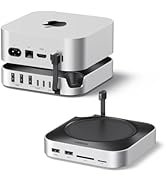
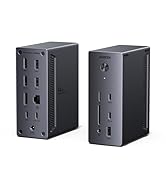
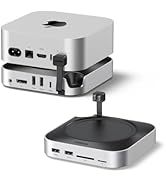
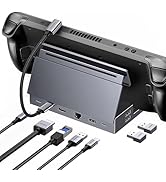
The UGREEN Revodok Pro 12-in-1 Docking Station is a powerhouse hub designed for professionals craving productivity and style. Featuring triple 4K display support via dual HDMI and DisplayPort (4K@120Hz), dual 10Gbps USB-C ports for rapid data transfer, and a robust 100W USB-C Power Delivery for fast laptop charging, it transforms any workspace into a high-efficiency command center. With 12 versatile ports including Ethernet, SD/TF card slots, and audio, plus a 40cm extended cable for neat setups, it’s compatible with a wide range of devices including Dell, HP, and MacBooks (with display mirroring on macOS). Elevate your professional setup with this sleek, space grey docking station trusted by thousands.





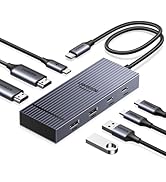





| ASIN | B0DRP1F6R7 |
| Best Sellers Rank | 1,533 in Computers & Accessories ( See Top 100 in Computers & Accessories ) 11 in Docking Stations |
| Brand Name | UGREEN |
| Colour | Space Grey |
| Compatible Devices | MacBook, Dell, HP, Smartphones, Cameras |
| Country of Origin | China |
| Customer Reviews | 4.0 4.0 out of 5 stars (1,167) |
| Hardware Interface | 3.5mm Audio, DisplayPort, Ethernet, HDMI, MicroSD, USB, USB Type C |
| Item Weight | 0.22 Kilograms |
| Manufacturer | Ugreen Group Limited |
| Number of Ports | 12 |
| Product Warranty | 2 year manufacturer |
| Total HDMI Port | 2 |
| Total USB Ports | 4 |
| Wattage | 100.0 |
S**N
Simple and Easy to Install
Very easy to install, and simply just worked, enabling my MacBook to connect to a monitor, which a previous dock found a challenge.
S**L
Great bit of kit
works absolutely fine, although I should have checked that my MacBook could support 2 screens before purchasing, it works on a laptop brilliantly.
C**S
Mostly works
I've been using this for few months now and it mostly works, but on few occasions (3-4 times) I had to unplug and replug power to it to make it work again. I don't think it's power supply issue because it is USB-C 100W PD power brick and my laptop does not complain about unreliable power supply. On those 3-4 occasions one of the 2 displays would stop working and only resetting this USB-C Hub fixed it. I do use active DP and HDMI cables to help with the signals because I use this with an KVM switch (DP+HDMI), so maybe it's pushing it to it's limits, given the price. Overall I will keep using it, since the issues do not happen too often.
P**R
Great all-in-one dock for triple displays and tidy workspace
I bought this UGREEN 12-in-1 laptop docking station to simplify my setup, and it’s done an excellent job. With the two HDMI ports and DisplayPort, I can run multiple monitors from a single USB-C connection, which makes working with lots of windows so much easier. The picture is sharp and stable on all screens, and I haven’t had any issues with flickering or random disconnects. The extra ports are very handy – the 10Gbps USB ports are fast for external drives, and having Ethernet, card readers and audio all built in means I don’t need a pile of separate adapters anymore. The 100W PD passthrough is a big plus too, as it keeps my laptop charged while everything else is plugged into the dock. The unit itself is compact, feels solid and looks smart on the desk in its space-grey aluminium finish. Setup was essentially plug and play: connect the USB-C cable, plug in my screens and peripherals, and it all just worked. Overall, this is a very capable and reliable docking station that really helps turn a laptop into a proper desktop-style workstation. I’m very happy with it and would definitely recommend it.
V**R
One 4K and One FHD Resolution instead of Dual 4K Resolution Dock
*Update to my review on 09.10.2025* I bought two top notch HDMI cables from Amazon which arrived today to see if this can lead to changing the resolution on my second 4K UHD monitor as I am very keen to keep the UGreen device due to its small size and no requirement for an adapter to be connected to it, but unfortunately the result was the same; so, there was no problem with my cables and this is an inherent problem with UGreen so-called Docking Stations: This is the cables' technical specification: "8K HDMI Cable, HDMI 2.1 b, certified Ultra Edition for maximum performance – 2m (48G, Ultra High Speed HDMI 2.1, 10K, 8K@60Hz & 4K@144Hz, Gaming PC/PS5/Xbox, HDMI certificate". These are the best HDMI cables with the highest specification available in the market and on Amazon. I bought this docking station which is supposed to be triple 4K display as I was very keen to use it immediately after receipt of the package which was delivered to me this evening since I am desperate to replace my two-piece Dell dock and get rid of it as it has a very big adapter in addition to the big size of the dock itself. I originally bought another UGreen's dock last week on my other Amazon account which was *'UGREEN Docking Station, Revodok Pro 308 USB C Hub, Triple Display with 2x 4K HDMI and 1x DP, 10Gbps USB-A & C Data Ports, 100W PD Charging, Laptop Dock'* but was immediately disappointed as it could only deliver 2 X 2K resolution although both of my monitors are HP 4K. I bought this new one this afternoon and was glad to receive it on the same day but tonight I was even more disappointed with this new dock which is more expensive, i.e. £42.72 while the other one was £28.49 (it has now increased slightly to £29.99) as I expected it to be better and higher in performance than the cheaper one but unfortunately it proved to be even worse as I could only get a 4K resolution on one monitor and 1K resolution on the other one when using an HDMI connection (1920 X 1200) or 1920 X 1080 when using a DP cable (please see the enclosed screenshots). Surprisingly, the picture on the second monitor regardless of using an HDMI or DP connection is smaller than the monitor size which can be likened to a rectangular within another rectangular and there is a marginal gap of 1 inch or 2-1/2 centimetres at the top and 3/4 inch or 2 centimetres at the bottom of the screen which is a big minus in addition to the very low resolution (I have included a photo of my second monitor to show these gaps but as it has been taken using a mobile rather than a screenshot, the picture is a little bit tilted). Therefore, I can't figure out how UGreen has claimed that this so-called docking station can support 3 X 4K resolution. Comparing this device which is more an adapter rather than a docking station with the cheaper version mentioned above, I prefer the latter as at least it could deliver full screen and 2K resolution on the second monitor. Due to such poor performance, I am afraid I don’t recommend this device and give it a one-star rating as it’s not possible to give it a zero rating.
G**N
Good dock
Works Well, decent value, recommended
V**.
3 stars – Works well but causes monitor wake loop
Overall it is a decent little dock. Very low-profile, and has all the ports that you could want. It does get quite hot under full load, but doesn't seem to reach dangerous or problematic levels, so that's alright. I wanted to like this dock. It's well made, has a good mix of ports, and mostly does what I expected. I'm using it with a 2025 ROG Flow Z13 and two monitors, one connected by DisplayPort and the other by HDMI. Everything looked good until I left the laptop idle for a few minutes. The problem is with the DisplayPort output. When the laptop screen turns off (not even full sleep), my KTC H24T7 monitor goes into a weird loop. It says "no signal," then "power saving," goes black, then immediately wakes up and starts the whole thing again. This repeats non-stop. The HDMI-connected HP monitor doesn't do this, so it's definitely something to do with the DisplayPort signal coming from the dock. Unplugging the USB-C from the laptop doesn't stop it, but unplugging the DisplayPort from the dock does. So the dock is clearly sending something the monitor interprets as a wake signal, even when there's no video output. I need DisplayPort to get my monitor’s full 180Hz, so switching to HDMI isn’t an option. If you’re using standard 60Hz monitors or only HDMI, you might not run into this issue. But if you’re using high refresh rate displays and need DisplayPort, just be aware this dock might cause problems when your system idles.
B**T
Small, sleek, gets the job done
I purchased this dock to work from home, and was very much impressed. There are a lot of available ports you can use, and it has a relatively small footprint. However, I think the price could be slightly lower. Otherwise, it's great, and I'd recommend it
A**E
Not very happy with this… I plug 2 external harddrives on it and they just disconnect… it's not very reliable I'm very disappointed. I don't trust it anymore
H**K
Excellent
D**A
The best but a bit pricey. I was looking for a hub which can support 2 usb c types one for charger input and other for c type earphones or pendrive. Searched everywhere and found this suggested by chatgpt and this is the best product. Metal body, faster speeds, flawless connectivity
S**Y
Excellent product from UGREEN. I purchased this for my MacBook pro 16" M4 processor. It's 100% compatible with Macbook Pro machine. It's perfect. Identified the external hard drives immediately. Only cons side is it's two USB hubs are of 480 mbps speed...but that's okay for me. ... I have got 2 ports for display in it .. One 4K HDMI with 60 Htz and One Display port for 4K 60 Htz output resolutions. Very happy with this product. Thanks to the seller UGREEN and Amazon.
G**C
Good usb hub! Supports QHD@180hz monitor on DP port. Very long upstream USBC cable. Usb C ports are usb3 but USB A ports are USB 2.0. PD works well with Macbook Air M4. I have supplied it with 66w power adapter. I have tortured it for couple of hours and it does not overheat - but it gets very warm like 40-45 degrees celsius. I hope this will not affect its longevity.
TrustPilot
5天前
1 个月前