We remain fully operational. Our teams are working around the clock to ensure your deliveries continue safely.

下载应用程序



🚀 Elevate your workspace: Power, speed, and clarity in one sleek hub.
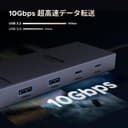
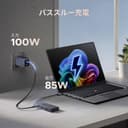
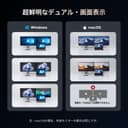
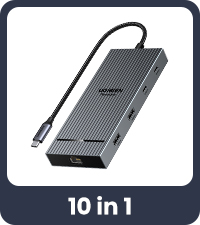
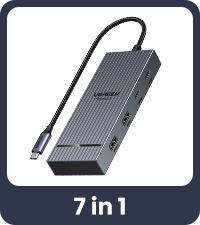
The UGREEN 7 in 1 Revodok Pro USB C Docking Station is a premium multiport hub designed for professionals seeking high-performance connectivity. Featuring dual 4K@60Hz HDMI outputs, 10Gbps USB 3.2 data transfer speeds, and 100W Power Delivery fast charging, it supports seamless multi-display setups and rapid device charging. Compatible with a wide range of laptops including MacBook Air/Pro and Windows devices, it consolidates multiple connections into a single USB-C interface, enhancing productivity and workspace organization.





| ASIN | B0D1XSKZRJ |
| Additional Features | Fast Charging, Fast Data Transfer, Lightweight |
| Amazon Bestseller | #931 in Computers ( See Top 100 in Computers ) #1 in Laptop Docking Stations |
| Brand | UGREEN |
| Color | black |
| Compatible Devices | Laptops, Monitors, Projectors |
| Country of Origin | China |
| Customer Reviews | 4.0 4.0 out of 5 stars (2,357) |
| Data Transfer Rate | 10 Gigabits Per Second |
| Enclosure Material | Aluminum |
| Hardware Interface | HDMI, USB, USB Type C |
| Item Weight | 91 Grams |
| Manufacturer | Ugreen Group Limited |
| Mfr Part Number | 45365 |
| Minimum Required Operating System Version | Mac OS 10.15 Catalina, Windows 10 |
| Model Number | 45365 |
| Number of Ports | 7 |
| Operating System | Windows, MAC OS |
| Total Usb Ports | 4 |
K**O
M4 Mac mini本体ThunderboltポートとHDMIでモニタ2台(4Kモニタ2台) Thunderbolt接続のUGREEN HUBからHDMIモニタ1台(FHD)で計3台拡張モニタ設定、10G/bpsハードディスクでしばらく運用しましたが問題なく使用しています。(他のメーカーは10G/bpsハードディスク認識したりしなかったりでした。)またスリープからの復帰後も問題なく動作しています。 UGREEN製品は他にも沢山使用していますが全て安定しています。 UGREEN=買って安心、高い信頼性
A**ー
PCの使用環境ですがノートPCをディスプレイ2枚に接続して3画面で使用しています。 マウスとキーボードはワイヤレスを使用しているのでレシーバーをノートPCに2つ付けています。 この使い方だと配線がごちゃつく上、ノートPCは外出先でも頻繁に利用するので持ち出すたびに接続が必要で、この手間を何とかできないかと調べていたらこのドッキングステーションにたどり着きました。 おかげでUSB-Cケーブル1本をPCとつなぐだけで、すべての機器と接続できるのでとても快適に仕事ができています。 他にも似たような製品はあったのですが、安い製品だと1画面は60Hz出力、もう1画面30Hzとリフレッシュレートが変わってしまう製品ばかりだったのですが、この製品は低価格なのに2画面に60Hzで出力できるということで即購入しました。 うれしい誤算だったのがUSB-C PDポートがPCへの給電だけでなく送電にも対応している点です。 2つのディスプレイのうち1つがモバイルディスプレイなのですが、USB-C PDポートとディスプレイ側のUSB-Cポートを接続するとPCから送電することができました。 非常に満足していますが、不満点も2点ほどあります。 ①ケーブルが短い 机の上を広く使えるようにディスプレイの裏に設置したかったのでもう少し長いケーブルだとなお良かったです。 ただ同じUGREENの製品で延長USB-Cケーブルが1,500円くらいで販売されていたので、このケーブルを使用してディスプレイ裏に製品を設置することができていますので、大きな不満点というわけではないです。 ②USB Cポートは映像出力非対応 製品説明にも記載されていましたがUSB Cポートは映像出力には対応していません。 対応していればモバイルディスプレイのケーブルをもう一本削ることができてさらに机の上がすっきりしたのにと思うと少し残念です。 HDMIーUSB-Cで接続したら給電もされるかもしれないのでこのあたりは今後試してみようと思います 不満点を考慮してもいい買い物をしたと思っています。
J**N
この価格で4K60hz出力や比較的高速な端子の搭載はかなり高コスパ。 しかし、たまに再接続が挟まる時もあった。
K**様
4kモニタとFHDモニタにそれぞれHDMI 60Hzで出力して、仕事で借用しているなんでもないノートPCを3画面モニタ化出来ました。テレワーク環境が一気に良くなります。まだ試していませんが、有線LANや電源も繋げばUSB-Cケーブル一つ繋ぐだけで全部接続完了なんて凄すぎます。昔はメーカー純正のドッキングステーションなんてのが同じコンセプトであったと思いますが、高価で自分が恩恵に預かることはないと思っていましたが、3900円なら買えます。このメーカーは凄いです。
S**R
Defective piece. Unethical business.
I bought it a week back. Price was 3800 yen at that time. Despite having prime account, it displayed delivery date 1 week ahead. I was doubtful why so late delivery. After waiting one week, it arrived. Device even didnt startup and not showed signal light as well. Of course i did not have any option than return. ( They didnt provide exchange option) When i checked after thet, price was increased upto 5400. This has broken my trust both on ugreen & amazon itself. 1. Have you provided me defective product intentionally because price was low at that time? So that i had no option than to return and order new. Is this some kind of cheap business strategy? 2. One the next day after I ordered, price went up to 4800 and then next day 5400. Why such price inflation (45%) within a week? 3. Are you playing with customer ? Make price low. Once customer decides and order, provide defective piece. So thar he has to return and order the new piece with inflated price. Anyway, ugreen is unprofessional in business and amazon supporting it. Dont buy it.
M**人
これでノートPCをトリプルモニターに出来た。モニター、キーボード、マウス等をケーブル一本で管理できるので便利。ノート付属のACアダプターで給電する場合は低速充電のマークが出ました。
ガ**ん
【購入目的】 ノートPCをUSB-C一本で電力供給・デュアルモニター出力・USB機器接続まで完結させたいと考え、このドッキングステーションを選びました。持ち運びつつ、デスク環境をすっきり整理したい用途に最適だと思って。 【良かった点(メリット)】 ・HDMI出力が2つあり、モニター2台への同時出力が可能で、映像品質(4K@60Hz)も安定している。 ・USB-A と USB-C ポートがそれぞれ複数あり、高速データ転送ができるため SSD や周辺機器でも快適に使える。 ・100W の PD 入力に対応し、ノートPCへ給電しながら映像・データ機能を同時利用可能。 ・構造がシンプルかつ薄型で、持ち歩きやすく、デスク上での設置も邪魔にならない。 【気になった点(デメリット)】 ・給電なし(バスパワー状態)では映像出力が不安定になる可能性があり、常にPD電源を前提とする必要あり。 ・macOS 環境では、拡張モードで2画面表示できずミラー表示になるケースが報告されている。 ・本体とPCをつなぐケーブルが着脱不可・長さ固定で、設置スペース調整の自由度に制限を感じることがある。 ・USB-C の下流ポートは映像出力に対応しておらず、モバイルモニターの追加は想定外となること。 ・長時間使用時に“ほんのり温かくなる”との声あり。発熱対策は環境によって注意が必要。 【総評(まとめ)】 この 7-in-1 USB-Cドッキングステーションは、HDMI 2系統・高速USB・高出力給電を一体化した、非常にバランスの取れた製品です。特に Windows ノートでの USB-C 一本化とデュアル 4K モニター運用を重視する人には非常に有力な選択肢になります。ただし、給電必須・macOSでの拡張表示制限・ケーブル仕様といった点は事前理解が必要。総合評価は ★4。環境をよく確認すれば、多くの場面で頼れるドックだと思います。
A**R
職場でのトリプルディスプレイ化と電源供給を一本のType C接続にまとめたくて購入。 以前、同じことができると称している別の安価な商品では、ディスプレイ出力はできるものの、PCへの給電がちゃんとできない、という状況だったが、この商品は、全く問題なく、期待通りの動作。 やっぱり一定のブランドのものを買わないと、と改めて思った。
M**S
✅ Un très bon dock qui fonctionne parfaitement ✅ Matériaux qualitatifs ✅ Tout petit, donc hyper pratique ✅ Affichage sur 2 écrans sans perdition
N**D
It works as expected. Everything connects smoothly. Build quality is great. It is in small size and doesn’t make a mess on the desk. Worth buying.
L**H
Have been using it for 11 months. Connected with a second monitor, two hard-drives all the time. It has been functioning very well so far.
M**A
Ho acquistato questo hub per utilizzarlo con un monitor portatile, nello specifico l’Arzopa Z1RC, che supporta la trasmissione video sia tramite HDMI che tramite USB-C. L’hub si presenta ben costruito, con una scocca in alluminio elegante e che rimane fresca anche durante l’uso prolungato. Punti di forza: • Porte disponibili: 2 HDMI (4K 30Hz), 2 USB-C dati (10Gbps), 2 USB-A, e una porta USB-C PD per la ricarica. • Tutto funziona perfettamente e senza problemi, inclusa la trasmissione video tramite le porte HDMI. • Design compatto ed elegante, perfetto per un utilizzo quotidiano. Limite importante: L’unico motivo per cui non assegno una valutazione piena è la mancanza di una porta USB-C dedicata alla trasmissione video. Il mio monitor Arzopa Z1RC, infatti, supporta la trasmissione video tramite cavo USB-C → USB-C (offerto con il monitor), il che consente di evitare l’utilizzo di un cavo HDMI. Tuttavia, con questo hub non è possibile sfruttare questa funzionalità poiché: 1. Le due porte USB-C presenti supportano esclusivamente il trasferimento dati. 2. La porta USB-C PD è dedicata esclusivamente alla ricarica e non permette la trasmissione video. Di conseguenza, è possibile collegare un monitor solo tramite HDMI, escludendo la possibilità di usare USB-C per video. Conclusione: Si tratta di un buon prodotto, funzionale e ben realizzato, ma avrei preferito che una delle porte USB-C fosse compatibile con la trasmissione video. Questo sarebbe stato particolarmente utile per monitor portatili come il mio, che supportano ingressi video sia HDMI che USB-C. Se il vostro monitor utilizza esclusivamente HDMI per il video, questo hub è una scelta eccellente. Tuttavia, se desiderate sfruttare una connessione video USB-C, meglio cercare un prodotto alternativo.
S**I
My main use case is extending display from my laptop and mobile to my Ultrawide monitor. This hub works fine with my Dell Windows and my Macbook Air M4 15" laptop. I tried cheaper hubs but they failed to give me a good display extension from my Windows laptop to an LG 29" Ultrawide monitor (its recommended display resolution is 2560x1080 @ 60Hz). With this UGreen hub, I am able to extend my Windows laptop display and the display is perfect because this hub gives me 2560x1080 @ 60Hz display output. The cheaper hubs were cheaper (I saved money), but useless as they gave me 4k display output at 30Hz which was very bad because the text appeared stretched and unreadable on my LG 29" Ultrawide monitor. My second use case is to use this hub with my Samsung Galaxy Fold 4's Dex mode and use it on my LG 29" Ultrawide monitor. This use case also works perfectly with this hub. Again the 4k @ 60Hz output is the game changer here. With other 4k @ 30 Hz hubs the text was unreadable and very pixelated too. This hub's build quality is very premium and another good part is that its type-c connector cable is quite long. This makes it easier to connect to my laptop. Other hubs had very small type-c connector cables and it was more difficult to use, in comparison, especially when there are multiple devices connected to the hub. Its passthrough charging works perfectly. ANother good thing is that if I leave my laptop charger connected to this hub, and then connect the hub to my Samsung Galaxy Fold 4 mobile, the phone also gets charged while its display is output to my widescreen monitor. I compared products like Samsung's Multiport Adapter and Belkin's hubs. Samsung's hub is more expensive with fewer ports. The Belkin hub is at almost the same price as this UGreen one but it has 4k @ 30Hz display output. I would recommend paying the extra premium and buying this hub or another one with 4k @ 60Hz display support because that is a key feature that future-proofs the purchase.
TrustPilot
3 周前
2 周前