We remain fully operational. Our teams are working around the clock to ensure your deliveries continue safely.

下载应用程序




Buy anything from 5,000+ international stores. One checkout price. No surprise fees. Join 2M+ shoppers on Desertcart.
Desertcart purchases this item on your behalf and handles shipping, customs, and support to SINGAPORE.
⚡ Power up your cable game with precision and style!
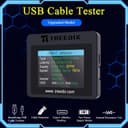
The Treedix USB Cable Tester is a professional-grade tool featuring a vibrant 2.4-inch color display that provides detailed diagnostics including USB cable continuity, internal resistance, and PD 3.0/3.1 fast charging support. It uniquely reads Type-C eMarker chips to reveal exact cable capabilities, ensuring compatibility with Lightning, Type-C, Micro-B, and Mini-B cables across USB 2.0 to 3.2 standards. Designed for tech-savvy professionals, it offers flexible power options and an intuitive interface to quickly identify high-quality cables and avoid subpar charging or data transfer performance.


| ASIN | B0DYJL5Z67 |
| Best Sellers Rank | #3,028 in Industrial & Scientific ( See Top 100 in Industrial & Scientific ) #5 in Network & Cable Testers |
| Brand Name | Treedix |
| Color | black |
| Customer Reviews | 4.6 4.6 out of 5 stars (392) |
| Included Components | usb cable tester |
| Item Weight | 0.09 Kilograms |
| Manufacturer | Treedix |
| Measurement Type | Ohms, Percentage |
| Minimum Operating Voltage | 5 Volts |
| Model | TRX5-0816 |
| Power Source | Battery Powered, Corded Electric |
| UPC | 644197778283 |
A**R
Easy to use and flexible
This is a handy little tester that helps you determine the properties of a cable, which often aren't obvious just by looking at the cable. It's very easy to use and although the display is fairly small, it is easy to read because the information is presented in an organized fashion. This tester supports cables with USB A or USSB C on one end, and either USB C, Micro USB, Mini USB, or Micro USB "3.0". Unfortunately it does not support USB B ("printer style") connections or USB B 3.0 style cables. Since those connectors are larger, I believe it would require the tester to be thicker. Additionally, this tester does not support lightning cables. There are 4 "screens" of information which you cycle through by pressing a (very) small button. The first screen is an overshowing if the cable can transmit data and power, and which type(s). The second screen shows the actual wire connections and their status. The third screen shows the cable resistance and can estimate the cable length, and the 4th screen will show the details of an active chip if there is one in the cable. Every computer technician or enthusiast should have one of these in their bag! PROS: * Small and easy to use * Gives you all of the details you need to know about a cable * Flexible and supports a number of common cable types and configurations CONS: * Does not support USB B, USB B 3.0, or lightning * Button to move between screens is a bit small
D**E
A very useful and easy to use tool
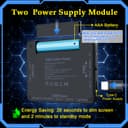
This is a very nice device and provides a lot of useful information. It is easy to use and easy to read. It comes with a small instruction booklet that is quite clear. The basic process is to connect both ends of your cable to the device and slide a small switch to the desired power source (included AA battery or external USB C power source). There are four pages of information and you step through them by pressing a small button. The first page gives you a summary of the protocols supported (e.g., USB 2.0, 3.2, 4 and Thunderbolt). Note that it does not report the "generation" of USB 3.2. Your computer might have USB 3.0, 3.1, 3.1 gen 1, or 3.2 gen 1 interfaces - these are all equivalent to 3.2 gen 1 (5 Gbps) and the "USB 3.2" indicator that will light for cables that support that. However, it also will light for USB 3.1 gen 2 and USB 3.2 gen 2 (10 Gbps), and for USB 3.2 gen 2x2 (20 Gbps) cables. The fact that 3.2 lights up indicates it's at least 5 Gbps but might be more. The second page shows the wire connection list between the two ends of the cable. The third page shows some resistance and latency information. The fourth page shows data from the "e-marker" chip, if present. These chips are embedded in some USB C cables. If present, the e-marker will report the max data rate and the max charging power supported. If you have USB A-A or USB A-C cables, or USB C-C cables without e-marker chips, you won't be able to tell whether they are rated for 5 (gen 1) or 10 (gen 2) or 20 Gbps (gen 2x2). If you have a cable with a chip, you will see the maximum data rate on the fourth page. Note also that if you want to evaluate a USB A-A cable, you'll need a USB A to C adapter plug. The unit has a wide variety of USB 2.0 connectors but only one Type A USB 3 connector. To perform the tests, both ends of the cable have to be connected to the device so you must be able to adapt a Type A connector on one end of the cable to a Type C. Overall I recommend this, but I wish it could tell which USB A-A 3.x cables support 5 (gen1) or 10 Gbps (gen 2) interfaces. I suspect it is technically impractical to determine that in a low cost device. I found that almost all of the USB C "charging" cables I have lying around have no e-marker chip and no data capability at all or just USB 2.0 480 Mbps. An e-marker chip is required for any cable that supports 60W or greater charging; any cable lacking the chip must necessarily be rated for <60 Watts, but you cannot tell whether it's 15, 20, 30W, etc. Lastly, the device comes with an AA battery. You can use that to power it, or you can plug in a power source via a USB C cable.
L**K
Tells which cables support high speed data and power delivery !
For those with a pile of USB-C cables that look alike... this little device is VERY handy for telling which cables support high speed data / power delivery. Also identifies bad cables. Extremely easy to use and works great. Device is powered by an AAA battery or USB-C - It uses up AAA batteries quickly - but that's OK. Recommended.
D**N
a magic wand to help you sort out your mess of cables
Informative and easy-to-use. Don't assume that just because the cable is new, it will be fast and support high power. Are you wondering why that Samsung cable that came with the power adapter transfers photos so slowly from your phone? It might be USB 2.0. Yes, even name brands cut corners on USB cables. They typically provide only the features they believe are essential to what the cables will most be used for. So, similarly, that USB 3.0 cable that came with your new external drive may not have Power Delivery and be able to handle higher watts. New doesn't mean full-featured. (Along these lines, you might want to invest in a USB power tester, such as the StarTech one I reviewed, and trying yours cables with an adapter and device that support high power, to see what the cable maxes out at.) Even though we think of USB as being all-purpose, in reality we wind up with this mish-mash of cables very few of which are all-purpose. Nor are the chargers. You can use a cable that is over-capable (with few exceptions), but you can't use a cable that is slow or underpowered if you want good results. With the help of this device, you can start to separate your cables into piles, so that you know what should be used for what! (And what should not be used for what!) Treedix fills a nice little niche with its USB cable testers in particular. They make a cheaper one that also works well, though this one is more powerful and easier to read, especially for figuring out speeds. Even with this thing, you're not going to learn everything about a cable, and if a cable is frayed or too small for the current, this is not gonna save you. But this is a very good starting point as you embark on that quixotic, continuing quest of trying to make sense of that infernal pile of similar-looking cables that you have accumulated in the Age of USB.
E**C
Works as advertised.
M**E
Excellent USB lead tester for routing out those poor quality usb leads you may have with details of power or data or both.
O**.
Es una excelente herramienta, tengo demasiados cables en casa y pues ya con éste equipo ya podré clasificar si es para datos de baja velocidad, alta velocidad o simplemente cable de carga.
T**R
Works very well. I am going through every USB cable in the house. If broken it gets recycled. Anything lower than USB 2 gets recycled. They all get labelled and marked if it can handle PD.
C**G
Item is as described. Fast delivery. It is a bit expensive but display the necessary info about the cables. I wished the device can update future firmware when technology evolved. Thank you very much.
TrustPilot
1天前
3 周前