We remain fully operational. Our teams are working around the clock to ensure your deliveries continue safely.

下载应用程序



Buy anything from 5,000+ international stores. One checkout price. No surprise fees. Join 2M+ shoppers on Desertcart.
Desertcart purchases this item on your behalf and handles shipping, customs, and support to SINGAPORE.
🚀 Elevate Your Game with Skytech Azure – Where Power Meets Style
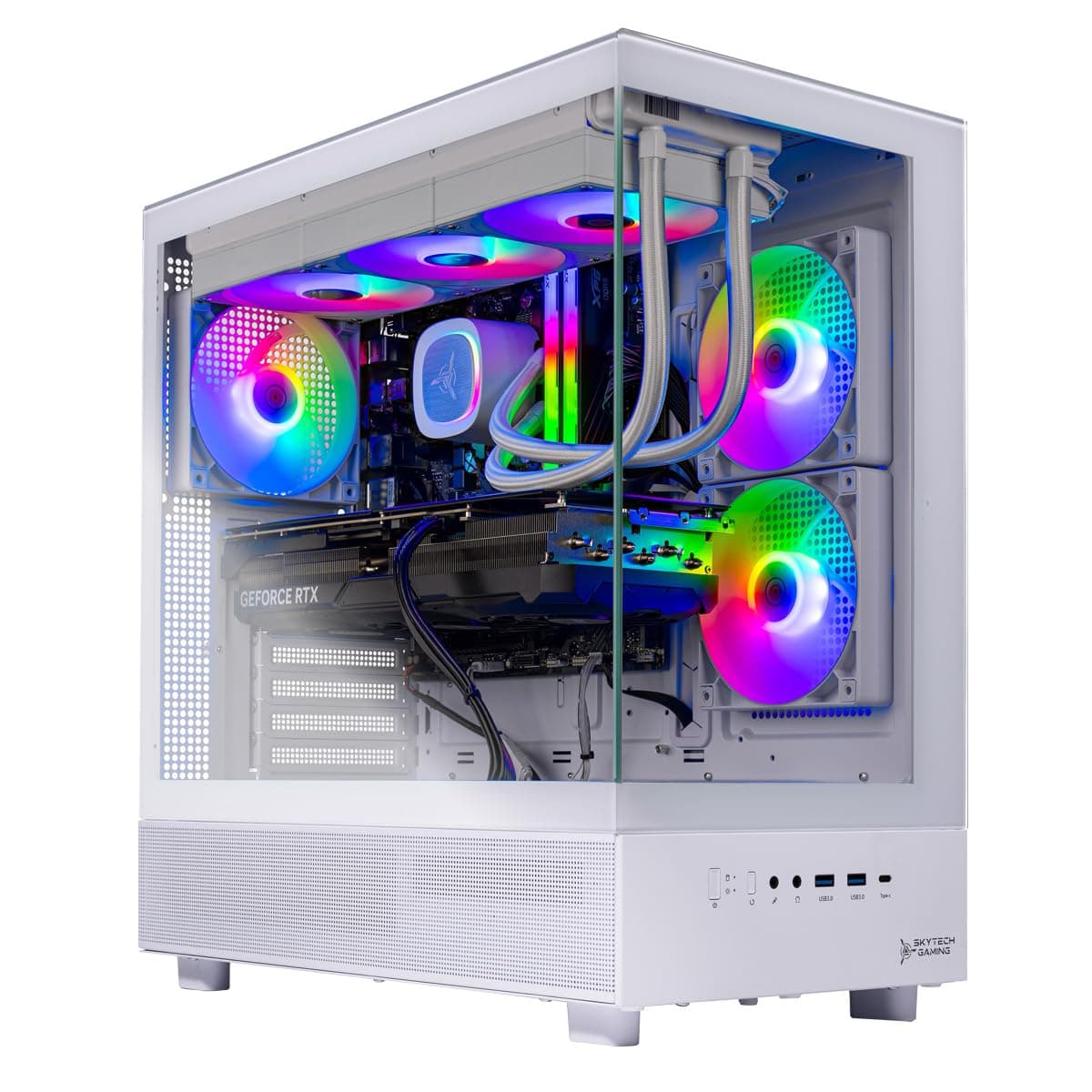
The Skytech Gaming Azure 3 Desktop PC is a high-performance gaming rig featuring an AMD Ryzen 7 9700X processor with up to 5.5GHz turbo boost, NVIDIA RTX 4060 8GB graphics, and a 1TB NVMe SSD for ultra-fast storage. Equipped with 16GB DDR5 6000MHz RAM and a 360mm ARGB liquid cooling system, it delivers smooth 1080p Ultra gaming at 60+ FPS. The sleek white tempered glass case with ARGB fans and Wi-Fi connectivity makes it a stylish and future-ready powerhouse, backed by a 1-year warranty and free technical support.


| ASIN | B0DQ6PVLCV |
| Additional Features | Liquid Cooling, Gaming Keyboard and Mouse |
| Aspect Ratio | 16:9 |
| Best Sellers Rank | #1,136 in Computers & Accessories ( See Top 100 in Computers & Accessories ) #15 in Tower Computers |
| Brand | Skytech Gaming |
| Built-In Media | Keyboard, Mouse, Power Cord, Start Guide |
| CPU Model Number | 9700X |
| CPU Model Speed Maximum | 5.5 GHz |
| Cache Memory Installed Size | 16 |
| Color | White |
| Compatible Devices | Gaming Controller, Keyboard, Monitor, Mouse, Speaker |
| Connectivity Technology | Ethernet, USB, Wi-Fi |
| Cooling Method | 360, Liquid |
| Customer Reviews | 4.4 4.4 out of 5 stars (62) |
| Display Resolution Maximum | 1920x1080 |
| Display Type | LCD |
| Graphics Card Interface | PCI Express |
| Graphics Card Ram | 8 GB |
| Graphics Coprocessor | 4060 |
| Graphics Description | Dedicated |
| Graphics Ram Type | GDDR6 |
| Hard Disk Description | SSD |
| Hard Disk Interface | Solid State |
| Hardware Interface | DisplayPort, HDMI, USB, USB 2.0, USB 3.0 |
| Human-Interface Input | Keyboard, Mouse |
| Item Dimensions | 17.2 x 9.1 x 17.8 inches |
| Item Weight | 14.7 Kilograms |
| Keyboard Description | Gaming |
| Keyboard Layout | QWERTY |
| Manufacturer | Skytech Gaming |
| Memory Clock Speed | 6000 MHz |
| Memory Slots Available | 4 |
| Memory Speed | 6000 MHz |
| Memory Storage Capacity | 16 GB |
| Model Name | Azure |
| Model Number | ST-AZURE3-1564-W-AM |
| Model Year | 2024 |
| Native Resolution | 1920 x 1080 |
| Number of Component Outputs | 2 |
| Operating System | Windows 11 Home |
| Personal Computer Design Type | Computer Tower |
| Power Consumption | 650 Watts |
| Power Plug Type | Type A - 2 pin (North American) |
| Processor Brand | AMD |
| Processor Count | 8 |
| Processor Series | Ryzen 7 |
| Processor Socket | AM5 |
| Processor Speed | 3.8 GHz |
| RAM Memory Installed | 16 GB |
| RAM Memory Technology | DDR5 |
| RAM Type | DDR5 RAM |
| Ram Memory Maximum Size | 16 GB |
| Resolution | 1080p Full HD |
| Screen Size | 1 |
| Security Features | Windows Defender, Windows Security |
| Speaker Description | External Speakers Required |
| Speaker Type | External Speakers Required |
| Specific Uses For Product | Gaming, Multimedia, Personal |
| Specification Met | True |
| Style Name | 9700X | 4060 |
| Total Number of HDMI Ports | 1 |
| Total Usb Ports | 3 |
| UPC | 810123732241 |
| Video Output | HDMI, DisplayPort |
| Video Output Interface | HDMI, DisplayPort |
| Video Processor | NVIDIA |
| Warranty Description | 1 Year Labor + Parts | Lifetime Technical Support |
| Wireless Compability | 802.11ac |
| Wireless Network Technology | Wi-Fi |
| Wireless Technology | Wi-Fi |
V**N
Great PC!
I got this PC as a birthday gift, and I love it. The build is quality and even though I ordered the pc to have a 4060 GPU, they gave me a 5060 instead, so that’s a huge bonus! Everything works great and the games I play on it run very smooth, but the fans run a little loud, so I need to adjust that more, but other than that, it’s a great gaming pc. It’s a great build for someone who is getting into pc gaming. It’ll last you a long time too. Worth the buy!
A**R
Solid Build
Alright, the computer is actually really solid. It came well boxed with a lot of protection inside and comes with a document of when the last time the PC was stressed test which is cool. Mines was in April. That being said, they didn’t clear out the plastic coverings for some of the parts so make sure to inspect thoroughly. The PC glass panels have plastic on both sides of the panel. I am running games mid-high at 1440p w/ 120+fps. I’m not entirely sure why the 4060 gets hate but of course there is better. I wanted something basic to upgrade over time and well it seems more than that. The CPU is amazing. 1. The PC comes with mostly Gigabyte components. The motherboard is a B650 UD AX Y1. You can find it on the website directly, but most of the information is found on the Aorus gigabyte site. BIOS was on version F33, its updates behind but I won’t update it unless I really have to. It’s not the best from what I’ve seen in research, but so far it’s solid. 2. The AIO it comes with is a rebranded Deep cooler, heard these were cheap but it’s really good so far. My temps have never touched over 75. The fans are really strong and in BIOS the fan speed is set to normal. You should 1000% change the fan curve in bios (change the speed at which the fans go depending on the temps reached). I say this because the same week, the AIO front fan started howling, couldn’t figure out why until I changed the speed and now it’s extremely quiet and still remains cool. It was set to hit max speed once it hits 70 degrees which isn’t needed. I was going to swap out the AIO but now I can hold off until I want a nice LCD AIO. 2. The RAM is patriot 16gigs with an XMP profile for 6000, I swapped these out for Corsair Vengence 32gig. If you do the same, it kept booting to bios because the XMP file was still enabled. Just disable it > reboot > it will go to windows > give it 10mins > reboot again and enable XMP or w/e profile you choose and it will boot back into Windows without issue. it was running at base speed but now at 6000. 3. The case is a Montech XR. The instructions it came with is not how you take off the panels. You want to first pop off the front glass panel and then the side. Pull from the very top, it will pop off and slide up. The side panel has a prop on the left, pull with some force and slide up. It will require force so don’t feel scared just don’t apply too much pressure at the same time. 4. The Power supply is a P650B from gigabyte. I plan on replacing this eventually because I’ve heard bad things about gigabyte PSU’s and I’d rather have something more premium or secure like a 750 seasonic or EVGA. Essentially, it’s a solid build. I was expecting serious issues because it’s a prebuilt which is why I got it off Amazon since the returns are easy but so far it’s been great. Of course, I’ll update if anything changes. I did have 2 issues mostly due to a windows update which freaked out the RGB But it does come with SIGNALRGB software to control it. I think it just got conflicted with the MOBO controlled RGB setting and signal. When you turn off the PC it will keep the LED on the AIO - you have to disable the feature where it keeps your USB ports powered when in turned off state. I forgot the setting name. Once that is done, you’re good. The cable management is decent, could’ve been better but that is a problem I’ll deal with when I change out the AIO, PSU and GPU.
A**N
Great option for casual gamers
Got this PC several months ago and haven't had any major issues. It runs great, very quiet and easy to set up. I can pretty much play any game I want at high settings with good FPS. Yeah there's better options out there, but if you aren't tech savvy like me then this is more than enough.
J**R
Great prebuilt PC
PC is what it claims to be. I am able to run Overwatch 2 at great speeds and quality, Minecraft runs like a dream, I have all my Sims packs and mods downloaded, and the PC itself has been running smooth this far. My only complaint is that when I received the PC, the quick start guide said to unscrew the left side panel, and my PC did not have screws on the left side panel. I was confused as a new PC owner, and finally figured out that you just pop the tempered glass off on the left side to remove the foam. I could not find any unboxing videos of this specific model, so it took me an hour to figure out how to remove the panel, since I was really scared I was going to break it.
T**S
Very good PC at decent price
Play all games with ease, also good streaming and recording as well.
J**S
Terrible support!
Buyer Beware! I bought this PC in May, stopped working in September. Spent an hour and a half just to get a live chat agent. Told me it was under warranty and they would email me instructions in 2-3 business days…17 days now, never received an email. Contacted support only to be told at this point I should have received the email instead of just resending if they have a record of it. Took to a PC shop and the cpu has gone bad. At this point I don’t expect to get any results from Skytech gaming. Do yourself a favor and choose a different brand! Would give it a zero if it would allow me to do so!
0**0
Good value
i bought a 4060 but got sent a 5060 a win is a win what can i say this pc isnt bad at all to be honest, one thing i like is that u can start from this and work ur way up since the upgrades are flexible, went to pc part picker and the money is actually there. runs fornite at 250+ fps easy to upgrade as well, if you want more fps or more performance i suggest getting a better graphics card but this will do for me
B**N
Great pc
This was my first pc and can say I’m very pleased with it. Very easy to setup
TrustPilot
1 周前
1 周前