
下载应用程序



🎮 Elevate your setup with the GMMK 3 — where customization meets pro-grade performance!
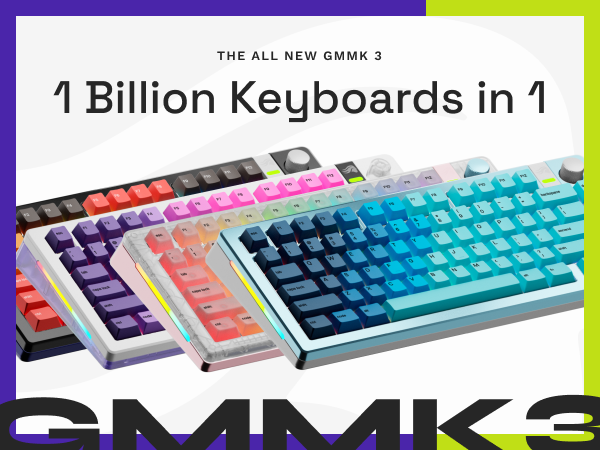
The GLORIOUS GMMK 3 Barebones is a 65% compact mechanical keyboard featuring a highly modular design with 9 customizable parts, including a programmable knob and 5-pin MX hotswappable switches. Its innovative Modular Gasket System and dual-layer sound dampening foam deliver a tailored, quiet typing experience. Built with a durable aluminum body and supported by Glorious CORE software, it’s perfect for gamers, programmers, and professionals seeking a premium, customizable keyboard.




| ASIN | B0DCHQ2Z9D |
| Additional Features | Aluminum Body, Barebones Keyboard, Compact 65% Layout, Customizable, Wired |
| Antenna Location | Everyday Use, Gaming, Programming, Student, Video Editing |
| Best Sellers Rank | #6,883 in Video Games ( See Top 100 in Video Games ) #543 in PC Gaming Keyboards |
| Brand | GLORIOUS |
| Built-In Media | 1 x GMMK 3 Barebones, 1 x Braided Cable, 1 x Keycap Puller, 1 x Screwdriver, 1 x Quick Start Booklet, 3 x Sample Switches, 6 x Extra Screws and O-Rings, 1 x Switch Puller |
| Button Quantity | 66 |
| Color | Black |
| Compatible Devices | Mac, PC, Supported Consoles |
| Connectivity Technology | USB-C |
| Customer Reviews | 4.0 out of 5 stars 111 Reviews |
| Enclosure Material | Aluminum |
| Global Trade Identification Number | 00840408300551 |
| Hand Orientation | Ambidextrous |
| Item Dimensions L x W x H | 13.2"L x 4.9"W x 1.7"H |
| Item Weight | 1.1 Pounds |
| Keyboard Backlighting Color Support | RGB |
| Keyboard Description | Barebones Wired Mechanical Keyboard |
| Keyboard Layout | QWERTY |
| Manufacturer | Glorious |
| Mechanical Keyboard Switch Model | MX |
| Model Name | GLO-KB-GMMK3-65-BB-W-BLK-US |
| Model Number | GLO-KB-GMMK3-65-BB-W-BLK-US |
| Number of Keys | 66 |
| Number of Sections | 3 |
| Power Source | Wired |
| Recommended Uses For Product | Everyday Use, Gaming, Programming, Student, Video Editing |
| Special Feature | Aluminum Body, Barebones Keyboard, Compact 65% Layout, Customizable, Wired |
| Style Name | Contemporary |
| Switch Type | Mechanical |
| Theme | Rainbow |
| UPC | 840408300551 |
| Unit Count | 1.0 Count |
| Warranty Description | 2 Year Manufacturer |
A**T
Overall amazing quality
Great keyboard. Overall amazing quality. +Price, This keyboard is a great price for what you get. It is the cheapest barebones 1800/96% keyboard. +Quality, Surprisingly very high quality. For the price I wasn't expecting something quiet this nice. No complaints. +Software, The glorious core software is great. Allows you to program macros, change led colors, remap keys. Very useful. +Support, Glorious has some of the best support around. some cons - screw in stabilizers don't seem to fit without modification, Even the gsv2 from glorious. I tried with 2 different gmmk 2 pros. Both had the same issue. Random stabilizers are stuck no matter what I did. I think the top frame interferes with how the stabilizer lines up making it bind and get stuck bottomed out. -LED colors are slightly off. The sidelight led won't display yellow. It has a very obvious green tint. My gmmk pro does not have this issue. Overall I really like this keyboard. Was easy to build/work on and came out great when finished.
B**Y
Great base to start with
Great keyboard base if you’re looking to choose your own switches and caps . The software is really nice ,the overall feel and weight of the keyboard assembled is very nice
C**A
Good But With A Few Problems
Overall, this is a good barebones keyboard for the price. You get a lot of customization via the software which is neat. Build quality doesn't feel the most premium but definitely not bad either. My biggest problem I have is when I updated the firmware to version 0009 it completed bricked the RGB and would not light up or respond on the software, the way I fixed it was FN + ESC then F1 + F3 + F5 (Hold for 10 Seconds.) Everything worked fine after doing the factory reset but I get some occasional flickering on the side RGB light that I did not have before updating the firmware. If you can get this keyboard on sale, I would recommend it, just don't update the software and save your self the headache.
R**Y
SENT FAULTY BOARD 2 TIMES NOW
second faulty board delivered in a row. i am not ordering this again and I will not recommend this to anyone to buy. 98% chance that some of the switch connectors are not lined up properly which makes the key effectively dead. i included a photo of what I am talking about. look at the A and X key. pretty sure I received someone’s board that they returned and they didn’t even bother to check it. very bad look. buy something else
R**E
My first custom barebones keyboard build.
I am very happy with my finished build. I used the following items for the build. 1) Outemu Honey Peach Switch V3, 5 Pin Pre-Lubed Silent Linear 2) Womier Low Profile Keycaps - Shine Through, Grey/White I am typing this review with this new keyboard. I am using low profile key caps on this board and I am really liking it. Please see attached picture. I only have a couple of small issues with this keyboard. one is that the space bar key would stick after installing the space bar. I replaced the stabilizer with a Durock Stabilizer and that fixed it. The other issue is the layout of the keys will take some getting used to relative to the number pad and curser keys. I don't see any indicator for keycaps lock being on unless I press a key. Other than those miner issues I very happy with it. The switches were shipped here from China but they are lubed and work as expected. I did need to straiten a few pins on them but they are working fine. I will be keeping and using this keyboard ... :)
K**S
Highly recommend - NOW WITH MAC SOFTWARE
UPDATE 1/2025: They now have their Core platform available for Macs. It is fairly janky and took multiple installs, forced opens, circumventing Apple's malware "protection", restarts, and applying changes, but.... I HAVE CUSTOM COLORS AND PATTERNS NOW. Definitely will buy from Glorious again in the future. --- Super quality build. Gorgeous. Amazing. Everything is great. Except... MACS! The software to fully customize the colors for this IS NOT AVAILABLE FOR MACS. I'm fine with keepin' the colors basic but honestly it really sucked to buy this and build it only to realize that after. I would've purchased the competing brand I was looking at because their software is Mac OS compatible. I didn't test both beforehand and that was my mistake.
J**E
Nice, with some minor flaws...
I bought this board because Glorious seems to be pretty popular amongst keyboard enthusiasts. After a lot of research, I decided to go with this as a budget option since I'm new to mechanical keyboards. The first board I got had issues right out of the box, one of the keys would not work, even after inserting multiple working switches. I returned it for a replacement, and the new board was fully functional. The sound quality is pretty decent, as the board as multiple layers of sound dampening built in. The stock stabilizers sound pretty bad though, very scratchy. Aside from that, building the board was pretty straightforward and easy. Overall, this is a great beginner keyboard for someone that wants to dip their toes into the mechanical keyboard pool.
S**M
Amazing
Love everything about this bare bone keyboard! You can download a software to control the profiles and rgb settings, but you can also use kb shortcuts with the Fn key to do this (I saw this on a YT video). It’s my first time building my own kb so there’s a lot more to uncover in this niche, and I’m here for it. I will be taking it apart to mod though, so it’s nice that it comes wrapped in PE foam already. :) Also, there’s definitely some weight to it which overall, does give it a more quality-like feel.
TrustPilot
1 周前
1 周前