We remain fully operational. Our teams are working around the clock to ensure your deliveries continue safely.

下载应用程序







Buy anything from 5,000+ international stores. One checkout price. No surprise fees. Join 2M+ shoppers on Desertcart.
Desertcart purchases this item on your behalf and handles shipping, customs, and support to SINGAPORE.
✨ Elevate your Galaxy Tab game — type, swipe, and create like never before! 🖋️
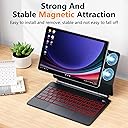
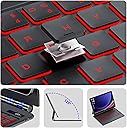
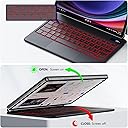
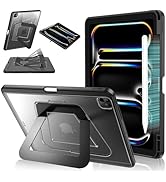
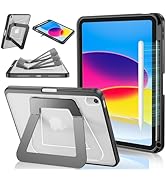
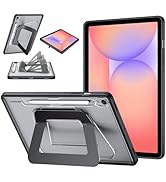
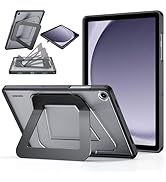
This Magic Keyboard Case is engineered for Samsung Galaxy Tab S10 FE/S9 FE 10.9" and S9/S8/S7 11" models, combining a magnetic detachable stand with a precision multi-touch trackpad and 7-color backlit scissor-switch keys. Featuring a built-in S Pen holder, real-time LED battery display, and Bluetooth connectivity, it transforms your tablet into a sleek, laptop-grade productivity tool designed for professionals on the move.



| ASIN | B0CZ6XS8XX |
| Antenna Location | Business, Education, Everyday Use, Multimedia, Personal, Student |
| Best Sellers Rank | 197,471 in Computers & Accessories ( See Top 100 in Computers & Accessories ) 3,157 in Tablet Keyboards |
| Box Contents | 1× Magic Keyboard Case, 1× USB-C Cable, 1× User Manual |
| Brand Name | PIMOFEE |
| Button Quantity | 78 |
| Colour | Black |
| Compatible Devices | Samsung Galaxy Tab S10 FE 10.9" 2025, Samsung Galaxy Tab S10 Lite 5G 10.9" 2025, Samsung Galaxy Tab S8/S7 11" 2022, Samsung Galaxy Tab S9 11" 2023, Samsung Galaxy Tab S9 FE 10.9" 2023 |
| Connectivity Technology | Bluetooth, USB-C |
| Customer Reviews | 4.4 4.4 out of 5 stars (63) |
| Enclosure Material | Polyurethane (PU) Thermoplastic Polyurethane (TPU) |
| Generation | 1st Generation |
| Hand Orientation | Ambidextrous |
| Item Dimensions L x W x H | 25.4L x 5.1W x 6.9H centimetres |
| Item Weight | 0.65 Pounds |
| Keyboard Backlighting Color Support | RGB |
| Keyboard Description | 2-in-1 with touchpad, backlight and S-Pen holder |
| Keyboard Layout | QWERTY |
| Manufacturer | PIMOFEE |
| Mechanical Keyboard Switch Model | Scissor-Switch |
| Model Name | Tab S9 FE, Tab S9 |
| Model Number | Magic-S9 |
| Number of Batteries | 1 |
| Number of Keys | 64 |
| Number of Sections | 1 |
| Power Source | Corded Electric |
| Product Features | Backlit Keys in Scissor Mechanisms, Floating Cantilever Design, Portable, Precision Touchpad, Rechargeable |
| Series Number | 9 |
| Style Name | Magic-S9 |
| Switch Type | Linear |
| Theme | Modern |
| Unit Count | 1.0 count |
| Water Resistance Level | Not Water Resistant |
E**S
Exactly how I expected it. No issues ☺️
P**O
Eu gostei bastante dessa capa teclado, por ser moderna e muito bonita! Até melhor que a capa original da Samsung. O imã dela segura muito bem o tablet. Nota 10 I really liked this keyboard case, because it's modern and very beautiful! Even better than the original Samsung case. Its magnet holds the tablet very well. Rating: 10.
S**C
THE GOOD The unit holds the tablet well and does not threaten to detach at the drop of a hat. Honestly, I think that the original Samsung magnetic case is wonderful and this competes with that as far as hold strength. I had no trouble connecting via BlueTooth and the key layout is fine as long as you can get accustomed to the smaller than standard footprint. I had no connection drops and the unit connects automatically once it is awake and has already been paired. It's pretty quick to get up and going No latency issues whatsoever. Keys are tactile and travel a good amount, making typing feel impactful and solid. The track pad is fluid and accurate. Unlike other magic keyboard type units I've used for smaller Samsung devices, the track pad is sized well and doesn't cause too much chaos with accidental cursor movement. I also really like that there is a digital power percentage readout on the unit and a clear indicator for when the keyboard is connected to the tablet. THE MEH As with all of the external keyboard cases, this gets a bit bulky. Surprisingly, it's about as streamlined as Samsung's official keyboard case with the kickstand, so I'm pretty happy with it. It has to be noted that the size of the S8 tablet is a little underwhelming, but that's mostly due to the fact that I'm spoiled by my Surface Pro, iPad Pro 2021, and my beloved S9 Ultra. Using the smaller screen hasn't hurt my work flow, it's just a little wonky to deal with in landscape mode for net browsing. THE BAD My only mild gripe is that the S Pen holder is just a vinyl band at the back of the tablet. It works well and the tablet can be removed with the pen attached with a single motion, but I worry that it isn't really effective once I throw this in my bag for work or travel. It has to be pointed out that social media apps like FaceBook, Instagram, and Reddit automatically orient in portrait mode, so the tablet needs to be vertical to use them. Because this keyboard locks you in landscape, you have to use your browser to get to the original websites to make the most of this. That's not just an Android issue, though. I've whined about this same forced aspect on my iPads. If you're at a desk, you can rotate the tablet to be vertical, but the magnets won't really engage and you'll run the risk of having the screen crash onto your knuckles. I wouldn't try it with this on my lap. The Fn + DEX quick-key is nice, though I have found that DEX isn't as useful as I once told myself. My biggest reaction is that using Chrome in DEX adds an upper line to the search bar so it robs you of just the slightest amount of screen space. “BUT, THE IPAD…” All of this is also ignoring the elephant in the room: how does this compare to an iPad with a similar keyboard? To be fair, it's not bad. The iPad's screen size is better for net browsing and for working across multiple windows. The S8 is good for allowing me to lock-in on my task at hand without over stimulating me with a ton of additional space. If you're used to working on a standard desktop with a monitor, the S8 may not offer enough screen real estate for you to feel like you are seeing the whole picture while working. The standard A14 / A16 iPad has a much more familiar aspect ratio for productivity. It must be stated: The modern, standard iPad (A16 chip as of this writing) BLOWS the processing power of even the upper Samsung tablets out of the water at a fraction of the price. Even the modern S6 Lite is only slightly cheaper than the basic iPad. The S9 (two generations back now as we brace ourselves for the S11 line-up) still retails for well over $600 USD, so I would find it hard to recommend this combo over an A14 or higher UNLESS you absolutely hate the Apple ecosystem. Personally, it's taken me years to open up to Apple, but the more I use the device, the more I like it. That said, I still prefer drawing on my Samsung (Sketchbook for life!), though the app selection is, admittedly, more limited. Still, I'm impressed with how well this combo competes, especially since comparing the S6 Lite with a similar keyboard felt so distant. I have an A14, 10th gen with an off-brand magic keyboard and a 2021, M1 iPad Pro with an official Magic Keyboard that are better than this, but only because of the tablet hardware AND the additional keyboard space due to the iPad screen size. The magic keyboard offerings for Apple do give you more key spacing and they are more comfortable to use. I've never struggled with the trackpad, the commands are smooth, and everything just works… slightly BETTER. Granted, both Android and Apple have the limited version of Chrome, so navigating your bookmarks and access bar is equally galling on both systems. “So, you basically made the S8 into a Chromebook?” Well, no. Android still has the limited version of Chrome and the apps do behave slightly differently. For the browser, you can work around that by installing other browsers (Firefox) to make it feel more like a standard Windows work station while perusing the web. I also like that you can use alternative launchers for Android, though Samsung's One UI is pretty good out of the box. If you're looking for something that will offer the full version of the Google work suite, I think that the Lenovo Duet 5 or newer Duet 11 would be a better fit. Sadly, there is no third-party “magic keyboard” for those. BUT… I did try! I have a first gen Duet 3 and a newer Duet 5. Both have a metal back that use a magnetic kick-stand. That should kind of work, right? Well, yeah, it “kind of” works. The 11” Duet 3 can be placed on the keyboard backing, though the metal plate isn't great to match up with the magnets on the keyboard. The larger 13.3” Duet 5 actually is better oriented but is comically undersized. Hmmmmm… Also, the Tab S8 screen dimensions still don't feel quite right compared to the Chromebooks I have on hand. I also have an older Pixel Slate that still gets quite a bit of use. Even though I love this keyboard with the S8, the Brydge keyboard I have for the Slate just feels so much more solid. With all of that in mind, I am keeping this little keyboard and may even try out something for my older S7+ to see if a larger device will better compete against the iPad or Chromebooks I have.
U**E
I am very pleased with this keyboard for my tablet. It has effectively replaced the need for a laptop. I highly recommend it, especially due to its integrated trackpad. I have larger hands and this is built perfectly!
A**N
Love it!!!