We remain fully operational. Our teams are working around the clock to ensure your deliveries continue safely.

下载应用程序


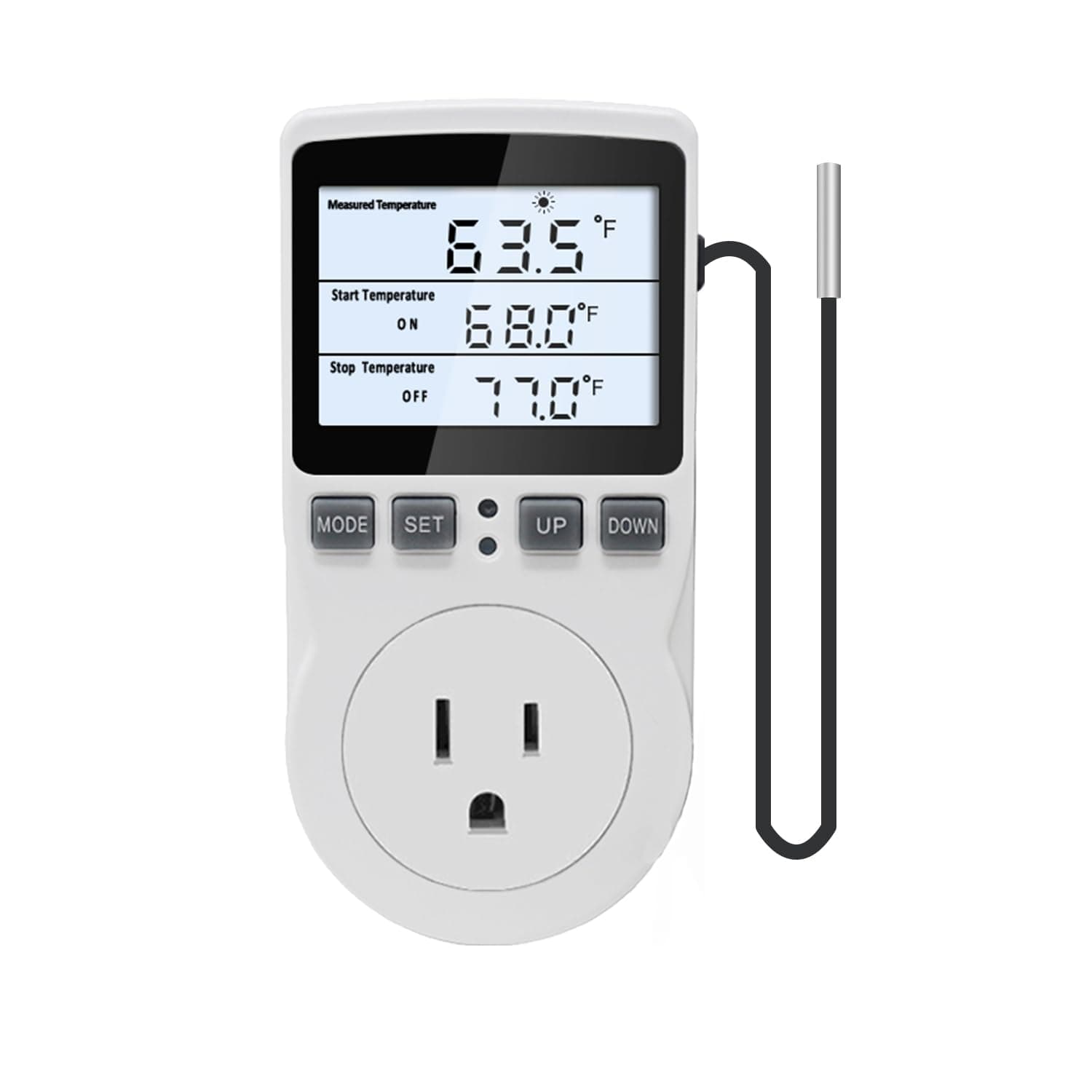
🌟 Take control of your climate like a pro—precision meets convenience!
The KETOTEK Digital Temperature Controller is a robust 120V thermostat outlet featuring a wide temperature range (-40℉ to 248℉), a 3-meter high-precision NTC sensor, and a bright LCD backlight. Designed for easy plug-and-play use, it supports five versatile modes for heating and cooling control, making it ideal for applications from incubators to homebrewing. Its fire-resistant construction and power outage memory ensure safe, reliable operation, while dual Fahrenheit/Celsius display and temperature calibration guarantee accuracy.


| ASIN | B0D3X3JSKN |
| Best Sellers Rank | #24,989 in Industrial & Scientific ( See Top 100 in Industrial & Scientific ) #23 in Temperature Controllers |
| Brand Name | KETOTEK |
| Customer Reviews | 4.5 4.5 out of 5 stars (841) |
| Display Type | LCD |
| Included Components | 1*Thermostat Plug Outlet; 1*Manual |
| Manufacturer | KETOTEK |
| Material Type | Plastic |
| Operating Temperature | 248 Degrees Fahrenheit |
B**E
Easy to program. Reliable.
Good product! Really fast delivery! My second Ketotek Temp controller. Highly accurate, exactly as advertised. Both of the controls I bought do different jobs!
A**Y
This has worked great for our heater application
Working great so far. using it to control a Ceramic heater for my well pit. It have multiple settings and ways to control what you need for your application as well, not just on or off.
P**L
Oh man these are great.
Saw them on a technology connections video and knew I needed them. I’d been looking for a good controller for my space heater and these work fantastically. I’ve even got one out in the well house that’s been going strong all winter.
D**R
Great temperature-controlled outlet (see details). Recommended
Buying appliances in the middle of a supply chain crisis is no fun. When I purchased an extra refrigerator a year ago, I was lucky to find one at all. Unfortunately, I didn't get one that was "garage" certified, which meant I lost a bunch of perishables when my garage got too cold (the ambient thermostat will turn off the fridge when it gets too cold). The solution was the combination of a Diophros 1500W Space Heater, and a KETOTEK Digital Thermostat Outlet Plug. I'm only using the temperature control mode of the KETOTEK, but it's working great. I'm turning on my "dumb" space heater at 10C, and it shuts off at 12C. That's enough to keep the ambient thermostat on my fridge happy, and I won't have to waste a ton of energy on the heater when it's warm enough without it on. The thermocouple seems accurate, and it's great that you can locate it away from the outlet. I don't love that the design of the unit blocks other outlets on my power strip (it blocks 4 of them, due to the specific nature of my power strip). I also don't like that the blue LED is so bright, as it makes the LCD hard to read without direct lighting. Those are minor quibbles, though, as the KETOTEK is an inexpensive and reliable method for keeping my fridge working when the garage is cold - without wasting energy when it's warm enough for the fridge to operate normally. Recommended
T**S
Great air temp probe
Bought this to regulate the temperature of a towel warmer i made. It has been great. Easy to use, with a very long temperature probe wire. It is accurate in the high low temp setting and easy to change when necessary. Nice thing about the probe is it measure air temp, without having to actually attach to anything, (metal to metal).
M**L
Just excellent
I've took to keeping a space heater in my room lately. The furnace never comes on when it is cold in this room, and when it does, it stays on so very long after it gets uncomfortably hot. So I closed that vent and got a space heater. Problem is. When the "heat" kicks off. The "fan" keeps going. That sucks in two ways. First it way to noisy. Then, the cold air from the fan hurts my head. BUT. turn the thermostat on my heater all the way hot. And use this little gem as the thermostat. And when it turns "off". No more fan. And this is accurate to a tenth of a degree fahrenheit. AND the temperature sensor (thermocouple), is no longer in the heater. Or even the plug. It is on the end of a 3 meter wire. Put that sensor up on the wall and enjoy a "true" 70.4 degrees fahrenheit. You get to set your "turn on" and your "turn off" temperature. So, in my scenario. Kick on at 70.2 and off at 70.4. That is a pretty tight tolerance, yes. And when the snow blows. That heater is on and off, every couple minutes. And when your thermocouple is accurate to a tenth of a degree. A person can do that. This is a must have for my situation. It will also go down. If you put the thermocouple in a refrigerator the the electronics are not functional. Maybe you are going to use it in the garage. It will go into "cooling" mode. If the "start temperature" is higher than the "stop temperature". That setting is automatic. Easy peasy. But as for settings. FIRST THINGS FIRST. You need to pick your measurement scale (fahrenheit or Celsius). You gotta long press "something". The "set" button?? maybe, i don't remember??
H**E
Appear really solid design, work well
Like this so much, I bought 2 more. My other internet-connected thermostats are forgetting their settings so these, which appear to be solid and dont forget, will take over preventing a freeze in my winter fig-house
T**M
I like that it seems accurate, it's easy to adjust, but I didn't see a manual with it and I don't understand quite yet how the other modes work, but very ideal if I can program a cooling setpoint and heating setpoint! I have this connected to 120v fans mounted on my register upstairs. Upstairs used to be 5-6°C warmer then the main floor, now this helps me keep it within 2°C
S**H
I bought it and it worked okay but I need model with powered up cord.
TrustPilot
1天前
2 周前