We remain fully operational. Our teams are working around the clock to ensure your deliveries continue safely.

下载应用程序


🎬 Stream Like a Pro, Anywhere, Anytime!
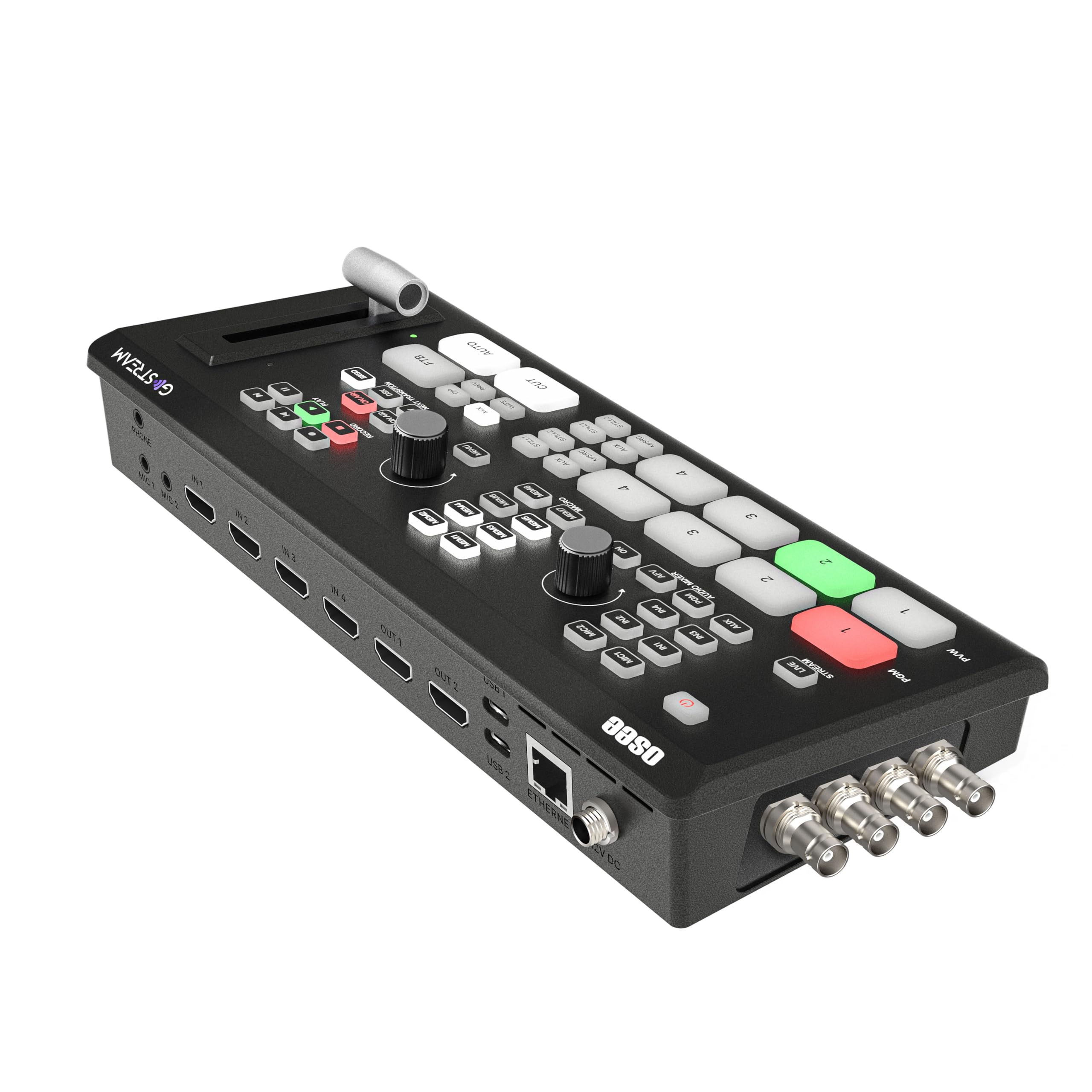
The Osee GoStream Duet is a compact, professional-grade live stream video mixer and switcher featuring 8 versatile inputs (SDI, HDMI, USB-C, NDI HX), advanced keying effects, and the ability to stream simultaneously to three platforms. Weighing just 2.2 pounds, it offers standalone operation with multiple control options and seamless integration with popular streaming software, making it the ultimate portable solution for high-quality live production.




| ASIN | B0CZ98YVY3 |
| Best Sellers Rank | #162 in Audio & Video Selector Boxes |
| Customer Reviews | 4.7 4.7 out of 5 stars (125) |
| Date First Available | May 15, 2024 |
| Item Weight | 2.2 pounds |
| Item model number | GoStream Duet |
| Manufacturer | osee |
| Product Dimensions | 4.2 x 10.6 x 1.94 inches |
B**A
Best streaming switcher I own.
Work in broadcast, we use the tricaster as our main switch and for location switching we used black magic, I saw this being advertised and bought it to try it. Best money I've spent, not only does it not need to be connected to a computer to get the most of it but I also have VTR playback and graphics via SD card and can record direct to a ssd 2 programmable outputs not including the usb-c out and sdi or hdmi inputs, which is great for me since a lot of our broadcast cameras are sdi only. Easy to use interface, great build quality, if you are in the air about a portable switcher, give this little beastie a try, don't think you will regret it.
W**L
Live production game changer!
I just used this for the first time as part of a mini convention that I do AV for every month and wow! It took care of nearly all my unresolved pain points. The multiview output is super convenient for preparing source selection without interrupting what's currently being displayed (PGM), whether that be a video input or an image/video loaded on the device. Those files can be uploaded from the SD card or from a computer attached via the USB-C port. We can have up to a dozen different speakers, each with their own laptop. Previously, they would have no idea if they were properly outputing a good signal prior to cutover. Now I'm able to run a signal (PVW) to a mini monitor mounted on their mic stand that shows what they're sending. I can see it as well on my multiview monitor. So, between the PVW and multiview there isn't another HDMI output available for PGM, but I have OBS connected to one of the USB-C connections and send the output from my laptop to an HDMI transmitter to display on our projector. On the subject of OBS, this device integrates flawlessly! I used to do video capture with an Elgato HD60 S+ on my M1 MacBook Pro, which was terrible. The video mostly worked fine, but the audio was tempermental to say the least. If a speaker needed to send audio over HDMI it would require opening and closing OBS several times while unplugging and plugging in the capture card. Then it might work. In testing, this unit has worked every time even when switching sources. Of note, OBS has crashed a few of times since adding the GoStream to my setup, but both OBS and macOS updated during that time as well, so it might not have anything to do with the Duet. I've barely scratched the surface of what this thing is capable of and am truly excited to see what else I can do with it. I can't imagine doing a live event again without the osee GoStream Duet!
S**H
Works Great.
Works Great. It has features the BM Design ATEM doesn't have and costs less. I'm a fan, as it does exactly what I want. I use it with my Teleprompter set up. It allows me to seamlessly switch between the main and the backup prompting computers.
R**A
Great for it’s price
Great video switcher for it’s price, I used it for a big event with 3 cameras on SDI and worked smooth, just have in mind that only support progressive resolution, not interlaced, so you have to consider the length of your SDI cables, 40 meters max (131ft) with a Belden 1505A cable
J**C
Less expensive with lots of features ... Works really well!
I've been using this for a while now. Several months. Overall very happy with the unit. I also have an ATEM MiniPro. What I like that's different: - You can stream to 3 sources (if your bandwidth allows) - You can stream at low bandwidth, while recording at the highest level (ATEM MiniPro doesn't do that). - There are (2) rows of buttons, which is good. - Most of the functions are available without another computer, although you can use a computer as well if you like. - I can easily adjust the sound for the input, as well as what's going to live stream with buttons. What I don't like: The Picture-in-Picture (PIP) is locked at 25%, 35% and 50%. - You can't size as you'd like with the ATEM MiniPro. - The software is a little odd ... you have to click on the top of buttons to get them to work. Not a big deal once you figure that out. Still, a little annoying at first. I'm used to clicking anywhere on a button with other Windows software. - Does not have an iPhone App that will work with my older iPad, or my iPhone 13. I took off a star for that as there is software (not by ATEM) where I can be at a camera (away from the switcher), and run sound + the switcher while managing the camera. That's NOT a recommended activity ... too much to do at once. However, if you NEED to do that because there's no other way? You can do it with the ATEM ... NOT with the GoStream. I did get fans for this unit, which I also use for the ATEM MiniPro. Even though there's a built in fan (in my unit, not the originals). And a stand, which makes placement of the fans easy. ATEM Mini tells you how much bandwidth you're using ... GoStream does not. It does flash a light when there's caching happening. If you go offline then back on? YouTube will assign a new link ... not use the existing. If you're having bandwidth issues? And you just let the bottleneck bandwidth play out? It's all good ... one link. Overall this is a lot less expensive, and if you use SDI this you can eliminate the need for SDI converters to HDMI, which I REALLY, REALLY like. Fewer conversion points means greater quality. Well built but not industrial grade. Treat it with care and it will take care of your streaming needs.
A**A
Excellent product. Worth the price. full of features compared to the ATEM mini. Dual HDMI out and able to stream to three platforms makes life easy.
G**S
Chose this particular model because it has the SDI as well as HDMI inputs. Very impressed with how well it operates.
R**A
Es un switcher muy versátil, de buena calidad y funciona muy bien, tiene una buena calidad relación-precio
T**O
Definitely better than the Atem mini. It's more user friendly. Easy to set up. Great product at a great price.
V**L
Cost effective.