We remain fully operational. Our teams are working around the clock to ensure your deliveries continue safely.

下载应用程序


Buy anything from 5,000+ international stores. One checkout price. No surprise fees. Join 2M+ shoppers on Desertcart.
Desertcart purchases this item on your behalf and handles shipping, customs, and support to SINGAPORE.
🚀 Elevate your external storage game with speed and style!
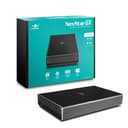
The Vantec NexStar Gx is a cutting-edge 2.5” SATA SSD/HDD enclosure featuring USB 3.1 Gen 2 Type-C connectivity for ultra-fast 10Gbps data transfer. Its full aluminum body provides superior heat dissipation and durability, supporting both 7mm and 9.5mm drives. Designed for professionals on the move, it includes versatile cables for universal compatibility and smart power features for efficient operation across Windows, Mac, and Linux platforms.


| ASIN | B072YLWP4Z |
| Best Sellers Rank | #163 in Enclosures |
| Brand | Vantec |
| Built-In Media | Installation Screws, Quick Install Guide, USB Type-C to Type-A cable, USB Type-C to Type-C, Vantec GX 2. |
| Color | black |
| Compatible Devices | Laptop |
| Customer Reviews | 4.2 4.2 out of 5 stars (3,955) |
| Data Transfer Rate | 10 Megabits Per Second |
| Enclosure Material | Aluminum |
| Global Trade Identification Number | 00844767022598 |
| Hard Disk Form Factor | 2.5 Inches |
| Hardware Interface | USB |
| Hardware Platform | PC; Mac; Linux |
| Item Dimensions L x W x H | 4.9"L x 3.25"W x 0.8"H |
| Item Type Name | Vantec NexStar Gx USB 3.1 Gen 2 Type-C 2.5” SATA SSD/HDD Enclosure for 9.5mm & 7mm Height Drive; Comes with C to C and C to A Cable; Aluminum Casing; (NST-271C31-BK) |
| Item Weight | 6.4 ounces |
| Manufacturer | Vantec USA |
| Memory Storage Capacity | 8 TB |
| Supported Devices Quantity | 1 |
| UPC | 844767022598 |
| Warranty Description | 1 year part and labor |
D**J
Awesome way to use Solid State drives for critical backups
Many of us we don’t really think about backups until its too late, then we wonder why we never got around to having a backup, or if we did have one, why we didn’t update it. Prior to my purchase of the Vantec NST-266S3-BK, I was using portable USB drives which unfortunately have a high failure rate due to their use of Shingled Magnetic Recording (SMR) technology. These manufactures never let the consumer know that they were buying an inferior product just so they could make larger profits, that is I'd have gladly paid the same amount of money for a portable USB drive that used Conventional Magnetic Recording (CMR) technology i.e. a 750GB CMR is much better than a 1TB SMR drive. My backup scheme is as follows: Copy 1: On a 2nd drive on the local PC Copy 2: On a 2.5-inch solid state drives Copy 3: On a 3.5-inch hard drives used in earlier systems In addition each machine's boot drive is duplicated in a standalone USB Disk Duplicator (Syba SY-EN50071) and stored in a folder for each PC in the file cabinet. I bought my first Vantec NST-266S3-BK in February 2021 to replace a failed SMR based USB portable drive, and have since purchased 5 more to replace the rest of the SMR based USB portable drives as they begin to fail. The Vantec NST-266S3-BK design uses the ASMedia ASM 1153E controller and when it was first designed, the largest commercially available hard drives at the time were 4TB in size with 6TB just beginning to be sampled but not in volume production. The ASM 1153E controller uses LBA48 addressing mode which means in theory the largest drive that the device can support is about 144.1 PB (the same as 144,000 TB) so there should not be an issue supporting larger drives. This device is cool to the touch, has a design which minimizes fingerprints on its case, was easy to install (they even provide screws and a screwdriver). As for ventilation, the device has many holes on one of the sides. A 2.5 inch HDD may get a little hot, but SSD's should not get that hot and many SSD's have built in thermal sensors which will throttle the drive until the temperature drops to comfortable levels. The 2.5 inch drive fits nicely in the enclosure and can be attached via the supplied screws. I used two at the far end which is enough to hold the SSD in place. Once the tray is back in the outer enclosure, another 2 screws secure it. Vantec supplied 5 of the screws needed to secure the drive to the tray and 3 to secure the tray to the enclosure i.e. 1 extra of each. On Windows 7, I was only able to see 228/222 MB/s Read/Write speeds mainly due to Windows 7 not supporting the USB Attached SCSI Protocol (UASP), however on Linux I was able to get 441/432 MB/s Read/Write since UASP support was enabled. One should get similar performance for Windows 8/10 as UASP support exists in those Operating Systems. Even though the SSD is capable of 560 MB/s (read), the top speed is capped by USB 3.0 which has a theoretical max of 500 MB/s and after accounting for overhead the results are pretty good. The SSD was recognized as an SSD and I was able to use TRIM. For those who are having problems using TRIM, open up an elevated command prompt in Windows and type the following command: fsutil behavior query DisableDeleteNotify. If DisableDeleteNotify is set to 1, rerun the command with a 0 on the end: fsutil behavior set DisableDeleteNotify 0 (thanks to programmers it's a double negative). In addition both HDD and SSD support SMART through the USB cable. We use the Vantec NST-266S3-BK on both Windows (7, 8.1, 10) and Linux (Linux Mint 20.1). Again, it's a little slow on Windows 7 due to a lack of UASP support but it's acceptable and it's very fast on all the other systems. With many manufactures resorting to the use of Shingled Magnetic Recording (SMR) technology in external USB drives, this devices lets you use Conventional Magnetic Recording (CMR) technology drives which are far superior. In the attached photo I have circled the asmedia controller chip on the circuit card. Some additional notes: If you are running Windows, Windows has a feature that is enabled by default that will turn off power to USB ports. You can verify this by going into Device Manager, expanding the Universal Serial Bus Controllers, and then selecting any (and all) USB Root Hub, then in the pop-up, look for Power Management and uncheck "Allow the computer to turn off this device to save power". If you don't do that, it's possible that windows shuts power off to your device and you experience a "disconnect". Hope this helps other potential buyers or those who have purchased this product and may not have had a positive experience (i.e. they blamed the device instead of Windows).
R**C
Fantastic value, immaculate product, and great for ps4
Amazon did not email me asking me to leave a review on this product in return for discounts, which is the only reason I have ever left reviews previously. I came here on my own accord to praise this absolute miracle of a disk enclosure. This review will be pretty lengthy in order to tell the whole story of my adventure with this product, so bear with me. I recently purchased the dual drive RAID enclosure (type A, I believe.) First, some preamble. A couple years ago I decided to put a hybrid drive in my ps4 pro. It worked very well, and I also used an enclosure to use the original 1tb toshiba hdd that came in the console as external storage. Well recently, I decided it was time to update and purchased a 1tb ssd for an internal drive. Which left me with a conundrum (or so I thought.) Ps4 only let's you connect one external storage device to the console at a time, so what to do with the other drive? Then by some stroke of luck, I came across this device. I could combine two drives and have it recognized as one? On a playstation? I didnt believe it, but worst case scenario I could sell it to a more technologically inclined friend or hold onto it until I found some other use for it. Lo and behold with a few hours on google (the lengthy amount of time it took was entirely my own fault, as I'll explain in a moment) I managed to get a 1tb seagate firecuda and a 1tb toshiba hdd recognized as one drive (as well as formatted correctly for ps4 external storage.) In addition to working perfectly, this thing gets better read and write speeds through the ps4s usb 3.0 port than the firecuda did on the internal sata III connection and that's without utilizing the firecuda drives 8gb flash cache, which is what makes the firecuda sshd a faster drive than a lot of other 2.5 inch 5400 rpm hdds. The flash memory cache in an sshd resets once power stops going to the drive, and data is only added to the cache after that data has been accessed several times (I think I've read 5 times?) on the same power cycle. So once power stops being supplied to the sshd, it performs the same as any other 5400 rpm hdd until you can open something enough times to get data back into the flash memory. But enough about the firecuda, this enclosure is absolutely spectacular. So as I stated previously, it took me a long time to set this drive up, but this was ENTIRELY due to user error on my part. There are switches on the enclosure that let you choose between JBoD, RAID0, and RAID1, as well as a reset button. I wrongly assumed that disconnecting, flipping the switches to the desired configuration, and reconnecting the drive to my laptop while setting it up would make my computer recognize the drive in my chosen configuration. It took me a long time to figure this part out, but listen to me when I tell you; YOU CAN ONLY RECONFIGURE THE DRIVE BY PRESSING THE RESET BUTTON. NOT DISCONNECTING THE DRIVE. NOT EVEN REMOVING THE HARD DISKS/SSD DRIVES THEMSELVES FROM THE UNIT. YOU NEED TO USE THE RESET BUTTON PROVIDED TO YOU ON THE ENCLOSURE. That's right. I spent almost 2 hours on google just to find out that all I had to do was press a stinking button. Boy was I mad at myself once I finally tried pressing the button and noticed that my computer recognized it as a RAID0 drive pretty much instantly. In summation; Vantec Nexstar GX Enclosure: 10/10, runs faster on 5gbps usb 3.0 than either HDD inside of it does on 6gbps SATA III My own technological prowess(in this instance, at least): 0/10, I ignored the instructions and paid the price, taking almost 2 hours of google searching to realize that I just needed to press a button (which the instructions clearly state needs to be pressed *facepalm*)
D**)
The enclosure is very nice. I have 3 of them already but bought locally. They ran out so I purchased online. I found 2 issues with this enclosure. 1) When inserting or removing the HD, the HD has to be on a 30 degree angle to the sata ports in the case. I don't think Vantec thought this through very well. 2) Sometimes my computers (I tried a desktop and a laptop) stops copying files to or from the HD in the enclosure. Then my computers stop reading the drive. I suspect that there is not enough power going to the enclosure for the speeds that the enclosure is trying to transfer at. I used a micro USB cable instead (the same cables you use for your Android phone) which are USB 2.0. So, the transfer is slower but I haven't had an issue. I did try using Y cables but the same thing happened but not enough power is still my assumption. Having said this, I rarely swap out my drives and I'm in no rush to transfer files. So, they are not such a big deal to me. I would buy these again.
B**R
Working fine.
E**B
The set up was very quick and simple. This enclosure feels secure enough but it's not a tool I'd want to take on the road. It works well, was easy to set up and was very I expensive. For my home office this is an awesome way to reuse an old hard drive.
M**X
Housing a Crucial MX500 1TB 3D NAND SATA 6 Gbps 2.5" SSD with stated 560 MB/s read and 510 MB/s write; using the NexStar GX (NST-271C31-BK) enclosure the disk speed test (5 GB file) achieved 527 MB/s read and 475 MB/s write. The USB 3.0 enclosure that I was using prior to the NST-271C31-BK achieved around 400 MB/s max. for read and write. Very happy with it ;)
L**X
Muy buen enclosure, había estado buscando un enclosure 3.0 que funcionará bien y al fin éste lo hizo, fue el tercero, primero un Anker que dejó de funcionar a la semana, luego un Sabrent que funcionaba bien, pero sólo en puertos 2.0, en puerto 3.0 simplemente no escribía nada, solo funcionaba en modo lectura, el diseño es bastante atractivo, el disco se fija bastante bien al enclosure para evitar moviento, viene con la tornillería necesaria, solo se echó en falta un destornillador para fijar los tornillos. La velocidad de lectura/escritura es bastante buena, claro, esto también depende del disco duro que se utilice. 100% recomendable.