We remain fully operational. Our teams are working around the clock to ensure your deliveries continue safely.

下载应用程序




Buy anything from 5,000+ international stores. One checkout price. No surprise fees. Join 2M+ shoppers on Desertcart.
Desertcart purchases this item on your behalf and handles shipping, customs, and support to SINGAPORE.
⚡ Stay Connected, Stay Ahead — Power Meets Precision
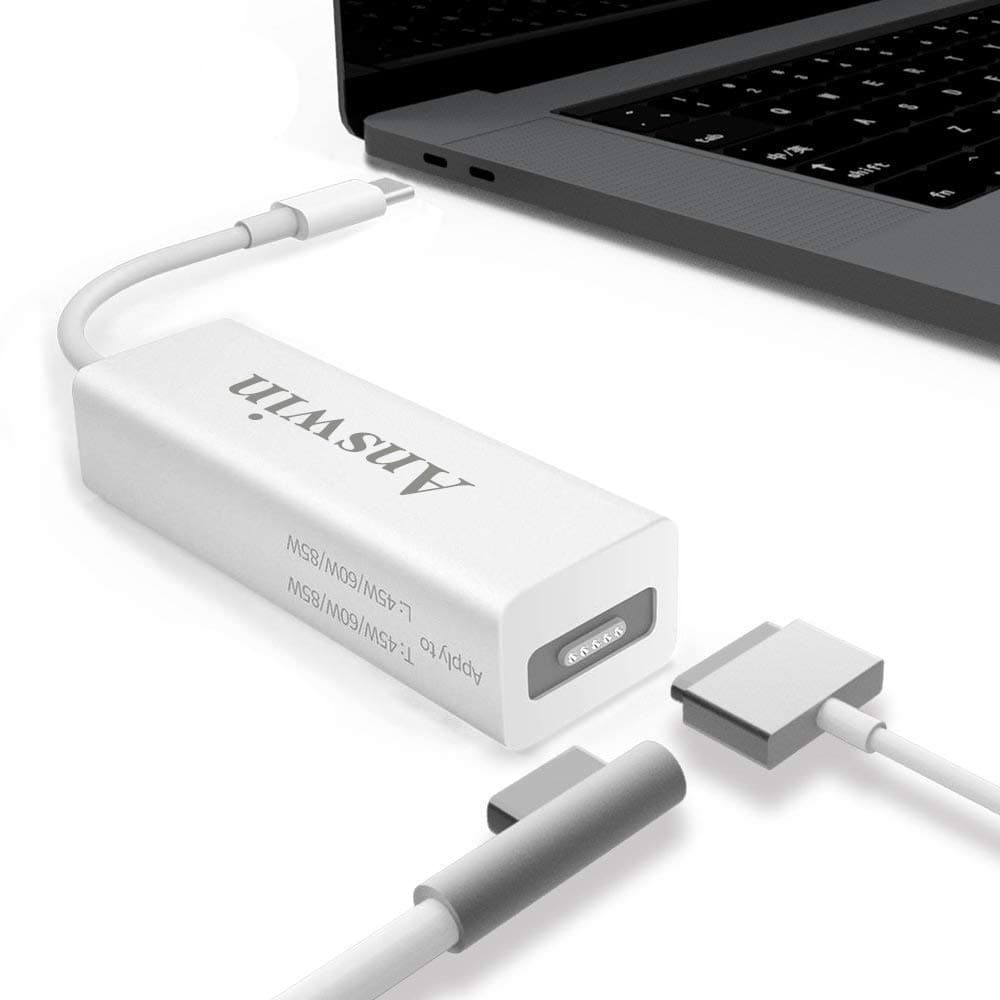
The Answin MagSafe to USB-C Adapter is a versatile, eco-friendly charging solution compatible with iPhone 15, M1/M2 MacBooks, and other USB-C devices. Featuring up to 60W power output, a reversible double-sided MagSafe connector, and intelligent safety protections, it offers reliable, convenient charging while reducing electronic waste. Its compact design makes it ideal for professionals who demand seamless power on the go.
| ASIN | B0CH4F8B9B |
| Best Sellers Rank | #495 in USB-to-USB Adapters |
| Brand | Answin |
| Color | White |
| Compatible Devices | Laptops |
| Customer Reviews | 3.4 out of 5 stars 119 Reviews |
| Enclosure Material | Plastic |
| Hardware Interface | USB Type C |
| Item Weight | 0.03 Kilograms |
| Manufacturer | Answin |
| Material | Plastic |
| Number of Ports | 1 |
| Operating System | Macos, Ios |
| Total USB Ports | 1 |
| Total Usb Ports | 1 |
| Unit Count | 1.0 Count |
C**L
Fantastic!
This little device brings mighty power to my MacBook Pro M1 2020 from my 27" Thunderbolt Display. Since the power cable comes directly from the back of the monitor, this adapter eliminates the tangle of extra cables. Since this version of the MBP didn't have MagSafe charging, it has USB-C/TB, this device works wonders! There was a couple of times that it was not working very effectively, but I flipped the MagSafe back and forth, that maybe the prongs weren't as responsive. But after some tinkering, it wound up working great.
A**E
Will Stop Working After Two Weeks. Should Have Listened to the Other Reviews!!!
This worked great for about two weeks. Such a disappoint. Should have listened to the other reviews. It started getting super super hot and then it just stopped working without not getting hot. I wanted it to work but that is not the same thing as it actually working. Wanting does not equal functionality.
I**E
Great product that works as promised!
I use to connect my MacBook Pro 14" in clamshell mode to my older Apple Cinema LED Display. This plug converts the magsafe adapter to a USB C connection and maintains all usability in clamshell mode, enabling me to use my laptop as a desktop when at my office.
L**S
Works well, but you may need to tweak it a bit
Works well, but you may need to tweak it a bit to get it to charge properly. This dongle allows you to use both your old MagSafe1--AND--MagSafe2 chargers with your newer USB-C charging port Mac. If you're . . . frugal like me, it's worth the money and time to make it work. I hate to throw away a good charger and I use my MacBook Air all over the house, so for convenience I prefer to keep many chargers in many places (bedroom, office, living room, porch, deck, etc). This dongle is a bit pricey, but it's not a simple adapter like the old MagSafe1-to-MagSafe2 piece (see pics), and it's nowhere near as small and unobtrusive. It works and charges well with both the original Apple T-format MagSafe1 and the MagSafe2 (at least all of mine), BUT: 1) it does NOT work (reliably) with the L-format MagSafe1 connector (where the cord comes out parallel to the side of the computer), as the barrel hits the shoulder surface of the socket and does not completely seat flat, making a very poor connection (if at all), and 2) it does not work with the MagSafe 1-to-2 adapter that some of you might have bought to continue to use your MagSafe 1 chargers with your new MagSafe 2 Macs (the shoulder is too fat to nest into the socket like the stock one, so it doesn't make a connection, see pics), and 3) according to some pics from other reviews here, the build quality is not great and the insulation will degrade over time and use (the device and cord get hot during use and that, along with frequent flexion, takes a toll on the insulation as it ages and becomes brittle). However, you can easily fix both of these issues. :-) 1) you can file a groove across the end of the socket to give the barrel of the L-format Magsafe 1 connector just enough clearance to seat flat and make a strong connection (see photos), and, 2) just remove the MagSafe2 adapter and use the original MagSafe1 connector with the modifications made in 1) above (if it is not a T-format charger) and 3) to address the added strain and the heat fatigue on the insulating cover of the small cord (see the pics in the other reviews, and mine here), I added some tape and heat-shrink to reinforce the cord and prolong the life of the dongle. My pre-cut pieces of heat shrink were not quite long enough to go all the way from one stress relief to the other, so I actually used three pieces and overlapped them. It's not nearly as flexible anymore, but it will outlive me now. ;-) While I would have preferred a much cheaper and smaller alternative, I could not find anything like my MagSafe1-to-MagSafe2 charger adapters here to go to a USB-C charge port connector, and this dongle does do the job (after some extra work tweaking it), so I'm happy overall. Now I just have to carry the dongle with the laptop when I move instead of the whole charger. :-D
L**N
Excellent solution for using older technology
I inherited a really high quality Apple external monitor that has the functionality to charge your laptop, but the charger was a magsafe1 with a magsafe2 dongle and a computer with a usb-c charging port. I got the version with only the magsafe input and USB c output and it works with both versions of the magsafe that I have and with my MacBook pro. Great solution to keep older technology that is otherwise in perfect condition out of the garbage and be able to keep using it!
G**R
USB ports do not work.
Why did you pick this product vs others?: I wanted to keep using exiting Magsafe 2 power cords with a newer Macbook, and add a USB-A port. Usb ports: USB-A port does not work with any device that I've tried: DVD player, mouse, or tablet. Functionality: Magsafe 2 adapter works most of the time. If someone trips over the cord, hopefully it will release.
E**N
Only provides 30 watts, NOT 45/60/85 like it claims
The "Mag-Safe to USB C Adapter 3-in-1" version that is being sold here only provides 30 watts to my 15" 2018 MacBook from my 27" Thunderbolt Display (which provides up to 85 watts), despite the adapter's description claiming to provide 45/60/85 watts. 30 watts isn't enough to prevent the battery from draining while using it on a laptop that normally has an 87 watt charger. I would have been fine with it providing 45 which wouldn't charge the laptop during use but would maintain the battery, or 65 watts which would charge it slowly, but only 30 is unacceptable. Even at 30 watts it gets quite warm, although not hot. I'm returning this.
J**G
Does it work? ....Yes....however
The product does what I need it to do. I had a Cinema Display sitting in the closest for a while and I started working from home more often. I decided to break it out and use it with my Dell Lattitude 5431 (work issued). The first thing I needed to do is find a dongle to get the display output. For those wondering, the USB-C that can be used for display output with a Dell dock does not work with the Cinema Display, at least one I bought didn't. A HDMI to minidisplay one worked though. As for this product. Well, it's a couple of small things. At first I didn't think it was working at all. I then discovered that the MagSafe was wasn't staying connected. I then discovered that the dongle wants it connected only one way. So while MagSafe is omni-directional this dongle is not. So, if you're having trouble with it staying connected flip the MagSafe connector and it should work a lot better. Next, the power output in the listing has me all confused but regardless of that the power output with my Dell Lattitude is quite terrible. When I use a 65w USB-C laptop charger I was getting "57 minutes complete until charge complete". With the dongle it was 2 hours and 57 minutes, meaning this thing is outputting 20w-25w. For the type of tasks I'm doing it's fine but if you expect your processor to be running full tilt for any lenght of time this dongle will not keep up. Last, and this one isn't the least problematic but I thought should be mentioned in the listing, the ports on the dongle (Type C PD and the the old USB-A) are power ONLY. They do not handle data. So, if you wante dto charge your smart phone and access the content only it, you're out of luck So for me, it'll get the job done but the price for this does not justify the quality and its shortcomings.
TrustPilot
1天前
2 周前