We remain fully operational. Our teams are working around the clock to ensure your deliveries continue safely.

下载应用程序



Buy anything from 5,000+ international stores. One checkout price. No surprise fees. Join 2M+ shoppers on Desertcart.
Desertcart purchases this item on your behalf and handles shipping, customs, and support to SINGAPORE.
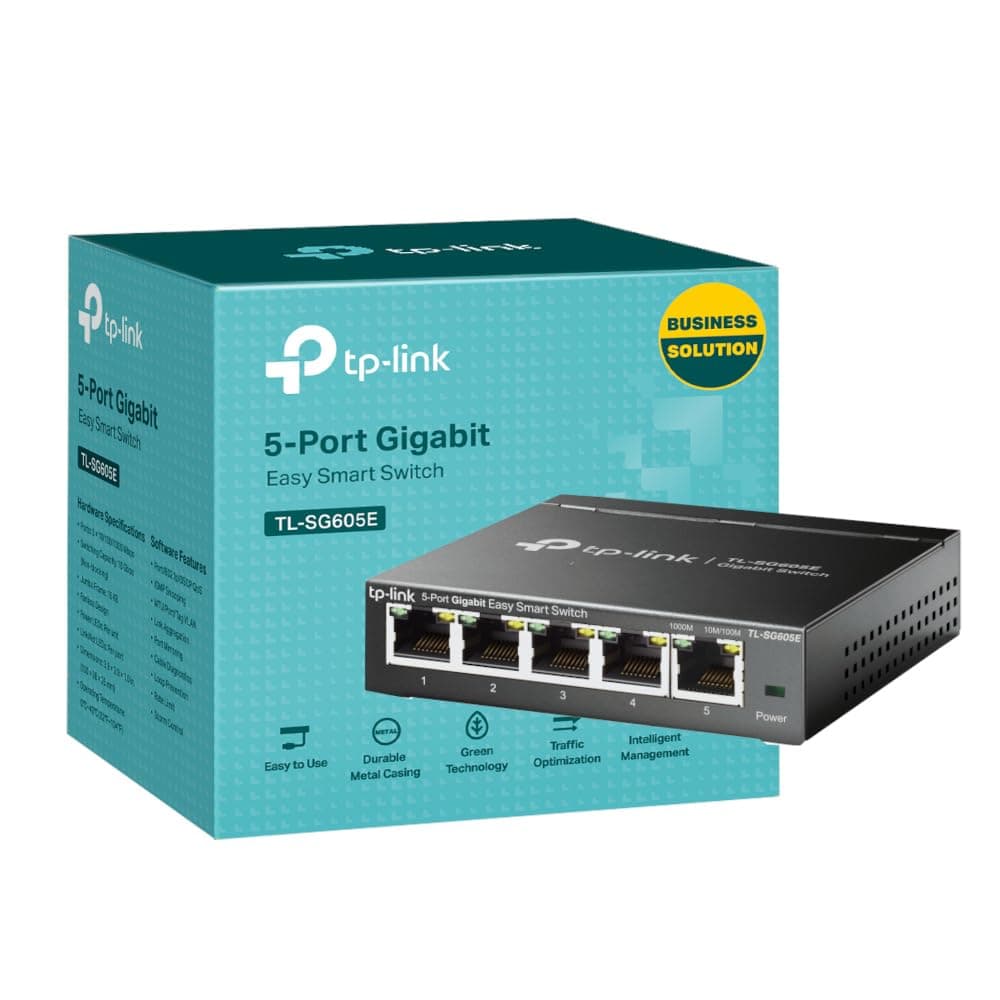
⚡ Power Your Network Like a Pro — Fast, Smart, and Sustainable!
The TP-Link TL-SG605E is a 5-port managed Gigabit Ethernet switch designed for professionals seeking reliable, high-speed connectivity with effortless plug-and-play setup. Featuring a robust metal case, intelligent network management tools, and energy-saving technology, it’s ideal for small offices or home workspaces aiming to optimize performance while minimizing environmental impact.


| ASIN | B0C79NHFJZ |
| Best Sellers Rank | 59 in Computers & Accessories ( See Top 100 in Computers & Accessories ) 1 in Network Switches |
| Box Contents | TL-SG605E |
| Brand Name | TP-Link |
| Case Material Type | Metal |
| Color | multi |
| Compatible Devices | Desktop |
| Country of Origin | China |
| Customer Reviews | 4.7 4.7 out of 5 stars (296) |
| Data Transfer Rate | 1000 Megabits Per Second |
| Interface | RJ45 |
| Item Dimensions L x W x H | 10L x 9.8W x 2.5H centimetres |
| Item Weight | 450 Grams |
| Manufacturer | TP-Link |
| Manufacturer Part Number | TL-SG605E |
| Model Number | TL-SG605E |
| Number of Ports | 5 |
| Platform | Not Machine Specific |
| Product Warranty | Limited Lifetime Warranty |
| Switch Type | unmanaged |
| Upper Temperature Rating | 40 Degrees Celsius |
| Voltage | 5 Volts (DC) |
N**K
Will buy more
Small, smart looking, good quality and manages everything I am putting through it which is a lot. The speed coming through it is top notch with zero drop out
D**D
Reliable and easy to manage
The TL-SG605E is a solid smart switch for small networks. Plug-and-play setup, with simple web interface for VLANs, QoS, and monitoring. Speeds are consistent, and it runs cool and quiet. Great value for home or small office use.
N**H
The switch wotks really well when correctly set up
I needed a small switch to extend one port from a TP-Link Wi-Fi extender to several devices; a 3D Printer, a laptop [used for gaming and not always plugged in here] and an existing switch that handles other devices. I bought this switch as I often use TP-Link products when setting up, adding to or upgrading network systems - something I have done as a hobbyist and semi-professionally for some years. Furthermore, I tell family, friends and some business contacts to use TP-Link as they are reliable and well priced. Sorry! I need to make a bit of a long post. It is relevant! I include some work around info for larger networks / experienced users. I will list some points about this switch; All in all, this is a very good, well priced and easy to use switch. Likes - Very sturdy metal boxing, very good speeds when properly set up, easy to use web based configuration tool, well priced and small footprint - less space used is good. The switch also works 'out of the box' on smaller networks [see below]. Dislikes - It is hard to dislike this switch, but I will say that the bigger, more complex your network, the more likely you are to need to do some configuration work [see below]. I have to praise TP-Link customer services. The first switch I initially bought was defective. This was confirmed by me doing some tests at the request of TP-Link customer services - all of which were very well documented / pointed out by TP-Link customer services and, for me, easy to follow. After a couple of days and a few e-mails, we concluded that the initial switch was defective. I was advised to get a replacement from the retailer as this would be quicker - the new switch arrived the next day. When I got the new replacement switch [via Amazon returns] it worked much better than the previous one. When I set up the switch between my router and one laptop, it worked 'out of the box' - this is excellent for smaller networks! My home network is a bit more complex though as it has router > power-line, Wi-Fi and standard network cabling [won't bore you with ratings etc]. My network has power-line adapters, two Wi-Fi extenders and a few switches. ** For smaller networks - you need read no further, as the switch will likely work for you 'out of the box'. ** This next part I include for those with larger networks and show two fairly easy work-rounds that got the switch working as needed, and excellently at that. I say fairly easy, but both are not for beginners [unless you want to learn as you go] and I recommend you at least have an entry level in networking to proceed or get help from someone with such experience. When set up from router > Wi-Fi extender [wireless] > this switch [wired] > laptop [wired] problems happened. I must stress that the replacement switch worked much better from the get-go than the returned one. The main issues were; Note: Wi-Fi extender > switch uses [physical] port one [1] of switch - this works best. Note: Remember to save changes as you go. 1; Possible conflict relating to DCHP on router and on switch with solution: - Go into router configuration and find the switch [connected devices] and make a note of its given IP address - this may be useful later - Disable DCHP in the switch and set a static IP address [can be one you took note of] for the switch to use - via the switch web based configuration tool. - In the router web based configuration tool [will vary per router] set the chosen static IP for the switch, so the switch always uses that IP address. - Turn off all network switches / extenders and router, then restart all network equipment - starting with router and progressing in order, allowing time as needed for each device to start up. This ensures router and switch do not conflict. [experienced users may disagree with this approach- but it works]. 2; Possible shut down of in use [physical] port by switch 'Loop Prevention Setting' with solution; Note: This was preventing some websites from loading and preventing any speed test sites from proper operation - they would get to a couple of percent marks, then 'hang'. Also, some games would 'hang' before this was altered. - In switch web based configuration tool, DISABLE 'Loop Prevention'. [I can hear some of the professionals screaming already]. I'm not even going to try to explain loop prevention and why it should or should not be used - web browsing is your friend [or fiend]. All I will say is that on my network, in the configuration needed there were problems as noted already, and it seemed like a loop was effectively closing a port [physical - to laptop] down then the port was re-opened some minutes later. By setting loop prevention to disabled, all the issues went away, and my network is working very well now. My education [and some work experiences] was largely in computing, but I did not specialise in networking. I include these steps only as an indication of how I got my network to perform as expected. Your results may vary. Change settings at your own risk. Get in a professional if needed.
T**W
Works well, no setup required, speedy and offered managed features if i need them in future.
Arrived quickly, easy to setup, just plug and go. Speedy, i am getting 800Mbs to my laptop using an internet test tool, so quick enough for me. I selected the managed version, as it was only a little bit more expensive, but offered features i might use in future.
M**I
Great product
Brilliant product
N**P
Fast managed switch
Gigabit switch performed as expected since installation, no problems. Insight into throughput and network performance through web interface.
C**N
Effective
Was effective and I didn't have any issues
M**T
Easy to use switch but can also be complex in its task
Love this product it sits out the way just doing its job, can be configured with DHCP, or told to be supplied with addresses, whats great is its easy to tell what's running at 1Gb and what's running 100mb or lower. Great little switch
TrustPilot
2天前
1天前