We remain fully operational. Our teams are working around the clock to ensure your deliveries continue safely.

下载应用程序






🚀 Stay ahead with the world’s fastest, most versatile 5G hotspot—because buffering is so last decade.
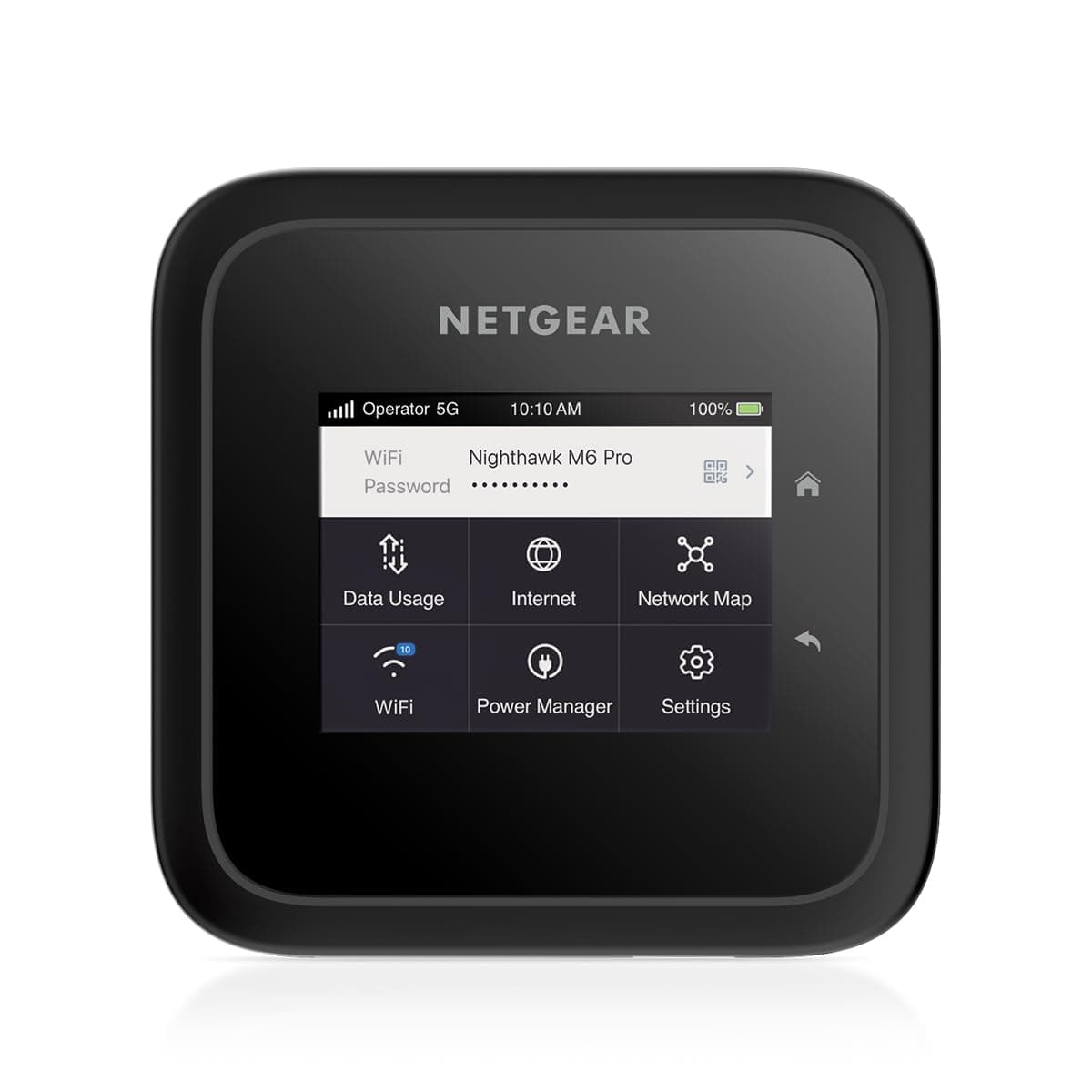
The NETGEAR Nighthawk M6 Pro is a cutting-edge 5G mmWave mobile hotspot delivering speeds up to 8Gbps with WiFi 6E technology. Unlocked and compatible with major US carriers and over 125 international networks, it supports up to 32 devices and covers up to 2,000 sq. ft. Its portable design, 13-hour battery life, and intuitive touchscreen make it ideal for professionals needing reliable, secure internet anywhere—whether traveling, working remotely, or as a robust backup solution.


| ASIN | B0C2ZP2DXH |
| Antenna Location | Business |
| Best Sellers Rank | #6,454 in Computers & Accessories ( See Top 100 in Computers & Accessories ) #297 in Computer Routers |
| Brand | NETGEAR |
| Built-In Media | AC adapter, M6 Pro Mobile Router device and battery, Manufacturer warranty card, Quick start guide, USB Type-C cable |
| Compatible Devices | Tablet |
| Connectivity Protocol | 5G, Wi-Fi 6E, LTE, Ethernet |
| Connectivity Range | 2000 Square Feet |
| Connectivity Technology | 5G, Ethernet, LTE, Wi-Fi |
| Control Method | Touch |
| Coverage | Up to 32 devices, 2,000 sq. ft. |
| Customer Reviews | 3.9 3.9 out of 5 stars (544) |
| Data Transfer Rate | 1 Gigabits Per Second |
| Frequency | 2.4 GHz |
| Frequency Band Class | Dual-Band |
| Is Modem Compatible | Yes |
| Item Dimensions L x W x H | 4.14"L x 4.14"W x 0.85"H |
| Item Weight | 1.3 Pounds |
| LAN Port Bandwidth | 2500 Mbps |
| Manufacturer | Netgear |
| Mfr Part Number | MR6550-100PAS |
| Model Name | Nighthawk M6 Pro |
| Model Number | MR6550-100PAS |
| Number of Ports | 1 |
| Operating System | Linux |
| Other Special Features of the Product | WPS |
| RAM Memory Installed | 1 GB |
| Security Protocol | WPS |
| UPC | 606449167016 |
| Warranty Description | 1 year limited warranty |
| Wi-Fi Generation | Wi-Fi 6E |
| Wireless Compability | 802.11ax |
R**N
Great Verizon Hotspot Device
Initially I had some weird "lock up" situations - but a firmware update got rid of those issues. I use this device on Verizon and had no problems activating and using it. I work in a building with terrible cell service overall, my phone spins and spins, and when I pop this out - BOOM - it connects to the cellular network sometimes 5G/4G and my phone can access internet like I was at home. The battery does quite well when I'm mobile. When I need it for backup purposes at home, you can plug it in and use a different mode that greatly expands Wi-Fi coverage. The onscreen display is great giving you all the information you'd need at a glance - including battery usage, number of connected devices and data usage. The price was high, but, I wanted a top notch hotspot and this fit the bill.
E**O
Signal strength and compatibility
First, WARNING avoid this seller at all cost! They will not return your money, I’ve been waiting 2 months now. Second, the signal strength of product was VERY bad, tried different companies (Verizon, cricket, T-Mobile) and still did not work as advertised. I ended up using an old att netgear hotspot that I use to use and that ended up working better, the downside was that it does not have an Ethernet port. (Call T-Mobile about their portable hotspot with Ethernet! That has worked great for me). I love netgear products because of their quality and strength but honestly this product was a major let down.
J**R
Perfect thank you
Love this one. Works really well with CarPlay auto on my console head unit and I use it with the ROKU stick then I use a portable power station like the EF RIVER 3 for external power ports
A**S
Muy buen produ
Except
D**3
Not good
Horrible! Didn’t work on the T-Mobile network. Wouldn’t even work on the Verizon network. Kept getting error after error. Spent a lot of time on the phone troubleshooting with T-Mobile. Verizon wouldn’t even try because it wasn’t purchased through them. Ended up sending back.
T**.
A bit pricy but really happy I got it.
I had a different 5g hotspot and was disappointed with the performance. I got this to try and see if the equipment was the cause of disappointing performance and this def made a difference, works well and has a number of different configurations.
A**9
Mobile hotspot is not enough!
This is my reliable companion whenever I work remotely. This provides top notch wifi speed compare using phone as mobile hotspot. This is open line, meaning; you can use this anywhere in the world using any provider. It connects to 5G/LTE/4G Service provider.
M**K
Unfinished and cheap. Waste of money
Actual speed is ok. I never expected the 8Gbps as advertised. There is no way you get to use it. Max speed I get is ~600Mbps with ok signal. The device is extremely picky on the usb-c power and it will just keep rebooting if it doesn't see the right specs. It can run without battery but every time you change the "power mode" it requires a reboot. The firmware is unfinished. 5G signal reporting is incorrect. Sometimes I clearly get 5G speed while 5G signal reports N/A. If I turn on IPPT then firmware update always fail. This is the deal breaker. If I turn off wifi, then every time I wake the screen it is going to bug me with a warning saying it is not turned on. Yeah it is not on because I turned it off. Construction is cheap. It uses thin and cheap plastic and unresponsive touch screen. The price of a premium phone won't justify for that. Security feature is weak. Max pin length is 4 while admin pwd does not really work since you can just reset the device through a button. Antenna feature is also not well thought after. The TS-9 is a delicate port that would wear out quickly but if you are traveling it means you need to frequently plug and unplug. After all you can just get a business grade device with similar amount of money or a consumer device with much less money. So why bother.
M**L
wrost router ever bad battery no 5G
A**N
I recommend using it with an outdoor antenna if possible but it is reliable and gives me over 200MB/sec speed.
S**M
Excellent Buy. Very fast. Long range i recommend
Z**K
جميل ولكن سعرة غالي جداً وفي افضل منه وارخص عيبه بطارية جداً سيىء
L**O
Since I've noticed that sometimes sellers will sell different items and use the same Amazon listing, my review is for the "NETGEAR Nighthawk M6 Pro 5G mm Wave WiFi 6E Mobile Hotspot Router (MR6550) – Portable Business Companion for Fast, Secure Connections Up to 8Gbps – Unlocked, International Roaming in 125+ Countries" The item that I got was on special. I think that I'm not allowed to mention the sale price but it was an excellent price from the regular price which is normally listed at around $1000+. Suffice it to say, what made me decide to purchase it is due to my experience with NETGEAR's earlier model (NETGEAR Nighthawk MR1100 4G LTE Mobile Hotspot Router) which I also own/bought from Amazon about 7 years ago and the sale price for the MR6550 (which was under $1000 even when taxes were added). My old NETGEAR Nighthawk MR1100 4G LTE Mobile Hotspot Router still works fine/great except after ~7 years, the battery isn't what it used to be brand new but I think that it is because the majority of the time, I was using the mobile hotspot router without the battery and while plugged into an electrical outlet. At the time that I bought the new MR6550, NETGEAR had a newer 5G mobile hotspot router available (and listed on Amazon) called the NETGEAR Nighthawk 5G M7 Portable WiFi Hotspot with eSIM which was roughly the same price as the sale price for this MR6550. What made me decide to go with this NETGEAR MR6550 instead of the newer NETGEAR M7 even though the newer NETGEAR M7 supports both eSIM and physical SIM but the NETGEAR MR6550 only supports physical SIM is that most of the time, I run my mobile hotspot router plugged into the electrical outlet and the MR6550 allows it to be used without the internal user removeable battery while plugged into an electrical outlet whereas the M7 has a built-in battery which isn't meant to be removed/inserted on a regular basis. As a side note, the earlier NETGEAR model that I own (NETGEAR MR1100) allows it to be used without the user removeable/replaceable battery being inside the device while it is plugged into an electrical outlet. At the time that I bought my NETGEAR MR6550, it was being sold and shipped by Amazon.ca and not be a 3rd party seller so my review is specifically about this since some reviewers sometimes mention that what they received was an unlocked mobile hotspot but it was branded with a carrier (like AT&T or T-Mobile) even though it was unlocked and their item was in an opened box. The item when sold & shipped by Amazon.ca is in a completely sealed manufacturer's box. I cut/tore away the plastic shrinkwrap Getting the item out of the box was very difficult without damaging the manufacturer's box as it was a very tight fit and brand new (unused). I managed to get it out of the box without damaging the manufacturer's box too much by opening both sides of the box and pushing the inner box out. This inner box was manufacturer lid sealed. I ripped/tore the lid seal and opened it to remove the contents. The first thing I did was to insert my nanoSIM. My nanoSIM is from Fido. The older MR1100 uses a microSIM so if upgrading, you'll need to convert your microSIM to nanoSIM. I decided to test the mobile hotspot router using the USB-C port since the majority of the time, I will be running this device without a battery inserted in the unit (similar to how I use my NETGEAR MR1100). I connected it my USB-C power adapter which I normally use to charge my Chromebook and the NETGEAR MR6550 booted but after it booted up, the screen indicated that I need to use the included USB-C cable and power adapter if I'm going to use it without the battery so I did this. The bootup process for the MR6550 is significantly slower than the bootup process for my older MR1100. After it booted up, I configured it with the WiFi name, the password that I wanted to use, and the admin password. the MR6550 hotspot router got Fido's APN settings automatically so I didn't have to configure the carrier data settings. From there, I used the touch screen to check if there was a firmware update available and there was so I updated the NETGEAR MR6550 to the latest firmware. The size of the update was ~260 MB and it took about 4 minutes to fully update (downloading the firmware and rebooting automatically a few times during the update). After the MR6550 firmware was updated, I connected my tablet to it and didn't have any issues. I was able to use apps on my tablet which required internet without any issues and it functioned just as well as it did when I connected it to my older MR1100. Since I'm with Fido which only uses/provides 4G/LTE for the time being, I wasn't able to test it with the carrier's 5G speed but I don't suspect that there will be any issues using a carrier that provides 5G data services (In Canada, this would be Rogers, Bell, Telus, etc.). After using the MR6550 for a few days, I think that it works fine. I also tested the battery and for me, it was sufficient to keep it working for over 12 hours (but would depend on what you were using it for and how many devices connected to it). For me, I was using it for the occasional streaming/browsing on my tablet, the constant connection of my cellphone for backgrond processes, and the constant connection to an older cellphone which I mainly use to read email (BlackBerry). It lasted me from the time I left my place with it powered on until the time I returned home where I never powered it off. The only negatives that I have to say about it is that: 1) the bootup process takes significantly longer than my NETGEAR MR1100. I didn't time it but it takes at least twice the amount of time to start up the MR6550 (perhaps 20 seconds or so if not longer) as it does to start up my older MR1100 (which takes maybe 10 seconds). 2) to use without the battery, you need to use the included USB-A power adapter with the included USB-A to USB-C cable. I haven't test it with my other USB-C power adapters but the first USB-C power adapter that I tested it with which works with my Chromebook showed a message indicating that I needed to use their USB power adapter and cable. 3) For those people who have or have used NETGEAR's older MR1100 LTE mobile hotspot router, the MR6550 5G mobile hotspot router doesn't seem as solidly built as it has a "cheaper" feel to it. 4) This is nitpicking but I'm someone who doesn't like to damage the original box and I think that NETGEAR could have packaged the item similar to how it was done with the older NETGEAR MR1100 since with the MR6550, opening one of the box lids doesn't allow you to easily remove the item. With the MR1100 box, the lid was a top opening lid which was sealed whereas with the MR6550 box, the box itself is sealed in shrink wrap plastic but after the plastic is removed, the lids are on the side of the box and to avoid damaging the box, you need to open both sides of the lid to push the contents out of the other side of the box. The positives of the MR6550 over my older MR1100 is that the MR6550 has a touchscreen so that you can use the touchscreen for some of the settings/configuration as opposed to using the NETGEAR Mobile app. For example, I normally want to put a security PIN on my SIM card so when powered on, the SIM PIN needs to be entered in order that it can be used. With my older MR1100 because it doesn't have a touchscreen or any way on the device itself to navigate through the menu/options, you need to connect to it either with the mobile app or using a browser once the device is connected to the wireless network and then you will be prompted to enter the PIN. With the MR6550, once it boots up, if the SIM card has a security PIN enabled, it will prompt for the PIN which you can use the touchscreen to enter the PIN. In terms of why someone might want to buy/use the unlocked MR6550 instead of another unlocked mobile hotspot router if they are looking for a mobile hotspot router, the key/main reason is that it can be used both with the included rechargeable battery as well as running it without the rechargeable battery inserted while it is plugged into an electrical outlet using the included USB power adapter and USB cable. Not a lot of mobile hotspot routers allow themselves to run either from an electrical outlet (allowing you to remove the battery) or run from the battery. If NETGEAR had made their M7 with a removeable battery where it could be powered by plugging it into an electrical outlet with the rechargeable battery removed, I would have purchased the M7 because it supports eSIM but for me, being able to use the mobile hotspot without the battery inserted while it is plugged into the electrical outlet is more important to me than eSIM support (for the time being).
TrustPilot
2 周前
2 个月前