We remain fully operational. Our teams are working around the clock to ensure your deliveries continue safely.

下载应用程序



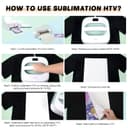
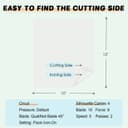
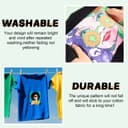
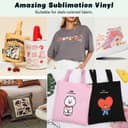
🔥 Transform your dark fabrics into vibrant canvases with HTVRONT Sublimation HTV!
HTVRONT Sublimation HTV is a 10-pack matte vinyl designed for sublimation on both dark and light pure cotton fabrics. It offers vivid, fade-resistant colors with a silky soft finish, strong heat adhesion, and easy cutting compatibility with popular machines like Cricut and Silhouette. Ideal for customizing shirts, pillows, bags, and hats, this premium vinyl ensures durable, bubble-free transfers and comes with 24/7 customer support.


| ASIN | B0C23VBW8W |
| Best Sellers Rank | #14,993 in Arts, Crafts & Sewing ( See Top 100 in Arts, Crafts & Sewing ) #129 in Craft Adhesive Vinyl |
| Brand Name | HTVRONT |
| Color | Matte |
| Customer Reviews | 4.6 4.6 out of 5 stars (1,519) |
| Manufacturer | HTVRONT |
| Material Type | Vinyl |
| Size | 10pcs |
| Unit Count | 10.0 Count |
M**A
Handy, much needed product
Excellent product for people that want to sublimate on a material other than polyester or a color that is dark. It’s a bit thick but it still works very well; print quality, color and value are 5 stars for sure. The material is a bit thick so it can be a bit difficult to weed but it’s still a high quality material. Mostly easy to use as long as you understand that you are meant to sublimate on to this material, not print on to it.
U**E
Enables Sublimination on Dark Shirts
Great for dark shirts. Essentially sticks onto the shirt after ironing. Stays on well and great quality. Once you have it ironed on, you put your sublimation print, transfer and done.
D**E
With and without the HTVRONT backing
First 2 pics are withOUT the htv. They are just 100% polyester and feel great. The 3rd one (gray) is also 100% polyester NO htv and color is abit dull. The last 2 FOR DARK COLOR I used the htvront sublamation vinyl so the colors would be bright. It does work very well and gives great color. The mindcraft one has a bit of the vinyl boarder in white. The earth one, the vinyl was cut the exact size so no white vinyl is showing around the edge. I love the feel and look of just the 100% white polyester but who always wants to ware white shirts. Nobody! They only thing i dont like about the htvront is ot feels like vinly and stiff. It would be so nice if this product could be made thiner and more flexable. Im hoping someone comes out with a more fusible white material like backing used in sewing. Im thinking of getting polyester spray and put on the white fusing and then the sublamation printing. So my short answer is, it works great for bright colors on dark material and they are 100% cotton shirts. They are just stiff like regular vinyl.
E**R
Sublimation on fabric.
Easy to use, great results! Highly recommend!
S**A
Works great! But it is a little thick and tricky to work with.
Update April 2024: After having tried this a few times, I have developed my own process for my own equipment. Your experience may vary. I have an HTVront autopress, an Epson ET-15000 printer with Hippoo sublimation ink, and a Silhouette Cameo 5 cutting machine. Here is my process: 1. Within Silhouette, apply an offset to the design. I like .06 – I don’t want it to be super big. I think with the right design, one could probably even get away with no offset. Lining things up could be quite tricky, however. 2. In the software, group both layers together – the printed image and the offset. Resize the group such that it will fit onto the sublimation htv. Flip the design horizontally to manually mirror the image. Both the printed layer and the htv need to be mirrored. 3. Print the image with registration marks onto the sublimation printer (since you have already mirrored the design in the software, be sure to NOT mirror within the printer dialog). I use Epson vivid for my color mode and change these settings: brightness 3, contrast 8, saturation 6, density 4. Use the cutting machine to cut out only the offset (not the outer edge of the image). That leaves a little wiggle room so you don’t cut off any of your printed image edges. 4. Cut out the htv using the offset as the cut edge (again – not the image edge). Follow the cut instructions that come with the htv (but do some test cuts first to see if it works well with your machine). 5. For my autopress, I have to trick the machine into doing a firmer press by putting another pressing pad on top of the existing pad. I press the htv for 10 seconds at 315 degrees. Cold peel as instructed. 6. Lining up the printed sublimation image with the vinyl is tricky, because the vinyl shrinks a little when pressed. But I have found that one can tug on the fabric here and there to help with alignment. And then use a ton of heat-resistant tape to hold it in place. 7. For my heat press, I need to press at 400 degrees for 50 seconds. And again, I have to place a second pressing pad on top of the regular pad. As with any sublimation, put a piece of butcher paper on top before pressing. You can see from my picture of the 3 mandala cats, that the sublimation isn’t perfectly aligned with the htv. But it’s close enough and I think it looks pretty good. I think that’s the hardest part: lining up the sublimation paper on top of the pressed htv. Cutting the design out with a cutting machine definitely helps in trying to align things. I wouldn’t attempt to line up a plain old printout that hasn’t been cut to match the htv – that would be super difficult. Also, I think next time, I would purchase this on a roll so that I could make my design bigger without the 10x12 limitation. BTW – it’s not quite 10” but is more like 9.85”x12”. Original review: I thought this was fairly easy to use and worked really well. My only complaint is that it feels a little thick on the shirt, but I guess that's to be expected, since it is vinyl. For a much softer feel, using Siser EasyColor DTV is superior (that's an inkjet product - not a sublimation product. But the end result is similar as it can go on dark fabrics). However; that product can be really frustrating to use if the design is intricate, as it tends to curl up and won't stick well to the mask. For a big, blocky design, I would go with the Siser product. For a more intricate design, I would use this HTVRONT product. The HTVRONT product is WAY easier and less frustrating to use. I also feel like the result is more vivid.
G**U
Excellent Product its a winner in my book.
This Sublimation HTVRont for dark fabric works really well on 100% cotton. I was impressed. I thought it would come out really thick and hard but it doesn't. It feels the same as when I do DTF. The only issue I had was lining the sublimation up on it. I think it stretches a little when you peel it as it is very strong. For that reason I would recommend making the cut a little smaller, or you can leave it as is and it will make your prints look 3D.
M**S
Wonderfully
Excellent item
K**S
Works great on dark and light fabric
I used it on both dark and light fabrics and the results were amazing. Colors came out bright, clear, and long-lasting. Very easy to work with—definitely recommend
S**.
This was a great buy and will buy again. The item works a treat and as advertised, easy to use and great final product.
C**R
Works well!
A**M
perfect product for sublimation
M**.
Purchase this item to put a sublimation design on a cotton shirt for my granddaughter's friend. It turned out great.
J**A
Works great! Make sure to tape down edges of design to prevent ghosting and fading and always to wash cold but can print pictures that always look fabulous!
TrustPilot
1天前
1 个月前