We remain fully operational. Our teams are working around the clock to ensure your deliveries continue safely.

下载应用程序



Buy anything from 5,000+ international stores. One checkout price. No surprise fees. Join 2M+ shoppers on Desertcart.
Desertcart purchases this item on your behalf and handles shipping, customs, and support to SINGAPORE.
🖱️ Elevate your left-hand game with precision and comfort — don’t let righties have all the fun!
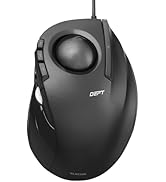
The ELECOM EX-G Left Handed Trackball Mouse is a wireless, ergonomically designed input device tailored for left-handed professionals. Featuring a high-performance optical sensor with adjustable DPI (750/1500), six programmable buttons including tilt scroll, and smooth artificial ruby ball bearings, it offers precise cursor control and customizable workflow enhancements. Powered by a single AAA battery with up to 6 months of life and compatible across major Windows and macOS systems, this mouse combines comfort, efficiency, and wireless freedom for the discerning left-handed user.






| ASIN | B016QCPRBM |
| Antenna Location | Gaming |
| Are Batteries Included? | Yes |
| Are Batteries Required | Yes |
| Battery Average Life | 6 months |
| Best Sellers Rank | 13,237 in Computers & Accessories ( See Top 100 in Computers & Accessories ) 337 in Mice |
| Box Contents | AA battery, Japanese manual, Receiver, Trackball mouse |
| Brand Name | ELECOM |
| Button Quantity | 6 |
| Colour | Left Handed |
| Compatible Devices | Personal Computer |
| Country of Origin | China |
| Customer Reviews | 4.1 4.1 out of 5 stars (4,435) |
| Enclosure Material | Plastic |
| Global Trade Identification Number | 04953103473690 |
| Hand Orientation | Left |
| Hardware Platform | Laptop, PC |
| Item Dimensions L x W | 9.4L x 4.6W centimetres |
| Item Type Name | ELECOM Left-Handed 2.4GHz Wireless Thumb-operated Trackball Mouse, 6-Button Function with Smooth Tracking, Precision Optical Gaming Sensor (M-XT4DRBK) |
| Item Weight | 127 g |
| Manufacturer | ELECOM |
| Model Name | M-XT4DRBK |
| Model Number | M-XT4DRBK |
| Mouse Maximum Sensitivity | 1500 Dots per Inch |
| Movement Detection | Optical |
| Network Connectivity Technology | Radio Frequency |
| Number of Batteries | 1 AAA batteries required. (included) |
| Operating System | Mac OS X 10.7 Lion, Windows 10, Windows 7, Windows 8.1, Windows Vista |
| Power Source | Battery Powered |
| Product Features | Wireless |
| Product Finish Type | Smooth Plastic |
| Range | 3 meters |
| Style Name | Wireless_BlackBall |
| Theme | Video Game |
| Unit Count | 1.0 count |
P**E
Good mouse
Good trackball mouse, like the 3rd button and the software allowing custom setup, really helps with my engineering work. The buttons are a little on the louder side when clicking compared to other devices. Good value, comfortable to use and surprisingly quick to adjust to using it
D**K
Does the job but feels cheap in comparison to Logitech
Seems OK, I purchased this as my right arm is recovering from injury. Compared to my right handed Logitech trackball this feels a bit cheap and the ergonomics aren't quite as nice.
A**R
Works on Chrome OS!
This is a great product! Works very well on Chrome 134. Only the very left hand button doesn't do anything.
A**R
left-handed mice(apart from gamers) are hard to come by and I'm so pleased I took a chance on buying this one
This is my first track ball mouse - a bit strange to start with but, after about half an hour, my hand finally stopped trying to move the mouse across my desk. Wireless, programmable, left-handed mice(apart from gamers) are hard to come by and I'm so pleased I took a chance on buying this one. I have large hands and this mouse is a perfect fit and feels comfortable to use. The programmable buttons are just what I wanted and makes using my mouse much easier. I can't comment on long-term use yet but, after two days, I am extremely pleased with the mouse and I would certainly recommend it to other lefties out there.
D**H
Updated views after exteded use
I'm more or less ambidextrous. I have carpel tunnel syndrome in my favoured, my right, hand. I use a trackball, a Perixx, for my right hand but have been trying, and failing, to use it in my left for a while. The Elecom XT40R is one of the very few trackballs, with a wheel, suitable for left-handed use. I so wanted to like it. The instructions are in Japanese. The diagrams are poor and, in any case, do not cover the programmable keys. The website is also in Japanese and Google translate doesn’t help when trying to find the particular device. The name on the trackball, Ex-G does not produce any search result and one has to use the number on the bottom of the device, together with a magnifying glass to read it. I eventually found the pdf, and the brief English bit tells one to go to a URL on the Japanese site. So I put the Bluetooth USB device in, put the supplied battery in the trackball. No response. After a few minutes, I put in a new AA battery. Success. Then it's a case of downloading the driver and restarting. The device is comfortable to use, although I have large hands and the device is a bit small – the norm for me. Otherwise it’s promising, although it feels about as robust for the price as I’d expect. Default is right-click for left-click, if you see what I mean, which is a bit odd. On the good side: lots of programmable keys, three main buttons, a wheel that you can use to scroll horizontally and, superior to my Perixx, a smooth ball action. Kudos to Elecom for providing a left-handed device. I said I'd update my review after more use. I've got used to it, find it comfortable, which was the main thing I was looking for, but the ball is not as smooth as I'd hoped, and inferior to my Perixx. Allround, I'm reasonably satsified, and the price was keen.
G**N
Excellent left handed trackball
I need a left handed trackball due to an injury to my right wrist. I am normally right handed. One of the few left handed trackballs available, this became almost a default choice. One initial problem was a slight "stickiness" when you first try to scroll with the ball. That made accuracy difficult. A few hours of use has smoothed that out and the unit now functions very well, with a similar degree of accuracy to the Logitech trackballs I normally use. I am using the trackball with Linux (Debian 12) which is not noted as being supported but the OS had no trouble recognising and enabling the device.
P**S
Smooth left-handed trackball
I already use a Logitech M570 but found after years of use my thumb was getting sore if I used it a lot in the evening. I'd have got a left-handed M570 if they did one but this trackball was the only option I could see. If you're happy using a thumb trackball then this is great. Nice smooth action and the only slight complaint I have about it is that my middle finger (resting on the right-click button) sometimes fires it accidentally if I tilt my hand forward at all as the pressure to click it is light. Otherwise it's all straight forward. The function button (ring finger) has to be setup with the Elecom utility. Yes, the instructions packaged with it are in Japanese, but there's a QR code and web address supplied to get the multilingual manual (which you'll need for all of about 2 minutes). Ideal if you already like using a right-thumbed trackball and want something to switch around with. Update: After 3 days of use I have to say that the sensitivity of the buttons is infuriating. Just the weight of my middle finger causes me to unintentionally right click all the time. The third (function) button is also very sensitive. Such as shame, it's fine in every other way but I'm going to have to return it because of this functional issue.
M**Y
Superb But Alittle Over Priced
The packaging is superb. No fancy printed, oversized glossy boxes. A simple protective box. There is no 200 page multi-lingustic manual. Only the need to use the website to download the manual and software. The materials could be a little better. It feels flimsy. The ball isn't quite as smooth as I would like. This is my first tracker. There are minute areas that feel hesitant. This could just be my inexperience. The downloadable software, manual and controllers, is easily found. As is the configuration of profiles and the assignment of buttons. I will update this review further after a few months usage.
R**A
Maravilhoso. Se você é canhoto só compre, não precisa pensar 2x. Eu tenho dificuldade em achar mouse. 1- uso com a mão esquerda. 2 - tenho a mão grande. Aí 90% do que tem no mercado é para mão média/pequena e para direita. Tem um mouse 650 da Logitech L (de large ou left) que é dos meus favoritos, mas este trackball eu liguei e apaixonei. O produto é excelente, tamanho grande, dá para espalmar a mão toda nele. A qualidade de construção é muito boa, fica bem firme no mousepad. Tem alguns botões a mais, do tipo tem um terceiro botão (tem o direito, meio, esquerdo e um ainda mais um pouco a esquerda, configurei para fechar janela, achei ótimo). É pesado e tem aparência de produto de boa qualidade. Tem um furo embaixo para cutucar a bola e tirar para limpar a bola e os sensores luminosos. A bola é bem precisa, não é tão precisa quanto um mouse mas é muito muito bom , tendo-se em conta que está se utilizando somente o dedão para o controle. Recomendo demais. É o tipo de produto que eu não sabia que precisava tanto até ter um.
L**O
Excelente relación de calidad y precio, funciona perfectamente
N**T
Sidewise scrolling is not good. Which is main function we are buying this mouse for.
P**A
Mi primer ratón de ordenador fue parecido a este, con una bola similar, que te permitía hacer casi todo con ella. Ahora, después de perder la movilidad de la mano derecha tras un ictus, vuelvo a tener un ratón fantástico para mí izquierda. Cómodo e intuitivo.
G**I
Ottimo, lo consiglio
TrustPilot
4天前
5天前