We remain fully operational. Our teams are working around the clock to ensure your deliveries continue safely.

下载应用程序








Buy anything from 5,000+ international stores. One checkout price. No surprise fees. Join 2M+ shoppers on Desertcart.
Desertcart purchases this item on your behalf and handles shipping, customs, and support to SINGAPORE.
🔗 Elevate your workspace with flawless 4K connectivity—don’t get left behind!
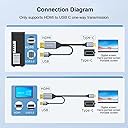
This 6.6ft HDMI to USB-C cable converts HDMI 2.0 signals to USB-C, supporting up to 4K@60Hz resolution with stable USB-powered transmission. Compatible with leading professional devices like MacBook Pro, Mac Air, Microsoft Surface, and Nreal Air AR glasses, it offers plug-and-play convenience with a durable male-to-male interface, ideal for seamless high-definition display connections.


| ASIN | B0BNX61QNV |
| Best Sellers Rank | 6,904 in Computers & Accessories ( See Top 100 in Computers & Accessories ) 1,582 in Cables (Computers & Accessories) |
| Brand Name | WJESOG |
| Colour | Black |
| Compatible Devices | Laptop |
| Connector Type | HDMI, USB Type C |
| Country of Origin | China |
| Current Rating | 1 Amps |
| Customer Reviews | 4.2 4.2 out of 5 stars (264) |
| Input Voltage | 5 Volts |
| Item Weight | 0.1 Kilograms |
| Manufacturer | WJES Technology |
| Model Number | WJESOG-717994489277 |
| Nominal Power | 5 Watts |
| Number of Items | 1 |
| Number of Ports | 2 |
| Package Quantity | 1 |
| Power Plug Type | No Plug |
| Product Finish Type | Hdmi |
| Product Warranty | 1 year |
| Specific Uses For Product | Projector |
| UPC | 717994489277 |
| Unit Count | 1.0 count |
| Warranty Type | Limited |
M**R
Confirmed to work with Xreal One Pro AR glasses
I can confirm this works with the Xreal One Pro glasses. Some reviews on the internet says it only works with the DisplayPort version, this is incorrect. This HDMI version works flawlessly. I am using it with a RTX 4080. I did also order a small USB-C to C female adapter, as this cable is very very stiff and uncomfortable to wear with the glasses. Using the adapter, you can continue to use the original USB cable provided by Xreal, for additional comfort. For anyone wondering which adapter I purchased, it's this one: https://www.amazon.co.uk/dp/B0BC3FDL35?ref=ppx_yo2ov_dt_b_fed_asin_title&th=1 Note that the positioning of the adapter matters, if it doesn't work, flip it around either horizontally or vertically until you get it right. I'd advise to mark it somehow which the correct side is.
Δ**Μ
Excellent for the XReal Air 2 Pro
Got this as a recommendation from reddit to be compatible with the XReal Air 2 Pro AR glasses, and oh it works perfectly!, 120hz 1080p without an issue, not a single drop in quality when connecting via this cable as opposed to using the original xreal cable. Works great with a 4080, as the 4080 I have only has 1 HDMI output its kind of a chore to swap around from my monitor to the cable but so far the cable fits snuggly and does not move even if I tug on it a bit due to sudden head movement. The usb cable coming off of the HDMI end fits perfectly into the back of the motherboard with adequate length still left on it to accommodate longer runs. Main connection to the glasses via the Type-C port is also perfect, fitting exactly into the glasses without leaving any extra length on the connector that would be exposed. Overall a great cable wish I got a little longer one but it is great!
N**N
Gets the job done
Really awesome for letting my AR glasses work while being able to charge them, just be careful as like all cabling too much movement can cause instability in the cables themselves as I had with my first set of these..
P**R
Quality Product - But Does Not Work with Xbox
Good quality product however not compatible for my use case. I bought this to connect my Xbox Series X to Xreal Air 2 AR Glasses, the USB powered connected is needed for the display to work as a standard HDMI to USB C cable will not work with Xreal products. Whilst the display and sound came through nice and clear when connected to my PC, it only produced a square format pixelated mess on my Xbox Series X. Speaking to the supplier they advised that Xbox SX requires some decoding that is not supported. Digging a bit deeper it seems Xbox SX internal convert Display Port to HDMI port which may be the source of the problem. Vendor, refunded.
A**I
Did not work with Apple Studio Display (dont try your luck)
It is not work for Apple Studio Display. Dont try your luck. would return it.
J**N
Perfect product
Amazing product. Worked just as described
C**L
Worth the money!
I used the cable to connect a Mac mini 2014 to a LG portable monitor, worked straight away no issues. Slighty expensive but it works.
G**F
Only worked at 720p
I have a monitor with only a USB-C / thunderbolt 3 / DP ALT input. Have been trying to get a working solution to feed an HDMI signal into it with no luck. This "worked" in so much as it displayed an image, but it would only work with two devices and no matter what I tried, it would only display in 720p. Its a 4k (LG Ultrafine) Monitor !?!?!? Sent back and refunded. Bought a different NUC with a thunderbolt out. Problem solved. Monitor running at 4k no problem No idea if this was a defective cable or expected behaviour, but it IS marked as a 4k cable. Its NOT!
A**X
Works with Apple Studio Display connected to RTX 4000 Mobile Ada via HDMI.
C**E
Did you know that pretty much all HDMI to HDMI cables are bidirectional (ie; doesn't matter which side you plug into the source vs. destination), but nearly all HDMI->USB-C cables are unidirectional (ie; one end is for the source of the video, while the other is for the destination/display)? It turns out that USB-C to HDMI cables are common, but HDMI to USB-C is not. That is because most monitors have HDMI as an input, not USB-C, so the cables are meant to have the USB-C end plugged in the PC (source) and the HDMI end plugged into the monitor (Destination/Display). Portable monitors, on the other hand, often just have USB-C ports for power and input, and no HDMI ports. In my case, my laptop only has one USB-C thunderbolt port, which I need for a hub to plug all of my other peripheral devices in (thumb drive, ring light, webcam, external speaker, etc.). Therefore, I could only use the HDMI port on either my hub or my laptop to attach my portable monitor. This requires either a bidirectional HDMI<->UCB-C cable, or a unidirectional "HDMI to USB-C", which is the opposite of most cables on the marketplace. This is the FIRST cable that actually WORKS with my portable monitor ((HDMI to USB-C). I admittedly initially purchased a few USB-C to HDMI cables, as I did not know about the unidirectional issue with these cables. Those initial cables obviously did not work, but not due to any fault in the cable itself, as they were meant to work in the opposite direction that I needed. However, since then I purchased SIX (6) other cables that were clearly listed as "HDMI to USB-C", and this one is the ONLY one of those 6 that worked! I tested this cable with a direct connection to my laptop, as well as through the HDMI port on my USB-C hub. Surprisingly both work just fine (many HDMI to USB-C cables have a disclaimer that they won't work through a hub). However, I must say that my USB hub gets REALLY hot when going through that way, so I wouldn't recommend using it through a hub unless the hub is designed to handle it. In my case, I plan to use it plugged directly into my HDMI port, so that won't be an issue.
A**R
Conforme
K**K
Use it for connecting to steam deck to my Viture Ar glasses as a external display. Works perfect now giving you ability to play your steam deck games in Ar/xr mode. Has transformed how I game for good. Highly recommend. The extra USB cable helps transfer power from a docked steam deck to the xr glasses to uninterrupted gaming experiences. 5 out of 5.
S**E
Ho comprato questo cavo per poter collegare i notebook portatili ai monitor USB-C, ovviamente essendo HDMI non supporta il MST, cioè la funzionalità di poter usare più monitor con un unico cavo, ma già questo è rivoluzionario, posso connettere tutti i vari computer che ho in giro al monitor senza dover aver problemi a cercare di infilare il cavo nella porta giusta, e grazie all'USB posso utilizzare anche il mouse, la tastiera, la webcam e le casse connesse allo switch del monitor. Unica pecca è che supporta solamente USB 2.0 e non supporta la modalità ALT half DP + half USB 3.1 che garantisce 5 Gbps e 2 1440p con DP 1.4 oppure 1 1440p con DP 1.2
TrustPilot
1 个月前
1天前