We remain fully operational. Our teams are working around the clock to ensure your deliveries continue safely.

下载应用程序


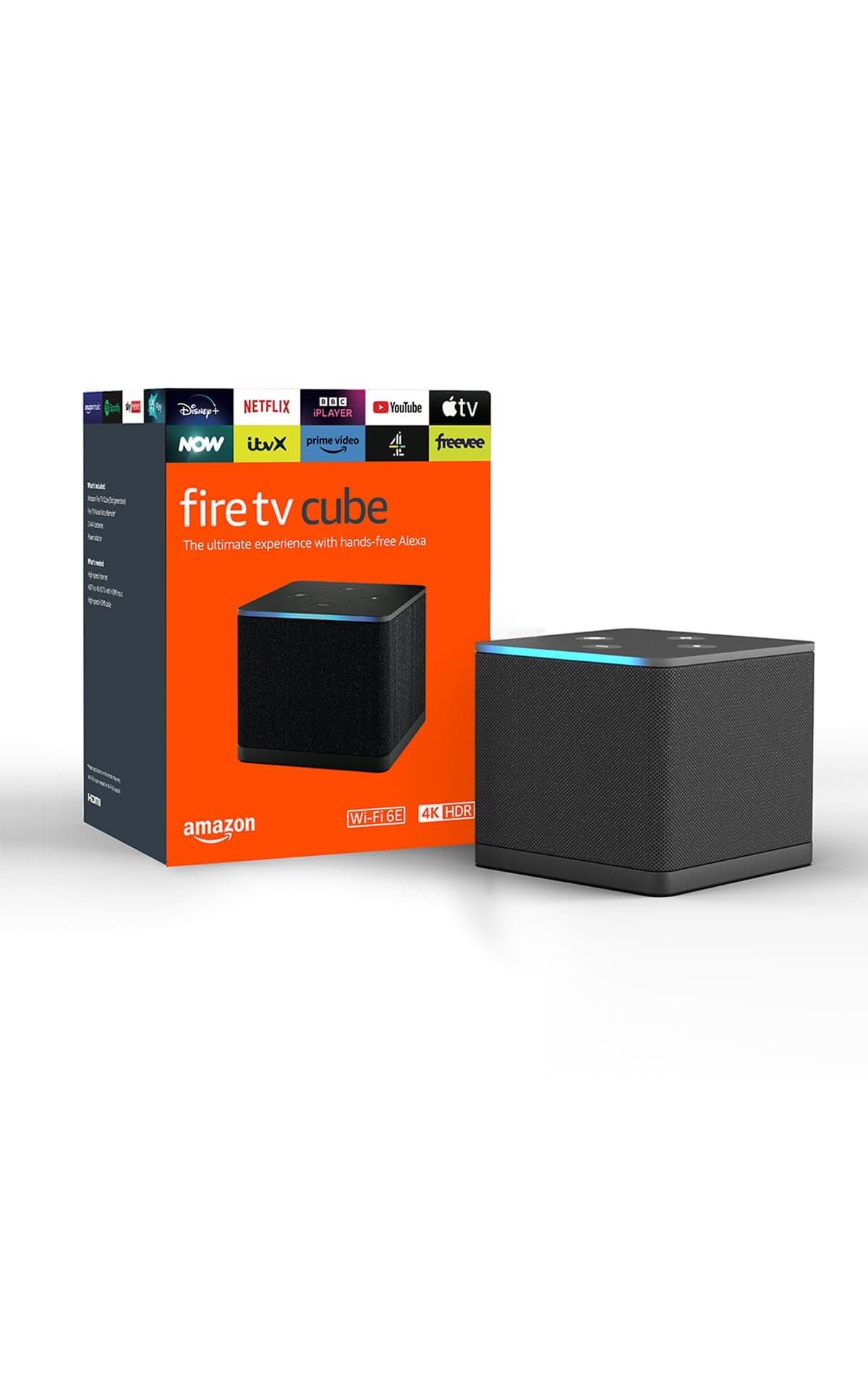
🔥 Stream Smarter, Live Louder 🎬
The Fire TV Cube (Newest Gen) is Amazon’s fastest streaming media player featuring an octa-core processor, 16GB storage, and Wi-Fi 6E tri-band connectivity. It supports stunning 4K Ultra HD visuals with Dolby Vision HDR and immersive Dolby Atmos sound. Hands-free Alexa voice control lets you manage your TV, soundbar, and smart home devices effortlessly. Designed with privacy in mind, it includes an electronic mic off switch. Perfect for professionals craving seamless, high-performance streaming and smart home integration.
| Size | 3.38” x 3.38” x 2.99” (86 mm x 86 mm x 77 mm) |
| Weight | 513 g |
| Processor | Octa-core 4x 2.2GHz 4x 2.0GHz |
| GPU | 800MHz |
| Storage | 16 GB internal |
| Memory | 2 GB internal |
| Wifi | Wi-Fi 6E Tri-band. Also supports 802.11a/b/g/n/ac/ax wifi networks. For Wi-Fi 6E support, Fire TV Cube must be connected to the 6 GHz band of a Wi-Fi 6E network using WPA3 encryption. |
| Bluetooth | Bluetooth 5.0 + LE. Pair with compatible Bluetooth speakers, headphones, video game controllers and more. |
| Voice support | Far-field and near-field voice support. |
| Voice control compatibility | Controls a wide range of IR-enabled devices, including TVs, soundbars, cable and satellite boxes, and A/V receivers. Learn more about supported devices. |
| Cloud storage | Free cloud storage for digital content purchased from Amazon. |
| Ports | HDMI 2.1 Input, HDMI 2.1 Output, IR Extender, Power, USB-A 2.0, Ethernet port 10/100 Mbps. |
| Audio support | Dolby Atmos, 7.1 surround sound, 2-channel stereo and HDMI audio pass-through up to 5.1. |
| 4K support | To watch films and TV programmes in 4K Ultra HD, you need a compatible 4K Ultra HD TV. Not all services are available in 4K/HDR. Certain services are subject to change at any time, may not be available in all areas or in 4K/HDR and may require separate subscriptions. Learn more about services. |
| Supported content formats | Video: Dolby Vision, HDR 10, HDR10+, HLG, H.265, H.264, VP9, AV1. Audio: AAC-LC, AC3, eAC3 (Dolby Digital Plus), FLAC, MP3, PCM/Wave, Vorbis, Dolby Atmos (EC3_JOC), Dolby MAT, DTS pass-through, DTS-HD pass-through (basic profile). Photo: JPEG, PNG, GIF, BMP. |
| Output resolution supported | 2160p, 1080p and 720p up to 60 fps. |
| System requirements | High-definition television with available high-speed HDMI input high-speed internet connection via WiFi or built-in Ethernet port, power outlet (compatible TV/sound/cable equipment for control by infrared or voice). High-speed HDMI cable rated 18Gbps or higher, and 4K TV with high-speed HDMI connector required for 4K viewing and more reliable device control. Wi-Fi 6E router needed for Wi-Fi 6E support. Auto-Low Latency Mode is included in the HDMI 2.1 standard. |
| TV compatibility | TV must support minimum HDCP requirements for protected content playback. Compatible with 1) 4K ultra high-definition TVs with HDMI capable of 2160p at 24/25/30/50/60 Hz and HDCP 2.2 or; 2) high-definition TVs with HDMI capable of 1080p or 720p at 50/60 Hz. Learn more about high-definition. |
| Warranty and service | Fire TV Cube is sold with a limited warranty of one year provided by the manufacturer. If you are a consumer, the limited warranty is in addition to your consumer rights and does not jeopardise these rights in any way. This means you may still have additional rights at law even after the limited warranty has expired (further information on your consumer rights can be found here). Use of Fire TV Cube is subject to the terms found here. |
| Content availability | Certain apps and services are subject to change or withdrawal at any time, may not be available in all areas or languages, and may require separate subscriptions. |
| Accessibility features | VoiceView screen reader enables access to the vast majority of Fire TV features for users who are blind or visually impaired. Screen magnifier enables viewers to zoom in and out, and pan around the screen. Text Banner consolidates on-screen text into a compact, customisable banner that appears on the screen. Watch videos and TV programmes with subtitles displayed. Use Audio Description for verbal descriptions of what is happening on the screen, including physical actions, facial expressions and scene changes. Subtitles and audio descriptions are not available for all content. Fire TV Cube (2nd/3rd generation) supports audio streaming for select compatible Bluetooth hearing aids for a private listening experience. You can also listen to Fire TV with compatible Bluetooth headphones. Learn more about accessibility for Fire TV. |
| Included in the box | Fire TV Cube (3rd generation), Fire TV Alexa Voice Remote, power adaptor, 2 x AAA batteries and Quick Start Guide. HDMI, IR extender and Ethernet cables are sold separately. |
| Software Security Updates | This device receives guaranteed software security updates until at least four years after the device is last available for purchase as a new unit on our websites. Learn more about these software security updates. If you already own a Fire TV, visit Manage Your Content and Devices for information specific to your device. |
| Size | 38 x 158 x 17 mm |
| Weight | 51 g (without batteries) |
| Batteries | 2 AAA (included) |
| Technology | Bluetooth 5.0 |
| Compatibility | Fire TV Cube (3rd Gen) |
D**M
Thank You Amazon
This was a replacement by Amazon for an earlier 2nd Generation which failed to boot, possibly after an update. I noticed it was faster than the previous one with more internal storage (16GB). In addition, it has a full HDR capability (Dolby Vision, plus HDR, HDR10, HDR10+, HLG) which is very noticeable on Netflix. A slight downside is that it doesn't come with either an IR Extender or an Ethernet adaptor. A Remote Control and Power Adapter was included and it now has an HDMI Pass Through option. --- Pitcher quality, response plus range of apps is good. The Operating System, unlike Amazon's own, is still based on Android so it is still possible to sideload other, non-blocked apps. I use Kodi (currently 21.3) as a media server combined with network NAS storage for the saved media. This is excellent and don't see why Amazon can't include the with other apps, without have to sideload? --- Although expensive, with increased performance, storage and versatility, highly recommended if you want this speed and increased storage. --- Thanks again to Amazon for replacing the previous non-bootable Cube.
R**N
Updated 9 Month Review
There is so much that is great about the all new Cube and with continuing regular updates it is one of the best streaming devices on the market... it's lightning fast with a USB interface and Ethernet, although it is disappointing that these connections are somewhat outdated. Ethernet is only 10/100 so it could be a struggle to stream your own content from a home server (Plex, Emby, Kodi etc.) without transcoding the video/audio. However, the WiFi 6 implementation is a welcome addition and bypasses the problem, assuming you have the Network capability so it's something to bear in mind when buying. I think my advice to amazon going forward would be anyone paying £140 for the device would have probably paid £160 for Gigabit ethernet and Superspeed USB. The new look is great, and it's now uniform with the rest of the Echo range (No more fingerprints to clean!!) Prime Video has seen lots of updates, I'm now experiencing excellent streaming quality with the correct resolutions and adaptive HDR setting activating with the correct refresh rates and audio bitstreams. I've seen a few negative postings about the super resolution upscaling. However, when I play a native 1080p and the screen resolution of the content video matches the native video display resolution - the upscaling really kicks in and works brilliantly!! All apps I have tried are now bit-streaming Dolby signals at DD+/Atmos, but under the guise of pcm/multi dds. A very welcome recent update has allowed True HD signals to be encoded and I'm getting Dolby signals and DTS X Bit-streamed from these audio codecs. I'm hearing a clarity of sound I've not experienced on a Fire device before and it will suit most cinephiles with half decent AV/Soundbar setups!! Tip for anyone wanting to pass through... Be aware that the cube is quite capable of processing all the codecs while keeping the voice assistant audible and features when watching on plex/vlc/kodi. You're going to see PCM-multi on your display but from my most recent experience and testing it's because the cube takes it all in and outputs it at a raw (pcm multi level) format to be able to cooperate with the alexa voice responses but I've noticed no difference when passing through directly except alexa responses won't happen when doing it this way.... brilliance from the amazon team and more people need to be aware of its function. The Cube Prime music is pretty decent although casting from the mobile app will play through an Alexa screen card as opposed to the native music app, which makes sense since different devices will have different audio capabilities in a group speaker setting... Although if I send music to the group where my TV cube is from somewhere else it plays through the the music app and all becomes a little confusing and disparate at times. It’s worth noting that there has been some customer pushback about the new way music selection/playback for prime subscribers now works with certain caveats on listening choice so research this if buying. It’s not personally an issue as I have always subscribed to prime music in addition, and may I say it's worth every penny if you have an Atmos/Spatial audio setup as more and more tracks are being added in these formats). I'm experiencing 24/192 playback Ultra HD when available in the music app and atmos/3d tracks sound amazing. It would be nice if I could add a song to my playlist via voice in the amazon music app... but apparently no music is playing when attempting the command... even a button selection to add the current song to playlist would be helpful in the app. On that note, the ability to play Amazon music from the mobile phone app to devices/multiroom music groups can now can be minimised for background play... so you can still browse other content of some apps without it stopping playback and is a welcomed feature. When using this playback mode, you can also add songs to playlist via voice command. It also behaves this way for multi-room music which is great if someone is also listening somewhere in the house while you're browsing around content, although again some apps do take control of the system audio on launch which will cut the music off (such as BBC Iplayer, ITVX, and Channel 4 Apps..... however, browsing home screen content, prime video, YouTube and silk web browsing is fine). Hopefully, Amazon is aware of this and going forward they could request app publishers not to take audio control on app launch, but rather on selecting an item for playback within their app. The HDMI IN for a set-top cable/satellite TV box or other HDMI Device is brilliant. I have a PC going through and is comfortably handling 4K resolutions @ 60HZ - it's an amazing feature that really makes it stand out from other devices and Alexa overlays for info cards/cameras is such a great feature. I only wish it had perhaps even an extra one or two HDMI In ports, but who's to say Amazon couldn't introduce their own HDMI switcher to add additional ports, maybe? Since the device is compatible with Hdmi 2.1 it would also be great to see 120hz vrr handled in the future of the device. On balance, I really recommend this product, especially if you have an existing Alexa ecosystem in your smart home. It is regularly maintained and updated by the Fire TV team, who have listened to feedback and responded with some great work and it has really gone from strength to strength - so well done guys! Would be nice to see the fire TV ambient screen option come to this device since the new 2023 fire TV 4k stick will be getting it, I'm sure this device is capable. Keep up the great work!
A**G
Great kit to be use TV apps, fast and can run VPN + 4K streaming with sideloaded apps.
Amazing piece of kit, can sideload apps and run them efficiently. Comparing this to my old Google Streamer it was night and day. The Streamer had a pretty UI but bad performance and would crash constantly. There is a slight price difference but if price is not an object this is the better piece of kit. Would prefer the OS to be less tv-like and better automation to open on certain apps (Alexa Automations) as this currently used for my mother in law. The simplier the better.
J**L
Good but buggy
Purchased this to upgrade from the Gen 2, on the whole a worthwhile upgrade but the software is very buggy ranging from minor annoyance, like the "new" app orange dot coming back after every reboot for some apps, to very frustrating, like the constant restarting needed to correct flashing video signal, or no video at all. The hardware choices are a suprise as well for a top of the range Fire TV product. I would've expected a Gigabit Ethernet port and USB 3.0 as let's face it most of us don't have WiFi 6. I've had to purchase a USB 2.0 ethernet adaptor that gets about 500 Mbps, so not the best but good enough. I play local media from my media PC at high bit rates so need something a little quicker than the 100mbps the onboard ethernet gives. Other than that the picture quality is great, especially in Dolby Vision, sound is equally good and the upscaling is subtle but noticeable. All-in-all a good bit of kit, just hope Amazon fix all the bugs! Edit: Dec 2022, after a recent software update I decided to carry out a factory reset and I'm happy to say it seems that most of the bugs have been fixed.
R**.
Best streaming device for quality 👌
Massive upgrade from my 1st generation fire stick 4k picture quality outstanding and sound in atmos. Set-up quite easy changed from wifi to ethernet much better and stable on eero router. This is a no brainer just aquire it. Only one problem stuttering when using 4k 2160 p 60hz uhd so changed to a audio quest vodka hdmi cable now perfect 👌