We remain fully operational. Our teams are working around the clock to ensure your deliveries continue safely.

下载应用程序



Buy anything from 5,000+ international stores. One checkout price. No surprise fees. Join 2M+ shoppers on Desertcart.
Desertcart purchases this item on your behalf and handles shipping, customs, and support to SINGAPORE.
🚀 Elevate your MacBook Pro setup to pro-level multitasking and speed!
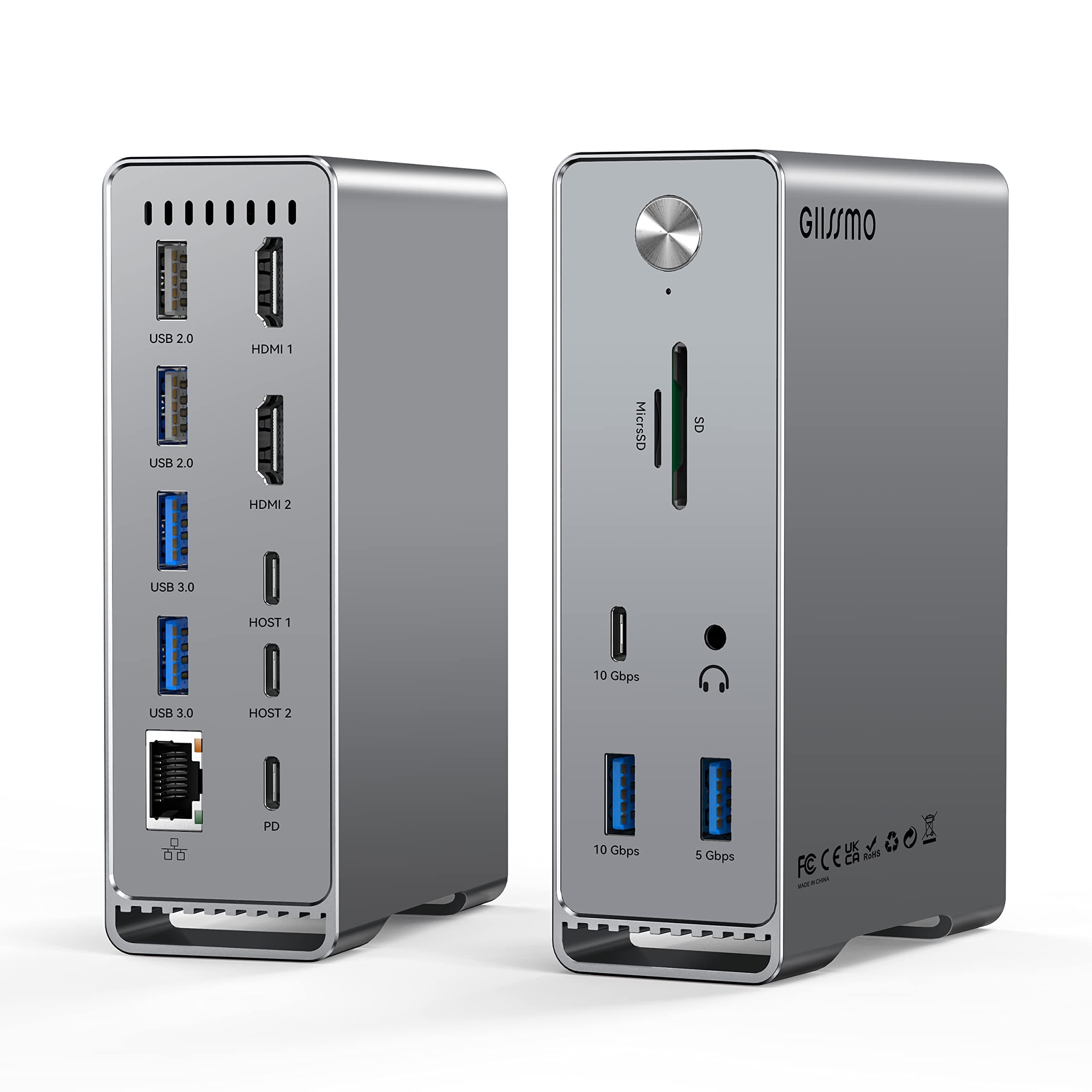
The GIISSMO 14-in-2 MacBook Pro Docking Station transforms your MacBook Pro/Air into a powerhouse workstation with dual 4K@60Hz HDMI outputs, ultra-fast 10Gbps USB-C/A ports, 87W power delivery, and comprehensive connectivity including RJ45 Ethernet and SD/TF card slots. Designed for plug-and-play ease with a smart on/off switch, it supports multiple displays and peripherals, ideal for professionals craving seamless productivity and a clutter-free desk.


| ASIN | B09TRK9J5F |
| Item model number | 5E01 |
| Manufacturer | GIISSMO |
| Product Dimensions | 7 x 5 x 10 cm; 640 g |
M**D
I was excited to use this docking station but as I was unboxing the package, there was no user manual included. However, it was straight forward simply like a plug and play. After successfully connecting it to my MacBook Pro and my 2nd monitor, none of the USB ports work. Couldn't connect my keyboard and USB drive (I've tried them all). I could've just bought a cable to connect my laptop to monitor for 1/10th of the price if I didn't need the other features of a docking station. I wanted it to work but not what I expected for the price.
南**る
2018年末に購入した、MacBook Airの為に買いました。 MacBook Airは買ってから4年経ちますが、USB-Cポートが2つしか無く、たびたび不便を感じていました。 本体のSSDは512GBにアップしていましたが、仕事でエクセル形式のファイルを送りたい時など、関数が組んであって重いファイルはメール送信が難しく、USBメモリに入れて手渡したいということが良くありました。 11 in 1や13 in 1の似たような商品はたくさんあったのですが、こちらの品物は最大3台のモニターに接続出来るという点も魅力的でした。会議で1つのモニタに出力することは多かったのですが、最近は別部署の人とも合同で会議をする機会も増え、モニター自体の向きや大きさを選ぶ必要もあり、その点も当商品で解決出来ました。 よくよく確認してみると、M1またはM2、チップ搭載の2020年以降のMacBookはトリプルディスプレイに対応していないとのことでしたが、偶然にもそこはクリアしていました。機能が多いので、商品仕様はしっかり確認した方が良いですね。 一年保証も付いているとのことで、まだ問題は起きていませんが、安心して使えます。
S**Y
I needed a docking station set up for my 2018 MacBook Pro, and a lot of the options out there were well over $100 just for the station itself. This one seemed like it would be decent quality, and the price was quite good too, so I went for it. It's completely made of aluminum, so it does get quite warm when in use, but that's to be expected for something that puts 100W through itself. When it's standing up, it almost looks like a mini Mac Pro, which is quite neat. The heat has to go somewhere. I have it connected to two HDMI high refresh rate monitors @ 144Hz, and it performs flawlessly in that respect. No issues whatsoever when connected up. The double USB-C cable it comes with is quite short, about 2.5-3 feet long, which would be sufficient for most people's desk setups. I wanted to place my MacBook underneath my desk to free up space on the desk, so I decided to get two Thunderbolt 3 cables and connect them up just like the cable that came in the box, and it works just as well. The only downside to doing this is that I have to plug two cables in now instead of 1, but it's well worth it for the freed desk space. One thing of note is that while on the product page it specifies that it takes 100W max input, you need to make sure that the power adapter and cable you use also can keep up with this. Under heavy loads, like rendering video, I noticed that my battery percentage was dropping by a significant amount, and that the battery wasn't being charged. I checked the output from the USB-C power adapter I was using (rated 100W) and found that it was only drawing about 65W at peak load using a USB-C power tester, which would explain why the battery percentage was dropping under load. I was using an original Apple USB-C cable, so I swapped it for another cable that specifically was rated for 100W, and now it draws about 90W under load, which is more in line with what I expected. If you buy this dock and notice your battery level dropping while under load, check the power adapter and the cable to make sure that it's pulling close to 100W, otherwise your laptop will lose charge with this. All of the ports work flawlessly, though be aware that the MicroSD card slot does stick out a significant amount when plugged in, so try not to force it in, lest you break your SD card. My setup consists of two high-refresh rate monitors, a USB DAC/Amp combo going to external speakers, keyboard, mouse, and an external hard drive all plugged in at once, and it takes it all with ports to spare. This is a very excellent dock for my needs, and if you have a 2016-2018 Intel MacBook Pro and need a docking setup for it, this is a good option to look into.
私**す
PCと接続する際に背面側の2箇所を使うので、実質表側しか使えません。 個別で繋いでみたところ片方は電源をとっていないので、両方ないと充電ができないので、こちらは付属のものが必要になります。 性能面としては反応などもよく接続した場合にディスプレイへのアクセスもとても良かったです。 耐久性も2ヶ月くらい使っていますが、特に問題なく使えています。 LANポートもよく、速度もかなり出るようになっていたので、Macを使う人にとっては有線でネットが使えるので、使い心地はとてもいいです。
Y**I
UPDATE: The customer service is top-notch. There was an issue with the cable. There was a quick replacement and the docking station is working excellent and as described. It was great at first, but for some reason, it stopped connecting all together to my MacBook Pro.
TrustPilot
1 个月前
2 个月前