We remain fully operational. Our teams are working around the clock to ensure your deliveries continue safely.

下载应用程序










Buy anything from 5,000+ international stores. One checkout price. No surprise fees. Join 2M+ shoppers on Desertcart.
Desertcart purchases this item on your behalf and handles shipping, customs, and support to SINGAPORE.
🖨️ Print smarter, save bigger, and stay effortlessly connected.
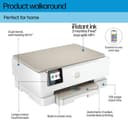
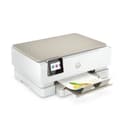
The HP ENVY Inspire 7220e is a versatile all-in-one wireless color printer designed for professionals and home offices. It features high-resolution 1200 dpi printing, automatic duplex printing, and seamless wireless connectivity with self-healing Wi-Fi. Included is a 3-month free Instant Ink subscription that saves up to 70% on ink costs with automatic delivery. Its sleek white design and touchscreen interface make it both stylish and user-friendly, supporting printing from smartphones, tablets, and computers with easy setup across multiple operating systems.


| ASIN | B09LZ6WWQ8 |
| Additional Printer Functions | All In One |
| B&W Pages per Minute | 15 ppm |
| Best Sellers Rank | 4,943 in Computers & Accessories ( See Top 100 in Computers & Accessories ) 23 in All-In-One Printers |
| Box Contents | HP ENVY Inspire 7220e, Cartridge |
| Brand | HP |
| Brand Name | HP |
| Color Pages per Minute | 10 ppm |
| Colour | White |
| Compatible Cartridge | [HP ENVY series cartridges] |
| Compatible Devices | Smartphones |
| Connectivity technology | USB |
| Control Method | App |
| Controller Type | Android, iOS |
| Customer Reviews | 4.1 out of 5 stars 1,260 Reviews |
| Display Type | LCD |
| Dual-sided printing | Yes |
| Duplex | Automatic |
| EU Spare Part Availability Duration | 6 Months |
| Hardware Interface | USB |
| Initial Page Print Time | 4 Sekunden |
| Ink Colour | Colour |
| Item Dimensions D x W x H | 38.3D x 46W x 46.4H centimetres |
| Item Type Name | Multifunction Printer |
| Item Weight | 6910 Grams |
| Manufacturer | HP |
| Maximum Copies Per Run | 125 |
| Maximum Copy Resolution Black and White | 1200 x 1200 punti per pollice |
| Maximum Copy Resolution Color | 4800x1200 dots_per_inch |
| Maximum Copy Speed Black and White | 15 ppm |
| Maximum Print Resolution Black and White | 4800x1200 dots_per_inch |
| Maximum Sheet Capacity | 125 |
| Maximum Supported Paper Size | A3 |
| Maximum print Resolution Color | 1200 dpi |
| Model Name | Inspire 7220e |
| Model Number | 242P6B |
| Model Series | 242 |
| Model name | Inspire 7220e |
| Network Connectivity Technology | USB |
| Number of Drivers | 1 |
| Number of Trays | 1 |
| Other Special Features of the Product | Auto-Duplex |
| Output sheet capacity | 100 |
| Paper Size | 210 x 297 millimeters |
| Power Consumption Size | 14 Watts |
| Print media | Glossy photo paper |
| Printer Output Type | Colour |
| Printer Type | Inkjet |
| Printing technology | Inkjet |
| Processor Count | 1 |
| Product Warranty | Up to 2 years HP Warranty. 24-hour, 7 days a week Web support; Business hour phone support within warranty period. Two years consist of: (1) one year standard HP warranty; (2) one year extra HP warranty through HP+ activation at setup [11] |
| Resolution | 1200 x 1200 |
| Scanner Type | Photo |
| Series Number | 242 |
| Special feature | Auto-Duplex |
| Specific Uses For Product | [INF] Domestic use, home office, family printing, creative projects |
| Total USB 2.0 Ports | 1 |
| Total USB Ports | 1 |
| UPC | 195697742323 |
| Unit Count | 1.0 count |
| Warranty Type | Limited |
| Wattage | 14 watts |
E**L
Impressed. Set up in 10 min and free ink. Use code 1cqb2r for extra 1 to 3 months.
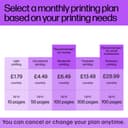
-- The 3-months free ink offer is only until 30 april 23, after which you get 1-month free plus the 6-month that comes with the printer. My referral code 1cqb2r You need to use the above referral code to get the extra one month. I had read reviews on different forums on what is the best HP printer for photos. Although I do not print photos, I subscribe to printer inks on my previous HP printer. So I reckoned if my cost per page is the same, why not invest in a good printer. I have kids and with photo paper being so cheap, its always good to print these photos to keep on desks. Secondly some of the cheap HP printers do not accept high GSM/thicker paper, the cheaper photo paper I have noticed are higher GSM/thicker. And anyway I like the option to run both low GSM and high GSM paper in my printer so I can buy whatever photo paper is cheapest I was very hesitant before buying this printer- there were mixed reviews and the price was too good to be true with free ink for 6 months. But I went ahead for 2 reasons, first is free inks and second is that this printer was the recommended HP printer for good quality photos. Compared to my earlier HP printer, my wife commented the photos looked great on this printer. Set up of printer- set up was super easy with my phone took me no longer than 10 min. We as a family use Linux, iPhone, mac and windows computers and I could easily set up the printer on all operating systems. For linux we needed to download hp drivers. Printer ink Printer comes with ink one black and white and one colour. I installed them and have to say they get used to pretty quickly. They cost around £30/£34 colour/black. Free ink hp + Subscribed for free 6 months ink I took the 700 pages plan not because I need it but because it's free anyway :D had a code which gave me an extra 3 months free so now I have 9 months of ink. You can use my code above for an extra 1-3 months or free ink for you :) Although initially did not like the idea of subscription when I need to pay I will downgrade to 99 p or £2.99 plan depending on usage. I only normally need it for the Amazon return, and the then and now page I need to print for something else. Printing quality is great compared to other printers including the photo quality. I would say that the hp plan is probably cheaper as the cheaper plan would be £12 a year for 10 pages a month that can roll over for up to 3 months, and the second one up is £2.99 a month with 50 pages a month that can roll over for 3 months. £36 a year ink isnt bad I think. Bear in mind that they send ink in 7 to 10 business days , so I used the free ink and subscribed straight away until I get the new ink. You have 7 days to subscribe to hp instank ink so you can wait a few days to make sure you use your ink as subscription starts on day to subscribe despite hp sending you the ink after 10 days. Hp app Super easy to use, shows cartridge left, subscription, you can print etc. Really like it. Size of printer The only thing I wish was that it was slightly smaller - it's not the biggest printer but I believe a few cm larger than the average printer due to the print tray at the bottom that does not close. The only reason I downgraded a star. Colour and sound - It lights up and makes a sound/ noise when it prints- some reviews complained about it I really like it :) but then again the printer is not in my bedroom. Hope you like this printer- as much as I do and this review was helpful :)
D**H
Easy, painless, high quality, just works
Our very old HP Envy finally died. In a brief moment of madness I decided to replace it with a Canon Pixma. This was a terrible experience. The install software wouldn't run on Windows 11 on an ARM-based laptop. Then it took hours to establish a connection to the wifi, and then the connection sporadically dropped. And the machine refused to feed one sheet of paper at a time, preferring instead to pull through between 5-10 pages! So we returned this item and once again bought an HP. We're delighted with the Envy Inspire 7220e. The software worked like a dream. Wifi setup and connectivity was totally painless and done in about 2 minutes. And since then, all our devices (mobiles, laptops, desktops) are able to print to the machine reliably and without issue. The printer is well-built, high quality, fast, quiet, and looks fantastic.
M**N
A good home printer
So, my last HP all in one printer coughed, spluttered and expired. HP seem to make good ones in my experience, so after looking around at their offerings and other makes, I chose this one. It was delivered promptly by Amazon and installation was a breeze. The footprint (if space is at a premium) is good, there's no back tray to feed paper from, it's a front loader, which is good. It's somewhat taller than my previous one though. But as an office item, it looks good and has a touch screen, so you can work it with or without using your computer. It'll also print remotely from other devices you may use, such as your 'phone. Printing is pretty quiet and quick and the results are fine. It uses a two cartridge system, one black, the other containing the usual other colours. My last one took four individual cartridges. So, whilst mentioning cartridges, it's worth saying that most home printers are relatively cheap and the suppliers endeavour to make money on ink supplies and HP are no different there. You can nearly spend as much as the printer itself replenishing the cartridges! HP have sought to soften the blow by offering "HP Instant Ink". A service that, if you sign up to it, as I understand it monitors your ink usage and sends you ink cartridges automatically as you need. There's an initial free period when you buy a printer after which you pay. But it's optional, so you can decide whether you want to go down that route. I'd also check the conditions. I'm no expert! So, to summarise, I'm happy with it.
B**T
Left without ink
I am writing this as i feel others need to be made aware of the reality of signing up to instant ink. My story - Firstly the printer is great, although in saying that it is my fourth of this model. The first printer I bought I signed for instant ink immediately. A big mistake, the ink didn't work properly for set up and because it was registered with instant ink a bought cartridge would not work ( although I shouldn't have had to spend money on ink). The shop exchanged for another one (same). The printer would not connect properly and had to be returned. The third printer connected but never sure if the connection would work or not. However the photographs' were of great quality for a reasonably priced printer. I gave up got another printer which did connect but the quality of print and of the actual printer was pathetic. I decided to get another one of the original, envy inspire 7200 and this time from amazon as i was concerned there was a bad batch in the other shop, I have not been disappointed, it is working brilliantly. Now I can assure you the person setting up the printer for me each time is well experienced in this procedure so no problem on our end. After all of this I signed up for instant ink. Very prompt service that is on sending it out when i signed up. But on enquiry as to when it would arrive it was 10-14 business days. I couldn't believe it. In effect that is at least 2 weeks without the use of the printer because the included cartridges are really only for set up. I thought I would have the choice to go and buy ink but not the case, they cannot override the system after i have signed up, it would be a case of cancelling it and go through the procedure which would take a great deal of time. Soooo disappointed when i need the printer for a project not to mention the other problems i had. Please be aware of this if like me you really need the printer within a time scale. HP printers should be sold making the buyer aware of the time delay in using it. As always the service from Amazon is 5 stars.
D**N
Has it's issues.......Sofware and network connectivity....and shockingly high ink expense
IMPORTANT UPDATE: MAY 2023 - HP HAVE RELEASE FIRMWARE UPDATE TO STOP THE CHEAPER COMPATIBLE CARTRIDGES FROM BEING USE FORCING YOU TO USE THE ONLY THE HP ONES AT OVER TWICE THE PRICE I bought a HP7220e to replace a very old HP6520 which had served me well for many years but was suffering issues from taking the paper from the main tray..... The first thing I hated is that you cannot just download the "driver software" for basic printing and scanning, instead you have to download and run their "HP Easy Start" software which at every step wants you to allow HP collect your data plus constant prompts to try and entice you to subscribe to their HP+ instant ink service, even if you select decline at the initial prompt it then repeated asks you again in the next immediate screen.....only after going through this abysmal process of denying HP to collect your data and repeatedly declining their HP+ service and a few other things it finally gets to a screen where you get to a choice of installing the "basic" or "full" driver. The basic driver allows for full printing and scanning, but this again prompts for HP to collect your data a number of times which you can deny. Not tried the full driver, I expect this may include some additional tools and bloatware no doubt! Note: If you download the full “offline” HP Easy Start software (about 300mb in size compared the 11mb) then whilst it still takes you through the same initial process of trying to sign you up for data collection & HP+ service when it gets to the choice of “basic” or “full” drivers…you actually do not get any choice here..…it automatically to install EVERYTHING on you system!! During the software/driver installation process it asked if I wanted the printer to “automatically” update the firmware or just “notify”, I selected “notify”…then 10 minutes later to my horror the printer starts downloading and updating to the latest firmware, despite selecting “notify”. Even worse I then navigate to the options on this on the printer’s screen in order to disable it and it is set to “automatically” and it is grey out and cannot be changed and states “the feature has been locked by the person who set up the printer” this is a complete lie !!. Not a problem I think and open up the printer’s software on my computer and after looking through all the settings including "advanced" there appears to be no option to change it. So my only option is to then do a full factory reset of the printer where I could then access the firmware update menu and no change it to simply “Off”. Finally, happy (yet frustrated!) I print a few docs and printer speed is good and also double sided printing is pretty quick…however this is not the end of my issues. The following day I wake up and the printing has lost it’s connection to the network (signal strength was 5 out of 5) so I have to reboot the printer. I wonder if this was due to the printer’s power setting set to automatically power off after 2 hours, not a problem I think just change this setting…but no you cannot!! HP defaults all it’s printer to power off after 2 hours and it CANNOT BE CHANGED!! However I later read that if the printer is connected to a network it will not power off…..however the following morning I woke up and the printer was again disconnected from the wifi network for reasons unknown….so I rebooted the printer again and it still would not connect, I then went into the wifi settings and saw that wifi was actually now “disabled” in the printers wifi settings for some unknown reason! (see picture) So far the HP software/drivers and the issue of disconnecting from my network results in this just getting 2 star and if it repeatedly keeps disconnecting from wifi every day then it’s going back and I will by a different make like Canon !! UPDATE: After 3 days of the printer keep disconnecting when everyone is asleep, for the last 2 nights it has remained connected despite nothing changing so hopefully the wifi issues with the printer have resolved themselves. However, the ink usage or paultry volume of ink in the cartridges is an absolute joke. We printed of just less than 50 pages so far of simple text documents with very little colour and normal sized text (i.e. NOT large blocks of black text where alot of ink is used) and the Black Cartridge is down to 50% and colour is down to 66%...this is shocking....by these figures it will be less than 100 pages for a standard 303 black cartridge. Update: After a number of days the printer did start behaving and did not disconnect from my network, I think this fix was due to me moving it off the 5ghz and on the the 2ghz wifi instead...why this made a difference is beyond me. Whilst I am happy with the print quality, speed and the overall printer, there is still the issue of ink usage/costs. I have now printed 140 pages of hardly any colour and mostly short letters totalling 140 pages and the colour is at 50% and black is virtually empty. Assuming the standard original 303 black is £20 and colour is £25, that is 100% black used = £20 and 50% Colour used=£12.50 totalling £32.50 to print 140 mostly black pages = over 23p per page, that is robbery of the highest degree! I know the HP instant ink will work out cheaper but I feel HP are making their cartridges overly expensive to replace or duplicate to tie people in to their monthly subscription model. My previous HP Inkjet I could spend £8 and get 4 XL Black compatible cartridges which would last over 1 year printing of reams of documents. Due to this I will never purchase another HP printer in the future and go for an ink tank printer from a competitor. I am reducing this to 1 star now due to printing costs and HP putting just 3ml to 4ml of ink in their standard cartridges and charging a disprportionate amount for them to try and force people in to the subscription model.
M**.
Excellent value for money and print results
I bought this printer to replace a previous HP that was at least 10 years old and showing its age. First of all, setting it up was easy, although I already had the HP Smart app and an instant ink account, so that cut out some steps. One thing I noted was that, for Instant Ink, the printer needs to be always on (albeit in sleep mode) but it had an eco setting to completely turn off after 2 hours, which wasn’t changeable. I was pondering this when it did a firmware update which magically added a “never” option, so just one to note. It connected to my 12-year old Mac with no problems at all! Print quality, especially for photos, is excellent and much richer and more vibrant than my old printer. Definitely recommend as a good home printer.
I**K
Cheap to buy; expensive to run
Printer is fine, only problem is the ink cartridges that it uses. Feels like you can only print about 20 pages before they need to be replaced. Rarely print anything, but it drinks ink. Far too expensive to run.
S**O
Good printer
So far so good. Printed a lot of very good quality pictures and I’m waiting for new inks to be delivered. ProMotion code was sent by Amazon to activate free inks supply for 3 months .