We remain fully operational. Our teams are working around the clock to ensure your deliveries continue safely.

下载应用程序





Buy anything from 5,000+ international stores. One checkout price. No surprise fees. Join 2M+ shoppers on Desertcart.
Desertcart purchases this item on your behalf and handles shipping, customs, and support to SINGAPORE.
🚀 Elevate your network game with the Dream Machine SE — where power meets simplicity.
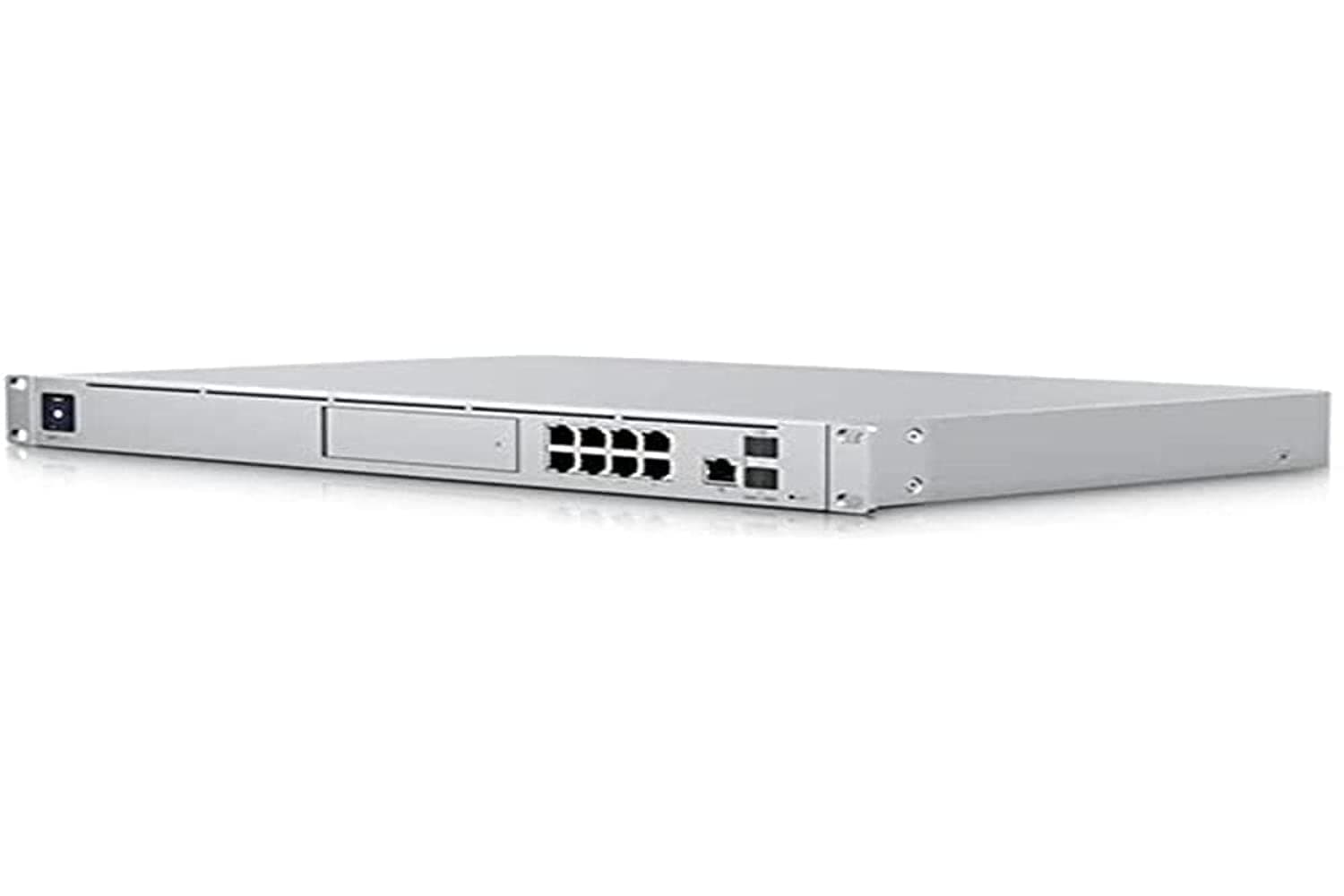
The Ubiquiti Dream Machine Special Edition (UDM-SE) is a premium all-in-one router and security gateway designed for small to medium businesses and advanced home labs. Featuring 3.5+ Gbps routing, an integrated 8-port PoE/PoE+ switch, dual 10G SFP+ ports, and a 2.5 GbE WAN port, it delivers enterprise-grade performance with intuitive UniFi OS management. Its rack-mountable design, 128 GB SSD storage, and 1.3" touchscreen make it a versatile, future-proof networking solution without recurring license fees.
| ASIN | B09QZBBRRS |
| Antenna Location | Business, Home |
| Antenna Type | Internal |
| Best Sellers Rank | #150 in Computer Networking Wireless Access Points |
| Brand | Ubiquiti Networks |
| Built-In Media | Information Not Available |
| Color | White |
| Compatible Devices | Information Not Available |
| Connectivity Protocol | Ethernet |
| Connectivity Technology | Ethernet |
| Control Method | App |
| Controller Type | Switch |
| Coverage | Cybersecurity protection (common threats) |
| Customer Reviews | 4.6 4.6 out of 5 stars (249) |
| Data Transfer Rate | 10 Gigabits Per Second |
| Frequency | 5 GHz |
| Frequency Band Class | Single-Band |
| Has Internet Connectivity | Yes |
| Has Security Updates | Yes |
| Is Modem Compatible | No |
| Item Dimensions L x W x H | 11.2"L x 17.4"W x 1.7"H |
| Item Weight | 10.9 Pounds |
| LAN Port Bandwidth | 10 Gigabit Ethernet |
| Manufacturer | UBIQUITI |
| Maximum Upstream Data Transfer Rate | 10000 Megabits Per Second |
| Mfr Part Number | UDM-SE |
| Model Name | Dream Machine Special Edition |
| Model Number | UDM-SE |
| Number of Ports | 18 |
| Operating System | UniFi |
| Other Special Features of the Product | Rack-mountable |
| RAM Memory Installed | 4000 MB |
| Router Firewall Security Level | High |
| Router Network Type | Wired (Ethernet) |
| Security Protocol | WPA2, WPA3 |
| Smart Home Compatibility | Not Smart Home Compatible |
| UPC | 810010077462 |
| Unit Count | 1.0 Count |
| Warranty Description | Information Not Available |
| Wireless Compability | 802.11ac |
M**O
Enterprise-Grade Performance Without the Cisco Headaches
As a network engineer, I’ve deployed and managed a wide range of networking equipment over the years, including plenty of Cisco gear. After extensive hands-on use, I can confidently say the Ubiquiti Dream Machine Special Edition (UDM-SE) is a solution I genuinely recommend—and in many scenarios, I would choose it over Cisco. Performance & Hardware: The UDM-SE delivers excellent throughput, rock-solid stability, and more than enough processing power for demanding environments. Multi-gig WAN support, integrated PoE, and the built-in 10G SFP+ ports make it incredibly versatile for modern networks. It handles heavy traffic, VLANs, VPNs, and advanced routing features with ease. Management & Usability: Ubiquiti’s UniFi OS is where this device really shines. You get enterprise-level visibility and control without the steep learning curve, licensing complexity, or command-line dependency that often comes with Cisco. Everything—from firewall rules to traffic analysis—is intuitive, centralized, and fast to configure. For engineers, it’s efficient; for admins, it’s approachable. Value Proposition: This is where the UDM-SE truly outclasses traditional enterprise vendors. No recurring licenses, no feature paywalls, and no sacrificing capability. You get an all-in-one gateway, controller, firewall, and NVR-ready platform at a fraction of the cost of comparable Cisco setups. Reliability & Real-World Use: In production environments, the UDM-SE has been consistently stable. Firmware updates are frequent and meaningful, and the ecosystem integration with UniFi switches and access points is seamless. Final Verdict: The Ubiquiti Dream Machine Special Edition is a powerful, modern networking platform that delivers enterprise-grade features with far less overhead than Cisco. For small to medium businesses, advanced home labs, or cost-conscious enterprises, this is an easy recommendation from a professional who uses this gear daily.
C**V
Awesome product!
Truly a great product! Generally speaking, this is in a weird category of products. Most people looking for something more business-oriented will want separate parts for their router, poe switch, wifi and camera controller, and ips/ids. Most home users will never care to even have half of these features, much less understand how to configure and use any of them. So this is a product that hits a unique sweet spot for small business users that need all the features, but don't want a whole rack of equipment to maintain, or (like me) home users with a more complicated home network but don't want to cobble together a home lab full of used Cisco equipment. Overall, very easy to set up, very easy to manage, and the few things that were not obvious were just a few Google searches away. I have ids/ips configured, secure dns is working, lots of vlans, isolated guest traffic, and I've started playing with the different app and site to site VPN options... It's awesome just how much this can do! I don't have cameras or door control stuff yet, but that is another feature I'm looking forward to. Some very minor complaints: The led panel has brightness controls, but the switch ports themselves are basically flashlights. Get the black tape ready, because from the outside it looked like there was some weird blinking rave party in my basement at night! The internet filtering options are awful! If you turn it on, your internet is safe for any toddler to use, but everything from porn to gambling to YouTube is restricted. No way to adjust it, no way to granularly apply it to certain networks, and there is a noticeable performance hit. Just being able to use normal YouTube would be enough for me to just grumble and deal with it, but I was hoping to be able to subscribe to a block list, or select specific categories... Nope, it's on or off with the only selection being if you also want to block VPN traffic. For the moment I'm just relying on a filtered dns provider which has a better balance of blocking the worst of the internet without being a nanny, but I really hope they make this better. Another minor complaint is how it deals with vlans and tagging, and I've set up a few different brands of switches... But the way theirs works is just weird. And how they explain it prompts more questions than it answers. Also with vlans, in a work environment the native Vlan0 would be a black hole dead end, and all legit traffic would be routed elsewhere. Off by default, and on if programed to be on. But all management and internet traffic is effectively hard coded to be routed through vlan0, so by default anything that gets plugged into an unprogrammed port will "just work". And I get that being the default for home users, but not having control over that is irksome. Similarly, there is some ipv6 voodoo happening, where even when v6 is "off", it isn't really off. I think it is just turning off v6 dhcp? But their documentation doesn't explain what that on or off is actually doing, and there was absolutely v6 traffic routing internally alongside the assigned v4 traffic. You will still need to turn off v6 at the device level to have it off as v6 is going to circumvent all of your v4 rules that you set up thinking you are routing and managing traffic. More ports would always be nice... But uniform ports, or more clear labels would really be helpful. Some are poe, some are poe+, some are 1gig, others are 2.5gig capable, and the sfp slots are 10gig capable, but one of those is intended to replace the internet line in and not meant for internal use (it can be assigned for internal instead of internet, but it is separated in a way that you aren't going to get 10gig across 2 internal devices that way). There is no visual indication of what port has what capacity, so I just printed a cheat sheet to go with it. It goes well with the black tape over the Ethernet port lights... So sad when beautiful minimalist design needs to be ruined by practicality... But it sits in a rack, so I don't actually have to see it. No mac address filtering or security. Yeah, more devices natively spoof Mac addresses now, so this isn't as helpful as it once was, but it seems like such a basic feature, that I was supprised and disappointed it doesn't exist. And years of requests for the feature have been ignored, so I'm not expecting that to come with time like other features and fixes might. Obviously I'm very persnickity, but those are my only real complaints, and none of those are deal breakers! Overall an amazing product, with a good balance of price and capabilities! It can almost do it all, and it's very fast, and the price is way less than other products that attempt to play in the same space, but do everything worse. Easy recommendation for anyone who needs something more than a typical soho all-in-one wireless router, but don't want a full degree in networking to get a home lab running smoothly.
Z**R
Performance with High Security Great Combination
This replaced an EOD Fotigate device. I now have extreme performance increases with this device, the UAP, and the 10gb NAS connection. The cost for the device is exceptional in comparison to staying with a purchase price plus recurring fees for subscriptions. This device is designed for the Novice as well as the Advanced network minded people. From a simplistic plug and play design, to far more extreme controls allowing even deeper securities imposed. The device watches all network traffic, manages DNS, VLAN, IPS, GeoBlocking and much much more. The unit is a rack mount unit, so do not expect it to sit on a desk, unless it's what your physical limitation is. Quiet, cool, and controlling lighting helps diminish a potential "unsightly" device sitting in an open area. I've worked with Cisco, Fortinet, Netgear, Linksys, Sonicwall, Palo Alto, Juniper, and others (not pfsense yet), and this box is clearly a contender for all security purposes from a small business to a home environment. The TCO and ROI are absolutely incredible values.
R**S
Great for nerds at home or small-businesses
I had gone back and forth for a while about whether or not I wanted to go from the UDMP to this UDM-SE at home. It's definitely overkill for an at-home setup, but I'm a huge nerd and this is a great piece of hardware. Looks great in the rack, is extremely reliable and fits seamlessly into the Ubiquiti ecosystem. 10/10 would recommend. If you're looking to use it at a small business or medium business, it would also work great, however, I would not recommend for larger deployments (yet) as the software behind it isn't designed to work at scale. It's getting better, but not quite there yet.
A**A
Does everything super fast
C**R
Great product, delivered ontime
G**O
Excelente router para sector empresarial a diferencia del modelo anterior tiene mayor capacidad y 8 puertos POE para 8 acces point
A**T
Works very good
V**O
Gestione PPPOE Aruba top, stabile, configurabile e facile. Consigliata