We remain fully operational. Our teams are working around the clock to ensure your deliveries continue safely.

下载应用程序


Buy anything from 5,000+ international stores. One checkout price. No surprise fees. Join 2M+ shoppers on Desertcart.
Desertcart purchases this item on your behalf and handles shipping, customs, and support to SINGAPORE.
🎨 Unlock your creative edge with precision and speed — don’t just draw, dominate!
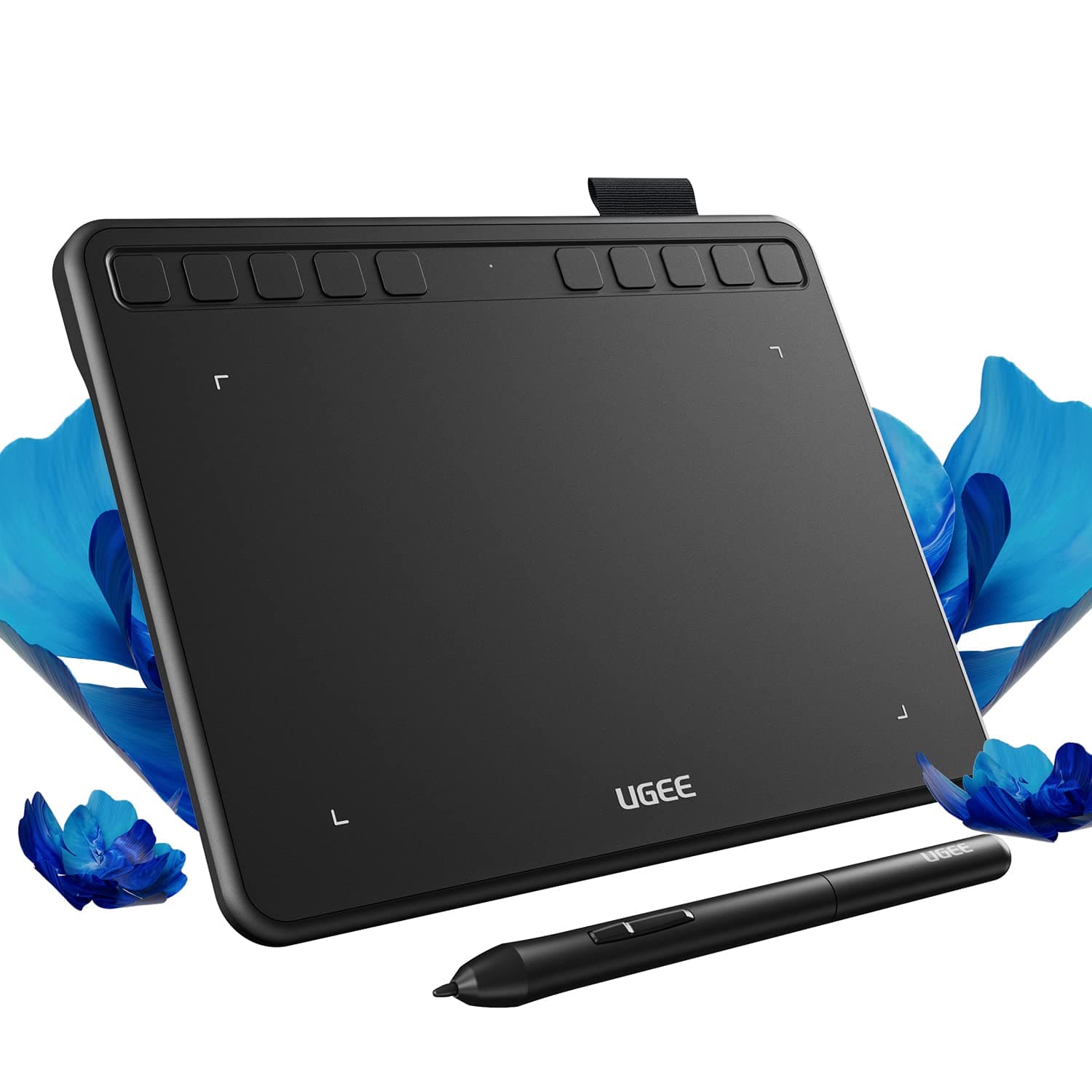
The UGEE S640 is a sleek, portable 6.5x4 inch digital drawing tablet featuring 8192 levels of pressure sensitivity and 10 customizable hotkeys. Compatible across Android, Windows, Mac, Linux, and Chrome OS, it offers plug-and-play USB connectivity for effortless setup. Ideal for professionals and beginners alike, it enhances productivity with precision input and workflow shortcuts, making it a must-have tool for modern digital artists and creative professionals.


| ASIN | B09MLR8BC6 |
| Active Surface Area | 26 square inches |
| Additional Features | Lightweight, Portable |
| Best Sellers Rank | #102 in Computer Graphics Tablets |
| Brand | UGEE |
| Color | black |
| Compatible Devices | Android 6.0 or later, Chrome OS 88 or later, Linux, Mac OS 10.10 or later, Windows 7 or later |
| Connectivity Technology | USB |
| Customer Reviews | 4.4 4.4 out of 5 stars (919) |
| Display Type | LCD |
| External Testing Certification | Não aplicável |
| Item Dimensions L x W | 8.48"L x 6.4"W |
| Item Weight | 280 Grams |
| Manufacturer | UGEE |
| Model Name | S640 |
| Model Number | S640 |
| Native Resolution | 1920x1080 |
| Operating System | Android,Chrome,Linux,Os,Windows |
| Pressure Sensitivity | 8192 Levels |
| Screen Size | 6 Inches |
| Specific Uses For Product | digital drawing, painting, graphic design, art creation |
| Target Audience | Teacher |
J**E
Great for beginners…and some small issues.
Wow. I was expecting this to be really trashy because i had asked some friends about their thoughts and they said it wouldnt be that good, but i used it a lot- and its so much better than i thought. Of course, something like this isnt exactly “ideal” for professional drawing but for beginners this is perfect. I was convinced 6x4 would be small but its actually a really good size. I love how easy it is to wrap up the cord and take it wherever with me. I haven't installed the program but the buttons work, the brush, eraser tool and the undo. Sometimes i just like sitting there clicking them because i love the sound. See- i WOULD. have put a 5 star, but ive come to see that as im drawing the pen will randomly dot on the screen. Or if im trying to make really small details it just lags and wont draw it. The other reason why i picked 4 star is because i followed all the instructions to use it on mobile and it wont work. But mostly because the drawing problem. Not to mention, sometimes while drawing i will lift the pen up and it will just stay coloring, (without me clicking anything) and it wont stop till i spam a bunch of the buttons or turn it off and on again. Other than that, i think if you can look past those small things then youll be fine. (Here is something i drew with it. The colors look weird in the picture but normal irl.) HELP. I realized this was a Computer problem. THE PAD CAN DRAW SMALL DETAILS!! my computer is just lazy. Tyy
L**.
Works for Linux
This works very well. I was able to use this out-of-the-box on Arch Linux without any additional drivers or configuration necessary. Highly recommend for any common Linux distro.
R**A
Fit my need
Prefect for quick use for taking notes when I was taking classes at local college. It was faster than trying to type due to I am not a typer.
A**S
Perfect for on the go and for drawing in bed
I love my Ugee Q6. I use two devices for my art. My computer with my screen tablet the Ugee U1600 and my Samsung Galaxy Tab S6 Lite. I love my Tab S6, but Krita picks up all my hand inputs even if I'm using a pen. I tend to draw in bed more than I do at my desk, so I needed something new. My husband got this for me for Christmas after much gushing about it. I've been using it nonstop since I've recieved it. It's small and can fit in my bag for on the go use. I doodle and take notes on my Tab S6 at school and this will be great to carry around with me. The cable goes into the back, the pen as a little loop to sit in when I'm done with is. The buttons were easy to program. I've tested it with several android drawing apps and the only issue I have is that Krita is still working on their kinks for their android app. Every single other app I have used has had zero issues. This tablet is worth the money. It's a wonderful lightweight starter tablet for those using just a laptop and want to learn how to use a screenless. For those tired of having issues with palm rejection or use their phones to draw this is a fantastic drawing tablet! I can't wait to take it with me for any of my studying not done at home! :))
J**S
Drawing tablet
Made editing and drawing in photoshop class a lot easier and was comfortable to use.
R**Y
Meh
Like the ideia but it doesn't run as smoothly as i'd like to be.
C**E
Awesome!
Functions like should. Software is good. Its what I paid for
A**X
Does its job. But a few issues.
Cord is too short. Board is not sensitive enough to the pen.
D**Y
仕事で大型のtabletを使用してきましたが、自宅での趣味用に購入しました。しっかりとした作りで使いやすい。WINDOWS10上でPhotoshopで使用していますが、反応速度、分解能も問題ない。充分に使えます。付属のマニュアルは極く簡単なものですが、それなりのものがダウンロードできます。その先は、tabletを使用したことのある方なら、特に問題なく使用できると思います。推奨できる機種です。
U**E
Zum Zeichnen auf Tablet oder mit Smartphone. Bisher kein Problem
E**D
My daughter absolutely loves it. Works great. Easy to use
A**A
Es buena tableta grafica
C**E
A entrega foi enviada dentro do prazo (inclusive recebi antes da previsão). Produto correto, bem embalado, tudo ok. Infelizmente vou ter que devolver pois não é compatível com meu celular (Moto G54 256Gb, android atualizado 15). É algo que acontece, pesquisando bastante, notei que estas mesas (até de outras marcas) não são compatíveis com todos os celulares mesmo. Mas a avaliação vai para o vendedor, que fez seu trabalho com excelência.
TrustPilot
2 个月前
2 周前