We remain fully operational. Our teams are working around the clock to ensure your deliveries continue safely.

下载应用程序




⚡ Power up your smart life — control, customize, and conquer your space!
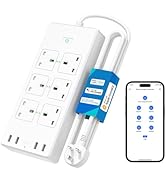
The Meross Smart Power Strip features 6 individually controllable AC outlets and 4 USB ports delivering up to 20W total output. Compatible with Alexa, Google Assistant, and SmartThings, it connects via 2.4GHz WiFi for remote app and voice control. With scheduling, surge protection, and flame-retardant design, it offers a safe, energy-efficient, and highly customizable smart home upgrade.



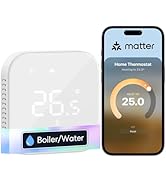
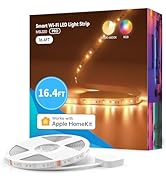
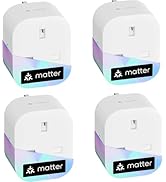







| ASIN | B09CH3WCDX |
| Best Sellers Rank | 6,673 in DIY & Tools ( See Top 100 in DIY & Tools ) 32 in Smart & Remote Controlled Plugs |
| Guaranteed software updates until | unknown |
| Item model number | MSS426(UK) |
| Manufacturer | meross |
| Product Dimensions | 24.79 x 11.1 x 3.28 cm; 712.6 g |
C**Y
Works well
I bought the 6 plug 4 USB extension lead. I will describe below what I think and also how to set it up and link it to Amazon and some basic uses, though not all, because you don't get instructions... It arrived next day with prime. It has a good length lead, very sturdy lead too. Set up; Set up was quite easy but instructions were non existent, all that was in the box was a warranty slip (2 years) and a piece of paper yelling you to download the app, I even downloaded the PDF called " user guide" from within the app...it was just a PDF of the same piece of paper with nothing useful on it at all, so as there is really no information given I will outline the steps here if it might help someone; 1: make a note of your broadband password, you will need it. 2: Download the app from Apple or Google Play store, search for "MEROSS" 3: ensure location and Bluetooth are enabled on your phone ( just for the set up, you can turn those off after setup and it still works fine) 4: create an account in the app. 5: pick a socket near your broadband for the set up, you can move it later. 6: go to the Homescreen of the app by pressing the house symbol bottom left, and the press the plus sign (+) top right corner to add your new device and follow the instructions. important: this 6 plug extension lead is listed as "surge protector", and then scroll down to the model number which is written on the top left corner of the front of the box. Set up is simple, switch on the socket when the app tells you, agree to the temporary Internet connection with a weird name ( connects automatically when you say yes, and then drops it later when you add your broadband info, this is pretty standard, my Google, Amazon and other smart items all do the same), enter your broadband password when asked) wait for it to pair, and then give it a name. Using: If you want to use Alexa to control the socket, allow linking with Alexa when the meross app asks for it. Then go to your Alexa app and you should, if you have the 6 plug, see 8 new devices listed, the extension as a whole, the 6 individual sockets, and all the usbs as a single USB switch. You cannot control the usbs individually, it does say that in the item listing information, but you can control the plug sockets individually. Go back to the meross app, click on your now listed device, it brings up a control Menü for you to control in the app, click the three lines top right which gives a new page and at the top where it says " device name" and lists the name you give it, click the right-hand arrow.. This loads a new page and allows you to name each socket individually, by giving each an individual name you can use voice control on Alexa to turn each on and off without opening any apps. You can, once you have done this, groups some or all sockets into a group on Alexa, so instead of saying " Alexa turn on socket one, Alexa turn on socket two" etc, you can turn on 4 sockets for example ( or off) at once by saying, for example " Alexa turn off Hifi", if you named that group hifi Alexa will be able to control it. Timings: In the meross app or Alexa ( I haven't tried Google yet, even thought it gave me a button to click to link it, I went alphabetically so did Alexa and then when I went back to the meross app I couldn't find an option yet to link it to Google as well, it must be there somewhere though). So, in both the meross app and/ or Alexa you can set timings, For example if you want the radio to come on at 6 am, if you plug it into this extension lead, you can set timings. One is called sunrise/ sunset in the meross app and Alexa, and in Alexa you can also set it up any time you like. Say you go to bed and want to turn everything off, but you want your phone to charge between midnight and 4 am, a four hour charge, and then power off again, simply set that up in Alexa for that socket. It's all very clever, I am sure there are more features I haven't used yet, if anyone knows where the " link with Google" setting is in the app I would be grateful to know. One last thing, you can of course turn the sockets on and off as and when you choose through the meross app, and as long at you leave the Internet on and connected, you could turn everything on or off whilst you are away from home, like on holiday, as long as your phone connects to the Internet wherever you are, and at the same time back home the Internet is on, you can freak out the neighbors turning the lights on and off from Australia....not that you would do that, of course. I hope this waffle is helpful to some.
M**R
Effortless Smart Home Upgrade - Meross Smart Power Strip Rocks!
I'm seriously impressed with the Meross Smart Power Strip. It's made adding smart control to my devices an absolute breeze. Here's why I love it: Super Simple Setup: Honestly, it was ridiculously easy to connect to my Wi-Fi and get it working with Alexa. No complicated tech stuff, it just works! Rock-Solid Reliability: Since setting it up, I haven't had a single dropout or issue. It responds instantly to commands, whether it's through the app or voice control. Customization for the Win: I love that I can rename each outlet! No more remembering "outlet 3" is the lamp – it makes control so much easier. Home Assistant Heaven: If you're into Home Assistant like me, this integrates beautifully. It was a snap to set up and offers total control. Should you buy it? If you want an easy, reliable way to make your existing appliances or lights smart, this is a no-brainer. It's well-made, simple to use, and expands your smart home possibilities without breaking the bank. I'm definitely considering getting another one! Note: I happily give this product 5 stars. While I haven't had it long enough to comment on extreme long-term durability, its performance so far has been flawless.
J**3
Game changing smart plugs. absolute peace of mind from anywhere
Great smart plug. I actually have several of these now, they are easy to set up using the app as long as you keep them away from each other when doing it. Otherwise the initial Bluetooth set up gets confused as to which one it's connecting to. Once set up it's controlled by the Alexa. Each socket can be individually named for the appliance. Then I just tell Alexa to turn on lamp or turn off heater. I have my hair straighteners plugged in also because I love the security of being anywhere and being able to check I actually turned them off and if I didn't I can do via the Alexa app. I dropped 1 star as it would be nice if the lead was slightly longer. I don't have many plug sockets in my house so a slightly longer lead would have really helped. Other than that though I'd highly recommend these plugs. They have been a game changer for me.
A**N
Works as expected - integrated into Apple HomeKit and can control via Siri or HomeKit app
Reviewed Jan 2024: We've 3 of these.. A 4 gang version in the shed, and a couple of the 6 gang versions that are in the house. The shed one is connected to a motion detector and internal and external cameras, the idea being that if there are connection problems with those devices, I can reboot them from the power strip. To be fair, I've not yet had to do this, but I'm a little paranoid about stuff getting pinched. In the house, one is on my desk, so PC, monitors, powered USB hub and the other one is in the bedroom, powering AppleTV, TV, soundbar, etc. I bought both of these because they were on sale around black Friday and they replaced cheap power strips that did not have individual switches per gang (yet along the ability to control them remotely). As I'm typing this review, I'm asking myself if I really need these to be connected and remotely controlled.... Perhaps I will want to shut them down at the power source if I'm away for a long period of timne, maybe I'll be saving a tiny amount of standby power if I was to power them down from a day to day perspective, but so far, I've not been motivated to do this. Away from the use, what I can say... Setting them up and getting them connected was really easy.. Note I'm using Apple homekit, and for me, the QR scanning code rarely works during setup, this might be as a result of my antique iPhone. But setting them up in the Meross app was relatively straight forward. TIP: Keep the box so you know exactly what item you are setting up in the Meross app, as there are several model numbers to choose from.
D**N
Really easy to set up every plug socket of the 8 on the strip is possible to program and label as a specific device but not the USB ports which is slightly disappointing as this would easily make it a 5/5 product and in my opinion is the only negative
B**O
Very easy to set up. Reliable connection. Only thing is no individual button to control each plug. But Siri can be used to operate though. Overall satisfy!
V**F
AWESOME GOOD ITEM
F**G
Working flawlessly again
U**1
Very good quality, easy connectivity, and reliability. اكثر من رائع