We remain fully operational. Our teams are working around the clock to ensure your deliveries continue safely.

下载应用程序






Buy anything from 5,000+ international stores. One checkout price. No surprise fees. Join 2M+ shoppers on Desertcart.
Desertcart purchases this item on your behalf and handles shipping, customs, and support to SINGAPORE.
🖨️ Bring your printer back to life—because your productivity deserves a flawless print!
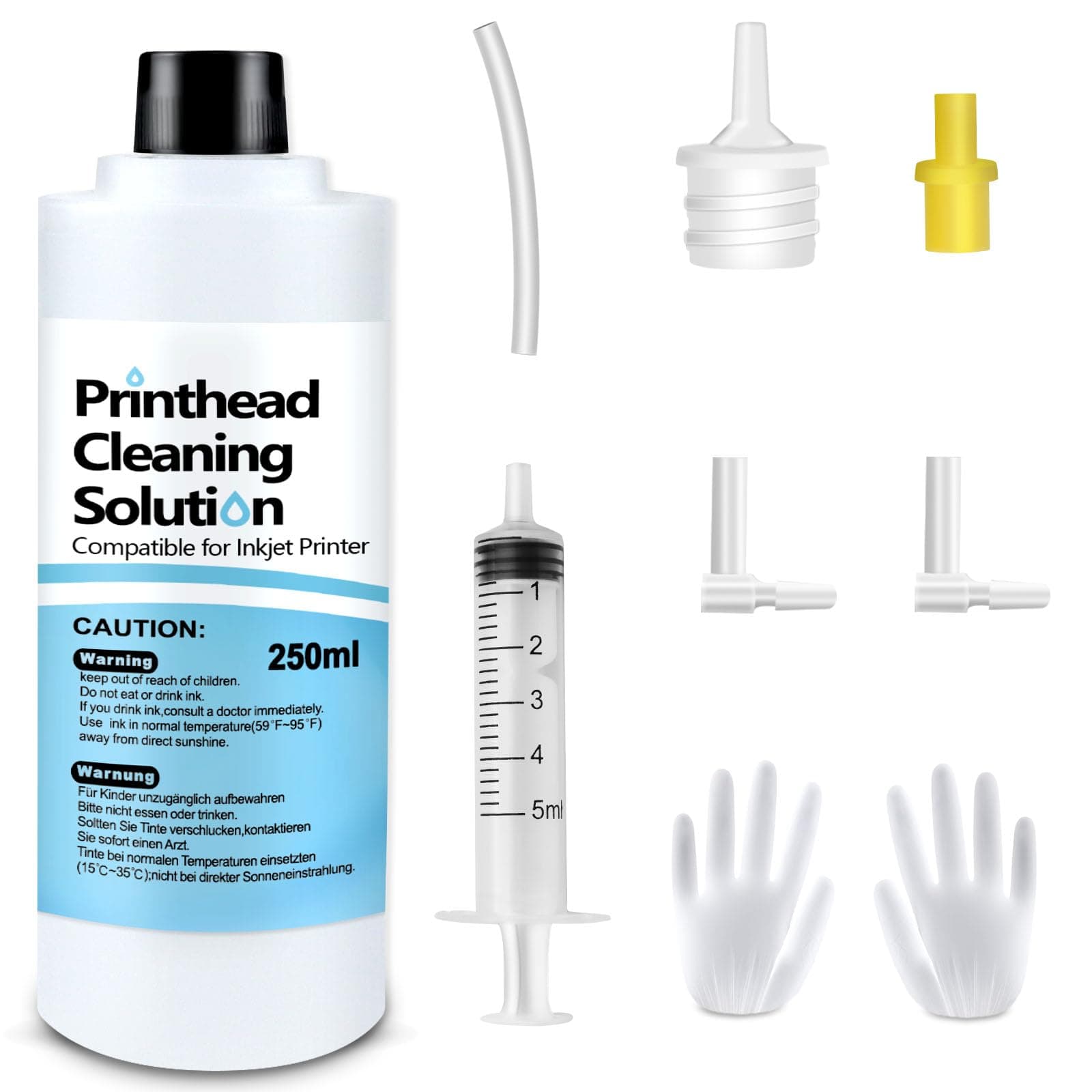
Absonic’s 250mL Printhead Cleaning Kit is a professional-grade solution designed to restore clogged inkjet printer heads across major brands like Epson, HP, Canon, and Brother. Featuring a complete set of nozzles, syringes, and accessories, it effectively dissolves ink blockages—including dye and sublimation inks—ensuring crisp, vibrant prints and extending your printer’s lifespan. Ideal for busy professionals who demand flawless output without the expense of a new device.


| ASIN | B093F7NYRM |
| Additional Printer Functions | All In One, Copy, Print Only |
| Best Sellers Rank | #2,172 in Office Products ( See Top 100 in Office Products ) #109 in Inkjet Printer Ink Cartridges |
| Brand | Absonic |
| Color | Print Head Cleaner Liquid |
| Compatibility Options | Compatible |
| Compatible Devices | HP DeskJet 2742e, HP Smart Tank 6001, HP DeskJet Ink Advantage 2640, HP ENVY 4520, HP ENVY 5055, HP OfficeJet Pro 8600, HP OfficeJet Pro 6978, HP OfficeJet Pro 6975, HP OfficeJet 7000, HP OfficeJet 8015, HP OfficeJet Pro 6950, HP OfficeJet Pro 6970, HP OfficeJet 6954, HP OfficeJet Pro 8210, HP PhotoSmart 6510, HP OfficeJet 4650, HP DeskJet 2700, HP DeskJet 3755, HP DeskJet 2755e, HP Smart Tank 700… |
| Compatible Printer Models | Printhead Cleaning Kit |
| Customer Reviews | 4.4 4.4 out of 5 stars (2,436) |
| Ink Base | Water |
| Ink Colour | Multicolor |
| Item Dimensions D x W x H | 6.84"D x 2.75"W x 2.44"H |
| Item Type Name | Printer Head Cleaning Liquid |
| Item Weight | 0.3 Kilograms |
| Manufacturer | Absonic |
| Model Name | Printhead Cleaning Liquid |
| Model Number | Printer Cleaning Kit |
| Other Special Features of the Product | Printhead Cleaning Kit |
| Page Yield | 1199 |
| Print media | Paper (plain) |
| Printer Output Type | Color |
| Unit Count | 8.45351 Fluid Ounces |
E**.
Amazing cleaner for clogged inkjets!!
AMAZING CLEANER!!!! I thought I was going to have to throw out my printer. Not a drop of black was coming out. I went through 4 cartridges trying to get the printer to clean the clog before I found this. Used just 5ML of solution out of the 250ML bottle and the printer is working like new again. I would give 10 stars if I could. The included tools made it easy to use. Just needed to add a microfiber towel.
B**R
Perfect alternative replacing a perfectly good printer!
this worked great! I have an EPSON 2850 that has been converted to sublimation and so ink tends to get a bit clogged. Usually if I run a few sheets through it, the clogs flush out, but this time I couldn't get my black to print at all. I ran print sheets through, did head cleaning, etc. but it didn't improve. So, $10 for a chance this might work, seemed like like at better idea, then pitching the printer. The process was super easy (there are some good video's on YouTube on the "how". Watch a few of them, but don't fall for the super expensive kits; this one works! Running like new!
T**A
Complete printer cleaning kit.
Nice cleaning set that was exactly as described. It worked well but did not fix my printer problem.
F**N
Great Product, restored my Epson Printer!
Great product and it does that's supposed to do. My Epson ET 3850 stopped printing magenta color completely and the yellow was starting to go next. As a result everything I printed looked horrible even some black and white items. The kit comes with everything you need although, I didn't use the gloves that came with it since they were too loose in my opinion - I used my own. So I did a thorough clean starting with the magenta and yellow; 4 times each a total of 20 ml each until everything loose clear. Then I cleaned the blue and black, 2 times each a total of 10 ml each, since I didn't want to go through it again. Make sure you keep everything nice and clean and dry and constantly replace the paper towel to absorb all ink. Afterward I didn't a power clean and voila the printer is back to normal printing beautifully and I still have plenty of cleaning solution for future use if the problem occurs again. I didn't use the instructions that came with the kit but instead I used a YouTube video specific to cleaning my epson which was slightly different and a lot more helpful. The whole thing was a lot easier than I expected and didn't take long. Plus it saved me a lot of time and money. All on all great product!
S**R
Fiddly, but worked perfectly
It was a bit difficult to figure out access to my inkhead, even after watching their video, but that's not their fault. I have ten minutes of intense fear after I did the cleaning, because I'd paused overnight and didn't notice there was still a sheet of paper in there. Teasing out all the soggy bits used up my quota of luck this month, so RTFM TWICE and doublecheck yourself. Assembling the syringe from random bits and forcing the silicon tube onto the ink stub was not easy. Good fingers, a hemostat or fine plier, and bright light are needed. Not easy. Not fun. But once I got it all done (and undid my paper jam mess) the printer fired up. Didn't tell me one color was out (as opposed to still clogged) but once I found that, eureka! The damn thing is printing again. I used two full syringes, after 6 "head cleanings" still hadn't purged the black, fwiw. I think the full kit would give you one full cleaning, 1x on all four colors. But for me, the black cart is the devil incarnate. If I don't print for three weeks...goodbye. Bottom line? This worked as claimed. Saved me from buying a new printer!
A**E
Sadly, failed to work with my C88+ Epson printer.
Sadly, failed to work with my C88+ Epson printer. I love the printer, one of the few that works with particle based inks which are the only ones that are water resistant. On the other hand, the printer is approaching 12 years old and has been reliable for that time. Epson appears to be phasing out their water resistant inks and it's hard to find a replacement.
T**E
Well worth the investment, fixed my clogged printer.
Compatible with my Epson MF-3720. Black was really gummed up and not working. It took a few times of forceing the fluid through with the syringe, at first just back flushing until it let go and statred flowing through. Ran a test sheet, good again! I cleaned all 4 just for good measure. All the fittings, the extra fluid I have for next time. All a bonus, making this well worth every penny. Easy to use, instructions included. Got rid of my clog.
S**H
100% work product super quality
A**I
منتج ممتاز جدا (اشكر البائع)
M***
After i didn’t use my printer for couple of days , it wasn’t able to print in colors and black. I tried to fix the problem by deep cleaning option but it didn’t fix the problem at all. I decided to buy this kit and thankfully i did. I followed Youtube videos tutorial and finally the problem is resolved. I highly recommend this kit if you want to revive and clean printer head.
M**I
الجودة