We remain fully operational. Our teams are working around the clock to ensure your deliveries continue safely.

下载应用程序






🎥 Capture the Moment, Share the Glory!
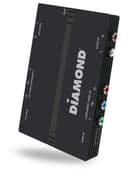
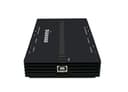
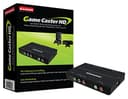
The Diamond GC1500 HD Video Capture/Game Box Recorder is a versatile device designed for gamers and streamers. It supports multiple platforms including Windows, Mac, PS3/PS4, Xbox360/Xbox One, and WiiU, allowing for high-quality 1080p video capture. With features like real-time voice commentary, OBS Studio support, and a loop-through function, it enables seamless recording and streaming to popular platforms like Twitch and YouTube. Its compact design makes it easy to transport, ensuring you can capture your gaming moments wherever you go.


| ASIN | B01FTX7LU4 |
| Brand | Diamond Multimedia |
| Compatible Devices | Gaming Console, Television |
| Customer Reviews | 2.7 out of 5 stars 33 Reviews |
| Global Trade Identification Number | 00757448024852 |
| Item Dimensions | 3.4 x 5.5 x 1 inches |
| Item Weight | 0.35 Pounds |
| Manufacturer | Diamond Multimedia |
| Mfr Part Number | GC1500 |
| Model Number | GC1500 |
| Operating System | Windows,Mac Os,Mac |
| Other Special Features of the Product | Compact |
| Platform | PlayStation 4, Windows, Xbox One |
| Special Feature | Compact |
| UPC | 757448024852 |
| Video Capture Resolution | 1080p |
J**.
Not a bad capture card, but ...
1. It only works with their included software or OBS ... No XSplit support ... Big yikes 2. Too much of a headache to get working properly with OBS and in-game sound. 3. Drivers are a pain, and it's kinda terrible that you need to download a separate drivers package for OBS support.
P**Z
Call me dumb, be the graphic in the instructions was vague ...
It works as advertised but my initial impression was full of frustration and confusion. Just be aware ahead of purchase that any time you change ANYTHING, be it, plug or unplug a device, change video settings, or whatever, you must completely stop the recording program, unplug and reconnect the device. The instructions do not cover this. Instead you typically get a black screen until you figure it out. Also be aware, you may need to have the game source powered on before the card, especially if you're using an RCA to HDMI scaller. Finally, be aware that to screen capture your own computer you have to actually run HDMI video out to the capture card. Call me dumb, be the graphic in the instructions was vague and I just assumed the program would record locally. BUT now that I am aware of these things, it's super easy and fun to use. I absolutely love it.
M**Y
Horrible capture device for Mac users
I bought this to stream PS3, Wii, WiiU, PSTV, and Switch gameplay to Twitch. Bad idea. First off, the majority of the software for it is PC based. They only include iCAP for Mac (last updated in 2015). I figured that this would not be an issue as it lists ObS support (something I already use for livestreaming) but this is a lie (on the Mac side anyway). OBS did not see it as a capture device at all. Neither did Final Cut Pro X, QuickTime Player, Gameshow, Videoglide, and many others. Only iCAP would sort of see it. So I tried it with all of my consoles that I could: Nintendo Switch (HDMI): no video or pass through Nintendo WiiU (HDMI): no video or pass through Sony PSTV (HDMI): no video or pass through AppleTV (4th gen) (HDMI): no video or pass through Nintendo 64 (composite): black and white 480i (the component connection on this does not switch to composite apparently) Nintendo Wii (Component): 480i video with pass through and stuttering lag. After spending 3 hours troubleshooting this, I can not express enough how unfriendly this device is and how useless it is for Mac users. I picked this over the Elgato series of game capture hardware because it was cheaper and had more inputs. Huge mistake. Stay away!
J**K
This product is no better then the Elgato Game Capture HD60S
This product is no better then the Elgato Game Capture HD60S. This product claims that there is no lag between video game console and computer, yet there is a 1.5 second lag difference. I'm sending this one back.
P**K
Worked very well
Easy to use Works great
P**N
Do not buy.
Do not buy this card thinking you are getting a deal. The software and drivers are very buggy and can cause big time crashes, the device is only recognizable to PCs sometimes, and you only find out it will not work with other software after you buy it and contact customer service. Customer service was polite and seemed to want to help me, but were unable to; because as stated, the software is wildly out of controls and it won’t work with anything else. This is the single most disappointing purchase I’ve made as far as I can remember. I bought 2 and both are already on their way back.
I**N
My boyfriend's laptop couldnt use this since it didnt have ...
My boyfriend's laptop couldnt use this since it didnt have a USB 2.0 port so ill have to work with a different one, but ive used this model on other computers and it works really well
T**S
I would not recommend this game capture imposture hardware.
Still waiting to hear back from a help ticket to DIAMOND (2 weeks now). So far not impressed with the GC1500 plug and play ability. Poorly written directions and no help to work thru the bugs. Some of the error messages that populated are poorly translated English and do not make any clear scene. I tried to hook this up to our PC so my son could record and voice over his games to post on the web. The software load was easy and drivers from the internet were easy to find. I was able to navigate thru most of it without any issues. I had problems getting the device to actually record any pc game play. Who ever translated the pop up window commands was not fluent in English. Humorous in some ways but frustrating Diamond support was no where to be found. Your on your own with this product.