We remain fully operational. Our teams are working around the clock to ensure your deliveries continue safely.

下载应用程序


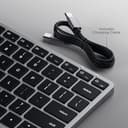



⌨️ Elevate your typing game with sleek style and seamless multi-device magic!
The Satechi X1 Wireless Keyboard is a premium, ultra-slim Bluetooth keyboard optimized for MacOS with a full QWERTY layout and Mac-specific function keys. Featuring multi-device Bluetooth connectivity for up to three devices, 10-level adjustable backlit keys, and a fast USB-C rechargeable battery, it combines portability with professional-grade performance in a sleek aluminium chassis. Ideal for Apple users seeking a modern, versatile typing experience across Mac, Windows, and Android devices.


| ASIN | B08Q2CB7DZ |
| Antenna Location | Programming, Games, Business, Office |
| Best Sellers Rank | 15,636 in Computers & Accessories ( See Top 100 in Computers & Accessories ) 230 in Keyboards (Computers & Accessories) |
| Box Contents | USB Cable |
| Brand Name | Satechi |
| Button Quantity | 104 |
| Colour | Space Grey |
| Compatible Devices | QWERTY LAYOUT (No Pound £ Sign, US English) MacBook Pro 14/16-inch (2025 M5/M4/M3/M2/M1), MacBook Air 13/15-inch (2025 M4/M3/M2/M1), iPad Pro 11/13-inch (2025 M5/M4/M2/M1), iPad Air 11/13-inch (2025 M3/M2/M1), iPad Mini (2024 A17/6th Gen), iPhone 17, iPhone Air, iPhone 17 Pro, iPhone 17 Pro Max, iPhone 16/15/14/13/12 Series, Mac Mini (2024 M4/M2/M1), iMac (2024 M4/M3/M1), Mac Studio (2025 M4/M3/M2… |
| Connectivity Technology | Bluetooth |
| Country of Origin | China |
| Customer Reviews | 4.3 4.3 out of 5 stars (2,391) |
| EU Spare Part Availability Duration | 1 Years |
| Enclosure Material | Plastic Aluminium |
| External Testing Certification | Não aplicável |
| Generation | 3rd Generation |
| Hand Orientation | Ambidextrous |
| Item Dimensions L x W x H | 28.3L x 11.5W x 1.2H centimetres |
| Item Weight | 290 Grams |
| Keyboard Backlighting Color Support | Single Color |
| Keyboard Description | Versatile, Multi-Purpose |
| Keyboard Layout | QWERTY |
| Manufacturer | Satechi |
| Mechanical Keyboard Switch Model | Scissor |
| Model Name | x |
| Model Number | ST-BTSX1M |
| Number of Keys | 78 |
| Number of Sections | 1 |
| Power Source | Battery Powered |
| Product Features | Backlit Keyboard, Multi-Device Bluetooth, USB-C Rechargeable, Ultra-Slim Aluminium, MacOS-Optimized Keys |
| Product Warranty | 2 Year Limited Warranty |
| Series Number | 202203 |
| Style Name | Stylish and modern |
| Switch Type | Tactile |
| Theme | Apple/Computing |
| UPC | 879961009038 |
M**Y
Nice compact keyboard with a good build quality and nice typing feel.
What a great little keyboard. Initially I bought it to use with my new Mac Mini G4, but after a few months I added a gaming laptop to my desk and this works on that too (I'm typing this review on it!). It's very compact and slides out the way when not in use and has the ability to work on 3 different devices. Typing feels nice, very much like a Mac keyboard and the berry lasts for ages. It was great value too as I got an open box one that looks like new!
B**U
An excellent keyboard
This is a very high quality, great keyboard. Having tried both the X3 and the W3, I would say that this (the X3 bluetooth version) is slightly better the W3 (the wired-only version) in a couple of ways, but also worse in one way which may matter to you. In terms of ways in which the X3 is better, firstly the W3 has only 3 brightness levels where the X3 has 10. (Although in fairness the 3 levels on the W3 are still well chosen, and the darkest not too bright.) Secondly (and slightly weirdly), on the W3 then £ and # symbols are printed the wrong way round on the 3 key. Since this is basically a US layout keyboard, the # symbol should be printed at the top of the key, not to the side, corresponding to the symbol accessed when pressing shift, as is done on all the other numeric keys on the W3, and indeed as is done on this keyboard, the X3, which has the same layout!) Related to this, I slightly prefer this keyboard, the X3's, key labelling over the W3, as on the X3 they don't include the ALT (€ and £) symbols on the 2 and 3 keys at all; I prefer this as omitting these symbols makes the keyboard look just a little neater and less cluttered. The one major downside to the X3, if you're the kind of person who regularly uses Del/F2/F12 to break into the BIOS menu, is that the X3, *even when used in wired mode* cannot consistently do this, and (not always, but often, half the time or more) causes the BIOS to report that there is no keyboard attached. (The W3, as would be expected of a natively wired-mode keyboard, has not such problems.) To point out one more (minor) imperfection shared by the X3 and the W3, the lighting on these keyboards is just not quite as beautiful as the lighting on a real Mac laptop keyboard - specifically, there are small overly bright spots here and there around the keys, where the light shows through too much, rather then the really uniform lighting around the keys on real Mac laptop keyboards. Nevertheless in build quality, in looks, and even in the above-mentioned quality of the lighting, this and the W3 are _way_ better than any of the (several) other illuminated external keyboards for the Mac which I have tried recently.
D**D
very viable alternative to the rip off Apple equivalent
From the moment of opening the Amazon cardboard box, I was impressed by Satechi's offering. We often think of Apple as being the arbiter of all that is good when it comes to packaging, but Satechi are trying hard with this one and the unboxing was a refreshing delight. The keyboard itself is well designed and built - Satechi are clearly listening to their reviewers as included were two little rubber stick on feet to help elevate the keyboard angle. It's still not as high at the back as my original Apple USB keyboard that it's replacing and I'll probably have to jury-rig some kind of device to improve the angle, but it's not too bad. I was really after this one because 1) it's Bluetooth and my new Mac mini is woefully lacking in ports and 2) it's backlit which is great in my dingy office. However well the Bluetooth works (flawlessly) this keyboard is a little let down by the backlighting, which is why I've given four instead of five stars. It's just not very well engineered. As you can see from the photo, there's little points of light spilling out around some of the keys, which is frankly quite distracting. I'd've expected better, to be honest. This keyboard ain't cheap and this is a bit disappointing. However, it's got a lovely typing feel and I'm getting on with it quite well. If you've got a Mac and you want a wireless keyboard that's as well built as the Apple one, this Satechi is well worth the money. Sure, there's a couple of little issues, but they're fairly insignificant in the grand scheme of things.
J**S
Apple quality but with more functionality
I bought this keyboard as the one that comes with the iMac doesn't have a numeric keypad. I also really liked the backlit keys and the ability to par it with up to 4 bluetooth devices. Currently I have it on my home office desk with key 1 mapped to my iMac and Key 2 mapped to my Windows 10 works computer. I am able to switch instantly between them with no delay whatsoever. The build quality is really surprising. As it has no logo on the top you would just assume you are looking at an Apple keyboard which I really like. Typing is smooth and they keys have nice travel distance and feedback. Connection seems to be very stable. With my previous Apple keyboard I would sometimes get lag where the letters would appear on the screen a while after I typed them. Only a reboot would resolve. That hasn't happened yet with this one but its early days yet. The only downside is that it has a US layout meaning that there is no key with the £ symbol on it. For anyone wondering its Alt + 3 (they key with a hashtag on it). All in all its really good and a big step up from what Apple provides. Oh and if you went for the Apple Keyboard with numeric keypad its about £140 with no backlit keys and no ability to switch between bluetooth devices. Get this one!
S**E
Bonne qualité
G**H
Super jakość, dobrze się sprawdza z kilkoma urządzeniami na raz
D**C
As a long-time fan of the now defunct Apple A1243 wired keyboard, I have been disappointed with the latest iterations of the Apple Magic Keyboards. The minuscule key travel provided by the new scissor-switch keys has long left me disappointed. Finally, Satechi comes along incorporates the all-important missing tactile elements of the original A1243 and includes functionality such as backlighting and multiple device compatibility. Then on top of that, they have the nerve to offer all this for about $100 less than Apple. This is a TKO. The keys provide just enough extra travel and tactile feedback that makes for that satisfying typing experience I have long missed. Not to mention the backlight has 9 levels of brightness. I just leave the keyboard plugged in so I don’t have to worry about the battery drain. As someone who interacts with a keyboard for a living, these are tools not to skimp on. Ergonomics plays an important factor in my day-to-day life, and this is a great addition. Satechi hit one out of the park here. Pros: ☺ Tactile feedback ☺ Backlighting ☺ 4 Bluetooth devices paired ☺ Premium aluminum finish ☺ Value compared to the competition Cons: ☹ The provided attachable “adjustable height” feet seem sort of like a bit of an afterthought. Granted this is still better than Apple not providing anything at all. The A1243 had the two USB ports incorporated which provided some lift. Overall: If you are looking for a keyboard with excellent feedback for a scissor switch, a plethora of options, and premium aesthetics this is an excellent choice. I have little negative to say about it... Highly Recommend
M**.
This Satechi BT keyboard is pretty much identical in size, shape and material as the Apple Magic Keyboard, but not quite as nice or finished as well, but hey I do like the much lower price. The bluetooth connection is good and persistent, but not always as 'instant on' as the Apple version when you wake your MacBook up.
N**K
Me encanta este teclado, lo uso con mi Macbook. Las teclas están en el mismo lugar que mi Macbook, ligeramente diferentes teclas de flecha. Las teclas se sienten similares en cuanto a los viajes. La batería dura mucho tiempo y se puede utilizar tanto por BT o en el cable USB conectado. No he notado ningún lag o malas teclas después de usarlo durante una semana durante el trabajo. La retroiluminación es agradable y el diseño es impresionante como se esperaba de Satechi. Gran alternativa más barata al teclado oficial de Apple. El único inconveniente que he notado, es que las teclas no funcionan cuando las presionas en el borde. Tienes que pulsar las teclas realmente en el centro del botón para que funcione, y mis hábitos de escritura aparentemente están causando que me pierda la 'T' a veces, ya que mi dedo está golpeando en el borde en lugar de la mitad. Pero después de usarlo más, me he acostumbrado y estoy seguro de que no me causará ningún problema.
TrustPilot
2天前
1 个月前